
StockWise
A command-line tool for investors in Indian (NSE/BSE) and US markets. It tracks your portfolio with exact lots and XIRR, works out Indian capital-gains tax and advance tax, looks up stocks, mutual funds and options, and lets an AI assistant read your portfolio through an MCP server. Your data stays in local files. One binary, no account, no API key.
Install
# macOS / Linux / Termux on Android
curl -fsSL https://raw.githubusercontent.com/iamsaquib8/stockwise/main/install.sh | sh

# Debian/Ubuntu, Fedora/RHEL: .deb and .rpm from the latest release
sudo dnf install https://github.com/iamsaquib8/stockwise/releases/latest/download/stockwise-x86_64.rpm

# With Rust (1.97+)
cargo binstall stockwise            # prebuilt binary
cargo install --locked stockwise    # build from source
Windows: scoop install https://github.com/iamsaquib8/stockwise/releases/latest/download/stockwise.json
or the .zip from the
latest release.
Docker: docker run --rm ghcr.io/iamsaquib8/stockwise quote RELIANCE.
Nix and the .deb/.rpm details are on the Install page, which also lists
what is not published yet (PyPI, Homebrew, winget, AUR).
Then run stockwise doctor to check your setup. If a command fails, see
Troubleshooting.
Quickstart
The five-minute quickstart goes from install to a quote, a portfolio with XIRR and a tax estimate. It works on throwaway data, so you can try it safely.
Pick your path
| I want to | Read |
|---|---|
| See my real returns across brokers and mutual funds | Import your trades and see true returns |
| Estimate my capital-gains tax and fill my ITR | File your Indian capital-gains tax |
| Check a stock or fund quickly | Check a stock or fund fast |
| Put new money where I am underweight | Rebalance to target weights |
| Ask Claude or Cursor about my portfolio | Use StockWise from Claude or Cursor |
| Get a message when a price or RSI level is reached | Set up alerts and the daemon |
| Test an idea on past data, or practise with paper money | Backtest and practise on past markets |
| Use the numbers in a script or spreadsheet | Script it with JSON, CSV and jq |
Each guide is a short walkthrough with commands to copy, the output to expect and links to the reference. What do you want to do? lists them with the commands each one uses.
The commands at a glance
stockwise quote RELIANCE TCS            # Indian stocks are the default
stockwise TCS                           # no command needed: a one-screen overview
stockwise quote AAPL NVDA -m us         # US stocks
stockwise import kite tradebook.xlsx    # CSV or .xlsx; yearly tradebooks merge
stockwise portfolio xray                # your real exposure across stocks, funds and ETFs
stockwise tax in                        # LTCG/STCG per lot, with set-off rules
stockwise harvest                       # losses and gains to book before 31 March
stockwise tax advance --paid 2025-06-14:3000   # instalments and Sec. 234C interest
stockwise mf sip 122639 5000 -p 5y      # what a ₹5,000/month SIP became
stockwise backtest INFY -s macd         # a strategy after STT and brokerage
stockwise mcp                           # read-only tools for AI assistants
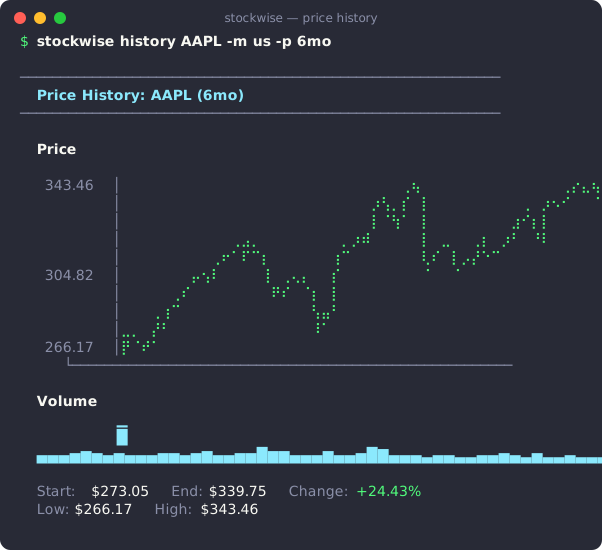
Reference
When you know what you want and need an option or a field name:
- Cheatsheet: the commands people use most, on one page.
- Commands: every command and option, with the JSON each one prints.
- Markets: India, US, global exchanges, crypto, FX, commodities.
- Data providers: where each number comes from.
- AI: the MCP server for Claude, Cursor and other assistants, and
stockwise ask. - Backtesting and Simulator: strategies, costs, replays and scores.
- Bots and alerts and Brokers: alerts, the paper-trading daemon, importing holdings, and optional live orders behind a preview.
- Troubleshooting: Yahoo or NSE not answering,
Not enough price data, import skips, where your data is. - How StockWise compares with other tools.
StockWise is open source under the MIT licence: github.com/iamsaquib8/stockwise. It is for education and information, not financial advice — see the disclaimer.
Install
StockWise is one binary with no runtime dependencies. Pick whichever way
you already use to install tools; they all give you the same stockwise.
Quick install
macOS, Linux and Termux on Android:
curl -fsSL https://raw.githubusercontent.com/iamsaquib8/stockwise/main/install.sh | sh
The installer picks the right build for your system, checks its SHA-256
against the release, and installs to ~/.local/bin ($PREFIX/bin on
Termux). STOCKWISE_INSTALL=/usr/local/bin changes the directory and
STOCKWISE_VERSION=v0.8.1 pins a version.
Every option
These work today with the latest release:
| Platform | Command | Man pages and completions | Updates |
|---|---|---|---|
| macOS, Linux, Termux | the quick install above | — | run it again |
| Debian 12+, Ubuntu 22.04+ | curl -fsSLO https://github.com/iamsaquib8/stockwise/releases/latest/download/stockwise_amd64.deb && sudo apt install ./stockwise_amd64.deb | ✓ | download the new .deb |
| Fedora, RHEL 9+ | sudo dnf install https://github.com/iamsaquib8/stockwise/releases/latest/download/stockwise-x86_64.rpm | ✓ | run the same command again |
| Nix | nix profile install github:iamsaquib8/stockwise | ✓ | nix profile upgrade stockwise |
| Windows | scoop install https://github.com/iamsaquib8/stockwise/releases/latest/download/stockwise.json | — | scoop update stockwise |
| Docker | docker run --rm -it -v stockwise-data:/data ghcr.io/iamsaquib8/stockwise quote TCS | — | docker pull |
| Rust | cargo binstall stockwise (prebuilt) or cargo install --locked stockwise | — | run it again |
| Any | archives from the latest release | man pages included | download again |
Coming soon
Prepared, each waiting on a one-time publishing step by the maintainer (see packaging):
| Platform | Command |
|---|---|
| Any (Python) | pipx install stockwise, uv tool install stockwise or uvx stockwise quote RELIANCE |
| macOS, Linux | brew install iamsaquib8/tap/stockwise |
| Windows | winget install iamsaquib8.StockWise |
| Arch Linux | yay -S stockwise-bin |
| Docker Hub | docker run --rm -it -v stockwise-data:/data iamsaquib8/stockwise quote TCS |
| NixOS / nixpkgs | nix profile install nixpkgs#stockwise |
| Android (Termux) | pkg install stockwise |
On ARM Linux, use stockwise_arm64.deb or stockwise-aarch64.rpm. The Linux
binaries (archives, quick install, .deb/.rpm) need glibc 2.34 or newer:
Ubuntu 22.04, Debian 12, RHEL 9 and later. Once PyPI is live, its wheels
(manylinux, glibc 2.17+, and musllinux) will also cover older and Alpine
systems.
Where completions are not installed for you:
stockwise completions zsh > ~/.zfunc/_stockwise           # bash, zsh, fish, powershell, elvish
stockwise man --dir ~/.local/share/man/man1               # then: man stockwise
Check it
stockwise --version
stockwise doctor        # data directory, network, optional Redis/Ollama/keyring
If a command fails, Troubleshooting lists the common messages and what to do about each.
Next steps
- Run the five-minute quickstart.
- Pick a goal on What do you want to do?.
- Something wrong? See Troubleshooting.
Privacy
StockWise sends no telemetry. The project counts downloads only from the public numbers each registry already shows (crates.io, GitHub releases, PyPI, Homebrew, Docker); see download stats.
Quickstart: five minutes
This page takes you from nothing to a quote, a portfolio with XIRR and a tax estimate. It assumes you have not installed StockWise yet. Each step says how long it takes.
1. Install and check (1 minute)
curl -fsSL https://raw.githubusercontent.com/iamsaquib8/stockwise/main/install.sh | sh
stockwise init      # pick a market, import holdings, optional AI assistant
stockwise doctor
The installer works on macOS, Linux and Termux. For Windows, Docker, Nix,
.deb, .rpm or cargo, see Install.
stockwise doctor checks your setup and prints the folder where StockWise
keeps your data. If it reports a problem, see Troubleshooting.
To try the commands below without touching your real data, point StockWise at a temporary folder first:
export STOCKWISE_HOME=$(mktemp -d)
Close the terminal, or run unset STOCKWISE_HOME, to go back to your real data.
2. Look up a stock (30 seconds)
stockwise quote RELIANCE TCS     # Indian stocks are the default
stockwise quote AAPL NVDA -m us  # add -m us for US stocks
stockwise TCS                    # no command needed: a one-screen overview
Each stock prints a short block: price, change, day range, 52-week range,
volume, market cap and P/E. Data comes from Yahoo Finance, so quotes can be
delayed. A bare ticker such as TCS means TCS.NS on the NSE.
3. Build a portfolio (2 minutes)
You can type a purchase, or import a file from your broker.
stockwise portfolio add TCS 10 3500 --date 2023-04-12   # 10 shares at ₹3,500
stockwise portfolio add INFY 20 1300 --date 2023-06-05
stockwise portfolio                                      # holdings, P&L and XIRR
Every purchase is a lot with its own date, so the holding period and the XIRR are exact. To load real trades, use the guide Import your trades and see true returns. It covers Zerodha, Groww, Upstox, INDmoney and mutual-fund CAS files.
4. Get a tax estimate (30 seconds)
stockwise portfolio sell TCS 4 3900   # record a sale; the oldest lots go first
stockwise tax in                      # LTCG and STCG for this financial year
tax in shows realised gains from your sales, and what you would owe if you
sold everything today. It is an estimate. The guide
File your Indian capital-gains tax explains how to read it and
how to export the rows for your ITR.
5. Connect an AI assistant (1 minute, optional)
claude mcp add stockwise -- stockwise mcp
This adds StockWise to Claude Code. Claude Desktop and Cursor need a small JSON entry instead; see Use StockWise from Claude or Cursor. The server only reads. It cannot place orders.
Next steps
- Pick a goal on What do you want to do?.
- Keep the cheatsheet open for the commands people use most.
- Look up an option in the commands reference.
What do you want to do?
The guides below are short walkthroughs. Each one starts from a goal, gives commands you can copy, shows what the output looks like and ends with links to the commands reference for every option.
New to StockWise? Do the quickstart first. It takes five minutes.
Pick your path
| I want to | Read | Main commands |
|---|---|---|
| See my real returns across brokers and mutual funds | Import your trades and see true returns | import, portfolio, portfolio lots |
| Estimate my capital-gains tax and fill my ITR | File your Indian capital-gains tax | tax in, harvest, tax advance, tax export in |
| Check a stock or fund quickly | Check a stock or fund fast | quote, deep, score, events, mf |
| Put new money where I am underweight | Rebalance to target weights | portfolio target, rebalance --inflow |
| Ask Claude or Cursor about my portfolio | Use StockWise from Claude or Cursor | mcp |
| Get a message when a price or RSI level is reached | Set up alerts and the daemon | alert, notify, daemon |
| Test an idea on past data, or practise with paper money | Backtest and practise on past markets | backtest, sim replay |
| Use the numbers in a script or spreadsheet | Script it with JSON, CSV and jq | --json, --csv |
Where each guide fits
StockWise does four jobs. The guides follow them.
- One portfolio with true returns. Start with Import your trades, then Rebalance.
- Indian capital-gains tax. Read File your Indian capital-gains tax. It needs the portfolio from job 1.
- Quick lookups. Check a stock or fund fast and Set up alerts.
- AI access with local data. Use StockWise from Claude or Cursor. Script it covers the same data for your own tools.
Backtest and practise sits beside these. It uses past prices and paper money, never your portfolio.
Not here?
- Every command and option is in the commands reference. The cheatsheet lists the common ones on one page.
- Errors and empty results are covered in Troubleshooting.
- Live orders through a broker are in Brokers. They move real money, so they have no guide here.
StockWise is for education and information. It is not financial advice. See the disclaimer.
Import your trades and see true returns
This guide loads your broker trades and mutual-fund statement into StockWise and shows your holdings with profit and XIRR. It takes about ten minutes, most of it spent downloading files.
You need: a Zerodha, Groww, Upstox or INDmoney export, and optionally a CAS for mutual funds. Nothing here changes your broker account. StockWise reads files and stores the result in local files.
1. Pick the right file
XIRR and tax need the date of every purchase. The file you choose decides whether StockWise has it.
| File | Has dates? | What StockWise does |
|---|---|---|
| Tradebook (every buy and sell, such as Zerodha Console’s) | Yes | Builds exact lots. Sales come out oldest-first and are kept for tax. |
| Holdings export (Kite, Groww, Upstox, INDmoney) | No | Matches quantity only. New shares are dated today, so holding periods and XIRR are approximate. |
CAS from CAMS or KFintech, read with casparser | Yes, for funds | Rebuilds each fund as dated lots when it covers the whole balance. |
| Any CSV with a date column | Yes | Read as a list of lots. |
Use a tradebook when you can. Use a holdings export only for stocks you cannot get a tradebook for.
Zerodha Console limits a tradebook download to 365 days. Download one file per year. StockWise merges them.
2. Import the tradebook
Import each file with the broker name. CSV and .xlsx both work.
stockwise import kite ~/Downloads/tradebook-2023.xlsx
stockwise import kite ~/Downloads/tradebook-2024.xlsx
stockwise import kite ~/Downloads/tradebook-2025.xlsx
You can import the files in any order. StockWise keeps the trades of each import and merges them, so running the same file twice changes nothing.
Each import prints one line per symbol:
  ✓ TCS.NS — 1 lot(s), 1 sale(s) recorded, now 6 shares @ ₹3250.00
  ✓ INFY.NS — 1 lot(s), 1 sale(s) recorded, now 15 shares @ ₹1300.00
  ✓ SBIN.NS — 1 lot(s), now 50 shares @ ₹620.00

  ✓ Imported 5 rows: 3 holdings updated.
Splits and bonuses are applied as they happened. This needs a network connection.
If a symbol is skipped, the message says why. The usual cause is a sale with no earlier purchase, because an earlier year’s file is missing. Import that file and run the import again. See An import skips a symbol.
3. Import mutual funds from a CAS
A CAS is a PDF, and its tables do not survive text extraction. Convert it with the open-source casparser, then import the result.
pip install casparser
casparser CAS.pdf -p <password> -o cas.json
stockwise import cas cas.json
# or let StockWise run casparser for you (casparser must be on PATH):
stockwise import cas CAS.pdf   # hidden password prompt (or set STOCKWISE_CAS_PASSWORD)
# Note: the bridge passes the password to casparser as a command-line argument,
# so other local users can see it in the process list while it runs.
Each fund with units left becomes MF:<AMFI code>. StockWise values it at
AMFI’s latest end-of-day NAV. A fund that AMFI does not list shows N/A, never
zero.
4. See your portfolio
stockwise portfolio
  Symbol         Shares   Avg Cost      Price        Value         P&L    P&L %     XIRR
  ──────────────────────────────────────────────────────────────────────────────────────
  TCS.NS           6.00   ₹3250.00   ₹2498.50    ₹14991.00   -₹4509.00  -23.12%    -4.6%
  INFY.NS         15.00   ₹1300.00   ₹1181.40    ₹17721.00   -₹1779.00   -9.12%    -0.9%
  SBIN.NS         50.00    ₹620.00   ₹1018.50    ₹50925.00  +₹19925.00  +64.27%   +19.3%
  ──────────────────────────────────────────────────────────────────────────────────────
  TOTAL                  ₹70000.00               ₹83637.00  +₹13637.00  +19.48%    +5.1%
  Realized P&L (2 sale lots)   +₹1200.00
The numbers above come from a small sample portfolio. Prices are live, so yours will differ.
How to read it:
- P&L % is the gain on cost, ignoring when you bought.
- XIRR is the yearly return that accounts for the date of every purchase. A holding that gained 64% over 3 years has a much lower XIRR than 64%.
- Realized P&L is the profit on shares you already sold.
- A holding with no price shows
N/Aand is left out of the totals.
Mixed INR and USD holdings are totalled in one currency. Pick it with
--base inr or --base usd.
5. Check one holding
stockwise portfolio lots TCS
    # Bought             Qty      Price         Cost     Held  Term  Source
    1 2023-04-12        6.00   ₹3250.00    ₹19500.00    3y 6m    LT  import:kite [zerodha]

  Sales (FIFO)
  Sold               Qty Bought              Buy       Sell         Gain  Term
  2025-08-20        4.00 2023-04-12     ₹3250.00   ₹3300.00     +₹200.00    LT
Each row is one lot with its date, its holding period (LT is long-term, ST
is short-term) and where it came from. Check these against your broker’s
statement. If a purchase date is wrong, correct it with
stockwise portfolio lots TCS --lot 1 --date 2023-04-10.
6. Compare with the index and look through your funds
stockwise portfolio benchmark NIFTY -p 1y   # your return against NIFTY 50
stockwise portfolio xray                    # overlap across stocks, funds and ETFs
benchmark rebuilds what you held on each day and compares the
time-weighted return with the index. It also prints alpha, beta and tracking
error. xray adds up your real exposure to each company across direct shares,
ETFs and mutual funds, and flags any company above 10% of the portfolio.
7. Keep it up to date
- Import the newest tradebook after each year, or whenever you want. Old trades are not counted twice.
- Add a purchase by hand:
stockwise portfolio add TCS 10 3500 --date 2023-04-12. - Record a sale by hand:
stockwise portfolio sell TCS 5 3900. - Apply splits, bonuses and dividends to lots you added by hand:
stockwise portfolio actions --apply. It is safe to repeat. - Rebuild one symbol from a dated file, replacing lots recorded another way:
stockwise import kite tradebook.csv --replace.
Next steps
- File your Indian capital-gains tax. The sales you imported feed straight into it.
- Rebalance to target weights.
- Every portfolio option is in the commands reference. The file layouts and rules for imports are in Brokers, and the lots, sales and tax section explains FIFO.
- Something looks wrong? See Troubleshooting.
File your Indian capital-gains tax
This guide takes the lots and sales in your portfolio and turns them into a capital-gains estimate, a list of what you could book before 31 March, an advance-tax schedule, and a CSV laid out for ITR Schedule CG and Schedule 112A.
You need: a portfolio with dated purchases and sales. If you have not built one yet, start with Import your trades.
StockWise gives an estimate. It knows only the sales it recorded, at the prices it recorded, without brokerage or STT. Compare every figure with your broker’s tax P&L before you file, and ask a chartered accountant if you are unsure.
When to use which command
| Time of year | Question | Command |
|---|---|---|
| Any time | What is my tax so far this year? | tax in |
| Before 31 March | Which sales would book a loss, or use my unused exemption? | harvest |
| 15 Jun, 15 Sep, 15 Dec, 15 Mar | How much advance tax is due, and did I pay enough? | tax advance |
| When you file | What do I enter in Schedule CG and Schedule 112A? | tax export in |
1. Estimate the tax so far
stockwise tax in
  Realized — sales 01 Apr 2026 to 31 Mar 2027
  Symbol               Qty Bought       Sold                 Gain  Term
  INFY.NS             5.00 2023-06-05   2026-07-10         +₹1000    LT

  Unrealized — if you sold everything today
  Symbol                 Cost        Value   Short-term    Long-term
  TCS.NS               ₹19500       ₹14991          +₹0       -₹4509
  ...

  Estimated tax on gains realized in FY 2026-27
  Long-term gains / losses     ₹1000.00 / ₹0.00
  LTCG exemption (₹125000 a year) -₹1000.00
  Taxable LTCG                 ₹0.00
  TOTAL TAX                    ₹0.00
The output has three blocks:
- Realized. Every lot you sold this financial year, with its own holding period. Long-term means more than 12 months.
- Unrealized. What each holding would book if you sold everything today. Nothing is sold.
- Estimated tax. The set-off rules, the ₹1.25 lakh LTCG exemption, the rates and the 4% cess applied to the realized gains.
The rates follow the date of each sale. Sales before 23 July 2024 use the old rates (15% STCG, 10% LTCG). Later sales use 20% and 12.5%.
Some holdings are left out of the estimate and listed with the rule that applies: debt funds, Sovereign Gold Bonds, gold and silver ETFs, liquid ETFs and crypto. Equity funds and equity ETFs count like listed shares. For the full list, see Lots, sales and tax.
2. Look at harvest candidates before 31 March
stockwise harvest
  Loss Harvesting Candidates (STCG / LTCG Offset)
  Symbol             Sell   Avg Cost      Price       ST P&L       LT P&L    Total P&L  Est. Saved
  TCS.NS                6   ₹3250.00   ₹2498.50          +₹0       -₹4509       -₹4509          ₹0

  Tax-Gain Harvesting (Section 112A ₹1.25L Annual LTCG Exemption)
  Unused LTCG Exemption        ₹124000 of ₹125000 remaining this FY
  • SBIN.NS      LTCG:    +₹19925 (saves up to ₹2590 at 12.5%)
harvest lists two things:
- Loss candidates. Sales that would book a loss to set off against gains.
Indian demat accounts sell the oldest lots first, so a row shows the whole
sale needed to reach the losing lot.
Est. Savedis how much the tax estimate falls. It is0when you have no gains to set the loss against. - Exemption candidates. Long-term holdings with a gain, and how much of this year’s ₹1.25 lakh LTCG exemption is still unused.
This is a list of what the arithmetic allows. It is not advice to trade. Brokerage, STT and your own view of each stock are not in the numbers.
Preview a sale before you record it
portfolio sell records the sale. Add --preview (alias --dry-run) to see
what it would do and change nothing: portfolio.json is not touched.
stockwise portfolio sell TCS 12 4000 --preview
The preview prints:
- The departing lots, oldest first (FIFO): lot number, purchase date,
days held, quantity, cost, gain or loss, and ST or LT. Lot numbers match
portfolio lots. - The tax the sale adds on top of gains already recorded this tax year,
from the same rules as
tax in: short-term gain at 20%, long-term gain at 12.5% after the ₹1.25 lakh Sec. 112A exemption still unused this year, the 31 Jan 2018 grandfathered cost for old lots, and 4% cess. Other countries use their own rates. Funds and ETFs taxed under other rules show lots and gains only, with the reason. - A long-term countdown. A lot within 45 days of turning long-term is listed with the day it turns and how much lower the tax would be if the same sale happened then, at the same price. A holding of exactly 12 months is still short-term; the first long-term day is the next one.
- A mutual-fund exit-load check. Units held under 365 days are flagged with a typical 1% exit load. Schemes differ, so check the factsheet.
The price defaults to the live quote (a fund’s latest AMFI NAV). A past
--date needs a price. The same preview is the MCP tool
portfolio_sell_preview. These are arithmetic on your records, not advice.
Regular vs Direct fund cost
stockwise mf bleed [--return 10] [--json]
For each held Regular-plan growth fund, mf bleed finds the Direct growth
plan of the same scheme and reads both expense ratios from AMFI’s TER
disclosure. It shows the gap, the yearly rupee cost of the gap on today’s
value, and the 10-year compounded difference at a gross return you choose
(--return, default 10% a year, no new money). It then splits the units by
age:
- Units held more than 12 months, and how many of them redeem with ₹0 tax inside this year’s unused Sec. 112A exemption (oldest units first).
- Younger units, with the day each lot turns long-term and, for a switch today, the tax, the exit load and the months of TER saved needed to cover them.
A switch is a redemption plus a purchase, so it can create tax. Funds that
are not equity-oriented are shown without the tax split. portfolio prints
a one-line pointer when you hold a Regular plan. MCP tool: mf_bleed.
3. Check advance tax
Advance tax is due when the estimated tax for the year is ₹10,000 or more. Pass each payment with its date so StockWise can work out Section 234C interest exactly.
stockwise tax advance                                # the current financial year
stockwise tax advance --fy 2025-26 --paid 2025-09-10:500
The second command gives output like this:
  Quarter Due Date       Cum. STCG    Cum. LTCG     Cum. Tax  Min %  Min Cum. Due   Quarter Due  Status
  Q1      15 Jun 2025           ₹0           ₹0           ₹0    15%            ₹0            ₹0  Nothing due
  Q2      15 Sep 2025           ₹0         ₹200           ₹0    45%            ₹0            ₹0  Nothing due
  ...
  • Section 208: Exempt (estimated tax < ₹10,000 threshold — advance tax not mandatory)
  • Advance Tax Paid Recorded: ₹500
  • Estimated Section 234C Interest: ₹0 (no shortfall subject to interest)
Things to know:
- Add
--fy 2025-26for a past year. --paid 25000with no date is assumed to be on time. That can understate the interest, so use dates when you have them.- Capital gains realised after an instalment date do not attract 234C interest if you pay the tax in the later instalments. StockWise applies this proviso.
- Surcharge is not included.
4. Export the schedule for your ITR
stockwise tax export in --fy 2025-26 --out cg-2025-26.csv
  Capital-gains schedule — FY 2025-26 (AY 2026-27)
  Sales                        1
  STCG 111A gains / losses     ₹0 / ₹0
  LTCG 112A gains / losses     ₹200 / ₹0
  Taxable LTCG (112A)          ₹0
  Estimated tax                ₹0

  Wrote 1 sales to cg-2025-26.csv
The CSV has one row per lot sold: section (111A or 112A), ISIN, scrip,
quantity, sale date and value, purchase date and cost, days held and the gain.
A summary block follows with the totals, the exemption and the loss to carry
forward. --fy accepts 2025-26, 2025-2026 and AY2026-27.
Open the file in a spreadsheet and compare it with your broker’s tax P&L. Check these before you file:
- Shares bought on or before 31 January 2018. StockWise flags them. Schedule 112A lets you use that day’s fair market value as the cost. StockWise does not apply it.
- ISINs. StockWise looks them up from NSE and AMFI. A blank ISIN is named in the summary.
- Same-day trades. A buy and sell of the same share on one day is shown separately as speculative business income, not as capital gains.
- Left out. Debt funds, SGBs, gold ETFs and crypto are listed but not in the schedule. Crypto is taxed at a flat 30% under Section 115BBH.
Next steps
- Rebalance to target weights. A buy-only rebalance adds money without selling, so it books no gain.
- Use StockWise from Claude or Cursor. The
tax_harvest_checkprompt asks an assistant for the same review. - Script it with JSON, CSV and jq, for example
stockwise tax export in --fy 2025-26 --json | jq '.summary.taxable_ltcg'. - Every rule and field is in the commands reference: lots, sales and tax, harvest, tax export and advance tax.
- Numbers look wrong? See An import skips a symbol.
- StockWise is not financial or tax advice. See the disclaimer.
Check a stock or fund fast
This guide shows how to size up a stock or a mutual fund in a few minutes: a quote, a one-page overview, accounting-quality scores, a timeline of events and what a fund’s past SIP returned.
You need nothing but StockWise. No account or API key is required. Data comes from Yahoo Finance, NSE and AMFI, so quotes can be delayed.
None of these commands tells you what to buy or sell. They show facts and simple scores. The decision stays with you.
1. Find the ticker
stockwise search "tata motors"
Bare tickers use the Indian market, so TCS means TCS.NS. For other markets,
add -m us, -m crypto, -m fx, -m commodity or an exchange such as
-m uk. See Markets.
2. Get the price
stockwise quote RELIANCE TCS     # one block per stock
stockwise quote AAPL NVDA -m us
stockwise TCS                    # no command: a one-screen overview
  RELIANCE.NS — Reliance Industries Limited
  ₹1320.00  ▲ 6.60 (0.50%)

  Open                         ₹1295.00
  Day Range                    ₹1295.00 — ₹1320.00
  52-Week Range                ₹1152.20 — ₹1611.80
  Volume                       22.77M
  Avg Volume (3M)              14.49M
  Market Cap                   ₹17.86L Cr
Short forms exist for the common commands: q for quote, a for analyze,
t for technical and c for compare.
3. Read the full picture for one stock
stockwise deep HDFCBANK
deep puts company details, valuation, profitability, financial health,
dividends, analyst ratings, a one-year chart, technical indicators, support and
resistance, risk and the six-pillar score on one screen. It is long. Scroll to
the part you need.
For smaller pieces, use these:
| Question | Command |
|---|---|
| Are the fundamentals sound? | stockwise analyze INFY |
| How volatile is it, and how deep were its falls? | stockwise risk HDFCBANK |
| Where is it against its moving averages and RSI? | stockwise technical TCS -p 6mo --explain |
| How does it compare with its peers? | stockwise compare TCS INFY WIPRO |
| What did it return over 1, 3 and 5 years? | stockwise returns TCS |
--explain adds plain-English notes to technical, score, verdict and
options oi.
4. Check accounting quality
stockwise score INFY --explain
  Piotroski F-Score:   6/9  ███████░░░  Moderate / Stable
  Altman Z-Score:      8.31  Safe Zone (Low Default Risk)
The Piotroski F-score counts nine yes-or-no tests of profitability, leverage
and efficiency. The Altman Z-score estimates distress risk. --explain shows
each test, its formula and the value used. When data is missing, StockWise says
how many tests it could run instead of guessing.
5. See what happened and what the data says
stockwise events TCS      # filings, results, news and analyst moves, with the price reaction
stockwise insights TCS    # positive and negative findings on ownership, growth, margins, valuation
events lists the last 90 days on a timeline. Each event shows how the stock
moved against the index afterwards. insights groups findings such as promoter
pledge, institutional buying and selling, and margin trends. Both are summaries
of public data, not forecasts.
Upcoming results and dividend dates for your holdings:
stockwise calendar --holdings
6. Check a mutual fund
stockwise mf search parag flexi direct   # find the AMFI code
stockwise mf nav 122639                  # latest NAV and expense ratio
stockwise mf sip 122639 5000 -p 5y       # what ₹5,000 a month became
     Code  Scheme                                                                 NAV        Date
   122639  Parag Parikh Flexi Cap Fund - Direct Plan - Growth                 93.9483 06 Nov 2026
mf sip replays a monthly SIP over the past five years and prints the amount
invested, the final value and the XIRR. It describes the past. Compare funds in
one category with stockwise mf screen flexi cap.
7. Options and IPOs (optional)
stockwise options chain NIFTY     # strikes with open interest, IV and greeks
stockwise options oi NIFTY        # open-interest walls, put/call ratio, max pain
stockwise ipo                     # open and upcoming IPOs from NSE
Add --explain to options oi for plain-English notes.
Next steps
- Want a message when a price or RSI level is hit? See Set up alerts and the daemon.
- Want to test a rule on past prices? See Backtest and practise on past markets.
- Want an assistant to run these lookups for you? See Use StockWise from Claude or Cursor.
- Every option for these commands is in the commands reference: Analysis, Market and Funds and F&O.
- Quote or data errors: Troubleshooting.
Rebalance to target weights
This guide sets the weight you want for each holding and shows how many shares to buy to move toward it. The most useful form puts new money only into holdings that are below target, so you do not have to sell anything and book a gain.
StockWise only does the arithmetic. It does not place orders, and the output is not a recommendation. You choose the targets.
You need: a portfolio. See Import your trades.
1. Set your targets
stockwise portfolio target set TCS 30
stockwise portfolio target set INFY 30
stockwise portfolio target set SBIN 40
stockwise portfolio target show
  Target Key      Weight%
  ─────────────────────────
  INFY.NS           30.0%
  SBIN.NS           40.0%
  TCS.NS            30.0%
  ─────────────────────────
  Total            100.0%

  Drift Tolerance: Not set (default: 0.0%)
Each set prints the running total. If the targets add up to less than 100%,
the rest is shared among holdings with no target. A key can be a symbol or a
sector. Remove one with stockwise portfolio target remove TCS.
With no targets saved, StockWise rebalances to equal weights.
2. Add new money without selling
stockwise rebalance --inflow 50000
  Portfolio Rebalance (Inflow: ₹50000.00)
  Current Value                ₹83637.00
  Projected Value              ₹133637.00

  Symbol          Current    Now% Target% Projected%   Allocation           Action
  TCS.NS        ₹14991.00   17.9%   30.0%      30.0%    ₹25100.10    BUY 10 shares
  INFY.NS       ₹17721.00   21.2%   30.0%      30.0%    ₹22370.10    BUY 18 shares
  SBIN.NS       ₹50925.00   60.9%   40.0%      40.0%     ₹2529.80     BUY 2 shares
Read it left to right:
- Now% is the current weight. Target% is the weight you set.
- Projected% is the weight after the new money goes in.
- Allocation is the part of the ₹50,000 that holding receives.
- Action is the whole-share count that fits that amount.
The new money goes to holdings below target. A holding above target, such as SBIN here, gets little or none. Nothing is sold, so there is no capital gain to report.
3. Rebalance by selling too
Without --inflow, StockWise also lists holdings above target as sales.
stockwise rebalance
stockwise rebalance --drift 2.0      # ignore holdings within 2 percentage points of target
  Symbol          Current     Now%  Target%           Action
  TCS.NS        ₹14991.00    17.9%    30.0%     BUY 5 shares
  INFY.NS       ₹17721.00    21.2%    30.0%     BUY 7 shares
  SBIN.NS       ₹50925.00    60.9%    40.0%   SELL 17 shares
A sale books a gain or loss. Run stockwise harvest or stockwise tax in
first to see the effect. The tax guide explains both.
--drift skips small differences, so you do not trade for a 0.5% gap. Save a
default band with stockwise portfolio target drift 2.0.
4. Try a plan without saving it
Pass targets on the command line to compare options. Nothing is saved.
stockwise rebalance TCS:30 INFY:30 SBIN:40 --inflow 50000
5. Keep the plan current
After you place the orders at your broker, record them so the next run starts from the right place:
stockwise portfolio add TCS 10 2498.50          # a purchase dated today
stockwise import kite tradebook-latest.xlsx     # or import the new tradebook
Next steps
- Import your trades if holdings are missing or out of date.
- File your Indian capital-gains tax before a rebalance that sells.
- Use the numbers elsewhere:
stockwise rebalance --inflow 50000 --jsonprints the same plan as JSON. See Script it with JSON, CSV and jq. - Every option is in the commands reference under Portfolio. A review prompt for assistants is in Use StockWise from Claude or Cursor.
Use StockWise from Claude or Cursor
This guide connects an AI assistant to StockWise so you can ask questions about quotes, your portfolio and your tax estimate in plain English. It takes about five minutes.
stockwise mcp is a Model Context Protocol
server. Your assistant starts it on your machine. The server reads your local
StockWise data and answers with JSON. It needs no account and no API key.
You need: StockWise installed (see Install) and an MCP client: Claude Code, Claude Desktop, Cursor or another.
What the assistant can and cannot do
- It can read. The 35 tools cover quotes, history, technicals, risk, scorecards, events, mutual funds, option chains, IPOs, screens, backtests, your portfolio and lots, tax estimate, advance tax, harvest and rebalance plans, calendar, watchlist and alerts.
- It cannot place orders. The server never places, changes or cancels an
order and never reads broker credentials. The optional
--allow-ordersflag adds one tool that only checks an order and returns a command such asstockwise trade buy TCS 2 --limit 4000for you to review and run yourself. - It cannot change your data. Every tool only reads.
One point on privacy. The server runs on your machine, but a hosted assistant
sends what its tools return to its own model provider. If you ask about your
portfolio, the holdings go with the question. If that is a problem, use
stockwise ask "question", which can run a local model through Ollama. See AI.
1. Connect your client
Claude Code:
claude mcp add stockwise -- stockwise mcp
claude mcp add stockwise -- stockwise mcp -m us    # US tickers by default
Claude Desktop: open Settings, then Developer, then Edit Config. Add this and restart the app.
{
  "mcpServers": {
    "stockwise": {
      "command": "stockwise",
      "args": ["mcp"]
    }
  }
}
Cursor: put the same JSON in ~/.cursor/mcp.json, or in .cursor/mcp.json
inside a project.
If the client cannot find the command, use the full path from which stockwise (where stockwise on Windows) as command.
Other settings go in args or in the client’s env:
| Setting | How |
|---|---|
| Market for bare tickers | "args": ["mcp", "-m", "us"] or STOCKWISE_MARKET |
| A named portfolio | "args": ["mcp", "--portfolio", "NAME"] |
| Data folder | STOCKWISE_HOME |
2. Check that it works
List the tools from your terminal. This does not need the assistant.
stockwise mcp --list-tools
It prints a JSON array. Each entry has a name, a description and an
inputSchema. Then ask your assistant something that needs data:
What is the current price and P/E of TCS and INFY?
The assistant shows a tool call to quote and then answers from the result.
3. Ask useful questions
Questions that work well, grouped by what they use:
| Ask | Tools used |
|---|---|
| “Summarise my portfolio: value, P&L, XIRR and my biggest holdings.” | portfolio_summary |
| “Which of my holdings are long-term and which are short-term?” | holdings_lots |
| “What is my capital-gains tax so far this year?” | tax_estimate |
| “Do I owe advance tax by the next due date?” | tax_advance |
| “Which lots would 20 shares of TCS sell, and what is the tax?” | portfolio_sell_preview (never records the sale) |
| “What do my Regular-plan funds cost me against Direct?” | mf_bleed |
| “What could I book before 31 March, and what is my unused LTCG exemption?” | harvest |
| “If I invest another ₹50,000, how should it be split to match my targets?” | rebalance |
| “How risky has HDFCBANK been over the last year?” | risk |
| “Explain the NIFTY option chain for this expiry in plain English.” | options_chain, options_oi |
Ready-made prompts are built in. In clients that support MCP prompts, pick one from the prompt menu:
review_portfoliofor value, P&L, concentration and risk, with no buy or sell calls.tax_harvest_checkfor unrealised gains and losses by lot before 31 March.explain_option_chainfor an option chain in plain words.
The server also offers three resources: stockwise://portfolio,
stockwise://watchlist and stockwise://alerts.
4. Check the answer
An assistant can misread a number. Keep these habits:
- Open the tool call and look at the returned values for anything that matters.
- Treat tax figures as estimates. Compare them with your broker’s tax P&L.
- Ask for the source of a number. Every result carries a short “not financial advice” note, and long lists say when they were truncated.
5. Over HTTP, or without installing
stockwise mcp --http 127.0.0.1:8788 # Streamable HTTP at http://127.0.0.1:8788/mcp
The server accepts loopback addresses only, unless you pass --allow-remote
and set STOCKWISE_API_TOKEN. Use HTTP only with clients that need it. The
AI page lists the safety rules. For Docker, uvx and the registry
entry, see AI.
Next steps
- Import your trades. The assistant has more to read once your portfolio is in.
- Script it with JSON, CSV and jq for the same data without an assistant.
- The full tool table, the resources and the safety model are in AI. Agents can also read the llms.txt file.
stockwise ask "question"runs the same tools from the terminal with a local model. See Ask in plain English.- Server does not start? See Troubleshooting.
Set up alerts and the daemon
This guide makes StockWise tell you when a price, RSI level or result date needs your attention, and shows how to leave it running. It takes about ten minutes.
You need: StockWise installed. For phone or email messages you also need a Telegram bot, a Slack or Discord webhook, or an SMTP account.
1. Build a watchlist
stockwise watch add INFY HDFCBANK
stockwise watch
watch prints your list with live prices. The list also feeds the
calendar and the MCP server.
2. Add alerts
An alert is a symbol, a condition and a number.
stockwise alert add RELIANCE below 1200
stockwise alert add INFY rsi-below 30              # RSI(14) at or below 30
stockwise alert add RELIANCE cross-above-sma 200   # close crosses above the 200-day average
stockwise alert add SBIN breakout-high 52          # new 52-week high
stockwise alert add HDFCBANK change-below 3        # a fall of 3% or more today
stockwise alert add TCS volume-spike 2             # 2x the 20-day average volume
stockwise alert add TCS results-in 7               # results due within a week
stockwise alert add AAPL -m us below 180           # US stock
Each command confirms the alert and gives it a number:
  ✓ Alert #0: RELIANCE.NS below 1200.00
  ✓ Alert #1: INFY.NS RSI(14) below 30
The full list of conditions is in Alert conditions.
List the alerts, and check them once against live data:
stockwise alert                 # your alerts, in words
stockwise alert check           # each alert with its current value and status
stockwise alert remove 0        # delete alert #0
alert check marks each alert triggered or waiting. It shows no_data in
--json when there is too little history.
3. Choose where messages go
Channels are opt-in and set with environment variables. Check what is configured:
stockwise notify
  · Telegram  not configured
  · Slack     not configured
  · Discord   not configured
  · Email     not configured
  · Desktop   not configured
Add the variables for one channel to your shell profile or your scheduler. For Telegram:
export STOCKWISE_TELEGRAM_TOKEN=<token from @BotFather>
export STOCKWISE_TELEGRAM_CHAT_ID=<your chat id>
To find the chat id, send your bot a message and open
https://api.telegram.org/bot<TOKEN>/getUpdates in a browser. Copy the number
under chat and id.
Then send a test message to each configured channel:
stockwise notify test
It exits with status 1 if any channel fails. Slack, Discord, email and desktop
settings are in Notifications. A token or password in
the config file needs a private file
(chmod 600).
4. Keep checking during market hours
stockwise alert watch                 # every 60 seconds while the market is open
stockwise alert watch --interval 30   # every 30 seconds (minimum 10)
alert watch checks an alert only while its market is open. It uses the NSE
clock for Indian stocks and the NYSE clock for US stocks, and sleeps otherwise.
It re-reads your alerts on every pass, so an alert add in another terminal
takes effect without a restart.
Each trigger is sent once. An alert fires when its condition becomes true, and fires again only after the condition turns false and true again, at most once a trading day. Press Ctrl+C to stop.
Run it from cron instead
If you would rather not keep a terminal open, run one pass on a schedule:
# every 15 minutes from 09:15 to 15:30 IST, Monday to Friday
*/15 9-15 * * 1-5  STOCKWISE_TELEGRAM_TOKEN=... STOCKWISE_TELEGRAM_CHAT_ID=... stockwise alert watch --once
--once checks every alert one time and exits. It remembers what it already
sent, so the same trigger is not repeated. Cron uses the machine’s clock, so
check that your server is on IST or adjust the hours.
5. Run the paper-trading daemon (optional)
The daemon runs the intraday paper bot on its own and records the results. It never sends broker orders.
stockwise daemon intraday 25000         # NSE hours, ₹25,000 of paper capital
stockwise daemon intraday 25000 --once  # one session, then exit (for cron)
stockwise sim history                   # results of settled sessions
The daemon follows the exchange clock, skips weekends and holidays, enters positions in the first 15 minutes, checks them every 60 seconds and squares everything off 15 minutes before the close. Ctrl+C closes open positions at the last price, saves the day and exits. If configured, it sends entries, exits and an end-of-day summary to the same notification channels.
There is also a once-a-day research pass:
stockwise daemon longterm # scores 30 stocks, snapshots wealth, checks alerts, lists holdings below cost
For how the bots decide and the risk limits, see Bots and alerts and Bot design.
Next steps
- Check a stock or fund fast when an alert fires.
- Backtest and practise on past markets to test a rule before you rely on it.
- Alerts and notifications in full: Bots and alerts
and Notifications. Command options are in
Portfolio (
watch,alert). - Messages not arriving? See Troubleshooting.
Backtest and practise on past markets
This guide covers two ways to learn from history without risking money. A backtest replays a rule on past prices. A replay lets you trade a past market one day at a time, with the future hidden. Both use paper money and neither touches your portfolio or a broker.
You need: StockWise installed and a network connection for price history.
Both describe the past. They are not predictions and not financial advice.
Part 1: Backtest a rule
Run one
stockwise backtest INFY -s macd
  Backtest: INFY.NS — macd (2y, 2024-11-06 → 2026-11-06)
  Entry                        macd_hist(12, 26, 9) crosses_above 0
  Exit                         macd_hist(12, 26, 9) crosses_below 0
  Fills                        next bar's open · capital ₹100000.00
  Costs                        India delivery — brokerage ₹20 or 0.1%, lower, STT, ...

  Net Return (after costs)     -16.60%
  Gross Return (no costs)      -10.96%
  Costs Paid                   ₹5347.83 (5.35% of capital)
  Buy & Hold Return            -35.22%
  Alpha (net vs B&H)           +18.62%
  Max Drawdown                 -33.72%
  Trades                       16 (31% winners)
The numbers are an example. They change with the date you run it.
How to read it:
- Net return is after costs: brokerage, STT, exchange charges, GST, stamp duty and slippage. Gross return is before them. A rule that trades often can lose most of its gain to costs.
- Buy and hold is the benchmark. Compare the net return with it. A rule that loses less than buy and hold in a falling market has not made money.
- Max drawdown is the deepest fall from a peak. Ask whether you would have held on through it.
- Entries and exits are decided on the close and filled at the next open, as you could really trade.
Try variations
stockwise backtest strategies                       # list the built-in strategies
stockwise backtest TCS -s rsi -P oversold=25        # change a parameter
stockwise backtest AAPL -m us -s sma -p 5y          # US stock, five years
stockwise backtest portfolio TCS INFY HDFCBANK -s sma --rebalance monthly
stockwise backtest walkforward RELIANCE -s rsi --train 1y --test 3mo
A walk-forward test picks the best parameters on one year of data, trades the next three months with them, then moves forward. Only those later windows count. This guards against fitting a rule to old data. Try it before you trust a result that looks good.
To test your own rules, write a small TOML file and run
stockwise backtest TCS -s file:my_rules.toml. The format is in
Backtesting.
Two simpler questions have their own commands:
stockwise sip NIFTYBEES 5000 -p 5y          # what a monthly SIP became
stockwise whatif TCS 100000 2015-01-01      # what a lump sum became
Part 2: Practise on a past market
Start a replay
stockwise sim replay list                    # the built-in scenarios
stockwise sim replay start covid-crash-2020  # 3 Feb 2020, ₹1,00,000 of paper money
stockwise sim challenge start crash-survivor # optional: play for a goal
You see the account and every stock’s close, its change on the day and over 20 trading days. That is all you know, as on the real morning. Scenarios include the 2020 crash, the 2008 crisis, the 2023 Adani report, the 2000 dot-com bust and the 2021 bull run.
Trade one day at a time
stockwise sim replay chart TCS --days 120        # price history up to today's close
stockwise sim replay buy TCS 10 --stop 1900      # set where you are wrong first
stockwise sim replay next                        # orders fill at tomorrow's open
stockwise sim replay status                      # positions, orders and the market
stockwise sim replay next 5                      # five trading days at once
stockwise sim replay sell TCS                    # the whole position, at the next open
Orders fill at the next day’s open. Stops and targets are checked against each day’s range. Costs are charged as in a real India delivery trade.
Finish and read the score
stockwise sim replay end            # scorecard, badges and what happened
stockwise sim profile               # your badges and best scores
stockwise sim card --svg card.svg   # a shareable result card
The score rates how you traded: return for the risk you took, how deep your drawdown went, whether you kept to your own rules and how widely you spread your money. Raw return does not score on its own.
Next steps
- Set up alerts and the daemon. The daemon is a paper-trading bot that runs sessions for you.
- Check a stock or fund fast before you backtest a stock.
- Script a sweep over strategies: see Script it with JSON, CSV and jq.
- Every backtest option, the cost model and the JSON shape are in Backtesting. Replays, challenges, scoring and your own scenarios are in Practice mode.
- The commands are listed under Strategies and bots.
Script it with JSON, CSV and jq
This guide shows how to take StockWise output into a spreadsheet, a shell script, a cron job or another program. It takes about five minutes.
You need: StockWise, and jq for the JSON examples. A spreadsheet handles the CSV.
1. Choose a format
Many commands take --json, and commands that print tables also take --csv.
stockwise <command> --help shows which flags a command has. You cannot
combine the two.
stockwise portfolio --json   # one JSON document
stockwise portfolio --csv    # a header row, then one row per holding
Both go to stdout and contain nothing else. Progress messages and errors go to stderr, so redirecting stdout is safe.
2. Open it in a spreadsheet
stockwise portfolio --csv > portfolio.csv
stockwise history TCS -p 1y --csv > tcs.csv       # every daily bar
stockwise screen dividend --csv | column -s, -t   # a quick view in the terminal
The CSV columns have the same names as the JSON keys.
symbol,shares,avg_cost,cost_basis,price,value,pnl,pnl_percent,weight_percent,xirr_percent,currency,name,price_source,nav_date
TCS.NS,6.0,3250.0,19500.0,2498.5,14991.0,-4509.0,-23.12,17.92,-4.61,INR,TATA CONSULTANCY SERV LT,quote,
3. Pull one number with jq
stockwise portfolio --json | jq '.totals'
{"cost_basis":70000.0,"value":83637.0,"pnl":13637.0,"pnl_percent":19.48,"currency":"INR"}
More patterns:
# The three worst holdings by return
stockwise portfolio --json | jq -r '.holdings | sort_by(.pnl_percent) | .[:3][] | "\(.symbol) \(.pnl_percent)%"'

# Estimated tax so far this year
stockwise tax in --json | jq '.realized.total_tax'

# Taxable long-term gain in a past year
stockwise tax export in --fy 2025-26 --json | jq '.summary.taxable_ltcg'

# Symbols of triggered alerts
stockwise alert check --json | jq -r '.[] | select(.status == "triggered") | .symbol'

# Prices only
stockwise quote TCS INFY --json | jq '.[] | {symbol, regularMarketPrice}'

# Your return against the index
stockwise portfolio benchmark --json | jq '{portfolio_return, benchmark_return, beta: .metrics.beta}'
The shape of every command’s JSON is in the Shapes table.
4. Loop over symbols
# RSI and bias for everything on your watchlist
for s in $(stockwise watch --json | jq -r '.[].symbol'); do
  stockwise technical "$s" --json | jq -r '"\(.symbol)\t\(.rsi_14)\t\(.bias.verdict)"'
done

# Compare the built-in strategies on one stock
for s in rsi macd sma bb vwap mr; do
  stockwise backtest INFY -s "$s" --json | jq -r '"\(.strategy)\t\(.total_return_percent)"'
done
5. Rules that make scripts safe
- Exit code. Errors go to stderr and the command exits with status 1, so
set -eand||work. - Empty is not an error. An empty portfolio prints
{"holdings": [], ...}or a CSV header with no rows. - Missing is
null. A value that is not available isnullin JSON and an empty cell in CSV. It is never0. Test fornullbefore you do arithmetic. - Names are stable. Keys are
snake_case. The exceptions arequoteandsearch, which pass Yahoo’s own camelCase fields through. - Percent fields. A field ending in
_percentis a percentage:12.5means 12.5%. Adividend_yieldis a fraction:0.012means 1.2%. - Dates are
YYYY-MM-DD.historybar times are RFC 3339 in UTC. - No AI text. The
--aisection is never part of JSON or CSV output.
6. Run it on a schedule
Save the day’s portfolio value with wealth, and mail yourself a daily line:
# crontab: weekdays at 16:00
0 16 * * 1-5  stockwise wealth > /dev/null
5 16 * * 1-5  stockwise portfolio --json | jq -r '"Portfolio \(.totals.value) (\(.totals.pnl_percent)%)"' | mail -s "StockWise" you@example.com
Check alerts from cron with stockwise alert watch --once; see
Set up alerts and the daemon.
Save your defaults in a config file so scripts do not repeat flags:
stockwise config init     # writes a starter config file
stockwise config show     # where each setting comes from
Shell completion for zsh:
stockwise completions zsh > ~/.zfunc/_stockwise
Next steps
- Use StockWise from Claude or Cursor for the same data through an assistant.
- Rebalance to target weights and File your Indian capital-gains tax both print JSON you can feed into a sheet.
- The full list of JSON shapes and the rules above are in the commands reference. The configuration file section lists every setting.
- A web version of the same data:
stockwise serve --open. See Web dashboard and API.
Cheatsheet
One page of the commands people use most. stockwise <command> --help shows
every option; the commands reference explains each one.
For step-by-step walkthroughs, see What do you want to do?.
Bare tickers use the Indian market (TCS → TCS.NS). Add -m us, -m uk,
-m jp, -m crypto, -m fx, -m commodity … for other markets, or set
STOCKWISE_MARKET. Many commands take --json, and tables take
--csv (stockwise <command> --help shows which).
Quotes and markets
| Do this | Command |
|---|---|
| Quote Indian stocks | stockwise quote RELIANCE TCS (or bare stockwise RELIANCE) |
| Quote US stocks | stockwise quote AAPL NVDA -m us |
| Everything about one stock | stockwise deep HDFCBANK |
| Indian and US indices | stockwise markets |
| One index per exchange worldwide | stockwise markets --global |
| Gainers and losers | stockwise movers |
| Scan all of NIFTY 500 in one NSE request, one cap tier | stockwise -m in movers --universe nifty500 --cap mid |
| Large / mid / small / micro stocks of a screen or heatmap | stockwise screen momentum --cap small, stockwise heatmap --cap large |
| Sector performance | stockwise sectors |
| Find a ticker by name | stockwise search "tata motors" |
| First-run setup: market, holdings import, MCP snippet | stockwise init (no prompts without a TTY: init --market in --import groww:FILE --no-mcp) |
| Check your setup | stockwise doctor |
| Persistent response cache: size, clear | stockwise cache status / stockwise cache clear |
Pre-load the market universe into cache.db | stockwise cache warm (or --background) |
| Filter cached stocks offline by cap, sector, P/E, RVOL | stockwise cache snapshots --cap large --min-pe 10 --sort roe |
| Run the background worker (live quotes, tasks, alerts, post-close sync) | stockwise worker start / status / stop |
Post-close notices: LTCG turns, new quarters, new non-routine NSE filings of held .NS stocks (each sent once) | stockwise tasks add eod queues it for a running worker (worker start) |
| Queue a long job and follow it | stockwise tasks add run -- backtest TCS then stockwise tasks / tasks show 1 |
Analysis
| Do this | Command |
|---|---|
| Fundamentals in plain English | stockwise analyze INFY |
| Key events & filings timeline | stockwise events LT |
| Last 8 quarters: YoY, QoQ, OPM, TTM, beat/miss | stockwise results TCS · results AAPL -m us --quarters 12 · results TCS --annual |
| Earnings-season scoreboard | stockwise results --universe nifty50 · results --holdings --csv |
| Positive and negative findings | stockwise insights LT |
| 6-pillar score (not a recommendation) | stockwise verdict LT · stockwise verdict LT --explain |
| Piotroski F-score & Altman Z-score | stockwise score INFY --explain · stockwise scorecard TCS --json |
| Open and upcoming IPOs | stockwise ipo |
| One IPO: demand, scores and allotment odds | stockwise ipo BCSSL --capital 2.5L |
| RSI, MACD, Bollinger Bands | stockwise technical TCS -p 6mo --explain |
| Price chart with volume | stockwise history AAPL -m us -p 1y |
| Compare stocks | stockwise compare TCS INFY WIPRO |
| Volatility, Sharpe, drawdown | stockwise risk HDFCBANK |
| Support and resistance | stockwise support RELIANCE |
| Stop-loss levels | stockwise stoploss TCS --entry 3500 |
| Preset screens | stockwise screen growth |
| Results and dividend dates | stockwise calendar |
Funds, options, commodities, bonds
| Do this | Command |
|---|---|
| Find a mutual fund | stockwise mf search parag flexi direct |
| SIP returns (XIRR) for a fund | stockwise mf sip 122639 5000 -p 5y |
| Rank a category by return | stockwise mf screen flexi cap |
| Regular vs Direct plan cost of the funds you hold | stockwise mf bleed --return 10 |
| Option chain with greeks | stockwise options chain NIFTY |
| Put/call ratio, max pain | stockwise options pcr BANKNIFTY · stockwise options maxpain NIFTY |
| OI build-up & resistance/support walls | stockwise fno oi NIFTY · stockwise options oi BANKNIFTY -n 5 --explain |
| Strategy payoff | stockwise options payoff NIFTY --strategy iron-condor --width 200 |
| Gold and silver in ₹/10 g | stockwise commodity spot |
| Sovereign Gold Bonds | stockwise commodity sgb |
| G-sec and T-bill yields | stockwise bonds yields |
Portfolio and tax
| Do this | Command |
|---|---|
| Add a purchase (a lot) | stockwise portfolio add TCS 10 3500 --date 2023-04-12 |
| Sell (oldest lots first) | stockwise portfolio sell TCS 5 3900 |
| Preview a sale: lots, STCG/LTCG tax, LTCG countdown (saves nothing) | stockwise portfolio sell TCS 5 --preview (alias --dry-run) |
| Regular-plan funds vs Direct: TER gap, yearly and 10Y cost, switch units | stockwise mf bleed |
| Holdings, P&L and XIRR | stockwise portfolio |
| Track a mutual fund (AMFI code or ISIN, valued at its NAV) | stockwise portfolio add MF:122639 100 80 --date 2024-01-10 |
| Portfolio X-Ray (overlap, concentration, sectors) | stockwise portfolio xray · stockwise portfolio xray --json |
| Import from your broker | stockwise import kite holdings.xlsx (CSV or .xlsx; also groww, upstox, indmoney, cas) |
Import a password-protected CAS PDF (needs casparser) | stockwise import cas CAS.pdf · casparser ... | stockwise import cas - |
| Rebuild a symbol’s lots from a dated file | stockwise import kite tradebook.csv --replace |
| One holding’s lots, sales and XIRR | stockwise portfolio lots TCS |
| Compare with NIFTY | stockwise portfolio benchmark NIFTY -p 1y |
| Splits, bonuses, dividends | stockwise portfolio actions --apply |
| Set target allocation | stockwise portfolio target set TCS 25 · stockwise portfolio target show |
| Inflow rebalance (buy-only) | stockwise rebalance --inflow 50000 (buy underweight without selling) |
| Rebalance with drift band | stockwise rebalance --drift 2.0 |
| Tax-loss & LTCG exemption harvest | stockwise harvest · stockwise harvest --json |
| Capital-gains estimate | stockwise tax in |
| ITR Schedule CG CSV | stockwise tax export in --out cg.csv |
| Advance tax schedule & 234C estimator | stockwise tax advance · stockwise tax advance --paid 25000 |
| Advance tax with each payment dated (exact 234C) | stockwise tax advance --fy 2025-26 --paid 2025-06-14:3000 --paid 2025-09-10:5000 |
| Everything on one screen | stockwise dashboard |
Alerts and watchlist
| Do this | Command |
|---|---|
| Watch stocks | stockwise watch add INFY HDFCBANK |
| Price alert | stockwise alert add RELIANCE below 1200 |
| RSI alert | stockwise alert add TCS rsi-below 30 |
| Moving-average cross | stockwise alert add INFY cross-above-sma 200 |
| Breakout alert | stockwise alert add SBIN breakout-high 52 |
| Keep checking during market hours | stockwise alert watch |
| Set up Telegram/Slack/email | stockwise notify |
Planning
| Do this | Command |
|---|---|
| SIP needed for a target | stockwise goal sip --target 1cr --years 15 |
| Retirement corpus and SIP | stockwise goal retire --monthly-expense 80000 --years-to-retire 20 --years-in-retirement 30 |
| Education fund | stockwise goal education --cost 25L --years 10 |
| Short goal, ₹10L in hand after tax | stockwise goal sip --target 10L --months 9 --net |
| Save a goal, track it | stockwise goal add house --target 50L --by 2031-06 · stockwise goal list |
| How long a corpus lasts | stockwise goal swp --corpus 1cr --withdrawal 50k |
| Prepay a loan or invest | stockwise goal prepay --principal 50L --loan-rate 9 --remaining-months 240 --extra 10k |
| What a past SIP became | stockwise sip NIFTYBEES 5000 -p 5y |
| What a lump sum became | stockwise whatif TCS 100000 2015-01-01 |
Strategies and practice
| Do this | Command |
|---|---|
| Backtest a strategy (after costs) | stockwise backtest INFY -s macd |
| Backtest a basket | stockwise backtest portfolio TCS INFY WIPRO -s rsi |
| Walk-forward test | stockwise backtest walkforward TCS -s sma --train 1y --test 3mo |
| Paper-trade one session, then exit (for cron) | stockwise daemon intraday 25000 --once |
| Replay the 2020 crash | stockwise sim replay start covid-crash-2020 |
| Take a challenge | stockwise sim challenge start beat-the-index |
| Your badges and best scores | stockwise sim profile |
| Shareable result card | stockwise sim card --svg card.svg |
AI assistants
| Do this | Command |
|---|---|
| Ask in plain English (local Ollama by default) | stockwise ask "how did my portfolio do this month?" |
| See which tools it ran | stockwise ask "compare TCS and INFY on RSI and risk" --verbose |
| MCP server for Claude, Cursor and other assistants | stockwise mcp |
| Add it to Claude Code | claude mcp add stockwise -- stockwise mcp |
| The MCP tools and their schemas | stockwise mcp --list-tools |
| MCP over HTTP | stockwise mcp --http 127.0.0.1:8788 |
Dashboards and scripting
| Do this | Command |
|---|---|
| Live terminal dashboard | stockwise tui |
| Web dashboard and JSON API | stockwise serve --open |
| Pipe into jq | stockwise quote TCS INFY --json | jq '.[].regularMarketPrice' |
| Save your defaults | stockwise config init |
| Shell completion | stockwise completions zsh > ~/.zfunc/_stockwise |
Live trading (real money)
| Do this | Command |
|---|---|
| Connect a broker | stockwise trade setup |
| Check a broker read-only | stockwise trade selftest |
| Preview an order, send nothing | stockwise trade buy RELIANCE 1 --dry-run |
| Live holdings | stockwise trade holdings |
Every order shows a preview and asks you to type yes. Practise with
stockwise sim first. StockWise is not financial advice — see the
disclaimer.
Commands Reference
stockwise --help lists every command by group; stockwise <command> --help
shows its arguments. This page adds detail.
Looking for a walkthrough instead? What do you want to do? lists task-based guides, and each section below links to its guide.
Global options
| Option | Env var | Description |
|---|---|---|
-m, --market <MARKET> | STOCKWISE_MARKET | Market for bare tickers. Default in: TCS → TCS.NS. us: AAPL. crypto: BTC → BTC-USD; BTC/USD, BTC_USD and BTC USD also resolve to BTC-USD. fx (or forex): USDINR, usd/inr → USDINR=X. commodity: GOLD → GC=F, SILVER → SI=F, other bare tickers → NSE (GOLDBEES → GOLDBEES.NS). Global exchanges from the market table: uk (VOD → VOD.L), de (SAP.DE), jp (7203 → 7203.T), hk (5 → 0005.HK), sg (D05.SI), ca (RY.TO), au (BHP.AX). Symbols with a suffix (RELIANCE.BO, VOD.L), indices (^NSEI), FX (USDINR=X), futures (GC=F) and crypto pairs (BTC-INR) pass through unchanged |
--quote-currency <CODE> | STOCKWISE_QUOTE_CURRENCY | Currency bare crypto tickers are quoted in with -m crypto. Default usd; inr gives BTC-INR |
--lang <en|hi> | STOCKWISE_LANG | Language for help groups, tables and messages. Default: your locale (LC_ALL / LC_MESSAGES / LANG starting with hi picks Hindi), else English. --json and --csv output is never translated |
--ai | STOCKWISE_AI | Add an AI section to analyze, technical, compare, screen, backtest, deep (slow with a local model; see ai.md) |
--no-ai | Turn the AI section off for one run, even if STOCKWISE_AI or the config file turn it on | |
--portfolio <NAME> | STOCKWISE_PORTFOLIO | Use a named portfolio (portfolios/NAME.json) instead of the default portfolio.json. Applies to portfolio, import, tax, wealth, dashboard, trade holdings and every other command that reads holdings |
--profile <MODE[:RISK]> | STOCKWISE_PROFILE | Investor profile mode (passive, active, active:low, active:med, active:high, ultra) and personal guardrails |
Other environment variables: STOCKWISE_HOME (data directory),
STOCKWISE_REDIS_URL (cache server, or off), STOCKWISE_DATA_PROVIDER
and its API key (data-providers.md),
STOCKWISE_AI_PROVIDER, STOCKWISE_MODEL, OLLAMA_HOST and the cloud AI keys
(ai.md), STOCKWISE_CONFIG (config file path), STOCKWISE_BIND and
STOCKWISE_API_TOKEN (serve), and the notification variables
(bots.md). NO_COLOR disables colour; colour is also
off when output is piped.
Defaults for most of these, and for each command’s -p, can live in a
config file. Precedence: command-line flag >
environment variable > config file > built-in default. API keys and the server
token are read from the environment only.
Crypto and FX: prices show with the precision they need (FX pairs 4
decimals, coins under 1 up to 8) and quote notes trading hours (crypto 24/7;
FX 24 hours Monday–Friday, closed at weekends). Commands built on exchange
sessions, sectors or fundamentals — sectors, rotation, sectorcmp,
screen, picks, matrix, surprise, peers, intraday, longterm,
daemon, sim start — refuse -m crypto / -m fx with an explanation;
movers, heatmap, history, technical, backtest and friends work.
Global exchanges (-m uk|de|jp|hk|sg|ca|au): quotes, history, charts,
technicals, movers (each exchange’s large caps), markets and alerts work as
for India and the US. Prices show in the local currency (£, €, ¥, HK$,
S$, C$, A$); London quotes in pence, so VOD.L shows 118.20p while its
market cap shows in pounds. sectors, rotation and sectorcmp need sector
indices or ETFs, which Yahoo has for Japan (TOPIX-17 ETFs), Hong Kong, Canada
and Australia only. Sessions, lunch breaks, half days and holidays come from
each exchange’s calendar (markets.md). tax has rules for India,
the US and the UK only, and names the other listings it leaves out. Backtest
costs default to the US model outside India. The bots and the simulator
(intraday, longterm, daemon, sim start, sim replay, sim challenge,
report) size positions from the capital you type, so they refuse -m uk,
whose prices are in pence; replays on other exchanges use their main index
as the benchmark.
Commodities (-m commodity): GOLD/SILVER resolve to COMEX futures, so
history gold, chart silver, technical gold and alert add gold above 4200 work; commodity and bonds have their own commands
(below).
Hindi (--lang hi): help group titles and the main command descriptions,
quote, markets, dashboard, portfolio, search and doctor labels,
and common errors. Other commands are still English. Indian amounts keep
lakh/crore grouping (₹16.27 लाख करोड़).
Periods (-p): 1d, 5d, 1w (same as 5d), 1mo, 3mo, 6mo, ytd, 1y, 2y, 5y, 10y, max.
Value names (screen growth, tax in, -s macd) are case-insensitive.
Exit codes: 0 success, 1 runtime error (unknown symbol, no data,
network, invalid config file), 2 invalid arguments.
Machine-readable output: commands marked [--json] print JSON, and
[--json\|--csv] print JSON or CSV, instead of a table. See
Scripting.
Start here
Guide: Quickstart: five minutes walks through the first commands.
stockwise SYMBOL with no command prints a one-screen overview, and bare stockwise
prints a quick start. Short names: q (quote), d (dashboard), a (analyze), t (technical),
c (compare), p (portfolio), w (watch), ev (events). The aliases are lowercase: a capital
single letter is a ticker, so stockwise C -m us (Citigroup), T, D, A and W work as bare
symbols, and stockwise c TCS INFY still compares. A longer ticker that spells a command, such as
ALL or PATH, is a symbol when you give -m (stockwise PATH -m us). stockwise quote C -m us
always works. Common names resolve to NSE symbols
(SBI → SBIN, L&T → LT, index names), and quote suggests close matches for a mistyped symbol.
| Command | Description |
|---|---|
quote <SYMBOLS...> [--json|--csv] (q) | Price, change, day/52-week range, volume, market cap, P/E, EPS, moving averages. Unknown symbols are named in the error |
deep <SYMBOL> [-p PERIOD] | Everything about one stock: fundamentals, technicals, support/resistance, Fibonacci, risk, gaps, volume, insights. Default 3mo |
markets [--crypto] [--fx] [--global] [--json|--csv] | US + India indices (S&P 500, Dow, NASDAQ, Russell, VIX, NIFTY 50, SENSEX, Bank NIFTY, NIFTY IT) and the India 10-year G-sec yield (CCIL, RBI fallback; left out when neither answers); --crypto adds the largest coins, --fx major pairs (USD/INR, EUR/USD, …), --global one row per exchange’s main index (NIFTY 50, S&P 500, FTSE 100, DAX, Nikkei 225, Hang Seng, Straits Times, S&P/TSX, S&P/ASX 200) with whether it is open and its local time. With -m crypto, -m fx, -m commodity or a global exchange that section comes first. --json rows carry region: Indian Markets, US Markets, Crypto, FX, Commodities, a country (United Kingdom, Japan, …) or Global |
dashboard (d) | Indices + portfolio P&L + watchlist + triggered alerts; first-run hints when empty |
search <QUERY> [--json|--csv] | Find a ticker by company name |
doctor | Check the config file, market and language, data directory, Yahoo reachability, the data provider that answered, Redis, AI provider and model (never the key), broker config. Exits 1 if market data is unreachable or the config file is invalid |
Analysis
Guide: Check a stock or fund fast.
| Command | Description |
|---|---|
analyze <SYMBOL> (a) | Valuation, profitability, growth, analyst ratings, plain-English outlook |
results <SYMBOL> [--quarters N] [--annual] [--json|--csv] | Last 8+ quarters side by side: revenue, operating profit, OPM %, other income, interest, depreciation, PBT, tax %, PAT, diluted EPS, YoY %, QoQ %, OPM change in bps, a TTM column, and EPS against consensus with the 1-day and 5-day move versus the index. Banks add NII and GNPA/NNPA. --annual shows fiscal years with CFO/PAT, FCF, ROE, ROCE and 3/5/10-year CAGR. Needs no key; results are kept in cache.db for six hours |
results --holdings / --universe nifty50 [--sort date|pat|margin|surprise] | Earnings-season scoreboard: how many companies reported the active quarter, aggregate revenue, operating profit and PAT growth YoY, beat / in-line / miss counts, and the reporters table |
events <SYMBOL> [--days N] [--ai] (ev) | Unified timeline of material corporate events, exchange filings, earnings results, and excess market reaction vs NIFTY/S&P 500 |
insights <SYMBOL> | Positive, negative and neutral findings (Growth, Valuation, Margins, Ownership, etc.) with quantified metrics and XBRL shareholding patterns |
verdict <SYMBOL> [--explain] [--json] | 6-pillar score: valuation (20%), growth & profitability (25%), balance sheet (15%), smart money & ownership (15%), analyst consensus (10%) and technical trend (15%). Each pillar gets 0–100 and a Strong / Moderate / Weak band, or “no data” when its inputs are missing; the composite (0–100) leaves “no data” pillars out and data_coverage says how much of the input was present. Crypto, FX and indices get only the technical pillar. Size cut-offs (cash, insider trades; market cap in longterm) are written in US dollars and amounts in other currencies are converted at rough fixed rates, so the same size scores the same in rupees and dollars. A description of the data, not a recommendation; --explain lists the weights and rules |
score <SYMBOL> [--json] [--explain] (scorecard, fundamental score) | Transparent accounting scorecards. Piotroski F-Score (2000): nine yes/no signals, most of them this year against last year. A signal whose data is missing shows n/a, earns no point and is not counted, so the score reads like 5/7 evaluated; it is rated only when all nine ran. Net income is estimated from trailing EPS × shares, or margin × revenue, only when no period reports it, and is marked (est.). Altman Z (1968): needs all five ratios; with any missing it shows n/a and names them, with no zone, and no input is guessed. Altman Z’’ (1995, non-manufacturers) uses book equity over liabilities and is shown with its own factor table whenever X1–X4 exist. In --json: piotroski.evaluated and criteria[].evaluated (piotroski.rating is null when not rated), altman.missing_factors, altman.z_double_prime_components and altman.z_double_prime_formula_str |
technical <SYMBOL> [-p] [--json] [--explain] (t) | RSI, MACD, Bollinger Bands, ATR, VWAP, SMA/EMA, braille charts. Default 3mo |
history <SYMBOL> [-p] [--json|--csv] | Braille price chart, volume bars, last 20 bars. --json/--csv emit every OHLCV bar. Default 1mo |
chart <SYMBOL> | 1W, 1M, 3M and 1Y charts at once |
compare <SYMBOLS...> [--json|--csv] (c) | Two or more stocks side by side across 16 metrics |
risk <SYMBOL> [-p] [--json] | Annualized volatility, Sharpe/Sortino/Calmar, max drawdown, VaR 95/99% — always from daily bars, annualized with 252 bars a year for stocks and indices, 365 for crypto and 260 for FX. Default 1y |
correlate <SYMBOLS...> [--json|--csv] (corr) | Correlation matrix of daily returns (two or more symbols), from the days both traded, so NSE, NYSE and crypto calendars line up; null/N/A when two symbols share fewer than 20 returns |
timeframes <SYMBOL> (mtf) | 1M–5Y return, volatility, RSI, SMA/MACD signals |
returns <SYMBOL> [--json|--csv] | 1W–5Y returns. The annualized figure (CAGR) uses the calendar time between the first and last bar, and is shown only for spans of a year or more (null otherwise) |
patterns <SYMBOL> [-p] | Candlestick patterns (doji, hammer, engulfing, morning star) |
support <SYMBOL> [-p] | Pivot points (R1–R3, S1–S3) from the last completed daily session (named on screen), whatever -p is, + Fibonacci levels |
fibs <SYMBOL> | Fibonacci retracement with a “you are here” marker, for the last 21, 63 and 126 trading days (1, 3 and 6 months of daily bars). Always reads a year of daily bars; -p is accepted but ignored |
volume <SYMBOL> [-p] (vol) | OBV, A/D line, volume ratio, volume bars |
gaps <SYMBOL> [-p] | Filled and unfilled price gaps |
stoploss <SYMBOL> [-e PRICE] [--capital AMT] [--risk-pct PCT] [-p] | ATR (1.5x/2x/3x), percentage and Chandelier stops, position sizing (shares and position value for risk budget) and R:R targets |
forecast <SYMBOL> [-d DAYS] [-p] | Linear trend projection with 95% bands — a projection, not a prediction |
--explain on verdict, technical, score and options oi adds plain-English notes for beginners.
Market
Guide: Check a stock or fund fast.
| Command | Description |
|---|---|
movers [--universe INDEX] [--cap TIER] [--json|--csv] | Top gainers and losers among 30 large caps, or an NSE index’s members (see below), with a cap-tier column |
sectors [--json|--csv] | Sector ETF/index performance with bars |
heatmap [--universe INDEX] [--cap TIER] | Heatmap of the 30-stock universe, or an NSE index’s members |
sentiment | Fear & Greed style gauge from VIX, momentum and trend |
news <SYMBOL> | Headlines collated from Yahoo Finance and Google News |
rotation | Sector rotation vs 50-day average |
sectorcmp <SECTOR1> <SECTOR2> | Two sectors head to head |
peers <SYMBOL> | Same-sector peers on P/E, P/B, market cap |
insider <SYMBOL> | Analyst consensus + insider-related news |
ipo [SYMBOL] [--board all|mainboard|sme] [--capital 2.5L] [--recent N] [--json] | Indian IPOs from NSE. Without a symbol: the live board of issues open now, upcoming and recently listed (price band, lot, minimum application, QIB/NII/retail subscription, a demand label such as “STRONG DEMAND” or “BOOK BUILDING”) and an IPO-market regime. With a symbol or company name: issue structure (fresh vs OFS, anchor, lead managers), subscription by category with the mutual-fund share of QIB demand, demand by price, SEBI allotment odds for retail, sNII and bNII (with --capital, the odds at that amount, including for several separate applications), unofficial GMP and broker calls from press headlines, and a 6-pillar score with a listing demand label and a long-term profile label. In --json: listing_demand, long_term_profile and timeline replace listing_verdict, long_term_verdict and timing_guidance; capital_odds and allotment_rules replace capital_plan and golden_rules. Not a recommendation |
earnings | Earnings growth for portfolio and watchlist |
surprise | Earnings momentum — accelerating vs decelerating |
matrix | Quality vs growth quadrants |
picks | The highest-scoring large caps on 8 fundamental and technical factors, with the factors that raised each score. A score, not a recommendation |
screen <CATEGORY> [--universe INDEX] [--cap TIER] [--json|--csv] | undervalued (P/E<15), growth (forward EPS > trailing), dividend (yield>2%), momentum (top gainers), bluechip (>$100B / >₹5L Cr) |
dividends <SYMBOL> [--json] | Yield, income projection, 10-year DRIP growth |
--universe (Indian market): scan the current members of an NSE index
instead of the built-in 30 large caps — nifty50, niftynext50 (next50),
nifty100, banknifty (niftybank), niftyit, nifty500, midcap150 or
smallcap250. NSE’s website lists the members and prices them in one bulk
request (all 500 of nifty500), whichever data provider you use. movers and
heatmap rank from that snapshot alone, so they work when Yahoo Finance is
unreachable; screen needs P/E and market cap too, so it asks Yahoo for them
and falls back to the snapshot (no P/E or market cap) when Yahoo fails. Every
scan also saves the prices into cache.db (market_snapshots) and the index
members for the cap tiers below. When NSE can’t be reached or
refuses, StockWise says so on stderr and scans a built-in list instead (the 30
large caps for nifty50 / nifty100, a built-in member list for banknifty
and niftyit); niftynext50 has no built-in list and fails with the reason.
Cap tiers (mega, large, mid, small, micro): a badge such as
[Large] next to the market cap in quote, deep, analyze and compare
(and a Cap column in movers, screen and portfolio), and a cap_tier
field in their --json / --csv (unknown when there is no market cap, or
no exchange rate for the currency). Indian stocks follow the SEBI/AMFI ranks
when the index members are known: NIFTY 100 is large (the top 10, or above
₹5,00,000 Cr, is mega), NIFTY MIDCAP 150 is mid, NIFTY SMALLCAP 250 is small
and anything outside NIFTY 500 is micro. Scanning those indexes with
--universe saves their members (cap_membership.json in the data
directory); until then, and offline, rupee cut-offs decide (large from
₹1,00,000 Cr, mid from ₹33,000 Cr, small from ₹10,000 Cr). Every other market
converts the market cap to dollars at the built-in approximate rates (London
pence GBp and Japanese yen JPY included): mega from $200B, large from
$10B, mid from $2B, small from $300M. A display and filtering aid, not a
regulatory classification.
--cap all|mega|large|mid|small|micro keeps one tier in movers,
heatmap and screen. With a tier, -m in and -m us scans read fresh
(under 30 minutes old) market_snapshots rows from cache.db when cache warm or the worker has stored most of the market’s list, with no request at
all; otherwise they scan live. There is no per-sector drilldown command yet,
so --cap has nothing to filter there.
Funds & F&O
Guide: Check a stock or fund fast covers funds and SIP returns.
| Command | Description |
|---|---|
mf search <QUERY...> [-n N] [--json] | Find Indian mutual-fund schemes by words in the name, fund house, category or ISIN; add direct growth to narrow. Shows the AMFI scheme code the other mf commands take |
mf nav <CODES...> [--json] | Latest NAV and date, fund house, category, ISINs, and the plan’s expense ratio (TER) with the other plan’s for comparison |
mf history <CODE> [-p PERIOD] [--json] | NAV chart for the period (default 1y), expense ratio (TER), trailing 1M–10Y returns (annualized from 1Y), since-inception CAGR, max drawdown. --json includes every NAV in the period |
mf sip <CODE> <AMOUNT> [-p PERIOD] [--json] | Monthly SIP from NAV history (default 5y): value-vs-invested chart, gain, units, and XIRR on the actual purchase dates |
mf screen [CATEGORY...] [--plan direct|regular|all] [-s 1y|3y|5y|ter] [--max-ter PERCENT] [-n N] [--max N] [--json] | Bare: list categories with their active scheme counts. With words (flexi cap, elss, liquid, equity etf): rank the category’s growth-option schemes by return (default 3Y CAGR, direct plans) or by expense ratio (-s ter, lowest first — with more matches than --max, the cheapest are screened), with a TER column. --max-ter 1.0 keeps only funds whose disclosed TER is at most 1% |
mf bleed [--return PERCENT] [--json] | Held Regular-plan funds vs their Direct growth twin: TER gap (AMFI disclosure), yearly rupee cost, 10-year compounded cost at a stated gross return, units that redeem tax-free inside the unused Sec. 112A exemption, and breakeven months for younger units |
mf overlap <A> <B> [--json] | Shared top holdings, holdings and sector overlap, and expense ratios of two funds or ETFs, e.g. mf overlap SPY QQQ -m us |
options chain <SYMBOL> [-e DATE] [-n STRIKES] [--rate %] [--div-yield %] [--json] | Calls and puts around the money: last price, open interest (and change on NSE/BSE), volume, IV, delta, gamma, theta, vega, rho, and the lot size. Default: nearest expiry, 10 strikes each side (-n 0 for all) |
options pcr <SYMBOL> [-e DATE] [--json] | Put/call ratio by open interest and by volume, and the three strikes with the most call and put open interest |
options oi <SYMBOL> [-e DATE] [-n N] [--json] [--explain] (open-interest, fno oi) | Open-interest analytics: PCR, Max Pain, top call resistance and put support walls with institutional build-up classification (LB, SC, SB, LU), and aggregate volume breakdown. Sentiment is read for the underlying: put buying (LB on a put) is bearish and put writing (SB) is bullish; --json carries calls_sentiment and puts_sentiment |
options maxpain <SYMBOL> [-e DATE] [--json] (max-pain) | The settlement strike at which open options pay their holders least, with the payout curve around it |
options payoff <SYMBOL> [--leg LEG]... [-s PRESET] [-w WIDTH] [-e DATE] [-l LOTS] [--lot-size N] [--rate %] [--div-yield %] [--iv %] [--today] [--json] | A multi-leg position priced from the live chain: legs with price source, IV and delta; net debit/credit; max profit and loss (or “unlimited”); breakevens; probability of profit; position greeks; and a braille P/L chart at expiry (green/red), plus today’s curve with --today. Analysis only — no orders |
options <SYMBOL> [-p] / options moves <SYMBOL> [-p] | Expected 1/5/10/30-day moves and OTM strike ideas from realized volatility |
MF periods (-p) are <n>mo, <n>y or max, e.g. 6mo, 3y, 10y. Expiries
(-e) are YYYY-MM-DD.
options payoff legs and presets
- A leg is
buy|sell [QTY] call|put STRIKE [@PRICE]orbuy|sell [QTY] stock [@PRICE]:--leg "buy call 24500" --leg "sell call 24800",--leg "sell 2 put atm-1",--leg "buy stock @2450".STRIKEis a listed strike, oratm,atm+N,atm-N(N listed strikes from the money). An unlisted strike is an error that names the nearest listed ones. - Prices: the bid/ask mid where both are quoted, else the last trade (flagged
ltp— it can be stale), else the leg needs@PRICE. A stock leg is priced at the current underlying value (for an index that stands in for the future). - Presets around the at-the-money strike,
W=--width(default two strike steps; a strike that isn’t listed snaps to the nearest one, with a note):bull-call(buy ATM call, sell ATM+W),bear-put(buy ATM put, sell ATM−W),straddle(buy ATM call and put),strangle(buy ATM−W put and ATM+W call),iron-condor(sell ATM±W, buy ATM±2W wings — a credit),butterfly(buy ATM±W calls, sell two ATM calls),covered-call(stock at spot, sell ATM+W call).--strategyand--legcombine. - Sizes: every amount is per position — per-unit P/L × lot size ×
--lots. Lot sizes come from the chain (NSE/BSE order-book quantities are whole lots; US contracts are 100 shares). After hours BSE shows no order book: pass--lot-size, otherwise amounts are per unit and the output says so. - Probability of profit: the chance the expiry price lands where P/L > 0 if the
price is lognormal with the at-the-money IV (or
--iv) and risk-neutral drift. It is a model, not a forecast. Costs (brokerage, STT, exchange charges) are not included. StockWise never places orders from this command.
Where the data comes from, and what has none
- NAVs: AMFI’s public NAVAll.txt,
every Indian scheme, cached in the data directory (
cache/) and re-downloaded after 12 hours. NAV history: api.mfapi.in, a free community mirror of AMFI data, cached the same way. If a download fails, a stale cached copy is used with a warning on stderr. - Returns are point-to-point NAV returns of the growth option, before tax
and exit load.
mf sipbuys at the first NAV on or after each monthly due date. - Expense ratios (TER): AMFI’s monthly TER disclosure
(amfiindia.com/ter-of-mf-schemes),
fetched from the API behind that page as one spreadsheet export for the month
(
/api/populate-te-rdata-revised?MF_ID=All&Month=MM-YYYY&strCat=-1&strType=-1&excel=true, ~3 MB; the previous month if the current one isn’t published yet). It lists each scheme’s TER per day for the regular and direct plan — from April 2026 split into base expense ratio, brokerage, transaction costs and statutory levies. StockWise keeps each scheme’s latest day, caches the result incache/amfi_ter.jsonfor a day, and uses a stale copy with a warning if AMFI is unreachable. The disclosure has no AMFI scheme code, so schemes are joined on their name (case and punctuation ignored); a plan the scheme doesn’t offer (AMFI writes 0) has no TER. When TERs can’t be loaded,mf nav/history/screenstill print NAVs and returns with a note;--sort terand--max-terfail instead. In JSON,terholdsplan,total, the breakdown, both plans’ totals and the disclosuredate, as fractions (nullwhen not disclosed).mf overlapshows Yahoo’s expense ratio for the funds it covers. - Holdings (
mf overlap) come from Yahoo Finance, which publishes the top 10 holdings and sector weights for US ETFs and mutual funds (SPY, QQQ, VTI, VFIAX, … with-m us) and for some funds under Yahoo’s0P…IDs. NSE-listed ETFs such as NIFTYBEES and AMFI scheme codes have no holdings data — StockWise says so instead of guessing. With only the top 10 known, the holdings overlap is a lower bound; sector weights cover the whole fund. - Option chains: in the Indian market (the default), NSE’s public
option-chain API — index options on NIFTY, BANKNIFTY, FINNIFTY, MIDCPNIFTY and
NIFTYNXT50 (
^NSEIand^NSEBANKwork too) and NSE F&O stocks such as RELIANCE. NSE serves browser sessions only: StockWise loads its option-chain page once for cookies, makes two API calls, and stops with a clear error if NSE refuses — wait a minute and retry.SENSEX,BANKEXandSENSEX50(also^BSESN,BSE-BANK.BO) and BSE stock options asSYMBOL.BOcome from BSE’s derivatives API, the one behind bseindia.com’s option-chain page: one session, calls 400 ms apart, answers cached for a minute incache/, no retries. BSE’s site sometimes refuses scripted requests (HTTP 403) — StockWise then says so; wait and retry, or use the website. BSE stock options are rarely traded. With-m us, Yahoo Finance (delayed quotes) for US stocks and ETFs. - Lot sizes: NSE and BSE quote order-book quantities in whole lots, so the
lot is their greatest common divisor across the chain (with at least five
quotes; a divisor of 1 counts as unknown); US contracts are 100 shares.
options chainshows it and--jsonhaslot_size(nullwhen unknown). - IV and greeks: Black-Scholes-Merton. IV is solved from the bid/ask mid
(else the last trade) at the data timestamp; when that fails, the source’s IV
is shown (
iv_fromin JSON). Risk-free rate defaults to 6.5% (India) / 4.0% (US) — pass--ratewith the current T-bill yield. Theta is per calendar day, vega and rho per percentage point. NSE options are European; US equity options are American, so their greeks are the usual European approximation. - PCR and max pain describe positioning for one expiry; they are not forecasts.
Commodities & bonds
| Command | Description |
|---|---|
commodity [--json|--csv] / commodity spot | Gold and silver in USD per troy ounce and in ₹ per gram, per 10 g (gold) and per kg (silver), with the day’s change. ₹ prices are international prices converted at USD/INR — before Indian import duty and GST |
commodity futures [--json|--csv] | COMEX gold and silver futures (GC=F, MGC=F, SI=F, SIL=F) with the front contract month and volume |
commodity etfs [--json|--csv] | Gold and silver ETFs on NSE: GOLDBEES, SETFGOLD, HDFCGOLD, GOLDIETF, GOLD1, GOLDCASE, SILVERBEES, SILVERIETF, HDFCSILVER, SILVER1 |
commodity sgb [--json|--csv] | Sovereign Gold Bonds trading on NSE: price per unit (1 g), premium or discount to 1 g of gold at the international spot price, current yield of the 2.5% interest, maturity and volume |
bonds [--json|--csv] / bonds yields | Benchmark yields by tenor — 91/182/364-day T-bills, G-secs from 1–2 to 28–30 years (India 10Y = the 9Y–10Y bucket) and state loans (SDLs) |
bonds list [QUERY] [--json|--csv] | Government of India securities outstanding: ISIN, name, maturity, NSE symbol, outstanding stock. QUERY is a maturity year (2033), part of a name (GS 2036), an ISIN or an NSE symbol |
bonds calc [SECURITY] (--price P | --ytm Y) [--coupon C --maturity DATE] [--settle DATE] [--dirty] [--tbill] [--json] | Price ↔ yield to maturity, accrued interest, dirty price, current yield, Macaulay and modified duration, next coupon. SECURITY (718GS2033, "7.18% GS 2033", IN0020230085) is looked up in RBI’s list for its coupon and maturity; or give --coupon and --maturity. --dirty: the price includes accrued interest (NSE quotes G-secs that way). --tbill: a Treasury bill, priced on its discount yield. Settlement defaults to today in India |
Where the data comes from, and what has none
- Gold and silver spot: Yahoo Finance has no free spot quote, so spot is
the COMEX front-month future (
GC=F,SI=F, USD per troy ounce) converted atUSDINR=X(1 troy ounce = 31.1035 g). It excludes Indian import duty and GST, so jewellers’ rates, IBJA rates and MCX prices are higher. - MCX futures have no free public feed (MCX’s site is bot-protected and its data is licensed), so StockWise shows COMEX contracts and labels them.
- ETFs are NSE listings via Yahoo, in ₹ per unit; each ETF holds a different amount of metal per unit, so compare % moves, not prices.
- SGB prices come from NSE’s Sovereign Gold Bond list
(
/api/sovereign-gold-bonds) through the same polite NSE session as the NSE provider, cached for 5 minutes and kept on disk. When NSE refuses (it often blocks scripts), the last saved list is shown with its date; with none, every outstanding tranche is listed without a price — never a guessed one. Tranche details (series, issue date, issue price, maturity = issue + 8 years, early redemption from year 5) are bundled from public tranche tables; 33 of the 44 issue dates were checked against RBI press releases, and RBI moves a maturity a day or two earlier when it falls on a holiday. Their NSE symbols come from a public list and are only shown when NSE’s own list is unavailable. No new SGBs have been issued since February 2024. SGBs you hold are valued from the same list inportfolioand the other holdings commands (see Mutual funds and SGBs). - Yields: CCIL’s tenor-wise indicative yields, end of day, cached for 6 hours; when CCIL can’t be reached, the five benchmark G-sec yields and T-bill cut-offs on the RBI home page. CCIL and RBI data are for personal, non-commercial use.
- Outstanding G-secs: RBI’s list of Government of India securities, cached for a day.
- Prices of individual G-secs and T-bills are not shown: neither CCIL nor
RBI publishes them as a plain page, and NSE’s live debt quotes have no
documented API. Enter the price your broker shows into
bonds calc. - Bond math: half-yearly coupons on the maturity date’s day, 30/360
(European) day count, yield compounded half-yearly, simple interest in the
final coupon period — the G-sec convention. T-bill yield =
(100 − price) / price × 365 / days. Floating-rate bonds (FRBs) are not supported.
Strategies & bots
Guide: Backtest and practise on past markets and Set up alerts and the daemon.
| Command | Description |
|---|---|
backtest <SYMBOL> [-s STRATEGY] [-P NAME=VALUE] [-p] [--json|--csv] | Backtest one stock after costs: net and gross return, buy & hold, CAGR, drawdown, Sharpe/Sortino, exposure, trades. Fills at the next bar’s open. Strategies: rsi (default), macd, sma, bb, vwap, mr, or your own TOML file. Default 2y |
backtest portfolio <SYMBOLS...> [-s] [--weights equal|inverse-vol|0.5,0.3,...] [--rebalance none|monthly|quarterly] [--json|--csv] | One strategy across several stocks sharing the capital; combined equity curve and per-symbol contribution |
backtest walkforward <SYMBOL> [-s] [--train 1y] [--test 3mo] [--json|--csv] (wf) | Tunes the strategy’s [grid] on rolling train windows and reports only the unseen test windows, with an overfitting verdict. Default 5y |
backtest strategies [FILES...] [--json] | List built-in and your own strategies, or check strategy files (exit 1 on errors) |
sip <SYMBOL> <AMOUNT> [-p] [--json] | Monthly SIP/DCA simulation with value-vs-invested chart and XIRR. Default 5y |
whatif <SYMBOL> <AMOUNT> <YYYY-MM-DD> [--json] | What a lump sum on a past date is worth today |
intraday [-s STRATEGY] (bot) | 9-strategy intraday signal scanner: sector heat, trend breadth, a table of regime, score and strategy agreement, and the strategies behind the strongest signals. No position sizes, entries, stops or targets. -s adds a strategy file’s rules as a tenth signal. Old CAPITAL TARGET% arguments are accepted and ignored |
longterm [MONTHLY_BUDGET] | 6-pillar scores (0–100) for the market’s stock universe, with the facts that added or took away points (“P/E 9.8 (below 12)”, “Analyst mean rating 1.4/5 (1 = most positive)”), a data-coverage figure, a risk level (Lower / Moderate / Higher) and rule-based moat signals. A pillar with no inputs shows a dash and the composite shows n/a when under half of the weight had data. Also an illustration at an assumed annual return set from the score (5- and 10-year growth, the monthly SIP that would reach 10 lakh / 1 million, your MONTHLY_BUDGET compounded) and a simulated 5-year range (10th, median, 90th percentile). It describes data; it is not a recommendation and gives no entry, stop or target. No --json yet. Wording changes in 0.8.1: the analyst lines no longer say “buy consensus” / “sell consensus” / “upside”, the risk tier names Conservative / Aggressive became Lower / Higher, and “Best case” / “Worst case” became the 90th / 10th percentile |
daemon intraday [CAPITAL] [--once] | Paper-trading loop on the NSE clock (IST, holidays included; -m us uses NYSE hours in ET): scan, enter at the open, trail stops every 60s, book half at T1, square off 15 minutes before the close, settle into sim history, then wait for the next trading day (--once exits after one session). Survives network blips, resumes the day after a restart, and squares off on Ctrl+C. Never sends broker orders |
daemon longterm | Post-market scan: the highest long-term scores, portfolio value and wealth snapshot, triggered alerts, holdings priced below their average cost, and optional AI research notes |
sim start [CAPITAL] [TARGET%] | Start a paper session with the bot’s picks (default ₹25,000, 2%) on a trading day before the close |
sim status / history [--json] | Live P&L / record + confidence rating |
sim settle [--now] | Settle open sessions from that day’s 5-minute bars: stop or target first, else exit at the 15:15 bar. Today’s session waits for the close unless --now |
sim reset [--yes] | Delete simulator history after confirmation (a timestamped backup is kept) |
sim replay list [--json] (scenarios) | Built-in historical replays: covid-crash-2020, gfc-2008, adani-2023, dotcom-2000, bull-run-2021, rate-hikes-2022. See simulator.md |
sim replay start SCENARIO|file:PATH.toml [--capital] [--costs] [--json] | Start a replay: daily history is fetched once, then you trade day by day and only ever see bars up to the replay date |
sim replay start --from DATE --to DATE --symbols A,B,... [--benchmark SYM] | Your own replay window in the active market (-m in/-m us); benchmark NIFTY 50 / S&P 500 by default |
sim replay buy SYMBOL QTY [--stop P] [--target P] / sell SYMBOL [QTY] | Queue an order for the next day’s open (backtest cost models; long only). sell without a quantity sells the whole position |
sim replay next [N] / status / chart SYMBOL|index [--days] | Move N trading days (stops and targets on each day’s range); account, positions, orders and the market on the replay date; a chart up to it |
sim replay cancel [ID] / set SYMBOL [--stop P] [--target P] | Cancel pending orders; move a position’s stop or target |
sim replay end [--json] | Finish: 0–100 score and grade, badges, streaks, and what actually happened |
sim challenge list|start NAME|status|end [--json] | Goal-based challenges with hard and soft rules over the running replay or your live paper sessions: beat-the-index, steady-hands, position-limit, stop-loss, sip-discipline, crash-survivor, or file:PATH.toml |
sim profile [--json] | Badges (earned and how to earn the rest), streaks, best score per scenario, recent runs |
sim card [--svg FILE] [--text] | Your last run as a text card, or a 640 × 360 SVG image — with the paper-trading disclaimer |
report <intraday|longterm|portfolio|SYMBOL> | Educational AI notes (signals, risks, what to watch) via local Ollama or an opt-in cloud model — see ai.md |
Every backtest form also takes:
| Option | Default | |
|---|---|---|
-s, --strategy | rsi | A built-in, a file in your strategies folder, file:PATH.toml, or wasm:PATH.wasm (a WASM plugin; --features wasm-plugins builds) |
-P, --param NAME=VALUE | Override a strategy parameter (repeatable) | |
--costs | auto | auto, in-delivery, in-intraday, us, crypto, fx, none. auto = crypto/FX models for coins and pairs, India delivery for INR stocks, US otherwise |
--brokerage | preset | Per order: 20 (flat), 0.03%, or 20,0.03% (whichever is lower) |
--slippage-bps | 5 | Slippage per fill, in basis points |
--fill | next-open | next-open or close (fills at the signal bar’s close — look-ahead) |
--capital | 100000 | Starting capital in the stock’s currency |
--json / --csv | Print the whole result as JSON, or the trades as CSV |
Costs, fills, the metrics, walk-forward and the strategy file format are in backtesting.md.
Portfolio
Guide: Import your trades and see true returns and Rebalance to target weights.
Data lives in the directory shown by stockwise doctor.
| Command | Description |
|---|---|
portfolio [show] [--base inr|usd] [--json|--csv] (p) | Holdings with live P&L, XIRR and allocation; mutual funds at AMFI’s NAV and SGBs from NSE (below); holdings without a price show N/A. Mixed INR/USD holdings are totalled in --base (default: the market’s currency) |
portfolio add <SYMBOL> <SHARES> <COST> [--date YYYY-MM-DD] [--force] | Add a purchase as a new lot (default date: today). A ticker Yahoo does not know is refused with “did you mean” names; --force saves it anyway (also on watch add and alert add). A mutual fund is MF:<AMFI code> or MF:<ISIN> (units and NAV per unit), kept as typed in every market |
portfolio sell <SYMBOL> <SHARES> [PRICE] [--date YYYY-MM-DD] | Record a sale, oldest lots first (FIFO). Price defaults to the live price (a fund’s latest NAV); a past --date needs a price. Refused while a split or bonus before the sale isn’t applied to your lots |
portfolio lots <SYMBOL> [--lot N --date YYYY-MM-DD] | Lots, sales, dividends and XIRR of one holding; --lot N --date corrects a purchase date |
portfolio actions [SYMBOL] [--apply] | Splits, bonuses and dividends since your purchases, including positions you have sold (from Yahoo). Shows them; --apply adjusts lots and records dividends, and is safe to repeat |
portfolio list | Your portfolios: the default one and every named one |
portfolio benchmark [NIFTY|SENSEX|SP500|...] [-p 1y] [--base inr|usd] [--json|--csv] | Time-weighted return against an index over the period, from the lots held each day: alpha, beta, tracking error, and attribution by holding and sector (see below) |
portfolio pme [NIFTY|SPY|VOO|VWCE|NIFTYBEES|...] [--base inr|usd] [--json|--csv] | Public Market Equivalent (Index Twin): mirror exact tradebook cash flows into a passive benchmark; computes Kaplan-Schoar PME, Direct Alpha, twin value, and net currency value added vs the index (see below) |
portfolio remove <SYMBOL> | Remove a holding and its lots without recording a sale |
portfolio target [show] / portfolio target set <KEY> <PCT> / portfolio target remove <KEY> / portfolio target drift <PCT> | Custom target weights by symbol or sector and configurable drift tolerance band |
portfolio xray [--json] (or portfolio x-ray) | Portfolio X-Ray: look-through overlap across direct stocks, ETFs and mutual funds, combined effective company exposures, 10% concentration risk alerts, broad asset-class split, market-cap breakdown, and sector concentration |
watch [show] [--json|--csv] / watch add <SYMBOLS...> [--force] / watch remove <SYMBOLS...> (w) | Watchlist |
alert [list] [--json|--csv] / alert add <SYMBOL> <CONDITION> <NUMBER> [--period N] [--force] / alert check [--json|--csv] / alert remove <N> | Price and technical alerts — conditions below; alert list shows each condition in words |
alert watch [--interval 60] [--once] | Check alerts while their market is open and notify each trigger once (see notifications). --once checks every alert once and exits, for cron |
calendar [SYMBOLS...] [--days 30] [--holdings|--watchlist] [--json|--csv] | Upcoming results, ex-dividend and dividend payment dates, splits and bonus issues for your holdings and watchlist (or the named symbols), sorted by date, with today and the next 7 days marked. See the calendar |
import <kite|indmoney|groww|upstox|cas|csv> <FILE> [--replace] [--sheet NAME] | Import broker holdings, a lot list, a tradebook (CSV or .xlsx: one sheet is read, the first whose header fits, or --sheet NAME; Excel date cells included) or a CAS (casparser JSON/CSV); re-importing updates instead of doubling (see below and brokers.md) |
export <portfolio|watchlist> | Write a CSV to the current directory |
wealth | Save today’s portfolio value and show growth (run daily) |
rebalance [--inflow N] [--drift N] [--json] (or portfolio rebalance) | Trades to rebalance to targets (or equal weight); --inflow buys underweight assets with new cash without selling; --drift ignores minor deviations |
harvest [--json|--csv] | Tax-loss and LTCG-exemption harvesting candidates, by FIFO sale (see below) |
tax <in|us|uk> [--json|--csv] | Capital-gains estimate for the current tax year: realized sales and unrealized lots, each with its own holding period (see below) |
tax export [in|us] [--fy 2025-26] [--out FILE] [--json] | Capital-gains schedule of a tax year’s sales: an ITR Schedule CG / 112A CSV for India, a Form 8949 worksheet for the US (see below) |
tax advance [--fy 2025-26] [--paid [DATE:]AMOUNT]... [--json] | Advance tax quarterly schedule (15 Jun, 15 Sep, 15 Dec, 15 Mar) under Indian Income-tax Act Section 208/211 with Section 234C(1) capital-gains proviso and interest estimator (see below) |
divcal | Dividend ranking and income for portfolio + watchlist |
income [--months 12] [--by-holding] [--json|--csv] (or portfolio income / portfolio dividends) | 12-month trailing and projected dividend, coupon and passive-income calendar, Yield-on-Cost (YoC), and dividend payout safety checks (see below) |
income upcoming [--days 60] [--json|--csv] | Radar of upcoming ex-dividend and payment dates for held and watchlisted shares (see below) |
pcorr | Correlation between holdings from the days both traded, diversification warnings (N/A when two holdings share too few days) |
Lots, sales and tax
Every purchase is a lot: quantity, price, date and where it came from
(manual, import:kite, broker:angel, …). portfolio sell takes shares
from the oldest lots first — FIFO, as Indian demat accounts and the IRS
default work — and keeps each slice as a realized sale.
tax classifies every lot by its own purchase date (long-term after more than
12 months for India and the US) and shows realized gains (sales this tax year)
separately from unrealized ones (if you sold everything today). For India it
applies the set-off rules: gains and losses of the same kind net first; a
short-term loss is set off against short-term gains, then long-term gains; a
long-term loss only against long-term gains; then ₹1.25 lakh of LTCG is exempt
and STCG is taxed at 20%, LTCG at 12.5%. Losses left over are shown as carry
forward. Holdings in another currency (e.g. US shares in tax in) are listed
but not included. It is an estimate — it includes the 4% cess but not surcharge or
brought-forward losses.
Grandfathering (India): for a long-term lot bought on or before 31 Jan 2018, the
cost is the higher of the actual cost and the lower of the 31 Jan 2018 price and
the sale price (Section 112A). tax in, tax export in, tax advance and
harvest all use it. The price is the day’s highest for a listed share (Yahoo)
and the NAV for a mutual fund with an AMFI code; it is looked up once and cached.
A lot whose price cannot be found keeps its actual cost, and tax export in
says so in its notes. Prices are split-adjusted, so a lot recorded before a split
or bonus must carry its adjusted cost.
Same-day trades (India): a buy and sell of one share on the same day net
against each other first, in a tradebook import and in trade sync fills. The
matched quantity is recorded as an intraday sale (priced at that day’s average
buy and sell) and the older lots are left alone. tax in, tax export in and
tax advance keep intraday results out of Sec. 111A/112A and show them
separately as speculative business income at your slab rate (losses can only
be set off against speculative gains). Without a date-time column a delivery
buy and sell of held shares on one day cannot be told apart from intraday.
Mutual funds and SGBs in tax in: equity-oriented funds — by their AMFI
category: equity schemes (ELSS included), arbitrage, aggressive hybrid and
equity savings funds, and Nifty/Sensex index funds — are counted like listed
shares and named under the estimate. Debt and other funds (taxed at your slab
rate for units bought from 1 Apr 2023, at 12.5% after 24 months for older
units), funds not found in AMFI’s file, and SGBs (tax-free when RBI redeems
them; sold on the exchange, 12.5% after 12 months without the ₹1.25 lakh
exemption) are left out and listed with the rule that applies (other_rules
in --json). So are exchange-traded gold, silver and international ETFs (12.5%
after 12 months with no exemption, slab rate before) and liquid and debt ETFs
(slab rate at any holding period). StockWise knows them from a built-in list of
NSE symbols (GOLDBEES, SILVERBEES, LIQUIDBEES, MON100, Bharat Bond
EBBETF…, …) and from …BEES names that say gold, silver, liquid, gilt,
Nasdaq or Hang Seng; an ETF it does not know is counted like a listed share, as
are equity ETFs such as NIFTYBEES. harvest skips the same holdings (they
are listed under “Not checked”) and tax export in and tax advance leave
their sales out.
tax in, harvest, tax export in and tax advance share one rule for what
counts as a listed share or an equity-oriented fund (Sec. 111A/112A); the other
three load AMFI’s file to read the category of any fund you sold. Crypto (such
as BTC-INR) is never in 111A/112A: it is taxed at a flat 30% under Sec.
115BBH with no set-off of losses, tax export in lists it under
virtual_digital_assets, and the other commands name it among the holdings
they leave out.
Mutual funds and SGBs
Guide: Import your trades shows how to load a CAS.
Holdings that Yahoo Finance doesn’t quote are priced by StockWise itself, the
same way in portfolio, dashboard, tui, serve, wealth, rebalance,
harvest, tax, portfolio sell and report portfolio:
- Mutual funds —
MF:<AMFI code>(portfolio add MF:120503 10 50) orMF:<ISIN>(the growth/payout or IDCW-reinvestment ISIN, asimport casand Groww imports store them) — at the latest NAV in AMFI’s NAVAll.txt (cached 12 hours). NAVs are end of day: the table says “NAV as of <date>” for each fund, and--jsonrows carryname,price_source: "amfi_nav"andnav_date. A code or ISIN that isn’t in AMFI’s file, or a scheme AMFI lists without a NAV, stays N/A with a note (find codes withmf search) — never 0. A scheme whose last NAV is over a month older than the file is flagged as possibly matured.MF:symbols are never sent to Yahoo, andwatch/alertsee the NAV too. - Sovereign Gold Bonds — the NSE symbol (
SGBNOV26, stored asSGBNOV26.NS) or the tranche’s ISIN — at the last price in NSE’s SGB list (price_source: "nse_sgb"). When NSE refuses or shows no trade, the value is one gram of gold at the international spot price per unit, labelled “estimated from gold spot” (gold_estimate). Values leave out the 2.5% yearly interest, which is paid to your bank every six months.
Older versions stored portfolio add MF:120503 as MF:120503.NS (and
watch add / alert add likewise); those symbols are repaired when the files
load.
Passive income and dividend calendar
stockwise income (or stockwise portfolio income) is a 12-month trailing and
projected dividend, coupon and passive-income engine for dividend-growth
investors, retirees, and bond/SGB holders:
- Monthly Cashflow Schedule: Shows month-by-month cash flows across trailing
12 months (received dividends recorded in
portfolio.dividends) and forward N months (default 12), with a visual terminal bar chart and--json/--csvserialization. - Yield on Cost (YoC): Calculates per-holding and per-lot Yield-on-Cost
(
YoC = Annual Dividend / Original Lot Cost), comparing it against current market yield to reveal dividend-growth compounding over time. - TDS and Withholding Tax: Automatically computes withholding tax (flat 10% TDS for Indian dividends and 25% WHT for US foreign dividends; 0% assumed for other currencies) to report net spendable income.
- Sovereign Gold Bonds & Fixed Income: Models half-yearly 2.5% p.a. SGB coupons on issue nominal values across maturity cycles.
- Payout Safety & Sustainability: Evaluates earnings payout ratios,
diagnosing distributions as
SAFE(< 60%),CAUTION(60–85%), orWARNING(> 85% or negative earnings). - Upcoming Radar (
stockwise income upcoming): Checks upcoming ex-dividend and payment dates for holdings and watchlists, showing held share counts and calendar details.
Harvest
harvest lists what you could sell to book a loss, and which long-term winners
you could sell to use this year’s unused ₹1.25 lakh LTCG exemption. For India it
follows FIFO, as a demat account does: to reach a losing lot you must sell the
older lots first, so the row shows that whole sale (shares, and the net st_pnl
and lt_pnl it books). If selling up to a losing lot books a net gain in all, the
holding is not offered as a loss; fifo_blocked (and a note on screen) says how
many shares you would sell and what the sale books. For the US you can choose lots,
so only the losing lots are offered.
estimated_tax_saved is how much the tax estimate falls when the loss is booked
on top of this year’s realized gains, so set-off order, the exemption and cess are
counted; a loss with nothing to offset saves 0 and is carried forward. The
remaining exemption is shared: each winner takes its part of it, biggest first,
and the saving counts only that part. Holdings in another currency (US shares for
in) are listed under other_currency and not counted; holdings taxed under
other rules (crypto, debt funds, SGBs, gold and similar ETFs) under other_rules.
Tax export
tax export in writes the realized sales of an Indian financial year as a
spreadsheet laid out for ITR Schedule CG and Schedule 112A: one row per lot
sold with section (111A short-term, 112A long-term), ISIN, scrip, quantity,
sale date and value, purchase date and cost, days held and the gain, then a
summary block — gains and losses of each kind, the short-term loss set off
against LTCG, the ₹1.25 lakh LTCG exemption, taxable STCG/LTCG, the estimated
tax and losses to carry forward. ISINs come from NSE’s equity list (shares)
and AMFI’s NAV file (funds imported from a CAS), both cached for 12 hours;
one that can’t be found is left blank and named. tax export us writes a
Form 8949 worksheet instead: Part I (held one year or less) and Part II rows
with description, dates (MM/DD/YYYY), proceeds, cost basis and gain, then the
Schedule D totals, the $3,000 loss deduction and the carryover.
stockwise tax export in --fy 2025-26 --out cg-2025-26.csv   # file + summary on screen
stockwise tax export in --fy AY2026-27 > cg.csv            # same year, by assessment year
stockwise tax export us --fy 2025 --json | jq '.summary'
--fy takes 2025-26, 2025-2026 or AY2026-27 (India) and 2025 (US);
the default is the current tax year. Without --out the CSV (or --json)
goes to stdout. It is an estimate — verify it with your broker’s tax P&L:
it only knows sales StockWise recorded (portfolio sell, tradebook and CAS
imports) at their recorded prices, without brokerage or STT. Shares bought on
or before 31 Jan 2018 are flagged — Schedule 112A lets you use that day’s
fair market value as the cost, which StockWise doesn’t apply; sales in
another currency (US shares for in) and crypto (taxed at 30% under section
115BBH, Schedule VDA) are listed but left out, and so are debt and other funds
and SGBs.
The rates follow the sale date: sales before 23 Jul 2024 are taxed at 15% (STCG) and 10% (LTCG), later ones at 20% and 12.5%. The LTCG exemption is ₹1 lakh up to FY 2023-24 and ₹1.25 lakh from FY 2024-25, for the whole of that year. In a mixed FY 2024-25, losses and the exemption are used against the higher-rate gains first (the lowest tax; the Act does not prescribe an order), and the summary shows how much of the taxable gain came from before 23 Jul 2024.
Advance tax (India)
Under Section 208 and 211 of the Indian Income-tax Act, any taxpayer whose estimated tax liability for the financial year is ₹10,000 or more must pay advance tax in four quarterly instalments:
- By 15 June: At least 15% of estimated tax
- By 15 September: At least 45% of estimated tax
- By 15 December: At least 75% of estimated tax
- By 15 March: 100% of estimated tax (capital gains realized between 16 and 31 March are payable by 31 March)
Because capital gains cannot always be predicted in advance, the proviso to
Section 234C(1) specifies that deferment interest is not levied if the shortfall
is due to capital gains realized after an instalment date, provided the remaining
tax is paid in subsequent instalments. stockwise tax advance groups realized sales
into the four statutory quarterly cut-offs and calculates cumulative set-offs under
Indian equity rules, by sale date: from 23 July 2024 STCG @ 20% and LTCG @ 12.5%, before it 15% and 10%; the LTCG exemption is ₹1.25L (₹1L up to FY 2023-24):
stockwise tax advance                             # current FY advance tax schedule
stockwise tax advance --fy 2025-26                # specific financial year
stockwise tax advance --paid 2025-06-14:3000 --paid 2026-01-10:17800   # dated payments: exact Section 234C interest
stockwise tax advance --paid 25000                # a total with no date: assumed paid on time
stockwise tax advance --json                      # programmatic JSON output
- Section 208 Check: Automatically flags whether advance tax is mandatory (total liability ≥ ₹10,000) or exempt.
- Status: A quarter is
Paidonly when payments dated on or before its due date cover the minimum. With no--paid, a quarter past its due date isOverdue, because StockWise has no record of any payment. - Section 234C Deferment Interest: Section 234C looks at what was paid by each due date, so pass each payment with its date (
--paid 2025-06-14:3000, repeated). It then charges 1% a month (3% for Q1–Q3, 1% for Q4) on each shortfall, rounded down to ₹100, when the payments by that date are below the safe-harbour level (12% in Q1, 36% in Q2, 75% in Q3, 100% in Q4). For Q4 the requirement on 15 March is the tax on gains up to 15 March; tax on gains after it carries no interest when paid by 31 March (the proviso). A payment dated before the financial year began is ignored (it was made for an earlier year) and the output says so. A payment without a date is assumed to have been made before every due date, which can understate the interest. - Cess: The tax and the instalments include the 4% health and education cess; surcharge is left out.
- Section 234B Note: Flags potential Section 234B liability if assessed after 31 March and cumulative advance tax paid is below 90% of total liability.
Benchmark and attribution
portfolio benchmark rebuilds what you held at each close of the period
from your lots and sales (in today’s share count, so splits don’t break the
history), and compares the portfolio’s time-weighted return with an index
over the same days.
stockwise portfolio benchmark                  # vs NIFTY 50 over 1 year (S&P 500 with -m us)
stockwise portfolio benchmark SENSEX -p 2y
stockwise portfolio benchmark SP500 --base inr # S&P 500 converted to rupees day by day
stockwise portfolio benchmark NIFTYBEES -p 6mo --csv
- Benchmarks by name:
NIFTY,SENSEX,BANKNIFTY,NIFTY500,SP500,NASDAQ,NASDAQ100,DOW; or an index symbol (^NSEI) or any ticker. Periods:1mo,3mo,6mo,ytd,1y(default),2y,5y,10y,max. - The period starts at the first close where something was held. Returns come from daily closes: a purchase or sale counts at that day’s close, so the figure measures the holdings, not your fill prices. Dividends are left out on both sides (NIFTY 50 and the S&P 500 on Yahoo are price indices).
- Alpha (annualized, risk-free rate 0), beta, tracking error, information ratio and correlation come from the daily returns and need 20 of them.
- Attribution: each holding’s average weight, its return while held, its contribution to the portfolio return and to the return over the index, in percentage points (linked with Carino’s method, so they add up exactly to the totals); the same by sector, from Yahoo’s asset profile (“Unknown” when Yahoo has none, “Mutual fund” for funds imported from a CAS, valued from their NAV history).
- Holdings in another currency are converted into the base currency (
--base, else the holdings’ one currency, else the market’s) at each day’s exchange rate; an index in another currency is converted too. - Flagged under Partial history: holdings with no price history (left out), days held before a holding’s price history starts (left out of those days), and purchases inside the period with an estimated date (the shares may have been held earlier than the history shows).
Public Market Equivalent (Index Twin)
stockwise portfolio pme mirrors your exact tradebook cash flows into a passive benchmark index or ETF (e.g. SPY, VOO, VWCE, NIFTY, NIFTYBEES) on their matching trade dates:
- Every buy of $X on date D buys $X worth of the benchmark twin.
- Every sell on date D distributes the equivalent proceeds from the benchmark twin.
- Recorded dividends are distributed from the twin on matching dates.
It answers: “Did my active trading and stock picking actually beat investing in a passive index on the exact same dates?”
Metrics reported:
- Index Twin Value: Current value of the synthetic benchmark portfolio.
- Value Added / Lost: Terminal portfolio value minus Index Twin value (in exact currency units: +$ / +₹).
- Kaplan-Schoar PME (KS-PME): Compounded future value of distributions + terminal portfolio value over future value of investments (> 1.000 indicates active outperformance; 1.000 is parity).
- Direct Alpha (Gredil, Griffiths, Stucke 2014): Annualized IRR of benchmark-discounted cash flows, yielding 0.00% on parity.
- Holding Breakdown: Direct Alpha and Value Added breakdown for each held asset.
XIRR (in portfolio and portfolio lots) is the money-weighted annual return
from each lot’s purchase, each sale, recorded dividends and today’s value. It
shows — with under 30 days of history. The portfolio figure includes closed
positions and converts other currencies at today’s rate.
Lots marked * have an estimated date: holdings from before lot tracking
(dated when they were added to StockWise) or imported from a file without
dates. Fix one with portfolio lots SYMBOL --lot N --date YYYY-MM-DD.
Corporate actions. portfolio actions lists splits, bonus issues (Yahoo
reports a 1:1 bonus as a 2:1 split) and dividends since each holding’s first
purchase. Nothing changes until --apply, which multiplies the quantity and
divides the price of lots bought before the split (cost and date unchanged)
and records each dividend on the shares held at its ex-date. Each lot
remembers the splits applied to it, so running it again is a no-op. Indian tax
treats bonus shares as bought at zero cost on the allotment date — check bonus
lots against your tax statement.
Imports. A holdings export (Kite, INDmoney) has no purchase dates: existing
lots are kept and only the quantity is matched — more shares add a lot dated
today, fewer shares come out of the oldest lots (not recorded as a sale).
trade holdings syncs the same way. When the snapshot has more shares and a
split or bonus isn’t applied to your lots yet, that holding is skipped until
you run portfolio actions --apply (otherwise the bonus shares would be
counted twice). A file with a date column (Date, Purchase Date,
Buy Date, trade_date, …) is a list of lots: each symbol’s lots are
rebuilt from it. With a buy/sell column (trade_type, Type, Side) it is a
tradebook — such as Zerodha Console’s — sells come out FIFO as realized sales,
and splits and bonuses are applied as they happened (this needs a network
connection). StockWise keeps the trades of each tradebook import and merges the
next file with them, so several yearly tradebooks (Console allows 365 days per
download) can be imported one after another, in any order, and re-importing a
file changes nothing. A symbol is left unchanged when its sells have no earlier
buy yet (the trades are kept; import the earlier tradebook to finish), or when
it already has lots or sales from elsewhere (manual entries, another import,
or a tradebook imported before StockWise kept trades) — --replace rebuilds it
from this file alone anyway. A file of dated buys only (no buy/sell column) is
the symbol’s whole list of lots and replaces them. Dates may be
YYYY-MM-DD, DD-MM-YYYY, DD/MM/YYYY (MM/DD/YYYY with -m us) or
15-Mar-2024; a file with an unrecognized date is refused.
Mergers. A dated row (or portfolio add --date) for a ticker that was
merged away is restated in the acquirer’s shares, keeping the date and the
total cost: HDFC up to the 13 Jul 2023 record date becomes HDFCBANK at 42 shares
for every 25, and Mindtree up to 24 Nov 2022 becomes LTIM at 73 for every 100
(quantity × ratio, price ÷ ratio). Rows without a date, and plain renames such
as ZOMATO → ETERNAL, are mapped to the new name only. Fractional shares from
the swap are kept as a fraction (the cash paid for them is not recorded).
Existing lots already imported under the new name are not corrected — re-import
the tradebook with --replace.
Accounts. Each lot and sale carries the demat account it came from, named
after the broker: import kite and trade … --broker zerodha are zerodha,
import groww is groww, and so on. A holdings file or tradebook only
matches, rebuilds or sells the lots of its own account, so the same stock held
at two brokers is two sets of lots in one holding (portfolio lots shows the
account). Lots entered by hand or saved by an older version, with no account of
their own, count as the account of their source, or — for manual lots — join
the first broker that syncs the symbol. Totals and tax span all accounts.
portfolio sell works on the whole holding, oldest lot first.
Groww, Upstox, CAS. Groww and Upstox exports are snapshots (quantity sync, like Kite). A CAS whose transactions cover a fund’s whole balance rebuilds it as dated lots, with redemptions as realized sales; otherwise only the quantity is synced. See brokers.md.
Upgrading. Portfolios saved before lot tracking are upgraded on first
load: each holding becomes one lot dated when it was added, and the original
file is kept once as portfolio.json.bak.
Planning
| Command | Description |
|---|---|
goal sip --target AMOUNT (--years N | --months N | --horizon 18mo | --by YYYY-MM[-DD]) [--return PCT] [--inflation PCT] [--tax equity|arbitrage|debt|none] [--slab PCT] [--exit-load PCT] [--net] [--glide-path] [--step-up PCT] [--savings AMOUNT | --from-portfolio | --holdings SYM,...] [--json] | Monthly SIP that reaches the target. Without --return the return follows the horizon: capital preservation up to 24 months (6.75% India / 4.25% US, or the cached 364-day T-bill yield), conservative hybrid to 60 months (9% / 6.5%), long-term growth beyond (12% / 9%). Shows tax and exit load at redemption per instalment (equity: 20% STCG under 12 months, 12.5% LTCG above with the ₹1.25 L exemption; debt: slab rate; cess 4%), the net in hand and the SIP that leaves the target after tax (--net makes the target itself post-tax), P10 / median / P90 outcome bands with the chance of reaching the target, a ±2% return sensitivity, and a month-by-month (up to 24 months), quarterly (to 36) or yearly schedule. Forcing an equity return on a short goal prints a warning with the simulated downside |
goal retire --monthly-expense AMOUNT --years-to-retire N --years-in-retirement N [--inflation 6] [--return-pre 12] [--return-post 7] [--monthly-income AMOUNT] [--buffer-years N] [--legacy AMOUNT] [--step-up PCT] [--savings AMOUNT] [--json] | Corpus needed on the day you retire to pay today’s expenses (grown by inflation, less any pension or rent) for every month of retirement, and the SIP that builds it; the initial withdrawal rate, how long the corpus lasts after a 30% fall on day one, and the year-1 tax of an SWP against FD interest |
goal education --cost AMOUNT (--years N | --months N | --horizon D | --by DATE) [--inflation 8] [--return PCT] [tax flags] [--json] | Today’s cost after the horizon of education inflation, and the SIP that pays it, with the same return basis, tax, bands and sensitivity as goal sip |
goal swp (--corpus AMOUNT | --from-portfolio | --holdings SYM,...) --withdrawal AMOUNT [--inflation 6] [--return 10] [--years 30] [--fd-return 7] [--slab 30] [--cost AMOUNT] [--json] | How long the corpus lasts under monthly withdrawals that rise with inflation: an equity SWP (tax on the gain share only) against an FD (interest at the slab rate) |
goal emergency --monthly-expense AMOUNT [--months-cover 6] [--horizon 12mo] [--savings AMOUNT | --from-portfolio | --holdings SYM,...] [--return PCT] [--json] | Reserve to hold, how much of it your liquid money covers, and the monthly build-up |
goal prepay --principal AMOUNT --loan-rate PCT --remaining-months N (--extra AMOUNT | --lump-sum AMOUNT) [--return PCT] [--tax KIND] [--slab PCT] [--json] | Exact interest and tenure saved by prepaying, against the after-tax SIP outcome of the same money (P10 / median / P90), the chance the SIP wins and the before-tax return it needs to break even |
goal add NAME --target AMOUNT --by YYYY-MM[-DD] [--inflation PCT] [--holdings SYM,...] [--return PCT] | Save a goal in goals.json (a --inflation target is in today’s money) |
goal [list] [--json] · goal show NAME [--json] · goal remove NAME | Saved goals with months left, the live value of their linked holdings, the funded share and the SIP still needed; one goal in full; remove one |
--from-portfolio and --holdings value the portfolio (or the named holdings, such as MF:122639 or NIFTYBEES) at live prices, or at cost when offline, and use that as existing savings; they replace --savings. Taxes and exit loads are estimates, not advice; --tax defaults to debt up to 60 months and equity beyond, with a 1% exit load on equity lots held under 12 months in India.
stockwise goal sip --target 1cr --years 15                  # ₹19,819 a month at 12%
stockwise goal sip --target 1cr --years 15 --step-up 10     # ₹11,516 a month, rising 10% a year
stockwise goal sip --target 10L --months 9                  # short goal: 6.75% baseline, month-by-month table
stockwise goal sip --target 50L --by 2031-06 --inflation 6 --from-portfolio
stockwise goal retire --monthly-expense 80k --years-to-retire 20 --years-in-retirement 30
stockwise goal education --cost 25L --years 10 --savings 3L
stockwise goal add house --target 50L --by 2031-06 --holdings NIFTYBEES
stockwise goal swp --corpus 1cr --withdrawal 50k
stockwise goal prepay --principal 50L --loan-rate 9 --remaining-months 240 --extra 10k
Amounts take Indian units — 50k, 25L / 25 lakh, 1cr / 1.5 crore,
2,50,000 — and results print in lakhs and crores (dollars with -m us).
The math, as Indian SIP calculators do it: the monthly rate is the annual
return ÷ 12 and SIPs are paid at the start of each month; a step-up raises
the SIP once a year; --savings already invested grows at the same return
and lowers the SIP. In retirement the expense rises with inflation once a
year and the corpus earns --return-post until it runs out at the end of the
last year. Returns are assumptions, not promises.
AI assistants
Both use the same read-only tools (quotes, history, technicals, risk, scorecards, insights, events, mutual funds, option chains, IPOs, screens, backtests, your portfolio, lots, tax estimate, advance tax, harvest and rebalance plans, calendar, goals, watchlist and alerts). See ai.md.
| Command | Description |
|---|---|
ask <QUESTION> [--verbose] [--max-steps 6] [--max-tokens 100000] [--json] | Ask in plain English; the configured model (local Ollama by default, or the cloud provider in STOCKWISE_AI_PROVIDER) calls the tools and answers. Needs a model with tool calling. --verbose prints each tool call on stderr; --json prints the transcript (answer, tool calls with arguments, token usage). The last request runs without tools, so the model must answer. Educational, not financial advice |
mcp [--http ADDR] [--allow-remote] [--allow-orders] [--list-tools] | Model Context Protocol server for Claude Desktop, Claude Code, Cursor and other assistants: 35 read-only tools, the portfolio, watchlist and alerts as resources, and three prompts. Stdio by default; --http 127.0.0.1:8788 serves Streamable HTTP at /mcp (other addresses need --allow-remote and STOCKWISE_API_TOKEN). --allow-orders adds a dry-run order_preview that returns the stockwise trade command for you to run — it never places orders. --list-tools prints the tools and their input schemas as JSON. Cargo feature mcp (on by default) |
stockwise ask "how is my portfolio doing?"
claude mcp add stockwise -- stockwise mcp     # Claude Code
stockwise mcp --list-tools | jq '.[].name'
Interfaces
Both are read-only and share the data layer with the commands above, so they
show the same numbers. They are on by default and can be left out of a build
with --no-default-features (cargo features tui and server).
| Command | Description |
|---|---|
tui [-i SECONDS] | Full-screen live dashboard: indices, watchlist, portfolio P&L, alerts and a chart of the selected symbol. Refreshes every 30s by default (10-3600). ? shows the keys. See tui.md |
serve [--bind ADDR] [--allow-remote] [--open] | Web dashboard at / (--open opens it in your browser), JSON API (/api/quote, /api/history/{symbol}, /api/markets, /api/search, /api/portfolio, /api/watchlist, /api/alerts), /healthz and Prometheus /metrics. Listens on 127.0.0.1:8787; other addresses need --allow-remote and STOCKWISE_API_TOKEN. See server.md |
Live trading
See brokers.md. Orders are previewed and need a typed yes.
Every trade command takes --broker angel|zerodha|upstox|dhan|fyers
(default angel, or STOCKWISE_BROKER); all but angel are experimental —
untested against a live account.
| Command | Description |
|---|---|
trade setup / trade config [--keyring] | How to connect / create the owner-only credentials file, move secrets into the OS keyring |
trade login | Daily login (Zerodha, Upstox, Fyers) or paste a Dhan token |
trade holdings / positions / orders | Live holdings (synced into portfolio, keeping your lots), open positions, order book |
trade buy <SYMBOL> <QTY> [--limit P] [--trigger T] [--dry-run] [--yes] | Buy on NSE: MARKET, LIMIT, SL-M (--trigger) or SL (both) |
trade sell <SYMBOL> <QTY> [--limit P] [--trigger T] [--dry-run] [--yes] | Sell on NSE, same order types |
trade limit <SYMBOL> <QTY> <PRICE> [--dry-run] [--yes] | Limit buy on NSE |
trade gtt <buy|sell> <SYMBOL> <QTY> --trigger T --limit P [--dry-run] [--yes] | Single-leg GTT (not Upstox) |
trade gtt list [--notify] [--json] / trade gtt cancel <ID> | List GTTs with status changes since the last look (triggered, cancelled, expired, gone; --notify sends them) / cancel one (asks for confirmation) |
trade sync [--since DATE] [--apply] [--notify] [--json] | Today’s executed delivery trades into the portfolio — buys become dated lots, sells come out FIFO — idempotent by broker trade id; previews unless --apply. Dhan also reads older fills with --since. See brokers.md |
trade selftest [--redact-amounts] [--json] | Read-only check of the integration against your account (session, profile, holdings, positions, orders, trades, GTTs, instrument lookup, a dry-run order, response shapes); prints a redacted report for a broker test report. Exits 1 if a check failed |
Setup
| Command | Description |
|---|---|
profile [show] [--json] | Show active investor profile mode (passive, active:low|med|high, ultra), effective tax parameters and personal guardrails |
profile set [MODE[:RISK]] [--risk low|med|high] [--tax-slab PCT] [--tax-regime new|old] [--horizon-years N] [--max-stock-weight PCT] [--max-smallcap-weight PCT] [--risk-per-trade PCT] [--json] | Save investor profile mode and personal guardrails to config.toml |
profile reset | Reset profile mode and guardrails in config.toml to defaults (active:med) |
config [show] [--json] | Effective settings and where each comes from (flag, env, config file, default), plus the config file’s status |
config path | Print the config file path (it may not exist yet) |
config init [--force] | Write a commented template to the config file path; refuses to replace an existing file without --force |
notify [status] / notify test | Show the configured notification channels (Telegram, Slack, Discord, email, desktop) / send a test message. See notifications |
completions <bash|zsh|fish|powershell|elvish> | Print a completion script, e.g. stockwise completions zsh > ~/.zfunc/_stockwise |
man [--dir <DIR>] | Print the stockwise.1 man page, or write it plus one stockwise-<command>.1 page per command into DIR, e.g. stockwise man --dir ~/.local/share/man/man1 |
Scripting with --json and --csv
Guide: Script it with JSON, CSV and jq.
stockwise portfolio --json | jq '.totals'
stockwise portfolio --json | jq -r '.holdings | sort_by(.pnl_percent) | .[:3][] | "\(.symbol) \(.pnl_percent)%"'
stockwise portfolio --csv > portfolio.csv                 # open in a spreadsheet
stockwise history TCS -p 1y --csv > tcs.csv               # every daily bar
stockwise alert check --json | jq -r '.[] | select(.status == "triggered") | .symbol'
stockwise screen dividend --csv | column -s, -t
stockwise tax in --json | jq '.realized.total_tax'
stockwise tax export in --fy 2025-26 --json | jq '.summary.taxable_ltcg'
stockwise portfolio benchmark --json | jq '{portfolio_return, benchmark_return, beta: .metrics.beta}'
stockwise goal sip --target 1cr --years 15 --json | jq '.monthly_sip'
for s in rsi macd sma bb vwap mr; do
  stockwise backtest INFY -s "$s" --json | jq -r '"\(.strategy)\t\(.total_return_percent)"'
done
for s in $(stockwise watch --json | jq -r '.[].symbol'); do
  stockwise technical "$s" --json | jq -r '"\(.symbol)\t\(.rsi_14)\t\(.bias.verdict)"'
done
stockwise quote TCS INFY --json | jq '.[] | {symbol, regularMarketPrice}'
stockwise markets --json | jq '.[] | select(.change_percent < -1)'
stockwise mf sip 122639 5000 -p 3y --json | jq '{invested, value, xirr}'
stockwise options chain NIFTY -n 2 --json | jq '.rows[] | {strike, delta: .call.greeks.delta}'
stockwise options payoff NIFTY -s straddle --json | jq '{breakevens, pop, max_loss}'
stockwise mf screen flexi cap -s ter --json | jq '.[] | {name, ter, return_3y}'
Rules
- stdout holds only the JSON or CSV; errors go to stderr with exit code 1, so
set -eand||work.--jsonand--csvcan’t be combined. - Empty states are not errors: an empty portfolio prints
{"holdings": [], ...}or a CSV header with no rows. - Keys are stable
snake_case. The exceptions arequote --jsonandsearch --json, which pass Yahoo’s own fields through (camelCase, unchanged since 0.3); their--csvuses snake_case columns. - A value that isn’t available is
nullin JSON and an empty cell in CSV — never0. A holding without a live price keeps its row but is left out of totals and listed inunpriced. - Fields ending in
_percentare percentages (12.5= 12.5%).dividend_yieldinquote,compareandscreenis a fraction as Yahoo reports it (0.012= 1.2%). Prices are as Yahoo returns them; derived money values are rounded to 2 decimals, indicators to 4. - Dates are
YYYY-MM-DD;historybar times are RFC 3339 in UTC. - CSV follows RFC 4180 quoting (fields with a comma, quote or newline are
quoted, quotes doubled), starts with a header row, and ends lines with
\n. CSV columns are the same names as the JSON row keys. - The
--aisection is never part of JSON or CSV output. mfandoptionshave their own--json(no--csv); fractions there are decimals (0.1234= 12.34%), and missing values arenull, never 0.options payoff --jsonis{symbol, source, underlying, currency, as_of, expiry, days_to_expiry, strategy, width, lot_size, lot_size_from, lots, multiplier, rate, div_yield, legs: [{side, qty, instrument, strike, price, price_from, iv, iv_from, delta}], net_premium, net_premium_total, premium_type, max_profit, max_loss, breakevens, profit_ranges: [{from, to}], pop, pop_iv, pop_iv_from, greeks: {delta, gamma, theta, vega, rho}, notes, curve: [{price, expiry, today}]}.net_premiumand leg prices are per unit (positive = debit); money totals, greeks and the curve are for the whole position (× multiplier= lot size × lots).max_profit/max_lossarenullwhen unlimited;max_lossis negative;to: nullmeans “and above”.price_fromismid,ltp,manualorspot. Money values, prices and breakevens are rounded to 2 decimals.
Shapes ([...] is an array; row is described next to it)
| Command | --json | --csv — one row per |
|---|---|---|
quote | [quote] — Yahoo’s quote fields, plus cap_tier and dataSource when another provider supplied the price, and deliveryPercent, lowerCircuit, upperCircuit when NSE did (data-providers.md) | quote: symbol, name, currency, price, change, change_percent, open, day_low, day_high, year_low, year_high, volume, avg_volume_3m, market_cap, cap_tier, pe_ttm, eps_ttm, dividend_yield, delivery_percent, lower_circuit, upper_circuit (the last three empty unless NSE answered) |
markets | [{region, symbol, name, price, change, change_percent, currency}] — region is Indian Markets, US Markets, Crypto, FX, Commodities, a country (United Kingdom, Germany, Japan, Hong Kong, Singapore, Canada, Australia) or Global. The India 10-year yield is the row with symbol IN10Y: price is the yield in percent, currency and change are null | index |
search | [hit] — Yahoo’s search fields | hit: symbol, name, quote_type, exchange |
commodity / commodity spot | [{metal, unit, price, currency, change_percent, source}] — metal is gold or silver; unit is USD/oz, INR/g, INR/10g or INR/kg | row |
commodity futures, commodity etfs | [{symbol, metal, name, contract, price, change, change_percent, volume, currency}] — contract is Yahoo’s short name (the front month for futures) | instrument |
commodity sgb | [{symbol, isin, series, issue_date, issue_price, maturity, early_redemption_from, years_to_maturity, price, change_percent, volume, gold_value, premium_percent, interest_per_year, current_yield_percent}] — price is ₹ per unit (1 g) and null when NSE gave none; gold_value is 1 g at the international spot price; maturity is nominal (issue + 8 years); NSE’s notes go to stderr | tranche |
bonds / bonds yields | [{date, tenor, kind, security, ytm, source}] — kind is tbill, gsec or sdl; source is CCIL or RBI; ytm in percent, null when the page shows none | yield |
bonds list | [{isin, name, coupon, issue_date, maturity, outstanding_cr}] — coupon is null for floating-rate bonds; outstanding_cr in ₹ crore | security |
bonds calc | {security, isin, kind, coupon, maturity, settlement, days_to_maturity, clean_price, accrued_interest, dirty_price, ytm, current_yield, macaulay_duration, modified_duration, next_coupon, coupons_left} — kind is gsec or tbill; prices per ₹100 face value, yields in percent | — |
history | {symbol, currency, period, interval, bars: [{time, open, high, low, close, volume}]} | bar |
technical | {symbol, currency, period, interval, bars, price, sma_10, sma_20, sma_50, sma_100, sma_200, ema_12, ema_26, rsi_14, rsi_signal, macd: {line, signal, histogram, trend}, bollinger: {upper, middle, lower, position}, atr_14, atr_percent, vwap, bias: {verdict, bullish, bearish}} — position is above_upper, below_lower or within; verdict is bullish, bearish or neutral | — |
risk | {symbol, currency, period, interval, bars, price, return_percent, volatility_percent, risk_level, sharpe, sortino, calmar, max_drawdown: {percent, peak_price, trough_price, trading_days}, var_95_percent, var_99_percent} — risk_level is low, moderate, high or very_high | — |
compare | [{symbol, name, currency, price, change_percent, market_cap, cap_tier, pe_ttm, pe_forward, eps_ttm, price_to_book, dividend_yield, profit_margin, revenue_growth, debt_to_equity, beta, year_high, year_low, sma_50, analyst_mean_rating}] — the table’s transpose | stock |
correlate | {period, interval, symbols: [..], matrix: [[..]]} — matrix[i][j] pairs symbols[i] and symbols[j] | symbol: symbol, <SYM1>, <SYM2>, ... |
returns | {symbol, currency, price, returns: [{period, label, start_price, end_price, return_percent, annualized_percent, growth_of_100000}]} — annualized_percent is null for spans under a year | period |
movers | {gainers: [row], losers: [row]}, row = {side, rank, symbol, price, change_percent, volume, currency, cap_tier} | stock, gainers then losers |
sectors | [{sector, symbol, price, change_percent, currency}], best first | sector |
screen | [{symbol, name, price, change_percent, pe, market_cap, dividend_yield, currency, cap_tier}] | match |
dividends | {symbol, currency, price, pays_dividend, dividend_yield_percent, annual_dividend_per_share, income: [{invested, shares, annual_income, monthly_income}], drip: [{year, shares, growth_percent}]} | — |
backtest | {symbol, currency, strategy, period, interval, bars, start, end, fill, capital, start_value, end_value, total_return_percent, cagr_percent, max_drawdown_percent, sharpe, sortino, exposure_percent, trade_count, win_rate_percent, avg_win_percent, avg_loss_percent, profit_factor, costs_paid, gross_return_percent, buy_hold_return_percent, alpha_percent, skipped_entries, costs, cost_model, rules, trades: [trade], equity: [{date, value}]} — returns are after costs except gross_return_percent; portfolio and walkforward shapes are in backtesting.md. trade = {symbol, entry_date, exit_date, qty, entry_price, exit_price, gross_pnl, costs, net_pnl, pnl_percent, bars_held, exit_reason} | trade (every form) |
sip | {symbol, currency, period, interval, monthly_amount, months, total_invested, final_value, profit, total_return_percent, xirr_percent, total_units, avg_cost, current_price} | — |
whatif | {symbol, currency, amount, date, buy_date, buy_price, shares, invested, current_price, value, pnl, pnl_percent, cagr_percent, days, years} — buy_date is the trading day closest to date | — |
portfolio | {holdings: [holding], totals: {cost_basis, value, pnl, pnl_percent, currency}, unpriced: [symbol], unconverted: [symbol], notes: [text]}, holding = {symbol, shares, avg_cost, cost_basis, price, value, pnl, pnl_percent, weight_percent, xirr_percent, currency, name, price_source, nav_date} — a holding’s money values are in its own currency; totals and weight_percent are in the base currency (--base); unconverted holdings had no exchange rate; price_source is quote, amfi_nav, nse_sgb, gold_estimate or null (no price) and nav_date the date of a fund’s NAV; notes explain fund and SGB prices (unknown codes, estimates) | holding |
watch | [{symbol, price, change, change_percent, volume, currency}], in watchlist order | symbol |
alert list | [{index, symbol, condition, target, created_at, period, description}] — index is what alert remove takes; condition is the CLI name (above, rsi-below, …), period the RSI or volume-average length (else null), description the condition in English words | alert |
alert check | [{index, symbol, condition, target, price, currency, status, period, description, value, reference}] — status is triggered, waiting, no_price (price alert without a live price) or no_data (too little history, or no results date); value is what the condition compared (price, RSI, day change %, volume multiple, days to results; the close for crosses and breakouts) and reference the moving average, previous high/low or average volume | alert |
calendar | [{date, days_until, when, symbol, event, detail, source, estimate}] — when is today, tomorrow, this_week (within 7 days) or later; event is results, board_meeting, ex_dividend, dividend_paid, split, bonus, rights or other; source is yahoo or nse; estimate marks Yahoo’s unconfirmed earnings dates. Notes (e.g. NSE refused) go to stderr | event |
portfolio benchmark | {benchmark: {symbol, name, currency, converted_to_base}, base_currency, period, start, end, trading_days, portfolio_return, benchmark_return, excess_return, portfolio_annualized, benchmark_annualized, metrics: {observations, alpha, beta, tracking_error, information_ratio, correlation}, holdings: [holding], sectors: [{sector, holdings, avg_weight, end_weight, return_pct, contribution, active_contribution}], flagged: [{symbol, reason}], series: [{date, portfolio, benchmark}]}, holding = {symbol, sector, avg_weight, end_weight, return_pct, contribution, active_contribution, days_held, days_unpriced, flag} — returns, weights, alpha and tracking_error are percentages, contributions are percentage points; annualized returns only for periods over about 13 months; series is growth of 100; figures are null when nothing was held | holding |
portfolio pme | {summary: {benchmark_symbol, benchmark_name, base_currency, start_date, end_date, total_invested, total_distributed, actual_value, twin_value, value_added, kaplan_schoar_pme, direct_alpha_percent, portfolio_xirr_percent, twin_xirr_percent, twin_shares, benchmark_end_price}, holdings: [{symbol, actual_value, twin_value, value_added, pme_ratio, direct_alpha_percent, actual_xirr_percent, twin_xirr_percent, cashflows_count}]} — Public Market Equivalent (Index Twin) analysis; kaplan_schoar_pme is the KS-PME ratio (> 1.0 indicates outperformance); direct_alpha_percent is the annualized excess return rate (%) | holding row |
portfolio xray | {portfolio_name, base_currency, total_value, effective_holdings: [{symbol, name, direct_value, direct_weight_pct, fund_value, fund_weight_pct, total_value, effective_weight_pct, is_concentrated, via_funds: [{fund_symbol, value, weight_in_fund_pct, effective_weight_pct}]}], concentrations_above_10pct: [effective_holding], market_cap_breakdown: {large_cap_value, large_cap_pct, mid_cap_value, mid_cap_pct, small_cap_value, small_cap_pct, unclassified_value, unclassified_pct}, sector_allocation: [{sector, value, weight_pct}], asset_class_split: {equity_value, equity_pct, debt_value, debt_pct, commodity_value, commodity_pct, cash_value, cash_pct}, funds_analyzed: [{symbol, name, look_through_available, holdings_count, coverage_pct}]} | effective holding |
tax export | {country, tax_year, period_start, period_end, currency, disclaimer, sales: [sale], summary, other_currency: [symbol], virtual_digital_assets: [symbol], intraday_sales, intraday_gain, other_rules: [symbol], notes: [text]} (virtual_digital_assets, intraday_sales, intraday_gain and other_rules for India only) — India: sale = {section, term, isin, scrip, symbol, quantity, sale_date, sale_price, sale_value, purchase_date, purchase_price, cost, actual_cost, fmv_31_jan_2018, holding_days, gain, grandfathered, purchase_date_estimated}, summary = {stcg_111a_sale_value, stcg_111a_cost, stcg_gains, stcg_losses, ltcg_112a_sale_value, ltcg_112a_cost, ltcg_gains, ltcg_losses, st_loss_set_off_against_ltcg, taxable_stcg, ltcg_after_set_off, ltcg_exemption, taxable_ltcg, taxable_stcg_before_23_jul_2024, taxable_ltcg_before_23_jul_2024, stcg_tax, ltcg_tax, cess, total_tax, st_loss_carried_forward, lt_loss_carried_forward}; US: sale = {part, description, symbol, quantity, date_acquired, date_sold, proceeds, cost_basis, gain_or_loss, date_acquired_estimated}, summary = {short_term_proceeds, short_term_cost, short_term_gain, long_term_proceeds, long_term_cost, long_term_gain, net_gain, taxable_short_term, taxable_long_term, loss_deductible_this_year, loss_carryover, short_term_tax, long_term_tax, total_tax} | — (the CSV is the schedule itself, see Tax export) |
harvest | {country, currency, total_st_loss_harvestable, total_lt_loss_harvestable, estimated_loss_tax_saved, ltcg_exemption_limit, ltcg_exemption_remaining, loss_candidates: [row], gain_harvest_candidates: [row], fifo_blocked: [{symbol, shares_to_sell, net_result, lot_loss}], unpriced: [symbol], other_rules: [{symbol, reason}], other_currency: [symbol]}, row = {symbol, shares, avg_cost, price, pnl, pnl_pct, st_pnl, lt_pnl, estimated_tax_saved, harvest_type} — harvest_type is tax_loss or ltcg_exemption_step_up; for India shares, st_pnl and lt_pnl describe the whole FIFO sale that reaches the losing lot; fifo_blocked holdings would book a net gain (net_result > 0) if sold up to the losing lot, so they are not offered as losses; other_currency and other_rules holdings are left out | row |
rebalance | {total_value, projected_value, currency, inflow, drift_tolerance, items: [{symbol, current_value, current_pct, target_pct, projected_value, projected_pct, price, diff_value, diff_shares, action_type, action_display, is_fund}]} — action_type is buy, sell or ok; with --inflow nothing is sold | item |
verdict | {symbol, name, price, currency, overall_score, data_coverage, pillar_bands: {strong, moderate, weak, no_data}, pillars: [{name, score, weight, band, inputs_present, inputs_possible, summary}], note, bull_points: [text], bear_points: [text], next_catalyst, warnings: [text], disclaimer} — score and overall_score are 0–100 and null when there is no data (then band is no_data and the pillar is left out of the composite); band is strong (65+), moderate (45–64), weak or no_data; weight is a share of 1; data_coverage is the share of input data present, in percent; note says why there is no composite | — |
score / scorecard | {symbol, name, currency, price, market_cap, sector, industry, piotroski: {score, max_score, evaluated, rating, rating_label, profitability_score, leverage_score, efficiency_score, criteria: [{id, category, name, formula, formatted_value, passed, points, explanation, evaluated}]}, altman: {z_score, zone, zone_label, formula_str, is_financial, note, missing_factors, components, z_double_prime, z_double_prime_zone, z_double_prime_components, z_double_prime_formula_str}, evaluation_date} — evaluated counts the signals that had data (score out of evaluated, not always out of 9); rating is null unless all nine ran; z_score is null with the missing ratios in missing_factors | — |
options oi | {symbol, source, underlying, currency, expiry, expiries, lot_size, pcr: {call_oi, put_oi, call_volume, put_volume, oi_ratio, volume_ratio}, pcr_sentiment, max_pain, top_calls: [wall], top_puts: [wall], breakdown: {calls: {long_buildup_oi, short_covering_oi, short_buildup_oi, long_unwinding_oi, neutral_oi, long_buildup_count, ...}, puts: {...}}, calls_sentiment, puts_sentiment}, wall = {strike, open_interest, share_pct, oi_change, price_change, last_price, buildup} — buildup is long_buildup, short_covering, short_buildup, long_unwinding or null (on screen LB, SC, SB, LU); calls_sentiment and puts_sentiment read each side for the underlying (put buying is bearish, put writing bullish); pcr_sentiment, calls_sentiment and puts_sentiment are words such as Bullish | — |
tax advance | {fy_label, fy_start, fy_end, as_of, total_stcg, total_ltcg, total_tax_estimated, sec_208_threshold, sec_208_applicable, total_paid, payments: [{date, amount}], assumed_on_time, ignored_before_year, total_sec_234c_interest, sec_234b_applicable, quarters: [{quarter, due_date, cutoff_date, stcg_quarter, ltcg_quarter, stcg_cumulative, ltcg_cumulative, cumulative_tax_estimated, required_cumulative_pct, min_cumulative_tax_required, quarter_tax_payable, paid, shortfall, sec_234c_interest, status}]} — paid is what was paid on or before that due date; status is paid, pending, upcoming, overdue or nothingdue | quarter row |
goal sip | {target, years, months, annual_return_pct, effective_annual_pct, step_up_pct, savings, savings_future_value, monthly_sip, final_monthly_sip, total_invested, gains, lump_sum_today, schedule: [{year, monthly_sip, invested, value}], monthly_schedule: [{month, monthly_sip, invested, value, lots_long_term}], regime: {kind, name, return_pct, vol_pct, source}, glide, target_today, inflation_pct, real_value_today, real_value_cpi_pct, net_target, tax: {kind, slab_pct, exit_load_pct, short_term_lots, long_term_lots, short_term_gain, long_term_gain, exit_load, tax}, net_after_tax, monthly_sip_for_net_target, percentiles: {p10, p50, p90, success_prob_pct, basis, gross: {p10, p50, p90}, net}, sensitivity: [{return_pct, monthly_sip}], mismatch, tax_compare: [{kind, net_after_tax}], warnings: [text], goal, currency} — goal is sip, retire, education, swp, prepay, emergency, list or show; monthly_schedule only up to 24 months; glide, target_today, real_value_today, mismatch and tax_compare only when they apply | — |
goal retire | {monthly_expense_today, years_to_retire, years_in_retirement, inflation_pct, return_pre_pct, return_post_pct, monthly_expense_at_retirement, monthly_income_today, monthly_need_at_retirement, buffer_years, legacy, corpus, initial_withdrawal_rate_pct, survival_years, crash_survival_years, swp_drag: {annual_withdrawal, gain_fraction, swp_tax, fd_tax}, sip: plan, goal, currency} — plan is the first part of the goal sip object (up to schedule) | — |
goal education | {cost_today, years, months, inflation_pct, future_cost, sip: report, goal, currency} — report is the full goal sip object | — |
goal swp | {corpus, cost_basis, monthly_withdrawal, inflation_pct, return_pct, years, fd_return_pct, slab_pct, initial_withdrawal_rate_pct, swp: path, fd: path, goal, currency} — path = {runway_months, lasts, final_value, total_withdrawn, total_tax} | — |
goal prepay | {principal, loan_rate_pct, remaining_months, emi, extra_monthly, lump_sum, new_tenure_months, tenure_saved_months, interest_without_prepay, interest_saved, sip_return_pct, sip_tax, sip_net, prepay_equivalent, sip_percentiles, breakeven_return_pct, goal, currency} | — |
goal emergency | {monthly_expense, months_cover, target, liquid, funded_pct, horizon_months, build: plan, goal, currency} | — |
goal list | {goal, currency, goals: [{name, target, target_future, by, months_left, holdings, linked_value, funded_pct, monthly_sip, status}]} — status is funded, needs_sip or overdue | — |
tax | {country, tax_year, currency, sales: [{symbol, qty, bought, bought_estimated, sold, gain, term}], holdings: [{symbol, cost, value, short_term_gain, long_term_gain, estimated_dates}], realized: estimate, if_sold_today: estimate, ltcg_exemption_left, unpriced: [symbol], other_currency: [symbol], equity_funds: [symbol], other_rules: [{symbol, reason}], intraday_sales: [{symbol, qty, bought, bought_estimated, sold, gain, term}], intraday_gain}, estimate = {short_term_gains, short_term_losses, long_term_gains, long_term_losses, taxable_short_term, taxable_long_term, exemption_used, short_term_tax, long_term_tax, cess, total_tax, loss_carried_forward} — term is short, long, or null (UK); ltcg_exemption_left is India only; equity_funds (counted at listed-share rates), other_rules (left out: debt/other funds, SGBs) and intraday_sales (bought and sold on one day: slab-rate speculative income, left out of every estimate) are filled for India | open holding |
sim history | {stats: {days, winning_days, day_win_rate_percent, total_pnl, avg_daily_pnl, best_day, worst_day, trades, winning_trades, losing_trades, trade_win_rate_percent, sharpe, max_win_streak, max_loss_streak}, confidence, sessions: [{date, market, capital, target_percent, settled, trades, pnl, pnl_percent, wins, losses}]} — confidence is high, moderate, low, or null before 5 settled days | — |
trade selftest | {stockwise, os, date, market, broker, broker_name, experimental, account, secrets, orders_enabled, max_order_value_set, amounts_redacted, read_only, checks: [{name, status, detail}], shapes: [{endpoint, status, rows, missing, unknown, error}], summary: {pass, warn, fail, skip}} — status is pass, warn, fail or skip; account is the last 2 characters only | — |
trade sync | {broker, experimental, portfolio, since, applied, orders: [{symbol, order_id, side, date, time, qty, price, fills, result, sales?, held?}], already_synced, skipped: [{order_id, symbol, reason}], open_orders: [{order_id, symbol, side, status, qty, filled_qty}], quantity_check: [{symbol, portfolio_qty, broker_qty}], gtt_changes: [change], notes} — result is lot, sold (with sales) or unmatched (with held); applied is true only when --apply wrote something | — |
trade gtt list | {broker, experimental, gtts: [{id, symbol, side, qty, trigger, limit, status}], changes: [change], first_check, last_checked}, change = {kind, id, symbol, side, qty, trigger, from, to, state} — kind is new, status or gone; state is active, triggered, cancelled, expired, rejected or other | — |
sim replay list | [{name, title, market, from, to, benchmark, benchmark_name, capital, stocks, description}] | — |
sim replay status | {scenario, title, market, date, day, days, last_day, capital, cash, invested, equity, return_percent, max_drawdown_percent, costs_paid, cost_model, benchmark: {symbol, name, close, return_percent}, positions: [{symbol, sector, qty, avg_price, close, value, pnl, pnl_percent, weight_percent, stop, target, opened}], orders: [order], universe: [{symbol, sector, close, change_percent, change_20d_percent}], challenge, finished_challenges: [outcome], disclaimer} — only data known at the replay date’s close; sim replay start adds description and skipped. order = {id, side, symbol, qty, stop, target, placed}; challenge = {name, title, description, day, days, started, rules: [{rule, goal, hard}], violations: [{date, rule, detail, hard}]}; outcome = {name, title, passed, reason, from, to, goals: [{goal, met, detail}], violations, sip} | — |
sim replay next | {days: [{date, events: [event]}], new_badges, status} — event is fill ({date, symbol, side, qty, price, charges, reason, with_stop, weight_percent, pnl}, reason = order, stop-loss or target), contribution ({amount}), rejected ({symbol, side, qty, reason}), waiting ({symbol, side}), rule_broken (a violation), challenge_over (an outcome) or last_day | — |
sim replay buy / sell | {order, warnings: [violation]} — warnings are soft challenge rules the order breaks | — |
sim replay end | {kind, name, title, market, benchmark_name, from, to, finished, scorecard: {days, score, grade, return_percent, benchmark_return_percent, max_drawdown_percent, benchmark_max_drawdown_percent, sharpe, benchmark_sharpe, sortino, benchmark_sortino, exposure_percent, parts: {risk_adjusted, drawdown, discipline, diversification}}, badges, new_badges, disciplined, challenges: [{name, title, passed, reason}], curve, benchmark_curve, debrief, disclaimer} — score/grade are null under 5 trading days; curves are rebased to 100 | — |
sim challenge list | [{name, title, description, days, modes, monthly_contribution, rules: [{kind, ...}]}] — days 0 = until the replay ends | — |
sim challenge status | {mode, challenge, ...} — mode replay adds finished: [outcome]; live adds sessions, complete, return_percent, benchmark_return_percent, max_drawdown_percent, violations; challenge is null when none runs | — |
sim challenge end | replay: {outcome, new_badges}; live: the sim replay end shape plus outcome | — |
sim profile | {badges: [{id, title, how, earned, run}], streaks: {disciplined: {current, best}, challenges: {current, best}}, best: {NAME: {score, grade, date}}, challenges_passed, challenges_failed, runs: [run], disclaimer} — earned is null for badges not earned yet; run = the sim replay end shape without debrief/disclaimer | — |
config show | {path, status, error, settings: [{key, value, source}]} — status is loaded, missing or invalid; source is flag, env, file or default | — |
Alert conditions
Guide: Set up alerts and the daemon.
stockwise alert add <SYMBOL> <CONDITION> <NUMBER>:
| Condition | NUMBER | Fires when |
|---|---|---|
above / below (> / <) | price | the live price is at or beyond the level |
rsi-below / rsi-above | RSI level (0–100) | RSI (14-day, or --period N) is at or beyond the level |
cross-above-sma / cross-below-sma | days (2–400) | the daily close crosses its simple moving average — on the crossing day only |
cross-above-ema / cross-below-ema | days (2–400) | the same with an exponential moving average |
breakout-high / breakdown-low | days (2–1000) | the close is above the highest high (below the lowest low) of the previous N sessions |
change-above / change-below | percent | the day’s change is +N% or more / −N% or less (change-below 3 and change-below -3 are the same) |
volume-spike | multiple (1–100) | today’s volume is at least N times its 20-day (--period) average |
results-in | days (0–90) | the next results date is at most N days away (from calendar) |
Technical conditions read daily bars (one chart request per symbol per
check), with the last bar updated to the live quote, so a cross or breakout
fires on the session it happens in. A symbol with too little history reads
no_data and never triggers. alert watch notifies each alert once until it
re-arms, at most once per trading day.
stockwise alert add INFY rsi-below 30
stockwise alert add INFY rsi-above 70 --period 9
stockwise alert add RELIANCE cross-above-sma 200
stockwise alert add AAPL -m us breakout-high 52
stockwise alert add HDFCBANK change-below 3
stockwise alert add TCS volume-spike 2
stockwise alert add TCS results-in 7
Alerts saved by earlier versions keep working unchanged.
Results and corporate calendar
Guide: Check a stock or fund fast and Set up alerts and the daemon.
stockwise calendar lists what is coming up for your holdings and watchlist
(--holdings or --watchlist for one of them, or name symbols), over the
next 30 days (--days 1-365):
| Source | Covers | Events |
|---|---|---|
Yahoo Finance (quoteSummary calendarEvents) | US and Indian stocks | results (earnings) date or expected window with the EPS estimate, ex-dividend date, dividend payment date |
| NSE board meetings | .NS / .BO stocks (looked up by their NSE symbol) | board meetings; those that consider results are listed as results |
| NSE corporate actions | .NS / .BO stocks | ex-dates of dividends, splits, bonus and rights issues, other actions |
- For an Indian stock, NSE’s filed results date replaces Yahoo’s estimate, and NSE’s ex-dividend date replaces Yahoo’s.
- Upcoming splits come from NSE only; Yahoo lists splits after they happen, so US splits don’t appear in advance.
- BSE filings are not read; a
.BOsymbol uses the same company’s NSE filings. - NSE’s API serves browser sessions. StockWise opens one session per run,
waits a second between requests and caches every answer for a day in
calendar_cache.json(failures for an hour). When NSE refuses, the table says so and shows Yahoo’s dates. - Crypto, FX and indices have no calendar and are skipped.
stockwise calendar
stockwise calendar --holdings --days 14
stockwise calendar TCS INFY
stockwise calendar AAPL MSFT -m us --json
Configuration file
Everything works without one. To set your own defaults:
stockwise config init     # write a commented template
stockwise config path     # where it is
stockwise config show     # every effective setting and where it came from
The file is config.toml in your platform’s config directory —
~/Library/Application Support/stockwise/ on macOS, ~/.config/stockwise/
on Linux ($XDG_CONFIG_HOME), %APPDATA%\stockwise\ on Windows — or the
file named by STOCKWISE_CONFIG.
market = "us"                       # in | us | crypto | fx | commodity | uk | de | jp | hk | sg | ca | au
lang = "hi"                         # en | hi
quote_currency = "inr"              # BTC → BTC-INR with -m crypto
portfolio = "long-term"             # a named portfolio
ai = false
ai_provider = "ollama"              # ollama | openai | anthropic | gemini
model = "llama3.1:8b"
ollama_host = "http://gpu-box:11434"
data_provider = "yahoo"             # yahoo | alphavantage | massive | twelvedata
redis_url = "off"
home = "~/Dropbox/stockwise"        # data directory; ~ is your home

[periods]                           # default -p per command
technical = "6mo"
backtest = "5y"
sip = "10y"

[notify]                            # STOCKWISE_* notification variables, lower-case, no prefix
telegram_chat_id = "123456789"
smtp_host = "smtp.gmail.com"
email_to = "me@example.com"
| Key | Overridden by | Built-in default |
|---|---|---|
market | -m, STOCKWISE_MARKET | in |
ai | --ai / --no-ai, STOCKWISE_AI | false |
model | STOCKWISE_MODEL | qwen3:14b |
ollama_host | OLLAMA_HOST | http://localhost:11434 |
redis_url | STOCKWISE_REDIS_URL | redis://127.0.0.1:6379/ |
home | STOCKWISE_HOME | platform data directory (see doctor) |
lang | --lang, STOCKWISE_LANG | your locale, else en |
quote_currency | --quote-currency, STOCKWISE_QUOTE_CURRENCY | usd |
portfolio | --portfolio, STOCKWISE_PORTFOLIO | default |
ai_provider | STOCKWISE_AI_PROVIDER | ollama |
data_provider | STOCKWISE_DATA_PROVIDER | yahoo |
[periods] <command> | -p | per command, see <command> --help |
[notify] <key> | STOCKWISE_<KEY> | none (see notifications) |
[periods] accepts the commands that take -p: deep, technical,
history, risk, patterns, support, fibs, volume, gaps,
stoploss, forecast, options, backtest, sip. --help shows the
default from your file, e.g. [default: 6mo].
A file that doesn’t parse — an unknown key, a wrong type, an unknown market or
period — stops every command with exit code 1 and an error naming the file and
the key. config, doctor and completions still run, so you can inspect it
or replace it with stockwise config init --force.
API keys (OPENAI_API_KEY, the data provider’s key, …) and
STOCKWISE_API_TOKEN are read from the environment only. Notification tokens
and passwords may go in [notify]; if they do, keep the file private
(chmod 600) — config show and doctor warn when other users can read it.
stockwise serve answers with the same shapes over HTTP — see
server.md.
Markets
-m picks the market bare tickers belong to. India (in, the default) and
the US (us) have their own lists and rules; crypto (crypto), currency pairs
(fx) and gold and silver (commodity) trade around the clock or 24x5; and
seven more stock exchanges come from one market table in src/market.rs.
Global exchanges
-m | Exchange | Suffix | Currency | Main index | Hours (local) | Holiday list bundled |
|---|---|---|---|---|---|---|
uk (gb, lse) | London Stock Exchange | .L | GBP, quoted in pence (GBp) | FTSE 100 | 08:00–16:30; 24/31 Dec close 12:30 | 2026, 2027 |
de (xetra) | Deutsche Börse Xetra | .DE | EUR | DAX | 09:00–17:30 | 2026, 2027 |
jp (tse) | Tokyo Stock Exchange | .T | JPY | Nikkei 225 | 09:00–11:30, 12:30–15:30 | 2026, 2027 |
hk (hkex) | Hong Kong Exchanges | .HK (codes padded: 5 → 0005.HK) | HKD | Hang Seng | 09:30–12:00, 13:00–16:00; eves close 12:00 | 2026, 2027 |
sg (sgx) | Singapore Exchange | .SI | SGD | Straits Times | 09:00–12:00, 13:00–17:00; eves close 12:00 | 2026 (2027 provisional) |
ca (tsx) | Toronto Stock Exchange | .TO | CAD | S&P/TSX Composite | 09:30–16:00 ET; 24 Dec closes 13:00 | 2026 (2027 provisional) |
au (asx) | Australian Securities Exchange | .AX | AUD | S&P/ASX 200 | 10:00–16:00 Sydney; 24/31 Dec close 14:10 | 2026, 2027 |
stockwise -m uk quote VOD BARC          # VOD.L, BARC.L — prices in pence (118.20p)
stockwise -m jp history 7203 -p 1y      # Toyota, 7203.T
stockwise -m hk quote 700 5             # 0700.HK, 0005.HK
stockwise -m au sectors                 # S&P/ASX 200 sector indices
stockwise markets --global              # every exchange's main index, open or closed now
What each row holds:
- Symbols: the Yahoo Finance suffix bare tickers get. Symbols that already
say where they trade (
TCS.NS,^FTSE) pass through unchanged. - Currency: prices use the local symbol (
£,€,¥,HK$,S$,C$,A$). London quotes shares in pence: prices print as118.20p, market caps (which Yahoo reports in pounds) as£27.38B, and portfolio totals convert pence at GBP’s rate ÷ 100. Enter London costs in pence too (portfolio add VOD.L 100 118.2). The bots and the simulator size positions in pounds, so they refuse-m ukfor now. - Benchmarks for
markets(-m uk marketsleads with the FTSE 100, FTSE 250 and FTSE All-Share); the first one is themarkets --globalrow. - Sectors where Yahoo has a usable set: TOPIX-17 sector ETFs (Japan), Hang
Seng sub-indices (Hong Kong), iShares S&P/TSX sector ETFs (Canada), S&P/ASX
200 sector indices (Australia). The UK, Germany and Singapore have none, so
sectors,rotationandsectorcmpsay so. - Universe: 14–15 large caps scanned by
movers,screenand the bots. - Session and time zone: European and Australian summer time are computed
(no time-zone database needed); Tokyo, Hong Kong and Singapore have lunch
breaks, during which
is_openis false and alerts wait. - Holidays (
src/clock.rs): weekday closures and half days from each exchange’s own calendar — LSE business days, Deutsche Börse’s trading calendar, JPX’s holiday page, SEHK circulars CT/075/25 and CT/077/26, ASX’s trading calendar, TMX holiday notices, and for SGX the Ministry of Manpower public holidays it follows (2026 cross-checked against SGX’s monthly trading-day counts; 2027 provisional for SGX and TSX until they publish). Years outside a table fall back to “every weekday trades”, andmarkets --globalwarns about it. - Tax:
stockwise taxhas rules for India, the US and the UK only. Other listings are left out of an estimate and named.
Commodities
-m commodity resolves GOLD (or XAU) to COMEX gold futures GC=F and
SILVER (XAG) to SI=F; other bare tickers are NSE listings, for gold and
silver ETFs (GOLDBEES) and Sovereign Gold Bonds. So history gold, chart silver, technical gold and alerts work on them. stockwise commodity shows
spot in ₹/g, ₹/10 g and ₹/kg; see commands.md
for where every number comes from — and what has no free source (MCX).
Indian government bonds
stockwise bonds reads CCIL’s tenor-wise indicative yields (RBI’s benchmarks
as the fallback) and RBI’s list of outstanding G-secs, and prices bonds with
bonds calc. markets shows the India 10-year yield. Details and limits are
in commands.md.
Adding an exchange
- Add a variant to
Exchangeand aMarketInforow toGLOBAL_MARKETSinsrc/market.rs, in the same order (a test checks the order). Check every symbol against Yahoo Finance first. - Add its holiday table to
src/clock.rs(weekday closures and half days, from the exchange’s own calendar) and list the years inofficial_years. If its time zone has summer time not covered by aTzRule, add the rule with a test of the changeover instants. - Add its title to the
messages!table insrc/i18n.rs(MarketXx). - If the exchange quotes in a new currency, add its symbol to
currency_symbolinsrc/market.rs. cargo test market clockchecks suffixes, universes, hours, that every holiday is a weekday in a covered year and that half days trade.
Updating holiday tables
Exchanges publish next year’s list between June (HKEX) and December (NSE,
TMX). Add the rows, move the year into official_years, and run cargo test clock.
Data providers
StockWise gets market data from Yahoo Finance by default — no account or key needed. You can opt in to another provider for quotes, daily history and symbol search. Yahoo stays in the loop either way: it fills every field the other provider lacks and answers whatever the provider can’t.
export STOCKWISE_DATA_PROVIDER=twelvedata
export TWELVEDATA_API_KEY=...
stockwise doctor            # "Twelve Data answered for AAPL (180 ms)"
stockwise quote AAPL -m us  # ends with "Data: Twelve Data"
Providers
| Provider | STOCKWISE_DATA_PROVIDER | Key variable | Free tier | Covers on the free tier |
|---|---|---|---|---|
| Yahoo Finance | unset or yahoo | — | unofficial, no key | Everything StockWise does |
| Alpha Vantage | alphavantage | ALPHAVANTAGE_API_KEY | 25 requests/day; end-of-day; last 100 daily bars | US stocks, BSE (.BO), LSE, TSX, XETRA, Shanghai/Shenzhen, FX, crypto |
| Massive (formerly Polygon.io) | massive or polygon | MASSIVE_API_KEY (or POLYGON_API_KEY) | 5 requests/min; end-of-day; 2 years of history | US stocks, FX, crypto |
| Twelve Data | twelvedata | TWELVEDATA_API_KEY | 8 credits/min, 800/day | US stocks, FX, crypto (NSE/BSE need the paid Grow plan) |
| NSE website | nse | — | unofficial; ≤3 requests/s | NSE stocks (.NS) and NSE indices (^NSEI, ^NSEBANK, …) — see NSE and BSE |
| BSE website | bse | — | unofficial; ≤3 requests/s | BSE stocks (RELIANCE.BO, 500325.BO) |
| NSE + BSE | exchange | — | as above | .NS and NSE indices from NSE, .BO from BSE, everything else from Yahoo |
| Finnhub | finnhub | FINNHUB_API_KEY | 60 calls/min | US quotes, company profile (market cap, industry), analyst recommendation trends, earnings surprises — see Backup providers |
| Financial Modeling Prep | fmp | FMP_API_KEY | 250 calls/day; mostly US listings | Quotes (one request for a whole list), company profile, quarterly and annual income / balance-sheet / cash-flow statements, company screener |
Free-tier limits are the providers’ own and change over time; check their pricing pages. Twelve Data’s free plan is licensed for internal, non-display use only.
Indian stocks: none of the keyed free tiers carries NSE, and only Alpha
Vantage carries BSE. With those providers, TCS (TCS.NS) keeps coming from
Yahoo; RELIANCE.BO goes to Alpha Vantage. For prices straight from the
exchanges, use nse, bse or exchange below. SENSEX (^BSESN) and
non-Indian indices always come from Yahoo.
What goes where
| Data | With a provider configured |
|---|---|
Quotes (quote, dashboard, portfolio, …) | Provider for price, day range, volume and change; Yahoo for name, 52-week range, fundamentals and anything else missing. quote says which provider answered |
Bulk scans (movers, screen, heatmap, …) | Yahoo, when the scan has more symbols than the provider’s per-run budget, so one table never mixes sources |
| Daily, weekly, monthly history | Provider, if its plan reaches back over the whole period (weekly and monthly bars are built from daily ones); otherwise Yahoo. Ranges beyond the free plan — over ~140 days on Alpha Vantage, over 2 years on Massive, and -p max on both — go straight to Yahoo without spending a request |
Intraday bars (-p 1d, -p 5d) | Yahoo (not on any free tier) |
search | Provider’s matches, mapped back to Yahoo symbols (RELIANCE.BSE → RELIANCE.BO, X:BTCUSD → BTC-USD); Yahoo’s when it finds none |
| Fundamentals, news, insider, earnings | Yahoo |
NSE and BSE
export STOCKWISE_DATA_PROVIDER=exchange   # or nse, or bse; or data_provider = "exchange" in config.toml
stockwise doctor              # "NSE answered for RELIANCE.NS (640 ms)", "BSE answered for 500325.BO (...)"
stockwise quote RELIANCE      # ... Circuit Limits ₹1,307.20 — ₹1,597.60, Delivery 52.35%, "Data: NSE"
stockwise quote 500325        # a bare 6-digit number is a BSE scrip code (500325.BO)
stockwise movers --universe nifty50
What these are. NSE and BSE have no free public market-data API. Their websites load prices from JSON endpoints meant for the site’s own pages, and these providers read the same endpoints. They are unofficial and undocumented: the exchanges can change, rate-limit or block them at any time, and their terms of use restrict automated access and redistribution of their data. Use them for your own analysis; don’t republish what they return, and check NSE’s and BSE’s terms of use yourself. Licensed real-time feeds come from the exchanges’ data vendors (NSE Data & Analytics, BSE’s data products) and from brokers’ market-data APIs.
What StockWise reads
NSE (nse) | BSE (bse) | |
|---|---|---|
| Quote | LTP, change, open, day high/low, previous close, 52-week range, upper/lower circuit; for up to three symbols at a time also volume, market cap and delivery % | LTP, change, open, day high/low, previous close |
| Indices | ^NSEI (NIFTY 50), ^NSEBANK, ^CNXIT, ^NSMIDCP (NEXT 50), ^CNX100, ^CNX200, ^CRSLDX (500), ^NSEMDCP50, sector indices (^CNXPHARMA, ^CNXAUTO, …), ^INDIAVIX — all in one request | — (SENSEX stays on Yahoo) |
Intraday bars (-p 1d) | Today’s session, 1m–90m bars built from NSE’s price chart, aligned to 09:15 IST; no volume (NSE’s chart has prices only) | Today’s session from BSE’s price chart; no volume |
| Daily / weekly / monthly bars | Up to 5 years (one request per year of history) | Up to 5 years (one CSV download) |
| Search | NSE’s autocomplete; NSE’s listed-equity file (EQUITY_L.csv, kept a day) if that fails | BSE’s scrip list (kept on disk for a day): ids, scrip codes and company names |
| Symbols | RELIANCE.NS, M&M.NS, NSE indices | RELIANCE.BO (looked up in the scrip list) or 500325.BO |
Everything else — names when the exchange gives none, fundamentals,
multi-day intraday bars (-p 5d), history beyond 5 years or -p max,
dividends and splits — comes from Yahoo, exactly as with the other providers.
--json quotes from NSE add deliveryPercent, lowerCircuit and
upperCircuit (and dataSource: "NSE"); --csv has delivery_percent,
lower_circuit and upper_circuit columns, empty for other sources.
Being a polite client
- One session per site per run: NSE’s home page is loaded once for the cookies its API expects; an expired session (HTTP 401) is renewed once.
- At most three requests a second per site, with random jitter on top, across everything a command does.
- Timeouts, HTTP 429 (honouring
Retry-After, capped at 10 s) and 5xx are retried twice with exponential backoff. - A refusal is final. HTTP 403 or an “Access Denied” page means the site
doesn’t want automated requests right now: StockWise prints one
ⓘnotice on stderr, stops asking that site for 15 minutes (the rest of a normal run), and Yahoo answers. It never retries a refusal with different headers. - If an endpoint disappears (404) or answers in a shape StockWise doesn’t
know, it says “NSE changed its response format (…)” once and Yahoo
answers.
doctorshows the same reason. - Answers share the Redis / in-memory cache (quotes 30 s, intraday 1 minute,
daily history 10 minutes, search 1 hour); the BSE scrip list and NSE’s
equity file are kept in the data directory’s
cache/for a day. - Big scans stay on Yahoo: a quote request for more than 12 uncached NSE
symbols (8 on BSE) goes to Yahoo in one request rather than waiting on the
rate limit. Members of an index fetched with
--universeare already priced by that one NSE request, somovers --universe nifty500costs one NSE request and no Yahoo request, and still works when Yahoo is unreachable;screen --universealso asks Yahoo for P/E and market cap.
Mixed mode (exchange): .NS symbols and NSE indices go to NSE, .BO
symbols to BSE, and US stocks, crypto, FX and SENSEX to Yahoo — so a
portfolio holding both TCS and AAPL gets each price from its own market.
search lists NSE matches first, then BSE’s.
Index members (--universe on movers, heatmap and screen) come from
NSE whichever provider is set; see commands.md. Offline,
the built-in lists stand in.
The fields StockWise reads from each endpoint, and how to record a fresh response for a test fixture, are in exchange-responses.md.
Backup providers (Finnhub and FMP)
Set a key and the provider joins a router that backs Yahoo up — no
STOCKWISE_DATA_PROVIDER needed (name one there and it becomes the primary
provider instead):
export FINNHUB_API_KEY=...   # US quotes, profile, analyst trend, earnings surprises
export FMP_API_KEY=...       # quotes, statements, screener
stockwise doctor             # "Backup providers: Finnhub answered for AAPL (210 ms)"
stockwise config show        # finnhub_api_key (set) — the value is never shown
Keys stay in the environment. They are sent in a header (Finnhub) or added to the request when it is sent (FMP), and never reach a cache key, a log line or an error message.
Each capability goes to the best configured provider that covers the symbol and still has calls left in its free-tier window, then down the list:
| Capability | Order | Used by |
|---|---|---|
| Quote | Finnhub, then FMP for one to five symbols; FMP first for longer lists (one batch request) | quote, scans and every command that quotes, when Yahoo fails or lacks a symbol |
| Fundamentals (profile, analyst trend, surprises) | Finnhub, FMP | missing market cap on a short quote list; earnings surprises in results when Yahoo has none |
| Statements (quarterly, annual) | FMP | results, when Yahoo’s statements are unavailable |
| Screener | FMP | US scans (movers, screen, heatmap, --cap) when Yahoo fails: FMP lists the companies, the keyed providers price them |
| Chart, search | — | stay with Yahoo and the primary provider |
Field-level merge. When two sources each supply part of a quote — Finnhub
the price, FMP the market cap, or Yahoo the price and Finnhub’s profile the
market cap — the first source to answer keeps its fields and the others fill
only what is empty. --json quotes then carry meta.sources, in the order
the sources answered: {"meta": {"sources": ["Yahoo Finance", "Finnhub"]}}.
Quotes Yahoo answered completely cost no backup request and carry no meta.
Only lists of ten symbols or fewer get holes filled (one extra request each);
bigger tables stay as the first source gave them, so one table never burns a
free tier.
Free-tier windows. Finnhub gets 60 calls a minute; FMP gets 16 every two
hours (its 250 a day, with room for two windows to touch). A provider with no
calls left in its window is skipped for the next one, not waited for. A rate
limit or refused key pauses the provider and prints one ⓘ notice.
Built from documentation. The Finnhub and FMP clients follow the
providers’ documented response formats (Finnhub /quote, /stock/profile2,
/stock/recommendation, /stock/earnings; FMP’s stable API:
batch-quote, profile, income-statement, balance-sheet-statement,
cash-flow-statement, company-screener). They are tested against recorded
shapes, not against the live services. Free plans do not reach every
exchange or endpoint; a refused request falls through to the next source.
BSE filings. The BSE provider also reads a scrip’s corporate
announcements and quarterly-result filings (AnnGetData) and the members of a
BSE group (ListofScripData with Group). These follow the format
open-source BSE clients read and are unconfirmed against the live site. BSE 500
snapshots are not read yet.
Limits and fallback
- Each command spends at most a small allowance of provider requests —
4 for Alpha Vantage, 5 for Massive, 8 for Twelve Data — so one scan can’t burn
a day’s allowance or wait a minute for the next slot. The allowance comes
back after a window: a minute for Massive and Twelve Data, 4 h 48 min for
Alpha Vantage (4 a window: two windows can touch, so 5 could reach 29 in a
day against its limit of 25). A long-running
serve,tui,mcpor daemon therefore keeps using the provider instead of dropping to Yahoo after the first few requests. - If a provider reports a rate limit, refuses the key, or can’t be reached, StockWise prints one
ⓘnotice on stderr, stops asking it for a while (to the end of the window after a rate limit, 3 minutes after a network error, an hour after a refused key) and uses Yahoo meanwhile. A later pause prints its own notice.--jsonoutput on stdout is unaffected. - Yahoo’s cookie-and-crumb handshake, which quotes, fundamentals and options need, is tried once per call. When it fails, the failure is remembered for 45 seconds and later calls get the same error at once, so a command that makes dozens of fundamentals calls doesn’t repeat six requests and their waits for each. Charts and search need no crumb and are unaffected.
- When AMFI’s NAV file or a scheme’s NAV history can’t be downloaded,
mfcommands use the saved copy only if it is at most 7 days old;mf navandmf historythen say so under the table and add astaleentry (source, reason, day saved) to--json. An older copy is an error that says how old it is. - A provider’s quote is dated by its own trading day (Alpha Vantage’s “latest trading day”, Twelve Data’s timestamp, the day of Massive’s latest bar), so an end-of-day quote from yesterday is never taken for today’s trade.
- Provider answers share the Redis / in-memory cache (quotes 1–5 minutes, daily history 10 minutes), so repeating a command doesn’t spend another request. API keys are never part of a cache key or an error message.
- An unknown provider name or a missing key is reported (by every command on
stderr, and by
doctor) and StockWise carries on with Yahoo. doctorasks the provider for oneAAPLquote to show it answers — one request of your allowance per run. Withnse,bseorexchangeit asks forRELIANCE.NSand/or500325.BOinstead and reports each exchange on its own line.
--json quotes from another provider carry a "dataSource" field naming it;
Yahoo-only quotes don’t have the field.
Adding a provider
Implement the MarketData trait in src/providers/ (quote, daily series,
search), map Yahoo-style symbols to the provider’s syntax and back, and add a
ProviderKind. Parse responses in pure functions with fixture tests, and test
the HTTP path against testutil::MockServer — tests must never call a real
API or need a real key. A source without an API (a website’s JSON) goes
through providers::session::Session, which brings the rate limit, retries,
caching and refusal handling.
AI Integration
StockWise works with AI in three ways:
- Commentary —
reportand--aiadd a plain-English section to analysis commands. stockwise ask— ask a question; the model calls StockWise’s read-only tools (quotes, technicals, your portfolio, …) and answers from the results. See Ask in plain English.stockwise mcp— an MCP server, so Claude Desktop, Claude Code, Cursor and other assistants can use the same tools. See Use StockWise from AI assistants.
By default the model runs locally through Ollama: no stock data, portfolio or credentials leave your machine. If you prefer a hosted model you can opt in to OpenAI, Anthropic or Google Gemini instead (see Cloud providers). Everything else in StockWise works without any AI.
Setup (local, the default)
# Install Ollama (macOS; see ollama.com for Linux/Windows)
brew install ollama

# Start the server
ollama serve

# Pull the default model
ollama pull qwen3:14b

# Check that StockWise can see it
stockwise doctor
Commentary: reports and --ai
Dedicated reports always use the model:
stockwise report intraday     # Notes on today's intraday scan
stockwise report longterm     # Research notes on the long-term scores
stockwise report portfolio    # Notes on your portfolio (funds at NAV, SGBs from NSE)
stockwise report RELIANCE     # Single-stock analysis
Opt-in sections on analysis commands — add --ai (or set STOCKWISE_AI=1
to make it the default):
stockwise analyze RELIANCE --ai
stockwise compare TCS INFY --ai
| Command | AI section |
|---|---|
analyze | Valuation in context, trend, risks, what to watch |
technical | Whether the indicators agree, possible scenarios, levels to watch |
compare | How the stocks differ on valuation, growth and risk (no overall pick) |
backtest | How robust the results look, when the strategy works or fails |
screen | Notes on the screened names, value-trap warnings |
deep | Summary of the full report |
Educational, not advice
Every prompt starts with the same rules: explain what the data shows — signals, trends, valuation context, risks and what to watch — in neutral, conditional language, and never tell the reader to buy, sell, hold, accumulate or avoid anything, never pick a winner, and give no price targets, entry or exit levels, position sizes or allocations. This follows SEBI’s rules for investment advisers and research analysts (and its guidance on finfluencers): StockWise is neither. Every AI section ends with a one-line disclaimer:
AI-generated educational analysis, not investment advice or a recommendation to buy, sell or hold. StockWise is not a SEBI-registered investment adviser or research analyst.
A model can still ignore its instructions; treat its output as commentary. The
prompts live in src/ai.rs (ai::prompts), and a test checks that none of
them asks for a verdict or a call. When the prompts change, PROMPT_VERSION is
bumped: it is part of the cache key, so an answer cached under older wording is
never shown again.
AI is opt-in because a local model typically takes 30–60 seconds per answer, which would turn these sub-second commands into minute-long waits. StockWise prints a progress line while the model works, and caches answers for an hour when Redis is available.
The daemon workers write an end-of-day AI note when local Ollama is running.
With a cloud provider they only do so when started with --ai.
Ask in plain English
stockwise ask "how is my portfolio doing?"
stockwise ask "compare TCS and INFY on RSI and one-year risk" --verbose
stockwise ask "what SIP reaches 1 crore in 15 years at 12%?"
stockwise ask "which of my holdings are long term for tax?" --json
ask sends your question and the list of StockWise tools to the configured
model. The model picks tools, StockWise runs them (read-only, against live
data and your local portfolio), sends the results back, and the model answers
in plain English. The answer ends with the tools that ran. The tools are the
same ones the MCP server offers.
| Option | Default | Meaning |
|---|---|---|
--verbose, -v | off | Print each tool call and the size of its result on stderr |
--json | off | Print the transcript: question, answer, every tool call with its arguments, token usage |
--max-steps N | 6 | Most model requests (1-20); the last one runs without tools, so the model must answer |
--max-tokens N | 100000 | Token budget across requests (input + output); once used, the next request must answer |
At most 12 tool calls run per question, and each result is kept to about 24 KB (12 KB for local models): long price histories keep their newest bars and option chains their strikes nearest the money. With Ollama the model must answer once the conversation fills most of its 16k-token context.
Models. ask needs a model with tool (function) calling:
- Ollama:
qwen3(the defaultqwen3:14b),llama3.1,qwen2.5,mistral-nemoand other models tagged tools on ollama.com. StockWise asks Ollama for a 16k-token context, because the tool definitions alone take a few thousand tokens. A model without tool support gets a clear error naming one that has it. - Cloud (opt-in, see below): OpenAI (Responses API function calling),
Anthropic (Messages API tool use) and Gemini (
generateContentfunction calling). Runningaskis the opt-in, as withreport;--aiis not needed.
Answers are educational, not financial advice: the model is told to describe what the data shows and its risks, not to tell you to buy or sell. The tools cannot place orders.
Privacy. With a cloud provider, the question and every tool result go to
that provider — including your holdings, lots and tax figures when the model
calls portfolio_summary, holdings_lots or tax_estimate. Keep the default
local Ollama if that matters to you. The first request of each run prints the
usual notice.
Use StockWise from AI assistants (MCP)
Guide: Use StockWise from Claude or Cursor is a short walkthrough of this section.
stockwise mcp is a Model Context Protocol
server built on the official Rust SDK. AI assistants start it and call its
tools; it runs on your machine with your data directory and needs no account.
stockwise mcp                          # stdio — what desktop and editor clients use
stockwise mcp --http 127.0.0.1:8788    # Streamable HTTP at http://127.0.0.1:8788/mcp
stockwise mcp --list-tools             # the tools and their JSON schemas
Set it up
Claude Code
claude mcp add stockwise -- stockwise mcp
claude mcp add stockwise -- stockwise mcp -m us     # US tickers by default
Claude Desktop — Settings → Developer → Edit Config, then restart:
{
  "mcpServers": {
    "stockwise": {
      "command": "stockwise",
      "args": ["mcp"]
    }
  }
}
Use the full path from which stockwise (where stockwise on Windows) if
Claude Desktop can’t find the command.
Cursor — ~/.cursor/mcp.json (or .cursor/mcp.json in a project):
{
  "mcpServers": {
    "stockwise": {
      "command": "stockwise",
      "args": ["mcp"]
    }
  }
}
Without installing — once the PyPI wheels are published, any client can
run it through uv: command uvx, args
["stockwise", "mcp"]. With Docker: command docker, args
["run", "-i", "--rm", "-v", "stockwise:/data", "ghcr.io/iamsaquib8/stockwise", "mcp"].
Other clients — command stockwise, args ["mcp"], transport stdio; or
point an HTTP client at stockwise mcp --http.
Settings work as usual: -m us (or STOCKWISE_MARKET) sets the market for
bare tickers, --portfolio NAME picks a named portfolio, STOCKWISE_HOME
the data directory. Add them to args or the client’s env.
Tools
There are 35 tools. Every tool only reads. Each result is JSON with the data, a short “not
financial advice” note, and truncated when long lists were shortened.
Tools that take tickers accept market (in, us, crypto, fx,
commodity, uk, de, jp, hk, sg, ca, au).
| Tool | What it returns | Same as |
|---|---|---|
quote | Price, change, day and 52-week range, volume, market cap, P/E for up to 20 tickers | quote --json |
history | OHLCV bars (most recent limit, default 60) with the period’s change, high and low | history --json |
technical | SMAs, EMAs, RSI, MACD, Bollinger Bands, ATR, VWAP and a signal tally | technical --json |
risk | Volatility, Sharpe, Sortino, Calmar, max drawdown, value at risk | risk --json |
verdict | The 6-pillar scorecard: each pillar’s 0–100 score, band and the facts behind it, the composite, and the data coverage. Pillars without data are marked as such. No rating, entry, stop or target, and the description tells the model it is not a recommendation | verdict --json |
scorecard | Piotroski F-score and Altman Z-score with every criterion and its formula | score --json |
insights | Positive, negative and neutral findings plus the shareholding split for one ticker | insights --json |
events | Recent and upcoming corporate events with the price reaction around each | events --json |
quarterly_results | Last 8+ quarters (or fiscal years) of results with YoY, QoQ, margin change, TTM, EPS vs consensus, bank NII and NPA | results --json |
search | Tickers matching a company name | search --json |
markets | Index levels; optional crypto, FX and global benchmarks | markets --json |
mf_search / mf_nav / mf_sip | Mutual fund search, NAV with expense ratio, past SIP returns with XIRR (by AMFI code or ISIN) | mf search/nav/sip --json |
options_chain / options_pcr / options_maxpain | Strikes around the money with OI, IV and greeks; put/call ratio; max pain | options chain/pcr/maxpain --json |
options_oi | Open-interest walls and the build-up classification (long build-up, short covering, short build-up, long unwinding) | options oi --json |
options_payoff | A preset strategy’s max profit/loss, breakevens, probability of profit, payoff table | options payoff --json |
screen | A preset screen (undervalued, growth, dividend, momentum, bluechip) | screen --json |
backtest | A built-in strategy on one ticker after costs, against buy and hold (last 10 trades) | backtest --json |
portfolio_summary | Holdings, value, P&L, weights, XIRR and totals; unpriced holdings listed, never valued at 0 | portfolio --json |
holdings_lots | Purchase lots with days held and short/long term, and recent sales | portfolio lots |
tax_estimate | Realized and if-sold-today capital gains with India’s set-off rules and ₹1.25 lakh exemption (or US/UK) | tax --json |
tax_advance | India’s four advance-tax instalments from your realised gains, with Sec. 234C interest on a shortfall | tax advance --json |
harvest | Lot-level loss-harvesting candidates and the unused ₹1.25 lakh LTCG exemption | harvest --json |
rebalance | Trades to reach your saved target weights (or equal weight); buy-only when inflow is given | rebalance --json |
calendar | Results, ex-dividend and split dates for tickers, or for your holdings and watchlist | calendar --json |
ipo_board / ipo_analyze | Open, upcoming and recently listed IPOs from NSE; one issue’s terms, subscription and allotment odds | ipo --json |
goal_sip / goal_education | SIP for a goal: horizon-matched return, tax at redemption, outcome bands | goal sip|education --json |
goal_retire | Retirement corpus and SIP, withdrawal rate, survival after a 30% first-day fall, year-1 SWP vs FD tax (no outcome bands) | goal retire --json |
goal_swp / goal_prepay | Withdrawal runway (SWP vs FD tax); loan prepayment against a SIP | goal swp|prepay --json |
goal_list | Your saved goals with live funded share | goal list --json |
alerts_list | Your alerts checked against live data | alert check --json |
watchlist | Your watchlist with live prices | watch --json |
Hosts see each tool’s read-only and open-world hints; the portfolio tools are marked as not reaching outside your machine.
Resources and prompts
| Resource | Content |
|---|---|
stockwise://portfolio | The portfolio as portfolio --json prints it |
stockwise://watchlist | The watchlist with prices |
stockwise://alerts | Alerts with their live status |
| Prompt | What it asks for |
|---|---|
review_portfolio (optional focus) | Value, P&L, concentration and risk of your holdings, without buy/sell calls |
tax_harvest_check | Unrealized gains and losses by lot before 31 March, the LTCG exemption left and the set-off rules |
explain_option_chain (symbol, optional expiry) | OI, PCR, max pain, IV and greeks in plain English |
Orders stay with you
The MCP server never places, modifies or cancels orders, and never reads broker credentials. That is a deliberate choice: an assistant can misread a request, and a prompt hidden in a web page or document it read could try to trade for you.
stockwise mcp --allow-orders adds one more tool, order_preview. It checks
an order you are considering against the last price (the same trigger and
price checks as trade), estimates its value, and returns the
stockwise trade command — for example
stockwise trade buy TCS 2 --broker zerodha --limit 4000 — for you to
review and run. That command shows its own preview, applies the
max_order_value cap from your broker config and asks you to type yes.
Nothing is sent to a broker from the MCP server.
HTTP
--http ADDR serves Streamable HTTP
at http://ADDR/mcp, stateless, with JSON responses. It follows the same
rules as stockwise serve:
-
Loopback addresses only (
127.0.0.1:8788,localhost:8788) unless you pass--allow-remote, which requiresSTOCKWISE_API_TOKEN(16+ characters); every request must then sendAuthorization: Bearer <token>. -
Without a token, requests must name a loopback host (
Hostheader) and come from no browser origin or alocalhostone, so a web page you visit can’t reach it through DNS rebinding. -
Loopback alone does not authenticate operating-system users. On a shared machine, another local user can call the unauthenticated MCP HTTP endpoint and read available portfolio data. Set
STOCKWISE_API_TOKENeven when listening only on127.0.0.1, and configure your HTTP MCP client to sendAuthorization: Bearer <token>.
Put a TLS proxy in front of it before exposing it beyond your network.
Registry and Claude Desktop extension
server.jsondescribes the server for the official MCP registry asio.github.iamsaquib8/stockwise. It lists the crates.io package and the GHCR image (ghcr.io/iamsaquib8/stockwise);uvx stockwise mcpworks once the PyPI wheels are published.packaging/mcpb/builds a Claude Desktop extension (.mcpb) from a release binary.
For agents: Agent Skill and llms.txt
skills/stockwise/SKILL.mdis an Agent Skill that tells Claude Code and other agents how to use the CLI (--json, markets, safe commands) and the MCP server. Copy the folder into~/.claude/skills/(or a project’s.claude/skills/).- The documentation site publishes
llms.txt(an index of the docs and the cheatsheet’s commands) andllms-full.txt(every page in one file), and a Markdown copy of each page.
Configuration
| Variable | Config key | Default | Purpose |
|---|---|---|---|
STOCKWISE_AI_PROVIDER | ai_provider | ollama | ollama, openai, anthropic (or claude), gemini (or google) |
STOCKWISE_MODEL | model | per provider | Model name; overrides the provider’s default below |
OLLAMA_HOST | ollama_host | http://localhost:11434 | Ollama server (host:port or a full URL). A server that is not on this computer is refused over plain http:// unless STOCKWISE_ALLOW_REMOTE_OLLAMA=1 is set (use https:// or a tunnel when you can); ask says when the server is remote |
STOCKWISE_ALLOW_REMOTE_OLLAMA | — | off | 1 to allow plain http:// to an Ollama server on another machine. Environment only |
OPENAI_API_KEY | — | — | Key for STOCKWISE_AI_PROVIDER=openai |
ANTHROPIC_API_KEY | — | — | Key for STOCKWISE_AI_PROVIDER=anthropic |
GEMINI_API_KEY | — | — | Key for STOCKWISE_AI_PROVIDER=gemini |
STOCKWISE_AI | ai | off | 1 to add AI sections to analysis commands by default (--no-ai turns it off for one run) |
Environment variables win over the config file. API keys are read from the environment only, never from the config file.
STOCKWISE_MODEL=llama3.1:8b stockwise report portfolio
STOCKWISE_ALLOW_REMOTE_OLLAMA=1 OLLAMA_HOST=192.168.1.20:11434 stockwise report TCS
If the Ollama model isn’t pulled, StockWise tells you the exact ollama pull
command instead of printing an empty section. An unknown
STOCKWISE_AI_PROVIDER value is an error, never a silent fallback: StockWise
won’t guess where to send your data.
Cloud providers (opt-in)
| Provider | STOCKWISE_AI_PROVIDER | Key | Default model | API |
|---|---|---|---|---|
| OpenAI | openai | OPENAI_API_KEY | gpt-6.1-sol | Responses API (/v1/responses), store: false |
| Anthropic | anthropic | ANTHROPIC_API_KEY | claude-opus-5-5 | Messages API (/v1/messages) |
| Google Gemini | gemini | GEMINI_API_KEY | gemini-3.8-flash | generateContent |
export STOCKWISE_AI_PROVIDER=anthropic
export ANTHROPIC_API_KEY=...            # from console.anthropic.com
stockwise doctor                        # shows provider and model, never the key
stockwise report RELIANCE               # first cloud request of the run prints a notice
To use a cheaper or newer model, set STOCKWISE_MODEL — for example
gpt-6-luna, claude-sonnet-5-5, claude-haiku-5-5 or
gemini-3.5-flash-lite. STOCKWISE_MODEL applies to whichever provider is
active, so change or unset it when you switch providers.
The prompts are the same for every provider. On Claude models that support it
(Opus 5.5, Opus 5, Sonnet 5.5, Fable 5.x), StockWise asks the API to retry a
safety-classifier decline on Anthropic’s recommended fallback model
(fallbacks: "default"); a request that is still declined is reported as an
error, not as an empty answer.
Privacy
- Nothing is sent unless you choose a cloud provider. The default is Ollama on your own machine.
- Choosing a provider is not enough on its own. A cloud model is called
only for
report(which you run to get AI output) or when you add--ai(or setSTOCKWISE_AI=1). Plain commands never contact it. - What is sent: the prompt for that command — the market data StockWise
fetched (prices, ratios, indicators, backtest numbers) and, for
report portfolio, your holdings with quantities, cost and fund names. No broker credentials, API keys for other services, or data-directory files are included. - You are told when it happens: the first cloud request of each run prints
ⓘ Sending this request's data to <provider> (<model>): market data, and your portfolio if a tool reads iton stderr. - Keys are read from the environment and sent only in request headers, never
in URLs, logs or error messages.
doctornames the variable it found, not its value. - Requests to OpenAI set
store: false. Each provider’s own data-retention policy still applies; read it before sending portfolio data. - Answers are cached for an hour in Redis (when running) under a hash of the prompt version, provider, model and prompt, so repeating a command doesn’t send it again.
Suggested local models
| Model | Download | Notes |
|---|---|---|
qwen3:14b | ~9 GB | Default. Strong structured analysis |
gemma3:12b | ~8 GB | Good general reasoning |
phi4:14b | ~9 GB | Good with financial metrics |
llama3.1:8b | ~5 GB | Lighter and faster |
Model output is commentary, not advice. See DISCLAIMER.md.
Backtesting
stockwise backtest replays a strategy over daily price history and reports
what it would have made after trading costs. It can test one stock, a
portfolio of stocks sharing one pot of capital, or run a walk-forward test
that tunes parameters on old data and scores them only on newer data.
Strategies are small TOML files; the six built-ins are files too.
Backtests describe the past. They are not predictions and not financial advice — see DISCLAIMER.md.
Quick start
Guide: Backtest and practise on past markets walks through a backtest and a replay.
stockwise backtest INFY -s macd                     # one stock, 2 years, Indian delivery costs
stockwise backtest TCS -s rsi -P oversold=25        # change a parameter
stockwise backtest AAPL -m us -s sma -p 5y          # US stock, US cost model
stockwise backtest portfolio TCS INFY HDFCBANK -s sma --rebalance monthly
stockwise backtest walkforward RELIANCE -s rsi --train 1y --test 3mo
stockwise backtest strategies                       # list built-in and your own strategies
stockwise backtest TCS -s file:my_rules.toml        # your own strategy file
Every form takes --json.
How a backtest trades
- Data. Daily bars from Yahoo Finance for
-p(default2y;5yfor walk-forward). A bar missing any of open, high, low or close is dropped, never filled in. Prices are split-adjusted; dividends are not credited. - Signals at the close, fills at the next open. Entry and exit rules are
checked on each bar’s close and filled at the next bar’s open — the
first price you could actually trade at.
--fill closefills at the signal bar’s close instead (how StockWise 0.3 and earlier filled); it peeks at a price that only exists once the bar is over, so it flatters results. - Long only, whole shares. An entry buys as many whole shares as the cash allows after costs; an exit sells them all. Cash earns nothing. If the capital can’t buy one share the entry is skipped and counted.
- Entry and exit on the same bar cancel: no new position is opened, and an open one is closed.
- Stops and targets (
stop_loss_pct,take_profit_pctin a strategy file) are measured from the entry price and checked against each bar’s low and high. A gap through the level fills at the open. If one bar touches both, the stop is assumed to have hit first. - The last bar. A position still open at the end is sold at the last
close, with costs, and listed as
still open.
Costs
Costs are on by default. --costs auto (the default) uses the crypto model
for coins (-m crypto, BTC-USD), the FX model for currency pairs (-m fx,
USDINR=X), India delivery for INR stocks, and the US model for everything
else. The Indian presets are refused for coins and currency pairs.
--costs | What it charges |
|---|---|
in-delivery | Brokerage ₹20 or 0.1% per order, whichever is lower · STT 0.1% on buys and sells · exchange 0.00297% · SEBI ₹10/crore · GST 18% on brokerage + exchange + SEBI · stamp duty 0.015% on buys · DP charge ₹15.93 per sell |
in-intraday | Brokerage ₹20 or 0.03%, lower · STT 0.025% on sells · exchange, SEBI and GST as above · stamp duty 0.003% on buys · no DP charge |
us | Commission-free; slippage only |
crypto | 0.1% exchange fee per order; 10 bps slippage |
fx | No commission; 2 bps slippage for the spread |
none | Nothing — the gross result |
The stock presets add 5 bps of slippage per fill: buys fill 0.05% above
the price, sells 0.05% below. Override with --slippage-bps, and
brokerage with --brokerage: 20 (flat per order), 0.03% (percent of the
order), or 20,0.03% (whichever is lower). A Zerodha delivery account is
--brokerage 0. Rates are NSE equity rates as of 2025; check your broker’s
contract note.
Worked example (delivery): buy 100 shares at ₹1,000 and sell at ₹1,100.
| Buy (₹1,00,000) | Sell (₹1,10,000) | |
|---|---|---|
| Brokerage | 20.00 | 20.00 |
| STT | 100.00 | 110.00 |
| Exchange | 2.97 | 3.27 |
| SEBI | 0.10 | 0.11 |
| GST | 4.15 | 4.21 |
| Stamp duty | 15.00 | — |
| DP | — | 15.93 |
| Total | 142.22 | 153.51 |
The ₹10,000 gross profit keeps ₹9,704.26 — before slippage. A unit test checks these numbers.
Every report shows the net return (after costs), the gross return
(the same rules with --costs none), and the money paid in costs.
What the numbers mean
| Metric | Meaning |
|---|---|
| Net / gross return | Change in portfolio value with / without costs |
| Buy & hold | The price change over the period (for a portfolio: weighted by the starting weights, no costs) |
| Alpha | Net return minus buy & hold |
| CAGR | Compound annual growth rate; shown for three months of data or more |
| Max drawdown | Largest fall from a peak, on the daily equity curve |
| Sharpe / Sortino | From daily returns of the equity curve, annualised with √252 (√365 for crypto, √260 for FX), risk-free rate 0 |
| Exposure | Average share of the portfolio invested rather than in cash |
| Win rate, avg win / loss | Per round trip, after costs |
| Profit factor | Money made on winners ÷ money lost on losers, after costs |
Portfolio backtests
stockwise backtest portfolio TCS INFY HDFCBANK RELIANCE -s sma
stockwise backtest portfolio TCS INFY -s rsi --weights 0.7,0.3
stockwise backtest portfolio AAPL MSFT NVDA -m us -s macd --weights inverse-vol --rebalance monthly
Each symbol gets a sleeve of the capital — its weight — and trades the strategy on its own; a flat sleeve holds cash. The report adds a per-symbol table: trades, win rate, net P&L, contribution (sleeve P&L as a percent of starting capital; the contributions add up to the total return), and how often the symbol was held.
--weights equal(default), explicit weights (0.5,0.3,0.2, normalised, one per symbol), orinverse-vol: weight ∝ 1 ÷ volatility of the last 63 daily returns, computed at each rebalance from data before that day.inverse-volneeds--rebalance.--rebalance none|monthly|quarterly: on the first trading day of each month or quarter, at the open, overweight positions are trimmed, cash is moved between sleeves, and underweight positions are topped up, so every sleeve is back at its weight. Drifts under 1% are left alone. Trades pay costs as usual.- Symbols are aligned by date; a symbol with no bar on a day keeps its last
price. Every symbol must trade in the same currency and use the same cost
model (stocks and coins can’t share a portfolio backtest unless you pass
one
--costs).
Walk-forward
A single backtest picks parameters with hindsight. Walk-forward avoids that:
history:  |----- train 1 -----|- test 1 -|
                    |----- train 2 -----|- test 2 -|
                              |----- train 3 -----|- test 3 -|
For each window, every parameter combination in the strategy’s [grid] is
backtested on the train window; the one with the best Sharpe (among those
that traded) trades the following test window. Only test windows count. The
test windows are chained with compounding capital into one out-of-sample
equity curve, after costs.
Positions carry across windows: the chosen parameters trade from the start of their train window, so a position they would already hold is open when the test window starts, and a position open at a window’s end is valued, not sold — only the last window sells at the final close. A trade is listed in the window it closes in. Switching parameters between windows is assumed to cost nothing.
stockwise backtest walkforward RELIANCE -s rsi --train 1y --test 3mo -p 10y
--train/--testtake90d,13w,6mo,1y, counted in daily bars: for stocks a week is 5, a month 21 and a year 252 trading days; crypto trades every day (7, 30, 365); FX years are 260 weekdays. Train needs 20 bars or more, test 5. Windows step forward by the test length; a short final test window is kept if it has at least half the test length.- The report lists each test window with the chosen parameters, in-sample
return and Sharpe, and out-of-sample return and Sharpe, then the stitched
out-of-sample result and an overfitting check:
- Walk-forward efficiency: out-of-sample annualised return ÷ the average in-sample annualised return.
- Verdict:
inconclusivewith fewer than 2 windows or no out-of-sample trades;no edgeif it loses money even in-sample;likely overfitif out-of-sample loses money, keeps under 30% of the in-sample return, or its Sharpe is more than 1.0 lower;degradedunder 60% or a Sharpe gap over 0.5; otherwiserobust.
- A strategy without a
[grid]has nothing to tune; walk-forward then checks how stable fixed parameters are across periods.
Strategy files
-s takes:
-
A built-in:
rsi,macd,sma(sma_crossover),bb(bollinger),vwap,mr(mean_reversion). -
The name of a file in your strategies folder:
-s trend_pullbackloadstrend_pullback.tomlfromstrategies/next to your config file —stockwise config pathshows where that is (~/Library/Application Support/stockwise/on macOS,~/.config/stockwise/on Linux,%APPDATA%\stockwise\on Windows), or$STOCKWISE_HOME/strategies/whenSTOCKWISE_HOMEis set.
stockwise backtest strategiesprints the folder it uses.Built-in names win over files of the same name. A
NAME.wasmplugin in the folder is found too (afterNAME.toml). -
A path:
-s file:path/to/rules.toml(or any path ending in.toml). -
A WASM plugin:
-s wasm:path/to/strategy.wasm— see WASM plugins. Needs a build with--features wasm-plugins.
The built-ins live in examples/strategies/ next to
two more examples (trend_pullback, breakout) — copy one to start.
stockwise backtest strategies lists everything and checks your files;
stockwise backtest strategies FILE... checks specific files. Both exit 1 if
a file has errors.
Format
name = "trend_pullback"                 # optional; defaults to the file name
description = "Buy RSI dips above the 200-day average"
entry = ["close > sma(200)", "rsi(14) < $dip"]   # all must hold
exit = "rsi(14) > 70 or close < sma(200)"
stop_loss_pct = 8                       # optional, from the entry price
take_profit_pct = 15                    # optional

[params]                                # numbers, used as $name
dip = 35

[grid]                                  # optional: values walk-forward tries
dip = [30, 35, 40]
| Key | |
|---|---|
entry | A condition, or a list of conditions that must all hold. Required |
exit | Same. Optional when stop_loss_pct or take_profit_pct is set |
stop_loss_pct | Exit when the price falls this far below the entry (0–100) |
take_profit_pct | Exit when the price rises this far above the entry |
[params] | Default parameter values; override with -P name=value (repeatable). A -P value also fixes that parameter for walk-forward |
[grid] | For each parameter, the values walk-forward tries (at most 500 combinations) |
Unknown keys are errors, so a typo like stop_los_pct is caught.
Conditions
A condition compares two values:
| Operator | True on a bar when |
|---|---|
< <= > >= | the comparison holds |
a crosses_above b (or crosses above) | a > b on this bar and a <= b on the previous one |
a crosses_below b (or crosses below) | a < b on this bar and a >= b on the previous one |
Combine conditions with and, or, not (or &&, ||) and parentheses.
Values can be numbers, $params, the series below, and + - * / between
them: close < sma(20) * (1 - $band_pct / 100). Keywords and indicator names
are case-insensitive; parameter names are not.
| Series | |
|---|---|
close open high low volume | The bar’s prices and volume |
sma(n) ema(n) | Moving averages of the close |
rsi(n) | Wilder RSI of the close |
atr(n) | Average true range |
macd macd_signal macd_hist | MACD(12, 26, 9) line, signal line, histogram; or macd_hist(fast, slow, signal) |
bb_upper(n) bb_middle(n) bb_lower(n) | Bollinger Bands, 2 standard deviations; bb_upper(n, k) for k |
vwap | Volume-weighted average price from the first bar |
highest(n) lowest(n) | Highest high / lowest low of the previous n bars (not including this one) |
These are the indicators of src/technical.rs; a test checks that every value
matches. Periods are whole numbers from 1 to 1000 and may be $params.
While an indicator is warming up it has no value, and a condition that uses
it is neither true nor false — so nothing fires, even under not. Division
by zero behaves the same way.
The file is checked before anything runs, with messages that name the file and the condition:
Error: rules.toml: entry "rsx(14) < 30": unknown indicator `rsx`. Available: close, open, ...
Error: rules.toml: `$dip` is used in a condition but not defined under [params]
Error: strategy `rsi` has no parameter `oversld` (it has: overbought, oversold, period)
Strategies in the intraday bot
stockwise intraday 50000 1.5 -s trend_pullback
intraday -s adds a strategy file as one more signal next to the bot’s nine:
a Long vote (strength 70) when its entry rule holds on the latest daily
bar, a Short vote (strength 60) when its exit rule holds. The rule gets
its own daily history (one year, or more for slow indicators), so the
built-in signals are unchanged. The vote shows as Custom rule in the plan’s
strategy list.
Not yet: daemon intraday and sim start don’t take -s.
WASM plugins
Experimental. When a strategy needs state or logic that TOML conditions
can’t express — a custom indicator, a regime filter, a model — write it in
any language that compiles to WebAssembly and load it with -s wasm:PATH:
cargo install stockwise --features wasm-plugins

cd examples/wasm-strategy-rsi
cargo build --target wasm32-unknown-unknown --release   # rustup target add wasm32-unknown-unknown
cd -

P=examples/wasm-strategy-rsi/target/wasm32-unknown-unknown/release/wasm_strategy_rsi.wasm
stockwise backtest RELIANCE -s wasm:$P -P oversold=25
stockwise backtest portfolio TCS INFY HDFCBANK -s wasm:$P
stockwise backtest walkforward TCS -s wasm:$P
stockwise intraday 50000 1.5 -s wasm:$P
stockwise backtest strategies $P        # check a plugin: name, ABI, parameters
A plugin works everywhere a TOML strategy does: single, portfolio and
walk-forward backtests, -P overrides, [grid]-style tuning, and the
intraday bot’s extra vote. Copy it into your strategies folder as
NAME.wasm to run it as -s NAME; backtest strategies lists it with its
declared name and ABI version. -s wasm:FILE.wat also loads WebAssembly
text, handy for tiny experiments.
examples/wasm-strategy-rsi is a complete
plugin in Rust with no dependencies: RSI mean reversion with exactly the
built-in rsi strategy’s signals (a test checks every grid combination).
src/backtest/fixtures/level.wat is the
smallest complete one, in WebAssembly text.
Sandbox
-
No imports. A plugin gets no host functions: no WASI, files, network, clock or randomness. A module that imports anything is refused at load (build for
wasm32-unknown-unknown, notwasm32-wasip1). -
Fuel. Each call runs on a budget of about one unit per instruction: 10 million for a
stockwise_on_barcall, 50 million for instantiation and each setup call. An endless loop stops with an error at the first bar. -
Memory. 64 MB of linear memory per instance, one memory, plugin files up to 16 MB, and wasmi’s strict limits on module structure (functions, globals, tables, data segments).
-
Errors, not crashes. A trap (a Rust panic, an out-of-bounds access, division by zero, stack overflow), running out of fuel or memory, or a return value outside the ABI ends the command with exit code 1 and a message naming the plugin, the call and the bar:
Error: loop.wasm: `stockwise_on_bar` on bar 1 of 496 (2024-10-23): ran past its budget of 10000000 instructions for one call — an endless loop? Error: src/backtest/fixtures/level.wat: the plugin rejected {"level":0.0} (`stockwise_init` returned 1): level must be a whole number above 0 -
No look-ahead. The plugin sees bars one at a time, oldest first, so a signal can only depend on the bars before it — the same guarantee as TOML rules. Signals take effect as usual: at the next bar’s open by default.
ABI (version 1)
A plugin is a WebAssembly module with these exports. Integers are i32 /
i64; strings cross as UTF-8 in the plugin’s exported memory, returned as
one i64 packing (pointer << 32) | length.
| Export | Signature | |
|---|---|---|
stockwise_abi_version | () -> i32 | Required. Returns 1 |
stockwise_on_bar | (time: i64, open: f64, high: f64, low: f64, close: f64, volume: f64) -> i32 | Required. One call per daily bar, oldest first; returns the signal at that bar’s close |
memory | memory | Required by the exports below |
stockwise_meta | () -> i64 | Optional. Packed pointer/length of the metadata JSON |
stockwise_alloc | (len: i32) -> i32 | With stockwise_init. A buffer of len bytes for the parameters |
stockwise_init | (ptr: i32, len: i32) -> i32 | Optional; required when params are declared. Receives the parameters; returns 0, or anything else to refuse them |
stockwise_error | () -> i64 | Optional. Packed pointer/length of a message explaining the last refusal or error |
Signals. stockwise_on_bar returns 0 (nothing), 1 (entry), 2
(exit) or 3 (both: an exit while holding, nothing when flat — as when a TOML
strategy’s entry and exit rules both hold). A negative value is an error
reported by the plugin (with stockwise_error’s message); anything else is
refused as bad output. time is the bar’s start in Unix seconds (UTC);
volume may be 0.
Lifecycle. At load, StockWise instantiates the module once to check the
exports and their signatures, call stockwise_abi_version and read
stockwise_meta. Then every price series — each symbol, each parameter set
in walk-forward, each stock the intraday bot scans — gets a fresh
instance: stockwise_alloc(len), the parameters written there,
stockwise_init(ptr, len), then stockwise_on_bar for each bar. Keep state
in globals; it never leaks between series. Parameter defaults and every
grid combination are tried through stockwise_init at load, so a plugin
can refuse values up front.
Metadata (stockwise_meta), every key optional, unknown keys refused:
{
  "name": "rsi-wasm",
  "description": "RSI(14) mean reversion as a WASM plugin",
  "params": { "period": 14, "oversold": 30, "overbought": 70 },
  "grid": { "oversold": [25, 30, 35], "overbought": [65, 70, 75] },
  "lookback": 15,
  "stop_loss_pct": 8,
  "take_profit_pct": 15
}
name defaults to the file name. params and grid follow the TOML rules
(names of letters, digits and _; at most 500 grid combinations); -P sets
a parameter and fixes it for walk-forward. lookback (default 0, at most
10,000) is how many bars the plugin needs before its first signal: backtests
refuse shorter histories and the intraday bot fetches enough.
stop_loss_pct and take_profit_pct work as in TOML.
Parameters reach stockwise_init as compact JSON: one flat object of
every parameter, names sorted, numbers as JSON numbers —
{"overbought":70.0,"oversold":25.0,"period":14.0}. Keys never contain
, : or quotes, so a small hand-written reader is enough (the example
does this).
Runtime
Plugins run in wasmi 2.x, a pure-Rust WebAssembly interpreter. It was chosen over wasmtime because:
- Size and build time. With the feature, the release binary grows by 2.4 MB (12.9 → 15.3 MB on aarch64 macOS): 1.5 MB for wasmi and 0.9 MB for the WAT text parser. Its crates add about 35 s of CPU time to a release build, mostly in parallel with the rest. wasmtime with Cranelift is several times larger, slower to compile, and pulls in a much bigger dependency tree.
- MSRV. wasmi 2.0 builds on Rust 1.86, well inside StockWise’s 1.97. wasmtime requires the newest compilers (wasmtime 50 needs 1.97, and each monthly release moves that up), which would tie StockWise’s MSRV to wasmtime’s release train.
- Limits. wasmi meters fuel deterministically per instruction and enforces memory, table and module-structure limits — what a plugin sandbox needs. wasmtime’s extra features (JIT speed, epoch interruption, WASI) are unneeded: a plugin does a few hundred instructions per bar, and has no host access.
- No unsafe host surface. No imports are linked, the module is validated before it runs, and an interpreter cannot jump to plugin-generated machine code.
The feature is off by default, so default builds and binaries are unchanged.
JSON output
--json prints one object. Percentages end in _percent; money is in the
stock’s currency.
backtest SYMBOL:symbol, currency, strategy, period, interval, bars, start, end, fill, capital, the metrics (start_value, end_value, total_return_percent, cagr_percent, max_drawdown_percent, sharpe, sortino, exposure_percent, trade_count, win_rate_percent, avg_win_percent, avg_loss_percent, profit_factor, costs_paid),gross_return_percent, buy_hold_return_percent, alpha_percent, skipped_entries,costs(brokerage, stt, exchange, sebi, gst, stamp, dp, slippage, total),cost_model,rules(the strategy as loaded, with-Papplied),trades: [trade]andequity: [{date, value}]. A trade is{symbol, entry_date, exit_date, qty, entry_price, exit_price, gross_pnl, costs, net_pnl, pnl_percent, bars_held, exit_reason}withexit_reasonone ofsignal, stop-loss, take-profit, rebalance, end-of-data.backtest portfolio: the same, withsymbols, weights, rebalance, rebalancesandper_symbol: [{symbol, weight, pnl, contribution_percent, trades, win_rate_percent, costs, exposure_percent}].backtest walkforward:symbol, currency, strategy, period, interval, fill, capital, cost_model, rules, train_days, test_days, combos,folds: [{params, in_sample, out_of_sample}](each window{start, end, bars, return_percent, annualised_percent, sharpe, max_drawdown_percent, trade_count}),out_of_sample(the metrics),out_of_sample_gross_return_percent, out_of_sample_annualised_percent, in_sample_annualised_percent, in_sample_sharpe, efficiency, verdict, verdict_reason, trades, equity.backtest strategies:{builtin: [{aliases, strategy}], directory, user: [{path, ok, strategy | error}], skipped_plugins: [path]}.skipped_pluginslists.wasmfiles a build withoutwasm-pluginsdid not load.
For a WASM plugin, rules (and strategy above) has empty entry and
exit, the plugin’s params and grid, and plugin: {abi_version, lookback}.
for s in rsi macd sma bb vwap mr; do
  stockwise backtest INFY -s "$s" --json | jq -r '"\(.strategy)\t\(.total_return_percent)"'
done
Limits
- Long only; no short selling, leverage or F&O.
- Daily bars only. Intraday costs (
--costs in-intraday) can be applied, but positions are still held from one daily bar to another. - Dividends are not credited; symbols that were delisted are not in Yahoo’s data (survivorship bias).
- WASM plugins are experimental and opt-in (
--features wasm-plugins); the ABI may change in a later version, which bumpsabi_version.
Practice mode: replays, challenges and scores
Practice mode turns the paper-trading simulator into a way to learn. You trade a past market one day at a time, without seeing what comes next, and you get a score for how you traded: return for the risk you took, how deep your drawdowns went, whether you kept to your own rules, and how widely you spread your money. Raw return never scores on its own.
Everything here uses paper money. Nothing in practice mode can reach a broker, and every scorecard and card says so: paper trading — not financial advice.
- A five-minute tutorial
- Replays
- Challenges
- Scores, grades and badges
- Profile and result cards
- Your own scenarios and challenges
- JSON output
- Files and limits
For the bot-driven daily simulator (sim start, sim settle) see
bots.md.
A five-minute tutorial
Guide: Backtest and practise on past markets puts this next to backtesting.
stockwise sim replay list                       # the built-in scenarios
stockwise sim replay start covid-crash-2020     # 3 Feb 2020, ₹1,00,000 of paper money
stockwise sim challenge start crash-survivor    # optional: play for a goal
You see the account, the challenge and the market on the replay date: every stock’s close, its change on the day and over 20 trading days. That is all you know — the same as an investor on that morning.
stockwise sim replay chart index                 # NIFTY 50 up to today's close
stockwise sim replay chart TCS --days 120
stockwise sim replay buy TCS 10 --stop 1900      # decide where you are wrong first
stockwise sim replay buy HINDUNILVR 8 --stop 2000 --target 2600
stockwise sim replay next                         # orders fill at tomorrow's open
stockwise sim replay status
stockwise sim replay next 5                       # five trading days at once
stockwise sim replay set TCS --stop 2000          # move a stop
stockwise sim replay sell TCS                     # the whole position, at the next open
stockwise sim replay end                          # scorecard, badges, what happened
stockwise sim card --svg card.svg                 # share the result
Replays
sim replay start takes a built-in scenario, a scenario file, or your own
window:
| Scenario | Market | Window | Benchmark |
|---|---|---|---|
covid-crash-2020 | India, 20 NIFTY 50 stocks | Feb – Jun 2020 | NIFTY 50 |
gfc-2008 | India, 19 large companies | Aug 2008 – Mar 2009 | NIFTY 50 |
adani-2023 | India, 6 Adani companies + 10 heavyweights | Jan – Apr 2023 | NIFTY 50 |
dotcom-2000 | US, 16 stocks | 2000 | Nasdaq Composite |
bull-run-2021 | India, 18 NIFTY 50 stocks | Jan – Oct 2021 | NIFTY 50 |
rate-hikes-2022 | US, 16 large companies | Jan – Oct 2022 | S&P 500 |
stockwise sim replay start --from 2022-01-03 --to 2022-06-30 --symbols TCS,INFY,HDFCBANK,ITC
stockwise -m us sim replay start --from 2008-09-02 --to 2009-03-31 --symbols JPM,BAC,XOM,KO --benchmark ^GSPC
stockwise sim replay start covid-crash-2020 --capital 500000 --costs none
A custom window uses the global market (-m in, the default, or -m us) and
benchmarks against NIFTY 50 or the S&P 500 unless you pass --benchmark. Its
stocks have no sector, so the diversification part of the score only counts
the number of stocks; write a scenario file
to name sectors.
The future stays hidden. At the start, StockWise downloads each stock’s
daily history once (about a year before the window, for charts, through the
window’s end) and saves it next to the replay. From then on the replay runs
offline. The price data lives in one place, and every view — tables, charts,
scorecards and --json — reads it only up to the replay date. A test plants
impossible prices after the replay date and checks that none of them, and none
of their dates, appear in any output.
How orders fill. The replay day is over when you see it: you know its close. Orders you place fill at the next trading day’s open:
- Sells fill before buys on the same morning, so you can rotate from one stock to another in one step. A buy that the cash no longer covers (a gap up) is cut to what you can afford.
- Every fill pays slippage and the same charges as the backtester
(costs): India delivery (brokerage, STT, exchange
and SEBI fees, GST, stamp duty, DP charge) for NSE stocks, the US model for
US stocks.
--costs none|in-delivery|in-intraday|usoverrides the choice. - After the fills, stop-losses and targets are checked against the day’s low and high. A stop fills at its level, or at the open if the stock gapped through it; when a day touched both, the stop is assumed first.
- Long only: no short selling and no leverage. A stock that did not trade on a day (a halt, or a gap in the data) keeps its order waiting.
sim replay next N moves up to N trading days and prints what happened each
day. On the last day of the window, run sim replay end; you can also end
early — a run of fewer than five trading days is not scored. end shows the
scorecard and then the scenario’s debrief: what actually happened.
Challenges
A challenge is a set of rules and goals, played over a replay or over your
live paper sessions (the bot’s sim start picks, settled by sim settle).
stockwise sim challenge list
stockwise sim challenge start steady-hands       # inside the running replay
stockwise sim challenge status
stockwise sim challenge end                      # give up, or score a finished live one
| Challenge | Length | Rules (checked as you trade) | Goals (checked at the end) |
|---|---|---|---|
beat-the-index | 30 days | — | return above the benchmark; ≥ 30% invested on average |
steady-hands | 30 days | drawdown ≤ 10% (hard) | ≥ 50% invested on average |
position-limit | 30 days | no position above 20% of capital (hard) | hold 5 stocks at once |
stop-loss | 30 days | every buy has a stop-loss (hard) | 5 or more buys |
sip-discipline | whole replay | ≥ 90% invested at every month end | end above a plain monthly SIP into the benchmark |
crash-survivor | whole replay | — | worst drawdown under half the benchmark’s; ≥ 30% invested |
Hard rules cannot be broken by accident: an order that would break one is refused with the reason, and a hard rule broken by the market (a drawdown) ends the challenge as failed. Soft rules are recorded and cost discipline points. Position size is judged when you place the order, at the last close, and the score judges it the same way. A challenge must fit in the days left in the replay, so start a 30-day challenge at least 30 trading days before the end.
sip-discipline starts on the replay’s first day, before any order: your
account begins with one month’s contribution (10,000 in the replay’s currency)
and the same again arrives on the first trading day of every month. It is
compared with a plain SIP that buys the benchmark with the same money on the
same days — can your timing beat discipline? Returns are time-weighted, so
the money you add never counts as profit.
Over live paper sessions a challenge counts settled sessions from the day
you start it: the first session settled on each trading day, up to the
challenge’s length. The rules are checked over the trades the bot made. Start
it outside a replay, then use sim start each morning and sim settle after
the close. Your return compounds each session’s intraday P&L, while the
benchmark moves close to close over the same dates, overnight gaps included —
a tougher comparison than in a replay.
Scores, grades and badges
A finished run gets a score from 0 to 100, from four parts:
| Part | Points | What earns them |
|---|---|---|
| Risk-adjusted return | 40 | your Sharpe and Sortino ratios against the benchmark’s: half the points for matching it, all of them two points above it |
| Drawdown control | 20 | a worst drawdown small next to the benchmark’s, scaled to how invested you were on average (with a 10% floor in calm markets), so cash alone earns nothing here |
| Discipline | 25 | buys with a stop-loss (60%) and positions of at most 20% (40%); −10% per soft rule broken; none after a hard break or with no buys |
| Diversification | 15 | sectors held at the same time (5 for full marks, 60%) and stocks used (8, 40%) |
The first two parts scale with how invested you were, reaching full weight at 30% invested on average. Sitting in cash through a crash avoids the loss, but it is not a trading decision worth points. Grades: A+ 90+, A 80+, B 70+, C 60+, D 50+, F below. The score is a pure function of the run, so the same trades always score the same.
Badges are earned once and kept in your profile:
| Badge | How |
|---|---|
| Kept your stops | three or more buys, every one with a stop-loss |
| Diversified across 5 sectors | hold stocks from five sectors at the same time |
| Survived the crash | the benchmark falls 20%+ and you lose at most half as much, 30%+ invested, 20+ days |
| Beat the index | a higher return than the benchmark with a smaller drawdown, 30%+ invested |
| Steady hands | 20+ days at least half invested with a drawdown under 10% |
| Risk-adjusted winner | a Sharpe ratio of 1+ over 20+ days, above the benchmark’s |
| Challenge complete | pass any challenge |
| Never missed a SIP | pass the SIP challenge without missing a month |
| Went the distance | play a replay to its last day |
| Three in a row | three disciplined runs in a row |
Streaks. A disciplined run is a scored run where every buy had a stop-loss and was at most 20% of the account, and no rule was broken. The profile counts disciplined runs in a row and challenges passed in a row.
Profile and result cards
stockwise sim profile                   # badges (earned and how to earn the rest), streaks, best scores, recent runs
stockwise sim card                      # your last run as a text card, ready to paste
stockwise sim card --svg card.svg       # ...or as a 640 × 360 image
stockwise sim card --svg card.svg --text
The card shows the scenario, dates, score and grade, your return, drawdown and Sharpe ratio next to the benchmark’s, your curve against the benchmark, badges, challenges and the disclaimer. It is built from your local profile: nothing is uploaded, and there is no leaderboard.
Your own scenarios and challenges
A scenario is a TOML file in the same format as the built-ins in
src/practice/scenarios/:
name = "my-2018-midcaps"
title = "The 2018 mid-cap fall"
market = "in"                  # in or us
from = "2018-01-01"
to = "2018-12-31"
benchmark = "^NSEI"
benchmark_name = "NIFTY 50"
capital = 100000
description = "Shown before and during the replay: don't give the ending away."
debrief = "Shown after `sim replay end`."

[[universe]]
symbol = "RELIANCE.NS"
sector = "Energy"
stockwise sim replay start file:my-2018-midcaps.toml
Challenges use the [[challenge]] format of
src/practice/challenges.toml, with these
rule kinds: max_drawdown {percent, hard}, max_position {percent, hard},
stop_loss_required {hard}, invest_each_month {percent, hard} (rules), and
beat_benchmark {margin_percent}, beat_sip (needs monthly_contribution),
min_exposure {percent}, min_positions {count}, min_trades {count},
drawdown_vs_benchmark {ratio} (goals). days = 0 runs until the replay ends.
stockwise sim challenge start file:my-challenges.toml # the file's first challenge
JSON output
--json works on sim replay list|start|next|buy|sell|status|end,
sim challenge list|start|status|end and sim profile. Field names are listed
in commands.md. Every replay
view carries the same no-future guarantee as the tables.
Files and limits
| File (data directory) | What |
|---|---|
sim_replay.json | the running replay: account, orders, fills, daily marks, challenge |
sim_replay_tape.json | its cached daily prices (deleted by sim replay end) |
sim_challenge.json | a challenge running over live paper sessions |
sim_profile.json | badges, streaks, best scores and your last 50 runs |
- One replay at a time, and one challenge at a time inside it (start another when it finishes). Replays use daily bars only: no intraday fills.
- Prices are Yahoo Finance daily bars, adjusted for splits but not dividends, so a replay ignores dividends. A stock missing from Yahoo for the window is left out with a note; it is not valued at zero.
- Live paper trades carry no sector, so live challenges can’t earn the sector badge.
- Practice mode is not shown in
tuior the web dashboard yet.
Trading Bots
Intraday Bot
9-strategy multi-signal engine for day trading.
stockwise bot 25000 2       # ₹25K capital, 2% daily target
stockwise -m us bot 5000 1  # US market, $5K, 1% target
Strategies
| # | Strategy | Signal | Trigger |
|---|---|---|---|
| 1 | RSI Reversal | Long/Short | RSI <30 (oversold) or >70 (overbought) |
| 2 | VWAP Reclaim | Long | Price crosses above VWAP from below |
| 3 | BB Squeeze | Long | Tight Bollinger bands + price above middle |
| 4 | BB Bounce | Long | Price touching lower Bollinger Band |
| 5 | MACD Cross | Long/Short | Histogram sign change (fresh crossover) |
| 6 | Volume Breakout | Long | 2x+ avg volume with positive price action |
| 7 | Support Bounce | Long | Price at pivot S1 level |
| 8 | OBV Divergence | Long | Volume accumulating while price flat/down |
| 9 | Mean Reversion | Long | Price >3% below 20-SMA |
Scoring
- Each strategy generates a strength score (0-100)
- Consensus bonus: +8 per additional agreeing strategy
- Volume multiplier: 1.15x if volume >1.5x average
- Regime multiplier: 1.2x if trade aligns with strong trend, 0.6x if counter-trend
- Confidence: HIGH (score >=75, 3+ strategies), MEDIUM (>=60, 2+), LOW (others)
Position Sizing (Kelly Criterion)
- Half-Kelly fraction for safety (max 25% of capital)
- 1% max risk per trade
- Never more than 30% of capital in one position
- At most 5 plans, and together they never need more than your capital: walking down the ranking, a plan that doesn’t fit in what’s left is shrunk to what does (or dropped)
- Exit level for each paper position: uses support levels when available, else ATR-based
Output
- Sector heat map (which sectors are moving)
- Market regime detection (Strong Uptrend → Strong Downtrend)
- Top 15 signals ranked by score
- The strategies behind the five strongest signals, with each one’s strength and reason (
intradayshows no position sizes or price levels; the paper-tradingdaemonandsimstill size simulated trades and show them as long or short with level 1, level 2 and an exit level)
Long-Term Scores
6-pillar scoring of the market’s stock universe with a Monte Carlo illustration. It shows data and how each score was built: no buy, sell or hold calls, no entries, stops or targets, and no allocation advice.
stockwise longterm 15000         # ₹15K/month SIP budget
stockwise -m us longterm 1000    # US market, $1K/month
6 Scoring Pillars
| Pillar | Weight | Key Metrics |
|---|---|---|
| Valuation | 18% | P/E, PEG ratio, P/B, forward P/E compression, EV/EBITDA, earnings yield |
| Growth | 22% | Revenue growth, quarterly earnings growth, EPS trajectory |
| Quality | 25% | Profit margins, ROE, debt/equity, current ratio |
| Momentum | 10% | Price against the 50- and 200-day averages, analyst mean rating, analyst mean price estimate against the price |
| Dividend | 10% | Yield level, DRIP compounding |
| Safety | 15% | Beta, market cap, historical volatility, debt levels |
Moat Analysis
Stocks get Wide/Narrow/No Moat signals from these rules:
- Profit margins >25% (pricing power)
- ROE >25% (capital efficiency)
- Revenue growth >25% (market dominance)
- Market cap >$1T (scale advantage)
Monte Carlo Simulation
- 1000 simulated 5-year paths using historical volatility
- Reports: P10 (worst case), Median, P90 (best case) returns
- Uses deterministic PRNG for reproducibility
Output
- Top 12 names ranked by composite score, with each pillar’s score (a dash where the pillar had no data;
n/awhen under half the weight had data) - Detailed top 3: score band, data coverage, risk level (Lower / Moderate / Higher), PEG, earnings yield, and the facts that added or took away points
- 5Y and 10Y growth at an assumed annual return set from the score (not a forecast), with dividends reinvested
- SIP arithmetic (the monthly amount that would reach ₹10L in 10 years at that rate, and what your budget compounds to)
- A simulated 5-year range: 10th percentile, median and 90th percentile
Paper Trading Simulator
Test the intraday bot without risking real money.
stockwise sim start 25000 2    # Morning: lock in trades
stockwise sim status           # During day: live P&L
stockwise sim settle           # After the close: replay the day, record results
stockwise sim history          # Performance over time
sim start only runs on a trading day before the close (the clock is IST, or
ET with -m us, and knows exchange holidays), and records when each trade
was entered.
How sim settle decides
Each open session is settled from its own day’s 5-minute bars, not from whatever the price is when you run the command:
- Bars before the entry time are ignored.
- The bars are walked with the same position manager as the daemon: book half at level 1 and move the exit level to the opening price, close the rest at level 2, trail the exit level after level 1, tighten it in the wind-down. (Levels are fixed when the paper position opens; they are simulation mechanics, not advice.)
- Whichever of the exit level or level 2 the price reached first decides the trade. Inside a single bar the order of the high and low is unknown, so a bar that touched both counts as the exit level (conservative). Levels fill at their price; a bar that opens beyond one fills at the open.
- Otherwise the trade exits at the open of the 15:15 IST bar (15:45 ET).
Yahoo keeps 5-minute bars for about 60 days. Older sessions fall back to
hourly bars, then to the daily bar (same rules, exit at the close). Today’s
session is refused until the market closes; sim settle --now settles it at
the latest bar. A session whose bars can’t be fetched stays open and the
command exits non-zero if nothing was settled.
What It Tracks
- Per trade: opening and closing price, whether level 2 or the exit level was reached, P&L, strategies used
- Per day: total P&L, win/loss count, how often level 2 was reached
- Cumulative: equity curve, Sharpe ratio, win streaks, day/trade win rates
Confidence Rating (after 5+ days)
| Rating | Criteria |
|---|---|
| HIGH | >65% day win rate + >55% trade win rate + profitable |
| MODERATE | >50% day win rate + profitable |
| LOW | Below moderate threshold |
Practice mode
To practise your own decisions rather than the bot’s, replay a past market
day by day with the future hidden — the COVID crash, 2008, the dot-com bust —
take on goal-based challenges, and get a risk-adjusted score, badges and a
shareable card: stockwise sim replay start covid-crash-2020. See
simulator.md.
Daemon Mode
Guide: Set up alerts and the daemon.
Persistent background workers that run the bots continuously.
Intraday Daemon
stockwise daemon intraday 25000         # NSE, ₹25K paper capital
stockwise -m us daemon intraday 5000    # NYSE hours (ET), $5K
stockwise daemon intraday 25000 --once  # one session, then exit
The daemon keeps running: after it settles a session it waits for the next
trading day (skipping weekends and exchange holidays) and runs that one, so
one process covers every day until you stop it with Ctrl+C or SIGTERM.
Start it any time: before or during a session it picks that session up (a
late start enters no new positions); after the close or on a weekend it waits
for the next pre-market. Add --once to run a single session and exit with
status 0 (for example from cron or a systemd timer).
Lifecycle (NSE; NYSE uses the same offsets from 09:30–16:00 ET):
9:00 AM   Pre-market scan (sectors, gaps)
9:15 AM   Enter up to 5 positions (9 strategies, Kelly sizing, ≤ capital in total)
9:30–3:15 Monitor every 60 seconds:
          - Level 1 reached → book 50%, move the exit level to the opening price
          - Level 2 reached → close fully
          - Exit level reached → close, record the loss
          - Trailing exit level updates (1.5% trail)
          - Wind-down (2 PM+): tighten the exit level to 0.5%
3:15 PM   Square off all remaining positions
3:20 PM   Settle → save to sim_history.json → AI EOD report → wait for the
          next session (with --once: exit)
The clock is the exchange’s, not your machine’s: IST (+05:30) for NSE, US Eastern with daylight saving for NYSE. Weekends and exchange holidays are closed all day; the daemon prints the reason and the next session, then sleeps until 15 minutes before it.
Risk controls:
- 1% max risk per trade, 30% max per position, total allocation ≤ capital
- 3% daily loss kill switch (closes everything; counts every realised exit, including level 2 exits)
- Max 5 concurrent positions
- Entries only in the first 15 minutes; no new entries after that
- Forced square-off 15 minutes before the close
Resilience:
- One Yahoo session is reused across ticks. A failed tick is logged and retried after 15 s, 30 s, 60 s … (capped at 5 minutes); after three failures in a row the session is rebuilt. Network blips never stop it.
- The day’s state (positions, risk manager, entries) is saved to
daemon_state.json(daemon_state_us.jsonwith-m us) in the data directory after every tick. Restarting the daemon the same day resumes it — the capital from the saved state wins. - Ctrl+C (or SIGTERM, e.g. from systemd) squares off open positions at their last price, records the day in the simulator history, saves, and exits 0. A second Ctrl+C exits immediately; the saved state is resumed next time.
- If the daemon missed the square-off (crash, laptop asleep), it hands that
day’s entries to the simulator as an open session instead of closing them
at stale prices: run
stockwise sim settleto settle them from the day’s 5-minute bars. - One NSE and one NYSE daemon can run side by side; don’t start two for the same market — they would share one state file.
The daemon is paper-only: it never calls a broker order API. Results are
saved to simulation history — check with stockwise sim history. With
notifications configured, it also sends entries, exits,
the kill switch and the end-of-day summary.
Market calendar
Holidays come from a table in src/clock.rs: the NSE equity-segment list
(2026 official; 2027 provisional — only fixed-date holidays until NSE
publishes its circular in December) and the NYSE calendar for 2026–2028,
including 1:00 pm early closes. When the current year’s list is missing or
provisional, the daemon prints a warning. Muhurat trading sessions are not
traded.
Long-Term Daemon
stockwise daemon longterm
Runs 5 steps:
- Score 30 stocks on 6 pillars + Monte Carlo and print the three highest scores
- Check portfolio value, snapshot wealth tracker
- Check all price alerts
- List holdings priced below their average cost
- Generate AI research notes via Ollama
Run daily after market close, or weekly for deep analysis.
Deep Dive
One command for everything about a single stock:
stockwise deep RELIANCE
Shows: company info, price action, valuation (P/E, PEG, P/B, EV/EBITDA), profitability, financial health, dividends, analyst ratings, 1Y chart, all technicals (RSI + gauge, SMA, MACD, Bollinger, ATR, VWAP), support/resistance, Fibonacci, risk (vol, Sharpe, drawdown, VaR), OBV trend, open gaps, insights, the 6-pillar score, and (with --ai) AI analysis.
Price and Technical Alerts
Guide: Set up alerts and the daemon walks through alerts, notifications and cron.
stockwise alert add TCS above 4200
stockwise alert add AAPL -m us below 180
stockwise alert add INFY rsi-below 30         # RSI(14) at or below 30
stockwise alert add RELIANCE cross-above-sma 200
stockwise alert add AAPL -m us breakout-high 52
stockwise alert add HDFCBANK change-below 3   # a fall of 3% or more today
stockwise alert add TCS volume-spike 2        # 2x the 20-day average volume
stockwise alert add TCS results-in 7          # results due within a week
stockwise alert watch                 # check every 60 s while markets are open
stockwise alert watch --interval 30   # every 30 s (minimum 10)
stockwise alert watch --once          # one pass over every alert, for cron
alert watch checks each alert only while its market is open — .NS/.BO
symbols on the NSE clock, US tickers on the NYSE clock, crypto and FX
(BTC-USD, USDINR=X) around the clock — and sleeps until the next open
otherwise. Alerts are re-read every pass, so alert add in another terminal
takes effect without a restart.
Technical conditions (RSI, moving-average crosses, breakouts, day change,
volume spikes) are evaluated on daily bars, fetched once per symbol per check
and brought up to the live price. A cross fires on the session it happens in,
not on the days after. results-in reads the next results date from
stockwise calendar (Yahoo, plus NSE board meetings for Indian stocks,
cached for a day). Every condition is listed in
commands.md.
Each trigger is announced once: an alert fires when its condition becomes
true, re-arms after the condition turns false again, and fires at most once a
trading day. Day-change and volume-spike alerts describe one session, so they
re-arm with each new session, using the quote’s own session date. Until today’s session has traded they give no reading, so a weekend or holiday does not repeat Friday’s move; results-in re-arms once the results date has
passed. That
memory lives in alert_watch.json, so a restart doesn’t repeat
notifications. If every configured channel fails, the trigger is not marked
and the next check tries again. Network errors are retried with backoff;
Ctrl+C stops it.
Notifications
alert watch and daemon intraday send to every channel you configure.
All channels are opt-in, set with environment variables:
| Channel | Variables |
|---|---|
| Telegram | STOCKWISE_TELEGRAM_TOKEN (from @BotFather), STOCKWISE_TELEGRAM_CHAT_ID |
| Slack | STOCKWISE_SLACK_WEBHOOK — an incoming-webhook URL |
| Discord | STOCKWISE_DISCORD_WEBHOOK — a channel webhook URL |
STOCKWISE_SMTP_HOST, STOCKWISE_SMTP_USER, STOCKWISE_SMTP_PASSWORD, STOCKWISE_EMAIL_TO (comma-separated); optional STOCKWISE_EMAIL_FROM, STOCKWISE_SMTP_PORT, STOCKWISE_SMTP_TLS (starttls — default, port 587 — tls for 465, or none for a server on this machine) | |
| Desktop | STOCKWISE_DESKTOP_NOTIFY=1, in a build with the desktop-notify feature: cargo install stockwise --features desktop-notify |
The same settings can live in the config file
under [notify], named without the STOCKWISE_ prefix in lower case
(telegram_chat_id = "123", smtp_host = "smtp.gmail.com"). An environment
variable wins over the file. If you put a token or password there, keep the
file private (chmod 600); config show and doctor warn otherwise.
stockwise notify          # which channels are configured (secrets are never shown)
stockwise notify test     # send a test message to each; exits 1 if any fails
Security: the bot token, webhook URLs and SMTP password are only sent to their
own endpoint. Redirects are not followed, error messages are stripped of
URLs, and notify shows only the chat id, the webhook’s host, or the SMTP
server. Email uses TLS (rustls); STOCKWISE_SMTP_TLS=none with a password is
refused unless the server is localhost. A failed notification is printed
as a warning and never stops the daemon or the alert loop.
Telegram setup: message @BotFather → /newbot → copy the token; send your
bot a message, then open https://api.telegram.org/bot<TOKEN>/getUpdates in
a browser and copy chat.id.
Bot Design & Architecture
Current State vs Vision
What exists today
- On-demand scanners (
intraday,longterm): scan once, show the scores, exit. daemon intraday: a paper-only worker on the exchange clock (IST / ET, holidays included) that enters at the open, manages positions every 60 seconds, squares off before the close and settles into the simulator history. It survives network errors, saves its state every tick (daemon_state.json), resumes after a restart, and squares off on Ctrl+C.daemon longterm: a one-shot post-market scan.alert watch: checks price alerts while their market is open.- Notifications to Telegram, Slack, Discord, email and the desktop for alert triggers and daemon entries, exits, kill switch and end of day.
Not built: live order execution from the daemon (Phase 2), the learning loop (Phase 4), and scheduling (run the workers from cron/systemd/launchd).
Design
Two persistent background workers that run throughout the day:
┌─────────────────────────────────────────────────────┐
│  INTRADAY WORKER (9:00 AM – 3:30 PM IST)            │
│                                                      │
│  9:00  Pre-market: scan overnight gaps, sector heat  │
│  9:15  Market open: lock initial positions            │
│  9:15–10:00  Aggressive phase: momentum entries       │
│  10:00–2:00  Monitoring: trail exit levels, book level 1 │
│  2:00–3:00  Wind-down: no new entries, tighten stops  │
│  3:15  Square off: close all intraday positions       │
│  3:30  EOD: settle, record P&L, update sim history    │
│                                                      │
│  Runs every 60 seconds during market hours            │
└─────────────────────────────────────────────────────┘

┌─────────────────────────────────────────────────────┐
│  LONGTERM WORKER (runs daily after market close)     │
│                                                      │
│  4:00 PM  Scan all stocks, score on 6 pillars        │
│  4:01     Run Monte Carlo on top candidates           │
│  4:02     Portfolio value, wealth snapshot            │
│  4:03     Check alerts: any triggered?                │
│  4:04     Holdings priced below their average cost    │
│  4:05     AI research notes (optional)                │
│                                                      │
│  Runs once daily, optionally weekly deep scan         │
└─────────────────────────────────────────────────────┘
Intraday Worker: Detailed Design
Lifecycle
PRE-MARKET (9:00 – 9:14)
├── Fetch sector heat (NIFTY IT, Bank, Pharma, etc.)
├── Scan for overnight gaps in all 30 stocks
├── Check global cues (US futures, SGX NIFTY)
├── Identify watchlist candidates (top 10 by score)
└── Print morning brief

MARKET OPEN (9:15 – 9:30)
├── Run 9-strategy engine on all candidates
├── Filter by confidence (HIGH/MEDIUM only)
├── Size positions via Kelly criterion
├── Lock paper positions (opening price, level 1, level 2, exit level, trailing exit level)
├── Record them in the simulator (the daemon never places orders)
└── Print the positions

MONITORING LOOP (9:30 – 3:00, every 60s)
├── Fetch live prices for all open positions
├── For each position:
│   ├── If price >= level 1: book 50%, move exit level to the opening price
│   ├── If price >= level 2: book remaining, position closed
│   ├── If price <= exit level: close, record loss
│   ├── Update trailing exit level (max of previous, price - 1.5*ATR)
│   └── Log P&L snapshot
├── Check for new signals (only in first 2 hours)
├── Print status table every 5 minutes
└── Notify when level 1, level 2 or the exit level is reached

WIND-DOWN (3:00 – 3:15)
├── No new entries
├── Tighten all trailing stops to 1x ATR
├── Book any position with >0.5% profit
└── Prepare for square-off

SQUARE OFF (3:15 – 3:20)
├── Close all remaining positions at market
├── Calculate final P&L
├── Settle simulation session
└── Generate EOD report

POST-MARKET (3:30+)
├── Save results to sim_history.json
├── Update wealth tracker
├── Generate AI EOD report
└── Print daily scorecard
State Machine
          ┌──────────┐
          │  IDLE     │ (before 9:00 or after 3:30)
          └────┬─────┘
               │ 9:00 AM
          ┌────▼─────┐
          │ PRE_SCAN  │ gaps, sectors, candidates
          └────┬─────┘
               │ 9:15 AM
          ┌────▼─────┐
          │ ENTERING  │ place orders, lock trades
          └────┬─────┘
               │ orders filled
          ┌────▼─────┐
      ┌──►│ WATCHING  │◄──── main loop (60s ticks)
      │   └────┬─────┘
      │        │ level 1 / exit level
      │   ┌────▼─────┐
      └───┤ MANAGING  │ partial exits, trail stops
          └────┬─────┘
               │ 3:15 PM
          ┌────▼─────┐
          │ CLOSING   │ square off all
          └────┬─────┘
               │ done
          ┌────▼─────┐
          │ SETTLED   │ record P&L, generate report
          └──────────┘
Data Flow
Yahoo Finance (prices) ──┐
                         ├──► Intraday Engine ──► Trade Manager ──► Angel One API
Ollama (AI insights) ────┘         │                    │
                                   │                    ▼
                              Score/Signal         Order Placed
                                   │                    │
                                   ▼                    ▼
                              sim_history.json     Real P&L
Risk Controls
| Rule | Implementation |
|---|---|
| Max 1% risk per trade | Kelly sizing capped, exit level enforced |
| Max 30% capital in one stock | Position size limit |
| Max 5 concurrent positions | Hard limit in trade manager |
| Total allocation ≤ capital | Plans are shrunk or dropped, best first, until they fit |
| No new entries after the opening window | Entries only 9:15–9:30; nothing after |
| Square off by 3:15 PM | Forced exit at market price |
| No trading on circuit-breaker days | Planned: check if NIFTY moved >3% pre-market |
| No trading on holidays | Exchange holiday table (src/clock.rs) |
| Daily loss limit (3% of capital) | Kill switch — close all if breached |
Long-Term Worker: Detailed Design
Daily Run (after market close)
SCAN (4:00 PM)
├── Fetch quotes for all 30 popular stocks
├── Fetch 1Y daily charts for each
├── Score on 6 pillars (val, growth, quality, momentum, dividend, safety)
├── Run Monte Carlo (1000 sims × 5 years)
├── Detect moat rating
└── Rank by total score

PORTFOLIO CHECK (4:02 PM)
├── Fetch current holdings from portfolio.json
├── Value them in the market's currency
└── Snapshot the value in wealth_history.json (skipped when a price is missing)

ALERT CHECK (4:03 PM)
└── Check all price alerts

HOLDINGS BELOW COST (4:04 PM)
└── List holdings whose price is under their average cost

REPORT (4:05 PM)
└── Optional AI research notes via Ollama (score, data coverage, moat signals,
    risk level), printed to the terminal
Not built: weekly deep scan, saved reports, allocation or rebalance output.
longterm and daemon longterm show scores and the facts behind them. They do
not allocate a budget, rank names as picks, place orders or say when to act.
Score bands
The composite and each pillar use the same descriptive bands as verdict. A
band describes the score; it is not an instruction.
Score 65 and above   Strong
Score 45 to 64       Moderate
Score below 45       Weak
No inputs            No data (the composite shows n/a under 50% data coverage)
SIP arithmetic
longterm compounds your monthly budget at an assumed annual return that is
set from the composite score (a rule of thumb, not a forecast) and shows the
monthly amount that would reach 10 lakh / 1 million in 10 years at that rate.
Every instalment grows only for the time it stays invested. It places no
orders and does not size a position.
Implementation Plan
Phase 1: Daemon Mode (what to build)
stockwise daemon intraday          # Run intraday worker
stockwise daemon longterm          # Run longterm daily worker
stockwise daemon --all             # Run both
Implementation (done):
- Tokio loop; the phase comes from
clock::market_phase(market, now)— IST for NSE, US Eastern (with daylight saving) for NYSE, holidays closed - Intraday: 60-second tick during market hours; one Yahoo session reused, failed ticks retried with bounded backoff (15 s → 5 min), never fatal
- State persisted to
daemon_state.json(daemon_state_us.jsonfor NYSE) after every tick and resumed on a same-day restart; a day whose square-off the daemon missed is handed tosim settle - Ctrl+C / SIGTERM: square off at last prices, settle into the simulator history, save, exit 0
- Longterm: single run, cron-scheduled or manual
- Not built:
daemon --all
Phase 2: Trade Execution (planned — not implemented)
Today the daemon is paper-only: it never sends orders to a broker. Live orders are placed only by
stockwise trade buy/sell/limit, one at a time, after a preview and confirmation.
Signal Generated ──► Confirmation Check ──► Angel One API
                          │
                     Risk check:
                     - Within daily loss limit?
                     - Position count < 5?
                     - Not in wind-down period?
                     - Capital available?
- Auto-execute:
stockwise daemon intraday --auto-trade - Paper mode (default):
stockwise daemon intraday --paper - Requires Angel One configured
Phase 3: Notifications (done)
src/notify.rs sends to Telegram (bot API), Slack and Discord (incoming
webhooks), email (SMTP via lettre + rustls) and the desktop (notify-rust,
behind the desktop-notify feature). Channels are configured with
environment variables; stockwise notify test checks them. The daemon sends
openings, closings (level 1, level 2, exit level, square-off), the kill switch and the
end-of-day summary; alert watch sends each trigger once. See
bots.md.
Phase 4: Learning Loop
After 30+ simulation days:
├── Analyze which strategies win most
├── Adjust strategy weights automatically
├── Identify which market regimes favor which strategies
├── Backtest adjusted weights on historical data
└── If improvement > 5%: adopt new weights
File Structure
src/
  clock.rs            Exchange clock: IST / US Eastern, holiday tables, phases
  daemon.rs           Positions, risk manager, daemon state + events, shutdown
  commands/worker.rs  The intraday and long-term loops
  commands/alerting.rs  `alert watch` and `notify`
  notify.rs           Telegram, Slack, Discord, email, desktop
  simulator.rs        Sessions, stats, and the bar replay behind `sim settle`
Planned: scheduler.rs (cron-like scheduling for the long-term worker).
Market Hours Reference
| Market | Open | Close | Pre-market |
|---|---|---|---|
| NSE/BSE | 9:15 AM IST | 3:30 PM IST | 9:00 AM |
| NYSE/NASDAQ | 9:30 AM ET | 4:00 PM ET (1:00 PM on early-close days) | 4:00 AM |
Holidays: NSE 2026 (official), 2027 (provisional), NYSE 2026–2028. To add a
year, see the module docs at the top of src/clock.rs.
FAQ
Q: Should the bot trade automatically?
A: Not yet. Start with paper trading (sim commands). Once you have 20+ days of HIGH confidence rating from sim history, then consider a future auto-trade mode (not built yet — today the daemon only paper-trades).
Q: How much capital should I start with? A: Paper trade with the same amount you’d use for real. ₹25,000–₹50,000 is a good starting point for intraday. For long-term SIP, whatever your monthly budget is.
Q: What if the bot loses money? A: The 1% per-trade risk limit means max loss per trade is ₹250 on ₹25K capital. Daily loss limit of 3% = ₹750 max. The kill switch stops all trading if this is breached.
Q: Can I run both workers simultaneously? A: Yes, they’re independent. Intraday worker runs during market hours, longterm worker runs after close. No conflict.
Brokers: live trading and holdings import
StockWise can read your holdings and place orders through a broker’s API, and import holdings from broker exports and CAS statements.
| Broker | --broker | Status | Holdings / positions / orders | MARKET, LIMIT | SL, SL-M | GTT |
|---|---|---|---|---|---|---|
| Angel One SmartAPI | angel (default) | original integration | yes | yes | experimental | experimental |
| Zerodha Kite Connect | zerodha / kite | experimental | yes | yes | yes | single-leg |
| Upstox API v2/v3 | upstox | experimental | yes | yes | yes | not supported |
| Dhan API v2 | dhan | experimental | yes | yes | yes | single Forever Order |
| Fyers API v3 | fyers | experimental | yes | yes | yes | single-leg |
Experimental — untested against a live account. The Zerodha, Upstox, Dhan and Fyers integrations, and stop-loss / GTT orders on Angel One, were built from each broker’s public API documentation and tested against recorded and handwritten responses on a local mock server. Nobody has run them against a real account yet. Until you opt in, they only read (holdings, positions, orders) and preview (
--dry-run); see Turning on live orders. Reports from real accounts are very welcome: runstockwise trade selftestand paste its report — see Help verify a broker.
Pick the broker per command with --broker, or set a default with
STOCKWISE_BROKER=zerodha. Without either, trade uses Angel One, as before.
stockwise trade holdings --broker zerodha
STOCKWISE_BROKER=dhan stockwise trade orders
Order safety
Every order — any broker, any order type, GTT included — goes through the same steps:
- Exact instrument. The symbol must match one NSE cash-equity (
EQseries) instrument in the broker’s own instrument list: Angel One’ssearchScrip, Kite’s instrument dump, Upstox’s NSE instrument file, Dhan’s NSE_EQ scrip master, Fyers’ NSE_CM symbol master. Partial names, other series (-BE), ETFs with a similar name, and F&O contracts never match; two matches are refused. - Price checks. Prices must be positive with at most 2 decimals (never
silently rounded). For stop-loss orders the trigger must sit on the right
side of the market (above it for a BUY, below it for a SELL — otherwise it
would fire at once), and the limit must be at or beyond the trigger in the
order’s direction. A limit more than 20% away from its trigger is treated as
a typo. A GTT trigger must be at least 0.25% away from the last price, and a
stop GTT (SELL below the market, BUY above it) needs a limit that is
marketable at the trigger. Stop and GTT orders need a last price; if it
can’t be fetched the order is refused. Orders go to NSE only: a
.BOsymbol is refused rather than traded on NSE. - Preview. Instrument and broker token, side, quantity, order type, product (delivery / CNC), last price, estimated value.
max_order_value. If set in the broker’s config file, any order whose estimated value is higher is refused (also on--dry-run). With a cap set, an order whose value can’t be estimated (a MARKET order without a last price) is refused too. Without a cap the preview says so, and--yes(step 7) is refused.--dry-runstops here: nothing is sent.- Opt-in for experimental paths (
"enable_orders": true, below). - Typed confirmation. You type
yes. Without a terminal (scripts, cron) the order is refused unless you pass--yes.--yesalso needsmax_order_valuein the broker’s config file, because it removes the last guard against a wrong quantity; without a cap, the order is refused before StockWise logs in to the broker.--dry-runis not affected.
If the network fails while an order is in flight, StockWise says the order
state is unknown — check the broker app or stockwise trade orders before
retrying, so you don’t place it twice. Cancelling a GTT goes through the same
preview, opt-in and confirmation.
The paper-trading daemon never sends broker orders.
Order types
stockwise trade buy RELIANCE 10                              # MARKET
stockwise trade buy RELIANCE 10 --limit 1300                 # LIMIT
stockwise trade limit RELIANCE 10 1300                       # LIMIT buy (0.3 form)
stockwise trade sell RELIANCE 10 --trigger 1250              # SL-M: market sell once 1250 trades
stockwise trade sell RELIANCE 10 --trigger 1250 --limit 1245 # SL: limit sell at 1245 once 1250 trades
stockwise trade buy RELIANCE 10 --trigger 1400 --limit 1405  # SL buy (breakout entry)
All orders are delivery (CNC) on NSE with DAY validity. MARKET and SL-M orders carry the broker’s automatic market protection where the broker requires it (Kite, Upstox).
GTT (good till triggered)
A single-leg GTT places a LIMIT order when the trigger trades; it stays active for up to a year.
stockwise trade gtt sell TCS 5 --trigger 3400 --limit 3390 --broker zerodha   # stop-loss below the market
stockwise trade gtt sell TCS 5 --trigger 4200 --limit 4190                    # target above it
stockwise trade gtt buy INFY 10 --trigger 1350 --limit 1355                   # buy the dip
stockwise trade gtt list
stockwise trade gtt cancel 112127
Two-leg (OCO) GTTs are not supported yet. Upstox GTT rules have no limit price, so StockWise can’t express “LIMIT at this price once triggered” there and refuses GTTs for Upstox.
Syncing trades and GTTs into the portfolio
trade sync reads the broker’s trade book (executed fills) and turns delivery
trades into the lot-based portfolio: a buy becomes a lot with its fill date,
average fill price and order id; a sell comes out of the oldest lots (FIFO) and
is recorded as a realized sale for tax. It previews by default and writes only
with --apply.
stockwise trade sync --broker zerodha                 # preview: what would change
stockwise trade sync --broker zerodha --apply         # write it
stockwise trade sync --broker dhan --since 2026-10-01 --apply
stockwise trade sync --apply --notify --json          # for cron: JSON on stdout, notify on changes
- Read-only at the broker. Sync and
gtt listrun on a session that refuses any order, GTT or cancel request. - Idempotent. Every fill applied is remembered (broker, order and trade id) in the portfolio file, and lots and sales keep the broker order id. Running sync twice, or after a partial fill completes, never counts a fill twice: the later part of a partly filled order becomes its own lot.
- Delivery equity only. Intraday (MIS / INTRADAY), margin (MTF), F&O and
commodity fills are listed as skipped, not turned into lots. NSE and BSE
fills of a stock you already hold go to that holding; a new holding takes
the exchange of its fill (
.NSor.BO). - Sells need the shares. A sell larger than the shares the portfolio held
on that date is left out (and not marked as synced) until you add the
missing lots, e.g. with
portfolio add SYMBOL QTY PRICE --date. Sells of a stock whose lots still wait for a split or bonus are held back too — runportfolio actions SYMBOL --applyfirst. - Dates. Fills are dated by the broker’s timestamp. Angel One gives a time only, so its fills are dated with the last NSE session (today once the market has opened, else the previous trading day).
- Today only, mostly. Angel One, Zerodha, Upstox and Fyers return today’s
trades only — run sync at the end of each trading day (or from cron). Dhan
keeps a trade history, so
--sincefetches older fills there (up to 50 pages; history rows get their NSE symbol from Dhan’s scrip master). For older history on other brokers,stockwise importa tradebook export. - Open orders (pending, partly filled) are listed; their fills sync once they appear in the trade book.
- Quantity check. For each symbol it touched, sync compares the
portfolio’s quantity with the broker’s holdings list. Today’s buys reach that
list only after settlement (T+1), so a same-day gap is normal; a lasting gap
means lots are missing or doubled. Use either
trade sync(dated lots from fills) ortrade holdings(quantities only, estimated dates) as your source for a broker —trade holdingsmatches quantities, so after a sync it only changes something when the two disagree.
GTT status changes
trade gtt list remembers what it saw (in gtt_seen_<broker>.json in the
data directory) and shows what changed since the last look: GTTs that
triggered, were cancelled or expired, or no longer appear (brokers drop old
ones from the list). --notify sends those changes to your notification
channels (Telegram, Slack, Discord, email — see stockwise notify status);
only real state changes and vanished GTTs are sent, not a status spelling
change such as Angel One’s NEW → ACTIVE. If every channel fails, the
record is not updated, so the changes are reported again next time.
trade sync --apply updates the same record and includes the changes;
trade sync --apply --notify notifies about them and about synced orders.
stockwise trade gtt list --broker zerodha --notify
stockwise trade gtt list --json     # {broker, gtts, changes, first_check, last_checked}
Turning on live orders
Read-only commands work as soon as a broker is configured. To send real orders
through an experimental path, first compare a --dry-run preview with what the
broker app shows, then add to that broker’s config file:
"enable_orders": true
This applies to every order on Zerodha, Upstox, Dhan and Fyers, and to SL, SL-M and GTT orders on Angel One. Angel One MARKET and LIMIT orders work as in 0.3 without it.
Most Indian brokers now accept API orders only from a static IP registered with your app (Kite, Upstox, Dhan, Fyers and Angel One since April 2026). Reads work from anywhere.
Credentials and the OS keyring
stockwise trade config --broker <name> creates <name>_config.json in your
data directory (the path is printed; stockwise doctor shows it too) with
owner-only permissions (0600 on Unix). Fill in the placeholders and run the
command again.
On the next trade command run in a terminal (or trade config again),
secrets in that file — passwords, TOTP secrets, API secrets, access tokens —
move into the OS keyring when one is available
(macOS Keychain, Windows Credential Manager, the Secret Service on Linux
desktops), and the file is rewritten without them. It keeps the non-secret
settings plus "secret_store": "keyring" and the keyring entry name. Each data
directory (STOCKWISE_HOME) gets its own keyring entry.
stockwise trade config --keyringmoves them now and says why if it can’t.- Scripts and cron jobs (no terminal) never move secrets themselves; after a
move they read them from the keyring, so on a machine where the keyring is
locked when cron runs, keep
STOCKWISE_KEYRING=off. - With no keyring (headless Linux, containers, CI) the secrets stay in the
owner-only file. Set
STOCKWISE_KEYRING=offto always use the file. - To change a secret later, put the new value in the file; it moves into the keyring again on the next command.
stockwise doctorshows, per broker, where its secrets live.- On macOS a rebuilt or upgraded binary may trigger a Keychain prompt the first time it reads an entry; choose “Always Allow”. Unattended runs right after an upgrade may wait for that prompt.
Never pass credentials as command-line arguments — they end up in your shell history. StockWise never prints or logs them, and sends them only to the broker’s own API.
Common optional settings in every broker config: "max_order_value": 50000
and "enable_orders": true.
Angel One
- Create an account at angelone.in and an app at smartapi.angelone.in; note its API key.
- Enable TOTP on your account and note the base32 secret.
stockwise trade config, then fill in:
{
  "api_key": "YOUR_API_KEY",
  "client_id": "YOUR_CLIENT_ID",
  "password": "YOUR_PASSWORD_OR_PIN",
  "totp_secret": "YOUR_TOTP_SECRET",
  "max_order_value": 50000
}
Angel One logs in with your PIN and a TOTP generated locally (built-in
HMAC-SHA1) on every command, so there is no trade login step. Existing
angel_config.json files keep working; their secrets move into the keyring on
first use.
Zerodha Kite (experimental)
- Create a Kite Connect app at developers.kite.trade
(a paid Kite Connect plan); note the API key and API secret. Set the
redirect URL to anything you can copy from the address bar, e.g.
http://127.0.0.1/. stockwise trade config --broker zerodhaand fill inapi_keyandapi_secret.- Every trading day:
stockwise trade login --broker zerodha. It prints the Kite login URL; log in in your browser, then paste the address the browser was redirected to (it containsrequest_token=…). StockWise exchanges it for an access token (checksum = sha256(api_key + request_token + api_secret)) and saves it. Kite sessions end at 06:00 IST.
Holdings include T1 shares. Selling holdings without DDPI/POA may need a CDSL TPIN authorisation in the Kite app first (Kite answers HTTP 428).
Upstox (experimental)
- Create an app at account.upstox.com/developer/apps;
note the API key and API secret and set a redirect URL such as
http://127.0.0.1/. stockwise trade config --broker upstox; fill inapi_key,api_secretand the sameredirect_uri.- Every trading day:
stockwise trade login --broker upstox— log in in the browser, paste the redirect address (it containscode=…). Sessions end at 03:30 IST. Orders use the v3 endpoint onapi-hft.upstox.com.
Dhan (experimental)
- On web.dhan.co open My Profile → Access DhanHQ APIs and generate an access token (valid 24 hours).
stockwise trade config --broker dhan; put your Dhan client id inapi_key.stockwise trade login --broker dhanand paste the token (input is hidden). It is checked against your Dhan profile and saved (in the keyring when available). Repeat when it expires.
GTT orders on Dhan are single “Forever Orders”.
Fyers (experimental)
- Create an app at myapi.fyers.in/dashboard;
note the App ID (e.g.
XXXX-100) and Secret ID, and set a redirect URL such ashttp://127.0.0.1/. Only App IDs ending in-200can place orders. stockwise trade config --broker fyers; put the App ID inapi_key, the Secret ID inapi_secret, and theredirect_uri.- Every trading day:
stockwise trade login --broker fyers— log in in the browser and paste the redirect address (it containsauth_code=…). StockWise validates it withappIdHash = sha256(app_id:secret). Sessions end around 06:30 IST.
Commands
stockwise trade setup [--broker B]          # How to connect
stockwise trade config [--broker B] [--keyring]
stockwise trade login --broker B            # Zerodha, Upstox, Fyers, Dhan
stockwise trade holdings                    # Live holdings (synced into `portfolio`)
stockwise trade positions                   # Open positions
stockwise trade orders                      # Today's order book
stockwise trade buy RELIANCE 10 --dry-run   # Resolve + preview, send nothing
stockwise trade sell TCS 5 --trigger 3400   # SL-M sell
stockwise trade gtt list [--notify]         # GTT orders + status changes since the last look
stockwise trade sync [--since DATE] [--apply]          # Fills into the portfolio (preview first)
stockwise trade selftest [--redact-amounts] [--json]   # Read-only check; report for a GitHub issue
Help verify a broker
Zerodha, Upstox, Dhan and Fyers — and stop-loss / GTT orders on Angel One — were built from public API docs and have never been run against a real account by the maintainers. If you have an account with one of them, you can help take the “experimental” label off in about five minutes, without placing an order.
-
Install the latest StockWise and set the broker up as described above (
trade setup,trade config,trade login). -
Run the self-test:
stockwise trade selftest --broker zerodha
stockwise trade selftest --broker zerodha --redact-amounts   # also hide prices
stockwise trade selftest --broker zerodha --json             # machine-readable
It is strictly read-only. It logs in (or loads today’s session), reads the profile, holdings, positions, order book, trade book and GTT list, resolves RELIANCE, TCS and NIFTYBEES (the Nifty 50 ETF) exactly, runs a 1-share LIMIT buy 5% below the market through every order check and stops before sending (like
--dry-run), and compares the field names of each response with the documented ones. The session it uses refuses any order, GTT or cancel in code, and the self-test never calls those methods. -
Read the report, then paste it into a broker test report. It contains no credentials, tokens, names, e-mail addresses or holdings symbols; the account id is cut to its last two characters, and long numbers in error messages are masked. Field names, row counts, statuses and instrument tokens stay, as do the dry-run price and value unless you pass
--redact-amounts. The command exits with status 1 if a check failed. -
Optional, and only if you want to: place one small order yourself — say a 1-share LIMIT buy of a liquid stock below the market, which you can cancel — after adding
"enable_orders": trueto the broker’s config. Check it in the broker’s app, runtrade ordersandtrade sync, and say in the report what happened. Nobody will ask you to place an order; this is the step that proves the write path.
Verification status
| Broker | Status | Self-test reports | Small live order confirmed by a tester |
|---|---|---|---|
| Angel One — MARKET, LIMIT | original integration (0.2), not experimental | reports welcome | — |
| Angel One — SL, SL-M, GTT | experimental | 0 of 3 | no |
| Zerodha Kite | experimental | 0 of 3 | no |
| Upstox | experimental | 0 of 3 | no |
| Dhan | experimental | 0 of 3 | no |
| Fyers | experimental | 0 of 3 | no |
From experimental to verified. A broker (or order path) loses the experimental label in a release when all of these hold:
- 3 independent self-test reports — different testers and accounts — on a release that includes any fixes they led to, with no failed checks and no missing fields left unexplained.
- One confirmed small live order, placed by a tester on their own
initiative (never on request) through
trade buy/trade sell(and, for GTT paths,trade gtt), that matched the preview in the broker’s app and showed up intrade ordersandtrade sync. - A maintainer has reviewed the reports and updated this table, the
BrokerKind::experimentalflag and the CHANGELOG.
Until then, live orders on that path need "enable_orders": true, and every
preview says the path is experimental.
Importing holdings
Guide: Import your trades and see true returns walks through a tradebook and CAS import.
Import holdings from other brokers without manual entry:
stockwise import kite ~/Downloads/holdings.csv       # Zerodha Kite
stockwise import indmoney ~/Downloads/portfolio.csv  # INDmoney
stockwise import groww ~/Downloads/holdings.xlsx     # Groww (CSV or .xlsx)
stockwise import upstox ~/Downloads/holdings.csv     # Upstox
stockwise import cas ~/Downloads/cas.json            # CAMS / KFintech / NSDL / CDSL CAS via casparser
stockwise import csv ~/Downloads/stocks.csv          # Any CSV
Columns are detected by name (Symbol/Instrument/Stock Name/ISIN,
Quantity/Qty, Avg Cost/Average buy price), and leading account-detail rows are
skipped. A holdings export is a snapshot: existing lots and their dates are
kept and only the quantity follows the file, so re-importing never doubles a
holding. trade holdings syncs broker holdings the same way.
An .xlsx workbook may have several sheets (a mutual-fund tab, a summary).
StockWise reads only one: the first, in tab order, whose header has the columns
the importer needs. It prints the sheet it used and the ones it skipped; choose
another with --sheet NAME.
- Groww exports holdings as
.xlsxwith no ticker column: import the file as it is, and StockWise looks up each ISIN’s NSE ticker (Yahoo search, one exact result only). Mutual-fund ISINs that don’t trade on an exchange becomeMF:<ISIN>. - Upstox holdings exports have no published layout; StockWise detects the
usual columns (Symbol / Scrip Name / ISIN, Qty, Avg. Price). If it can’t,
use
import csvwith Symbol, Quantity and Average Price columns — and please open an issue with the header row.
CAS (consolidated account statement)
CAS PDFs are password-protected and their tables don’t survive plain text extraction, so StockWise reads the output of the open-source casparser instead:
pip install casparser
casparser CAS.pdf -p <password> -o cas.json      # or -o cas.csv
stockwise import cas cas.json
- CAMS / KFintech (mutual funds): each scheme with units left becomes
MF:<AMFI code>(orMF:<ISIN>). When the statement’s transactions cover a scheme’s whole balance (a CAS from the first purchase), every purchase becomes a dated lot (stamp duty included) and every redemption a FIFO sale, sotaxand XIRR use the real dates. Otherwise the statement’s cost value is used to sync the quantity; a statement that starts with units of unknown cost only updates funds you already track. A scheme you have fully redeemed is imported only as its sales (no holding is left) when the statement covers every purchase; otherwise it is skipped with a reason. The JSON and both CSV forms (transactions,-ssummary) are supported. A scheme with lots from elsewhere is only rebuilt withimport cas FILE --replace. - NSDL / CDSL (demat): equities carry no purchase cost, so they only update
the quantity of holdings already in your portfolio (keeping your cost);
new ones are listed with a
portfolio addhint. Mutual funds in a demat CAS are imported with their average cost when it is given. - Feeding the PDF directly prints these instructions. Imported funds are
valued at AMFI’s latest end-of-day NAV in
portfolio,dashboard,wealth,rebalance,taxand the rest, matched by AMFI code or by either ISIN (growth/payout or IDCW reinvestment). A scheme AMFI no longer lists stays N/A with a note, never 0 (see Mutual funds and SGBs).
Terminal dashboard (stockwise tui)
A full-screen, live version of stockwise dashboard: market indices, your
watchlist, portfolio P&L, price alerts, and a chart of the selected symbol,
refreshed in place.
stockwise tui              # Indian market (default)
stockwise tui -m us        # US indices; bare tickers are US symbols
stockwise tui -i 60        # refresh every 60 seconds (default 30, range 10-3600)
Read-only. The TUI never places orders and has no trading keys. The only
thing it changes is your local watchlist (add and remove). Live trading stays
in stockwise trade, with its preview and confirmation.
Layout
| Pane | Shows |
|---|---|
| Header | Market, time of the last refresh, ⟳ while a refresh runs |
| Indices | NIFTY 50, SENSEX, BANK NIFTY, NIFTY IT (or the US indices with -m us). Prices are dropped on narrow terminals |
| Watchlist | Price and day change for every watched symbol |
| Chart | Closing prices of the selected symbol for the selected period, with the change over the period |
| Portfolio | Total value and P&L, then each holding. Holdings without a live price show N/A and are left out of the totals (the title says how many) |
| Alerts | Triggered alerts first (marked !), then the rest, with the live price. An alert never fires without a price |
| Footer | Key hints, or the latest message (errors in red) |
The chart follows the selection: move through the watchlist or, after Tab,
the portfolio. With both empty it shows the first index.
Keys
| Key | Action |
|---|---|
↑ ↓ / j k | Move the selection (the chart follows) |
g G / Home End | First / last row |
Tab | Switch between watchlist and portfolio |
1-6 / [ ] | Chart period: 1d 5d 1mo 6mo 1y 5y |
/ or a | Search a company or ticker and add it to the watchlist (Enter searches, ↑ ↓ choose, Enter adds, Esc cancels). Listings on your market’s exchanges (NSE/BSE for India) are listed first |
x / Del | Remove the selected watchlist symbol |
r | Refresh now |
? | Show or hide the help |
q / Ctrl+C | Quit |
Refresh and rate limits
Every refresh is one batched quote request for the indices, watchlist, holdings and alert symbols together, plus one chart request. All requests go through the same client as the CLI, so they share its rate limiter (5 requests/second), retries, and cache. Quotes are cached for 30 seconds (in Redis too, when it runs), so an interval below 30s mostly re-reads the cache.
If a refresh fails (network down, Yahoo rate-limiting), the last data stays on screen, the footer shows the error, and the next refresh tries again.
Terminal support
- Works in any terminal crossterm supports (macOS, Linux, Windows Terminal).
- 80×24 shows everything. Smaller (down to 40×12) drops the chart and shows the alerts as one line; smaller still shows a “too small” message until you resize.
NO_COLOR=1turns colours off; direction is still shown by ▲/▼ and +/− signs, and the selection by reverse video.- The terminal is restored on
q,Ctrl+C,SIGINT, errors, and panics. - Needs an interactive terminal. For a one-shot view use
stockwise dashboard; for scripts, the--jsoncommands orstockwise serve.
Screenshots
stockwise tui --snapshot 100x30 fetches the data once, prints a single
frame, and exits. With CLICOLOR_FORCE=1 the frame keeps its colours when
piped, which is how assets/tui.svg is made:
CLICOLOR_FORCE=1 stockwise tui --snapshot 100x30 \
  | python3 assets/ansi2svg.py assets/tui.svg "stockwise tui"
Building without it
The TUI is the tui cargo feature, on by default. A minimal build leaves out
ratatui and crossterm:
cargo install stockwise --no-default-features            # no tui, no serve
cargo install stockwise --no-default-features --features tui
stockwise tui in a build without the feature exits with a message saying so.
Web dashboard, HTTP API and metrics (stockwise serve)
stockwise serve runs a small web dashboard for your browser, exposes
StockWise data as JSON for remote dashboards, spreadsheets, Grafana or Home
Assistant, and serves Prometheus metrics for the server and the intraday
daemon.
stockwise serve                          # http://127.0.0.1:8787; Ctrl+C stops it
stockwise serve --open                   # ...and open the dashboard in your browser
stockwise serve --bind 127.0.0.1:9000    # another port (or STOCKWISE_BIND)
stockwise serve -m us                    # bare tickers are US symbols
Read-only. There are no endpoints that trade, change your portfolio, watchlist or alerts, or touch the broker. Broker credentials are never read.
Web dashboard

Open the address the server prints at startup (Dashboard http://127.0.0.1:8787/), or start it with --open. One page shows:
- Indices — your market’s indices, then the other stock market’s. Select one to chart it.
- Chart — the selected symbol’s price for 1D, 5D, 1M, 3M, 6M, 1Y, 5Y or Max, with its live quote and day range. Hover it, or focus it and use ←/→, PgUp/PgDn, Home/End, to read a date’s close, high, low and volume; Esc hides the crosshair. Times are in your browser’s time zone.
- Watchlist — price, change and volume for
stockwise watch. - Portfolio — value, invested amount and P&L (Indian amounts in lakhs and
crores, e.g. ₹1.74 L, ₹2.10 Cr), an allocation bar, and every holding with
quantity, average cost, price, value, P&L, XIRR and weight. Column headers
sort the table; Totals in switches the totals to INR or USD (
?base=). Holdings without a live price or exchange rate are listed below the table and left out of the totals, as inportfolio. Mutual funds show their scheme name and are valued at AMFI’s end-of-day NAV (its date is noted under the table); SGBs come from NSE’s list or a labelled gold-spot estimate. - Alerts — every alert with its live price; triggered ones first.
- Search — type a company or ticker, pick a result with the arrow keys and Enter (or a click) to chart it.
The page refreshes every 30 seconds while its tab is visible (intraday charts
too), and right away when you come back to it. The selected symbol and period
are kept in the address (/#symbol=TCS.NS&period=6mo), so you can bookmark a
chart. It works on a phone (narrow cards drop the less important columns),
follows your system’s light or dark theme, and is usable with the keyboard
alone.
The dashboard is a few static files (web/ in the repository) compiled into
the binary: no build step, no CDN, no fonts or scripts from anywhere else.
It reads the same /api/* endpoints described below, so it shows exactly
what the CLI prints, and it can’t change anything — it only sends GET
requests.
With a token. When the server has STOCKWISE_API_TOKEN (required for
--allow-remote), the page asks for it on first load. The token is kept in
the tab’s session storage (gone when you close the tab; Sign out forgets it
sooner) and sent only as an Authorization: Bearer header to the same
server — never in the address, a cookie or a log. A wrong token brings the
prompt back.
Endpoints
All responses are JSON except /metrics. Bare tickers follow the server’s
market (-m, default India: TCS → TCS.NS); quote, history,
markets and portfolio accept ?market=in|us|crypto|fx to override it per
request.
| Endpoint | Returns | Same as |
|---|---|---|
GET /api/quote?symbols=RELIANCE,TCS | Array of Yahoo quote objects (camelCase fields). Up to 50 symbols. Unknown symbols are listed in the X-Stockwise-Missing header; 404 if none are known | quote --json |
GET /api/history/{symbol}?period=1mo | {symbol, currency, period, interval, bars: [{time, open, high, low, close, volume}]}. Periods as in the CLI; default 1mo | history --json |
GET /api/markets?crypto=true&fx=true | Array of {region, symbol, name, price, change, change_percent, currency}, your market first; crypto / fx add those sections | markets --json |
GET /api/search?q=tata motors | Array of {symbol, shortname, longname, quoteType, exchange} | search --json |
GET /api/portfolio?base=usd | Holdings (lots, FIFO cost) valued at live prices, totals in one currency (below); base is inr or usd | portfolio --json |
GET /api/watchlist | Array of {symbol, price, change, change_percent, volume, currency} in watchlist order | watch --json |
GET /api/alerts | Array of {index, symbol, condition, target, price, currency, status, period, description, value, reference}; status is triggered, waiting, no_price or no_data (technical alert with too little history) | alert check --json |
GET /api/events | Server-sent events: quotes ({type, quotes:[{symbol, price, change_percent}]}) when held or watched prices move, task ({type, task:{id, title, status, progress_pct}}) when a background task changes. Keep-alive comments every 15 s | — |
GET /healthz | {"status": "ok", "version": "..."} — never needs a token | |
GET /metrics | Prometheus text format (below) |
/api/portfolio:
{
  "holdings": [
    {"symbol": "TCS.NS", "shares": 10.0, "avg_cost": 3500.0, "cost_basis": 35000.0,
     "price": 4100.0, "value": 41000.0, "pnl": 6000.0, "pnl_percent": 17.14,
     "weight_percent": 100.0, "xirr_percent": 15.2, "currency": "INR",
     "name": "TATA CONSULTANCY SERV LT", "price_source": "quote", "nav_date": null}
  ],
  "totals": {"cost_basis": 35000.0, "value": 41000.0, "pnl": 6000.0,
             "pnl_percent": 17.14, "currency": "INR"},
  "unpriced": [],
  "unconverted": [],
  "notes": []
}
price_source is quote, amfi_nav (a mutual fund at its NAV, dated by
nav_date), nse_sgb, gold_estimate (an SGB valued at its gram of gold) or
null; notes explain fund and SGB prices (see
Mutual funds and SGBs).
A holding’s money values are in its own currency; totals and
weight_percent are converted to the base currency at the live rate. A
holding without a live price has null price, value, P&L and weight, is
listed in unpriced, and is left out of the totals — it is never valued at 0.
One whose currency couldn’t be converted is listed in unconverted. The
server uses the active portfolio (--portfolio / STOCKWISE_PORTFOLIO when
it was started).
Likewise an alert without a price has "price": null, "status": "no_price"
and never counts as triggered; a technical alert without enough daily bars
reads "status": "no_data".
Errors are {"error": "..."} with status 400 (bad parameter), 401 (missing
or wrong token), 403 (request not addressed to localhost while no token is
set, or sent by a web page on another origin; see below), 404 (unknown symbol
or endpoint), 405 (not GET), 500 (a local
data file such as portfolio.json could not be read; details only in the
server’s log), or 502 (market data could not be fetched). Responses carry
Cache-Control: no-store.
curl -s 'localhost:8787/api/quote?symbols=RELIANCE,TCS' | jq '.[] | {symbol, regularMarketPrice}'
curl -s 'localhost:8787/api/history/INFY?period=6mo' | jq '.bars | map(.close) | max'
curl -s localhost:8787/api/portfolio | jq '.totals | {value, pnl_percent}'
curl -s localhost:8787/api/alerts | jq '.[] | select(.status == "triggered")'
Prometheus metrics
stockwise_build_info{version="0.8.1"} 1
stockwise_uptime_seconds 3600.1
stockwise_http_requests_total{method="GET",route="/api/quote",status="200"} 42
stockwise_http_request_duration_seconds_bucket{route="/api/quote",le="0.25"} 40
stockwise_upstream_requests_total 57          # requests sent to Yahoo, retries included
stockwise_upstream_errors_total 1             # fetches that failed after all retries
stockwise_cache_hits_total{layer="redis"} 12
stockwise_cache_hits_total{layer="memory"} 30
stockwise_cache_misses_total 57
stockwise_daemon_up{market="IN"} 1
stockwise_daemon_up{market="US"} 0
stockwise_daemon_status_age_seconds{market="IN"} 41
stockwise_daemon_last_update_timestamp_seconds{market="IN"} 1792560600
stockwise_daemon_open_positions{market="IN"} 3
stockwise_daemon_day_pnl{market="IN",currency="INR"} 412.5
stockwise_daemon_realized_pnl{market="IN",currency="INR"} 120
stockwise_daemon_unrealized_pnl{market="IN",currency="INR"} 292.5
stockwise_daemon_capital{market="IN",currency="INR"} 25000
stockwise_daemon_kill_switch{market="IN"} 0
stockwise_daemon_settled{market="IN"} 0
route is the route template (/api/history/{symbol}), so label values stay
bounded; anything that matched no route is unmatched, and unusual HTTP
methods are counted as OTHER.
Daemon metrics. stockwise daemon intraday saves its day state in the
data directory after every tick — daemon_state.json for NSE,
daemon_state_us.json for -m us — and the server reads both, so run them
against the same data directory (STOCKWISE_HOME). Every daemon gauge has a
market label (IN or US). stockwise_daemon_up is 1 if that market’s
state is less than 45 minutes old. A running daemon saves at least every 30
minutes, including overnight, at weekends and on holidays, so it stays 1 around
the clock; it is 0 when no daemon is running (never started, stopped, crashed,
or exited after daemon intraday --once). The other stockwise_daemon_* gauges appear
once a daemon has run. The daemon paper-trades only.
The money gauges (day_pnl, realized_pnl, unrealized_pnl, capital) also
carry a currency label (INR for IN, USD for US, the exchange’s
currency for the others): the values are in each market’s own currency, so
sum() them by currency, never across it. A settled day (the session is over
and recorded in sim history, including one the daemon handed to sim settle
after missing the square-off) reports stockwise_daemon_open_positions 0 and
stockwise_daemon_unrealized_pnl 0, with stockwise_daemon_settled 1.
stockwise_daemon_last_update_timestamp_seconds is the Unix time of the last
save; time() - stockwise_daemon_last_update_timestamp_seconds gives the age
in a query, and stockwise_daemon_status_age_seconds is the same figure
computed at scrape time.
# prometheus.yml
scrape_configs:
  - job_name: stockwise
    static_configs:
      - targets: ["127.0.0.1:8787"]
    # with a token:
    # authorization: { type: Bearer, credentials: "<STOCKWISE_API_TOKEN>" }
Example alert: stockwise_daemon_kill_switch{market="IN"} == 1, or
stockwise_daemon_up{market="IN"} == 0 for as long as you expect the daemon to
be running (all the time, unless you start it with --once from a scheduler).
Remote access
The API shows your holdings, so it listens on loopback only by default and
refuses any other address. Without a token it also only answers requests
whose Host is localhost, *.localhost or a loopback IP, so a web page
can’t reach it through DNS rebinding.
Shared-machine security: Loopback prevents remote network access, not
access by other operating-system users. On a machine with multiple user
accounts, another local user can connect to the unauthenticated loopback API
and read portfolio holdings and other private data. Set STOCKWISE_API_TOKEN
even when binding only to 127.0.0.1 on a shared machine. The bearer token
is required on loopback too; keep it private to your user account.
$ stockwise serve --bind 0.0.0.0:8787
Error: Refusing to listen on 0.0.0.0:8787: other machines could read your portfolio.
To serve other machines, set a bearer token (16+ characters) and pass
--allow-remote:
export STOCKWISE_API_TOKEN=$(openssl rand -hex 32)
stockwise serve --bind 0.0.0.0:8787 --allow-remote
curl -H "Authorization: Bearer $STOCKWISE_API_TOKEN" http://my-host:8787/api/portfolio
When STOCKWISE_API_TOKEN is set, every endpoint except /healthz and the
dashboard’s static files (/, /assets/*, which hold no data) requires it —
on loopback too. The server speaks plain HTTP: across an untrusted network,
put it behind a TLS reverse proxy (Caddy, nginx) or a private network such as
Tailscale or WireGuard, so the token isn’t sent in clear text.
Browser security
The dashboard and the API are meant to be read from the server’s own origin only:
- No CORS. The server never sends
Access-Control-Allow-*headers, so a page on another site can’t read responses, and preflight requests get 405. - Cross-origin requests are refused. Browsers label each request with
Sec-Fetch-Site;/api/*and/metricsanswer 403 unless it issame-originornone(typed address, bookmark). Clients that aren’t browsers (curl, Prometheus, Grafana’s server) don’t send the header and are unaffected. - Strict headers on every response:
Content-Security-Policy: default-src 'none'; script-src 'self'; style-src 'self'; img-src 'self'; connect-src 'self'; base-uri 'none'; form-action 'none'; frame-ancestors 'none'; require-trusted-types-for 'script'; trusted-types 'none', plusX-Frame-Options: DENY,Referrer-Policy: no-referrer,Cross-Origin-Opener-PolicyandCross-Origin-Resource-Policy: same-origin,X-Content-Type-Options: nosniffandCache-Control: no-store. - No inline code. The page has no inline scripts, styles or event
handlers, and inserts API data only as text, never as HTML (the tests in
src/server/web.rscheck both). - No cookies. Authentication is a header the page adds itself, so another site can’t make your browser send it (no CSRF).
- Without a token, the
Hostcheck above also covers the dashboard, so a DNS-rebinding page can’t load it.
Rate limits and caching
All requests share one Yahoo client, so they share its rate limiter (5 requests/second), retries, and cache (quotes 30s, charts 1-10 min; Redis when available). The Yahoo session starts on the first request that needs it and is retried on the next request if it fails, so the server starts without network access.
Building without it
The server is the server cargo feature (axum), on by default.
cargo install stockwise --no-default-features leaves it out; stockwise serve then exits with a message saying so.
Troubleshooting
Start with stockwise doctor. It checks the config file, the data directory,
whether Yahoo Finance answers, the optional Redis cache, the AI model and your
broker config, and exits with status 1 if market data is unreachable or the
config file is invalid.
Walkthroughs for the common jobs are in What do you want to do?.
The messages below are quoted from StockWise. ... stands for text that
changes from run to run.
Where is my data?
Your portfolio, watchlist, alerts and caches are plain files in one folder.
stockwise doctor prints it (the line “Data directory”).
| System | Default folder |
|---|---|
| macOS | ~/Library/Application Support/stockwise/ |
| Linux | ~/.local/share/stockwise/ |
| Windows | %LOCALAPPDATA%\stockwise\ |
STOCKWISE_HOME (or home in the config file)
chooses another folder. Use a scratch folder to try things without touching your
portfolio: export STOCKWISE_HOME=$(mktemp -d). The files are listed in
Data storage. cache/ is safe to delete.
A named portfolio (--portfolio NAME) lives in portfolios/NAME.json.
Yahoo Finance is unreachable or throttled
Most prices and history come from Yahoo Finance. Three messages come from it:
Cannot reach Yahoo Finance (...). Check your internet connection.The request did not get an answer. Check the network, a VPN or a proxy, then runstockwise doctor.Yahoo Finance is rate limiting requests. Wait a minute and try again.Yahoo answered HTTP 429. StockWise already retries three times and honoursRetry-After, so run fewer commands at once (a loop over many symbols is the usual cause) and try again in a minute. Redis, if you run it, caches answers across commands.Yahoo Finance refused to start a session (HTTP ...)orYahoo Finance returned HTTP ... after 3 attempts. Yahoo is having a problem. Wait and retry, or see data providers.
NSE refuses automated access (HTTP 403)
NSE’s website serves browsers and often blocks scripts. StockWise opens one polite session, spaces its requests, never retries a refusal and does not try to get around it. You see one of:
NSE refused the option-chain request (HTTP 403). NSE's API serves browser sessions and sometimes blocks scripts — wait a minute and retry, or open nseindia.com/option-chain. ...Affectsoptions chain,options pcr,options oiandoptions maxpainfor Indian symbols. US options (-m us) use Yahoo instead. BSE has the same kind of message (BSE refused the option-chain request ...).NSE refused the session (HTTP 403),NSE refused the request (...)orNSE refused an earlier request; not asking again for now. After a refusal StockWise stays away from that site for a while (15 minutes for most features, an hour for the calendar), so retrying at once does not help. Long-runningserve,tuianddaemonprocesses try again after that.NSE refused the request (HTTP 403); ... Showing Yahoo Finance dates onlyincalendar: you still get Yahoo’s dates, without NSE’s board meetings and corporate actions.
Features that read NSE lose that data while it refuses: ipo, the filings in
events, calendar, --universe scans (a built-in list is used, with a note
on stderr), SGB prices (the last saved list is shown, or no price) and the NSE
data provider. Waiting a while, or a different network, usually fixes it.
AMFI file unavailable
Mutual fund NAVs come from AMFI’s NAVAll.txt, cached in cache/ for 12
hours. If the download fails:
- With an older copy in
cache/, the command still works and printsWarning: ...; using the copy saved <date> from <path>on stderr. - Without one, you get
AMFI returned HTTP ...,Cannot reach AMFI (...)orAMFI's NAV file had no schemes; try again later.
mf search, mf nav, and portfolio, tax in and harvest for funds you
hold all need that file (mf history and mf sip also use api.mfapi.in). A fund that AMFI does not list stays N/A
with a note, never 0. Expense ratios (TER) come from a second AMFI download;
when it fails, NAVs and returns still print with a note, but mf screen -s ter
and --max-ter stop with an error.
Not enough price data
Error: Not enough price data for technical analysis — try a longer period, e.g. -p 6mo
An indicator needs enough daily bars: technical needs 30, so -p 1mo
(about 21 bars) is too short, and risk and forecast have similar limits.
Use a longer period (-p 6mo, -p 1y). A newly listed stock may not have
enough history at all.
Unknown ticker
Error: No quote for RELIANC.NS (Indian market is the default — for US stocks add `-m us`; use `stockwise search <name>` to find a ticker)
  Did you mean: RELIANCE.NS (Reliance Industries)
- A bare ticker is Indian (
TCSmeansTCS.NS). For a US stock add-m us(stockwise quote AAPL -m us), or setSTOCKWISE_MARKET=us. stockwise search "company name"finds the ticker.portfolio add,watch addandalert addrefuse a ticker Yahoo does not know and save nothing:Nothing was saved. Add --force to keep it anyway.Use--forceonly when you are sure, for example for a delisted stock.- A mutual fund is
MF:<AMFI code>orMF:<ISIN>, not a ticker (stockwise mf searchfinds the code).
--yes needs max_order_value
--yes skips the typed confirmation, so it needs a cap on the order value. Add
"max_order_value": 50000 to <file> (your <broker> config), or leave out --yes and
confirm by typing yes. --dry-run always works.
trade buy, trade sell and the other order commands normally show a preview
and ask you to type yes. --yes skips that, and StockWise only allows it when
your broker config file has a max_order_value. Add the key (the message names
the file) or drop --yes. If the order’s value is above the cap, or cannot be
estimated (a market order without a price), the order is refused: Estimated value ₹... exceeds max_order_value ₹... in your ... config. Try the order with
--dry-run first. See Brokers.
An import skips a symbol
stockwise import prints one line per skipped symbol, and exits with status 1
(Nothing imported from FILE — see the skipped holdings above.) when it
updated nothing.
skipped: it has lots or sales from elsewhere (manual entries, another import, or a tradebook imported by an older version) that this file would replace. Re-run with --replace to rebuild it from this file.A dated file (a tradebook or a list of lots) rebuilds a symbol’s lots, so StockWise will not do it over lots you entered another way. Run the import again with--replaceif the file should win. Check first withstockwise portfolio lots SYMBOL.not applied yet: sells of N shares have no earlier buy in the trades imported so far.A tradebook sold shares that an earlier file bought. Import the earlier tradebook too (the trades of this file are kept, in any order), or use--replaceto rebuild from this file alone.- A holdings file with no dates only changes quantities: more shares add a lot
dated today, fewer take from the oldest lots. A split or bonus that is not applied
yet blocks it; run
stockwise portfolio actions --applyfirst. - An unrecognised date is refused, and an
.xlsxworkbook with several sheets uses the first one whose header fits (--sheet NAMEpicks another).
More in importing holdings and the portfolio commands.
The config file is invalid
Invalid config file <path>: ... stops every command with exit code 1. config,
doctor and completions still run. Fix the key it names, or write a fresh
template with stockwise config init --force.
Still stuck?
Run the command with --json (errors go to stderr, so stdout stays clean) or
check the commands reference. To report a bug, include the
command, its full output and stockwise --version in an
issue. Do not paste
files from your data folder, broker config or API keys.
How StockWise compares
StockWise is a free, open-source command-line toolkit that runs on your own machine. This page compares it with tools people often use instead, so you can pick the right one. It is based on each project’s public documentation as of October 2026, and the StockWise column was checked against the code in November 2026. If something here is out of date, open an issue and we’ll fix it.
Key: ✓ yes · ◐ partly · ✗ no
Open-source tools
| StockWise | OpenBB | ticker | Ghostfolio | Wealthfolio | Portfolio Performance | Freqtrade | OpenAlgo | |
|---|---|---|---|---|---|---|---|---|
| Runs as | CLI, TUI, local web | Python, API | TUI | Self-hosted web | Desktop app | Desktop app | Bot + web UI | Self-hosted web |
| Indian stocks (NSE/BSE) | ✓ default | ◐ | ◐ | ◐ | ◐ | ◐ | ✗ | ✓ via brokers |
| US and global stocks | ✓ | ✓ | ✓ | ✓ | ✓ | ✓ | ✗ | ◐ |
| Indian mutual funds (AMFI) | ✓ | ✗ | ✗ | ✗ | ✗ | ✗ | ✗ | ✗ |
| Indian capital-gains tax, ITR-style export | ✓ | ✗ | ✗ | ✗ | ✗ | ✗ | ✗ | ✗ |
| Portfolio with lots and XIRR | ✓ | ✗ | ◐ | ✓ | ✓ | ✓ | ✗ | ✗ |
| Option chains, greeks, payoff | ✓ NSE, BSE, US | ✓ US | ✗ | ✗ | ✗ | ✗ | ✗ | ✓ |
| Backtesting with Indian costs | ✓ | ✗ | ✗ | ✗ | ✗ | ✗ | ◐ crypto | ◐ |
| Paper trading and historical replay | ✓ | ✗ | ✗ | ✗ | ✗ | ✗ | ✓ dry-run | ✓ sandbox |
| Live broker orders | ◐ Angel One; 4 experimental | ✗ | ✗ | ✗ | ✗ | ✗ | ✓ crypto | ✓ many brokers |
Scripting (--json, REST) | ✓ | ✓ | ✗ | ◐ | ◐ | ✗ | ✓ | ✓ |
| No account or API key needed | ✓ | ◐ | ✓ | ✓ | ✓ | ✓ | ✗ | ✗ |
| Single binary, no runtime | ✓ | ✗ | ✓ | ✗ | ✓ | ✗ | ✗ | ✗ |
Web and app platforms
Popular Indian platforms such as Screener.in, Trendlyne, Tickertape, StockEdge, Sensibull, Zerodha Console and Kuvera go deeper in their own areas — fundamentals and screening data, open-interest analytics, family accounts — and some of that depth relies on licensed data that a free tool can’t redistribute. StockWise’s angle is different:
- Your data stays on your machine. Holdings live in local files, broker secrets in your OS keyring, and AI runs locally by default.
- One tool across the whole journey — research, funds, options, tax, backtests, practice and orders — instead of a separate app for each.
- Scriptable. Many commands take
--jsonand tables take--csv, andstockwise serveexposes a local API. - Free and open source (MIT).
When to use something else
- You want the deepest fundamentals and custom screening on Indian companies: a dedicated screener such as Screener.in.
- You trade options daily and need intraday open-interest charts or a strategy
builder with live P&L: a dedicated options platform.
options oiis a snapshot of one expiry. - You want a polished desktop or phone app for a household’s net worth: Wealthfolio, Ghostfolio or your broker’s app.
- You run 24/7 crypto trading bots: Freqtrade.
- You want broker connectivity across dozens of Indian brokers: OpenAlgo.
StockWise is for education and information, not financial advice — see the disclaimer.
Roadmap
The plan from today to a public 1.0, then what comes after. Each release has a goal, the issues in it, and a test for “done”. Target dates are aims, not promises: a release ships when its “done when” list is true. Have an opinion? Open a Discussion or upvote an issue — the roadmap follows demand.
The live view is on GitHub: milestones for releases, and eleven epics for the themes. Every open issue is a sub-issue of exactly one epic, so each epic shows its full list and progress.
| Epic | Goal | Until |
|---|---|---|
| #257 Install anywhere | One command on every platform, updates included | 0.9 |
| #258 Trustworthy portfolio data | Multi-currency & multi-broker imports never lose or corrupt lots | 0.10 |
| #259 Global & Indian tax season | Capital gains, lot engines (FIFO/HIFO/Sec 104/ACB), wrappers & tax exports | 0.9 |
| #260 Neutral, accurate research | Data and transparent scores, no buy/sell calls, correct numbers | 0.10 |
| #261 StockWise for AI assistants | Ask about your portfolio, data kept local | 0.10 |
| #262 A simple, stable 1.0 | A small CLI (#205), a compatibility promise, quality gates | 0.10 |
| #278 Reliable market data | Sources that recover, fast commands, a live-data canary | 0.10 |
| #279 Security and trading safety | Private secrets, safe local servers, guarded live orders | ongoing |
| #280 Dashboards, alerts and practice | A dependable TUI, web dashboard, alerts and simulator | ongoing |
| #281 Launch and community | Be found, be tried in a minute, hear from users | 1.0 |
| #282 More markets and deeper research | Coverage and research depth users ask for | after 1.0 |
Legend: ✅ shipped · 🛠️ in progress · 📋 planned · 💡 exploring
✅ Shipped
0.8.1 — fix what was wrong
- Imports no longer lose lots: a second tradebook or broker file merges, same-day trades are intraday, HDFC and Mindtree trades use the merger ratios, and writes are locked
- Gold, silver, liquid and international ETFs are no longer taxed as listed shares
- Correct SIP projection, BSE codes reported as not found, USD statements converted, dividend yield
verdict,ipo,picksandintradayshow scores and data, never buy/sell calls- Yahoo’s session opens lazily, so one failed handshake no longer stops every command
- Tax: 4% cess, dated advance-tax payments, one classification across
tax in,tax export in,tax advanceandharvest, sale-date rates in the export, and FIFO-awareharvest - Calculations: put build-up for the underlying, date-aligned correlation, 365-bar crypto annualisation, prior-session pivots, dollar size cut-offs
- Alerts, simulator and trade safety fixes;
--yesorders needmax_order_value - Scorecards count only the signals that have data; statements in another currency convert
correctly; neutral wording in
technical,ipo,longterm, the report and the daemon - Docs site: a Troubleshooting page, README and docs checked against the binary; changelog
fragments replace edits to
CHANGELOG.md
0.8 — portfolio depth, tax season and an easier start
- Portfolio X-Ray (look-through overlap across stocks, funds and ETFs), target allocations with
drift bands and inflow-only rebalancing, and lot-level
harvestwith--json/--csv - Advance tax instalments (Section 211/234C); open-interest analytics and build-up; transparent Piotroski F-score and Altman Z scorecards; an Indian IPO workbench
- Direct
.xlsxbroker imports;stockwise SYMBOL, short command names and name aliases;--explainonverdict,technical,scoreandoptions oi - Eight more MCP/
asktools; a research workbench in the web dashboard; TUI stock inspector
0.7 — key events timeline, quantified insights and decision engine
stockwise events: NSE corporate filings + RSS news timeline with regex financial extraction, benchmark-adjusted market reactions and upcoming corporate radar (-m inand-m us)stockwise insights: INDmoney-style positive/negative/neutral impact cards across 9 dimensions, with live NSE XBRL shareholding (FII/DII/promoter/pledges) and US SEC insider & institutional datastockwise verdict: 6-pillar 0–100 decision engine with entry zone, stop-loss, target price, risk-reward ratio, multi-horizon guidance and bull vs. bear thesis
0.6 — AI assistants and more ways to install (first released in 0.7.0)
stockwise mcp: 24 read-only tools, resources and prompts for Claude, Cursor and other AI assistants (no orders);stockwise askwith tool calling;llms.txtand an Agent Skill- Install: PyPI wheels (
pipx/uvx, published once enabled),.deb/.rpm, a Termux build, nixpkgs and Termux recipes, a Docker Hub mirror; Linux binaries run on glibc 2.34+ (Ubuntu 22.04, Debian 12, RHEL 9); download stats without telemetry - Mutual funds and SGBs valued across portfolio views and tax;
MF:symbols fixed - Educational AI wording instead of buy/sell verdicts
- Documentation site with a cheatsheet and a comparison with other tools
0.5 — planning, reporting and more markets
- Planning: capital-gains export (
tax export in|us), portfolio vs benchmark with attribution, goal planner (goal sip|retire|education) - Alerts: RSI, moving-average crosses, breakouts, day-change and volume spikes; results calendar
- Markets: UK, Germany, Japan, Hong Kong, Singapore, Canada, Australia from one table; gold and silver (spot ₹/10 g, ETFs, SGBs, COMEX); G-sec yields and a YTM calculator; NSE/BSE data provider
- Funds & options: AMFI expense ratios, BSE options, options strategy builder with payoff charts
- Simulator: historical replay with the future hidden, challenges, risk-adjusted scores, badges
- Brokers: read-only
trade selftest+ tester kit,trade syncof fills and GTT status - Web dashboard in
stockwise serve; experimental WASM strategy plugins; MSRV 1.97
0.4 — the whole 0.3 roadmap
- Markets: crypto and FX (
-m crypto,-m fx), mutual funds via AMFI (mf search/nav/history/sip/screen), fund/ETF overlap, F&O option chains with greeks, IV, PCR and max pain (NSE + US) - Portfolio: lots with purchase dates, FIFO sales, XIRR, splits/bonuses/dividends, named portfolios, INR/USD totals, Indian LTCG/STCG with set-off rules
- Brokers: Zerodha, Upstox, Dhan, Fyers (experimental — untested against live accounts) next to Angel One; stop-loss and GTT orders; OS keyring; Groww, Upstox and CAS imports
- Bots & alerts: resilient paper daemon (Ctrl+C square-off, saved state), IST/US exchange clock
with holidays,
sim settlefrom intraday bars,alert watch, Telegram/Slack/Discord/email/desktop - Backtesting: Indian/US cost models, next-bar fills, portfolio and walk-forward backtests, TOML strategy files usable by the intraday bot
- Interfaces:
stockwise tuidashboard,stockwise serveJSON API + Prometheus metrics - Scripting:
--json/--csvacross commands,config.toml, man pages - Data & AI: Alpha Vantage / Massive (Polygon) / Twelve Data providers, opt-in OpenAI /
Anthropic / Gemini, Hindi (
--lang hi, partial) - Distribution: Docker image, Nix flake, Homebrew/Scoop/winget/AUR manifests
0.3 — usability and safety
doctor, shell completions, grouped help,--jsonon core commands- Typed subcommands with suggestions; real exit codes
- Live orders behind exact instrument matching, preview, and confirmation
- Opt-in local AI; owner-only credential storage; atomic data files
- One-line installer,
cargo binstall, checksums, Linux ARM64 binaries
0.2 — first public release
- 57 commands across analysis, screening, bots, trading, and portfolio
- Daemon workers, paper-trading simulator, Angel One live trading
- Broker import (Kite, INDmoney, CSV), Redis cache, braille charts
The road to 1.0
Who 1.0 is for: a self-directed global investor or developer — across the US, UK, Europe, Canada, Australia, APAC, and India (including cross-border expats and NRIs) — who is comfortable in a terminal or an AI assistant, holds stocks, ETFs and funds across brokers and currencies, files their own taxes, and wants their financial data kept strictly private on their own machine. Four jobs must be excellent everywhere: one true multi-currency portfolio, local capital-gains tax done right, instant keyless market lookups, and asking an AI about your money locally. Everything else is secondary until 1.0.
0.9 — global-first markets, stockwise use switcher, investor profiles, multi-jurisdiction tax & year-end checkup (milestone, target: 31 December 2026)
Epics: #257, #258, #259, #260, #261, #262, #278, #279, #280, #281, #282.
Year-end (31 Dec US/EU/CA tax-loss harvesting cutoff, December US/Indian estimated/advance tax, and Q1 UK ISA / Indian Jan–Mar tax windows) is when global and Indian investors look for local-first portfolio, tax, and goal tools.
- 📋 Wave 1 CLI modularisation, one-command installs & self-update (#178, #257, #398) — split
src/main.rsintocli/modules (#178) for conflict-free parallel contributor PRs,stockwise updateinstall-channel-aware self-updater with SHA-256 verification (#398), npm andnpx -y stockwise mcp(#228), PyPI (#169), Homebrew (#233), winget (#234), AUR (#235), a Scoop bucket (#236), nixpkgs and Termux (#237), the Docker Hub mirror (#271), and hardenedinstall.shchecksum verification (#130) - 📋 Instant market switcher (
stockwise use), statusbar widget, investor profiles, zero--mresolution & visual demo —stockwise use <market>/use -/ interactive session picker /--shell/--statusprompt badge /markets world/config setand per-portfolio market binding (#388),<5msstockwise statusbar(tmux/waybar/sketchybar/starship) & 1-click Raycast/Cursor/VS Code/Zed MCP setup (#408),stockwise init(#192) from install to first portfolio, Investor Profile modes (passive,activewithlow|med|highrisk, andultrafull-telemetry mode) with personal tax-slab & concentration guardrails (#374), zero--mcross-market ticker/EXCHANGE:SYM/ISIN resolution, aliases and completion (#54, #388), and the animated VHS terminal demo in the README (#23) - 📋 Multi-currency
base_currencyportfolio, totalnetworth, 12M dividend/income calendar, Index Twin (pme), RSU/ESPP, encrypted backups, familycontinuity& global broker imports (#248, #389, #396, #397, #403, #404, #407) — trade-date historical FX cost basis (auto-backfilled via ECB/Frankfurter #341),Local Return + FX Impact + Net Dividendsattribution,TTWROR(time-weighted) alongsideXIRR, Index Twin / Public Market Equivalent (portfolio pmevsSPY/VWCE/NIFTYBEES) (#404), 12-month dividend/coupon calendar (stockwise income) with Yield-on-Cost (YoC) & FCF payout safety (#403), global & Indian totalnetworth(401k/IRA/HSA,ISA/SIPP,RRSP/TFSA,EPF/PPF/NPS, FDs/CDs/T-Bills/SGBs, cash & liabilities) (#248), RSU/ESPP equity-compensation importers (E*TRADE,Shareworks,Schwab EAC,Fidelity NetBenefits),sell-to-coverbasis & unvested grant runway (#396), passphrase-encrypted portable backups (stockwise backup),beancount/hledgerexport (#397), family emergencycontinuitydossier (#407), and 1-command importers for IBKR (Flex/CSV), Schwab, Fidelity, Robinhood, Vanguard, Trading 212, DEGIRO, Scalable Capital, Wealthsimple, Portfolio Performance (.xml/CSV) and Sharesight alongside Zerodha, Groww, Upstox and PDF CAS (#375) - 📋 Universal
--json&--csvserialization parity, local AI assistant (stockwise ask), agenticask --auto& MCP — 100%--jsonand--csvcoverage across all data/tabular commands with unified schemas and JSON errors (#381, #223, #180),stockwise mcp setup <client>(#193), the official MCP registry (#194), MCP directories (#242), expanded MCP tools (#53), embedded local LLM inference via pure-Rustcandle/GGUF (stockwise ask --local) (#401), and profile-awarestockwise ask --auto/-iREPL with safe workspace actions (stockwise undo) and built-in playbooks (checkup,tax-season,earnings) (#378) - 📋 Global & Indian tax engines, tax-free wrappers, audit packs & global corporate actions (#259, #390, #399, #405) — pluggable lot-accounting engines (US & AU
HIFO/LIFO/MinTaxSpecID, UK HMRC Section 104 Pool + 30-day Bed & Breakfast with SA108, CanadaACB+ Superficial Loss + T1135, Germany Abgeltungsteuer + 30% ETF Teilfreistellung, and SG/HK 0% CGT + WHT), US 30-day wash sales, NIIT, ESPP Sec. 423 qualifying dispositions (#396), IRS quarterly estimated tax & Form 8949 (#97), tax-advantaged wrappers (Roth IRA,401k,ISA,SIPP,TFSA,RRSP,NISA), penny-exact event-boundary rounding & reproducibletax export --audit-packworkpapers (#399), global corporate-action auto-detector, Return of Capital (RoC) basis reduction, reverse splits, fractional merger cash (#317), and IRS Form 8937 / HMRC / SEBI spin-off ratio tables (#405), plus full Indian ITR readiness (non-equity ETF categories #318, Jan 2018 grandfathering #247, dividend/interest TDS #246, lot edit/undo #94, bonus lots #95, demergers/renames #96,tax reconcile#203, andportfolio sell --previewwith LTCG countdown #375) - 📋 Global & local post-tax goal & FIRE planning (#356, #392) — horizon-matched return & local sovereign yield baselines (
US Treasury,ECB Bund,UK Gilt,JGB,RBI G-Sec) with pre-goal glide paths, per-instalment local tax & wrapper math (401k/Roth/ISA/TFSA/NISA),P10/P50/P90shortfall odds, sub-year horizons (--months,--by), saved goals (goals.json) linked toportfolio, Global FIRE modes (4%SWR, Coast-FIRE, Guyton-Klinger guardrails), retirement Year-1 crash checks, andgoal swp|emergency|prepay - 📋 19+ global stock markets, SQLite WAL cache, background worker & universal cap tiers (#267, #357, #377) — expand to South Korea, Taiwan, France, Netherlands, Switzerland, China and Brazil (#267),
DXY& global FX pairs (#18), zero-setupcache.db(L2 HTTP cache replacing Redis, indexedmarket_snapshots, incremental dailyohlcv_bars, quarterly results, andtasksqueue), market-aware background live-update worker & OS service (stockwise worker+ live push fortui/serve), capability routing, shared NSE session (#159), curated global index constituents (#337), provenance footer (#338), SEC EDGAR (#339), Stooq (#340), Frankfurter FX (#341),midcap150/smallcap250/nifty500(#16), and FX-adjusted / SEBI-rankMega / Large / Mid / Small / Microbadges (--cap) - 📋 Global sovereign yield curves, SEC Form 4/13F, S-1 IPOs, American options, UCITS ETFs & year-end checkup (#391, #19, #361, #376, #392) — US Treasury (
1M–30Y+ TIPS +2s10s), Bund, Gilt & JGB curves withAct/Act&Act/360bond math, SEC EDGAR Form 4 insider & 13F institutional flows, US/Global S-1 IPO & lock-up board, American equity option pricing &GEX, UCITS (Acc/Dist) & global ETF intelligence, 8–12Qstockwise results <SYMBOL>collation, plusportfolio checkup(holistic red-flag, global TER bleed, employer-RSU concentration, non-US investor US-domicile 30% WHT / $60k estate-tax vs UCITS check, Regular-vs-Direct MF bleed & asset-location scan) andportfolio wrap [--redact] - 📋 Global (
Alpaca,IBKR) & Indian multi-broker execution, statutory order-cost preview, streaming TUI & Tailscale-ready Web PWA (#382, #383, #392, #400) — Alpaca Markets (US equities/crypto paper + live + WebSocket stream) and Interactive Brokers (IBKR) alongside Zerodha, Angel One, Upstox, Dhan and Fyers, keyring TOTP / OAuth renewal and cached instrument lists (#31), full market-specific fee & rule breakdown (US SEC/FINRA +PDTcounter, UK0.5%SDRT, HK board lots, and Indian STT/GST + slippage & breakeven) intradepreviews, position sizing instoploss(#22), event-driven streaming TUI (mmarket hotkey, custom[tui]layouts, live option Greeks Δ, Γ, Θ, ν), andstockwise serveweb dashboard parity with live SSE push & private mobile-friendly PWA (#400) - 📋 Institutional Backtest Engine v2, Shadow Paper-Trading Bridge (
--deploy-paper), On-Demand ML Models (stockwise model) & Strategy Base-Rate Atlas (#383, #394, #395, #401, #406) — multi-timeframe (5m–1wk), shorting & fractional shares, ATR/vol-target/Kelly sizing, Chandelier/trailing stops, sovereignRfcash sweep &--after-taxtearsheets, cross-asset benchmark/VIX regime filters,filed_atpoint-in-time fundamental rules, Purged/Embargoed walk-forward (CPCV) + Deflated Sharpe (DSR), Monte Carlo drawdown distributions,backtest compare&--universeruns overstockwise data sync, 1-command shadow paper-trading deployment (backtest --deploy-paper) & live forward-Sharpe drift monitor (#406), empirical survivorship-free Strategy Base-Rate Atlas, and on-demand local models (stockwise model pull, built-in pure-RustGARCH(1,1)+HMMregime,chronos-boltquantile cones,finbertfiling scorer, andonnx:/lgbm:BYO models with mandatorytraining_cutoffleakage guards) - 📋 Global & regional soft launch — how-to, local-first privacy and year-end portfolio-checkup posts across
r/commandline,r/Bogleheads,r/UKPersonalFinance,r/Finanzen,r/PersonalFinanceCanada,r/algotrading,r/IndiaInvestments,r/developersIndiaand TradingQnA (#200)
Done when: src/main.rs is split into cli/ modules (#178), every channel in “Coming soon” on the install page is live with stockwise update (#398), every data command emits --json/--csv, stockwise init + stockwise use + profile + portfolio checkup + backtest v2 (#394) + stockwise model (#395, including training_cutoff OOS leakage guards) work end-to-end across global and Indian portfolios, and hand-checked reference portfolios pass penny-exact --audit-pack (#399) tax exports across US (Form 8949 / HIFO / Wash Sale / RSU & ESPP #396), UK (Section 104 / SA108), Canada (ACB), and India (Schedule 112A).
0.10 — simplify and stabilise: the 1.0 release candidate (milestone, target: January 2027)
Epics: #262, #258, #260, #261, #278, #279.
Feature freeze. Make the CLI small, the data safe and the promise written.
- 📋 A smaller CLI — the simplification plan (#205): about 25 commands in the short help, old names kept as hidden aliases for one release; help that fits a terminal (#150) and a README written for one user and four jobs (#191)
- 📋 Safe data (#258) — versioned files with migrations and backups (#256) and named demat accounts (#315)
- 📋 Neutral, accurate research (#260) and AI answers checked by an eval set (#255)
- 📋 A written promise — the 1.0 stability policy (#195) and frozen 1.0
--jsonschemas (#223, #180) - 📋 Quality gates — required CI (#171), cargo-deny (#172), hardened workflows (#173), CLI snapshot tests (#181), parser fuzzing (#182), a weekly live-data canary (#245)
Done when: the release candidate runs a full user journey (install, init, import, portfolio, tax, MCP) on macOS, Linux and Windows without a known bug in the four jobs.
1.0 — public launch (milestone, target: February 2027)
Epic: #281.
Launch into Q1 global & regional tax/investing season (US Form 8949 / IRA window, UK 5 April ISA/CGT deadline, Canadian RRSP/ACB filing, and India’s 31 March harvesting & ITR window), when the four jobs matter most.
- 📋 Show it — “Open in Codespaces” (#240) and three task guides for the core jobs (#201)
- 📋 Launch — Show HN (#199), Reddit and TradingQnA posts timed to the harvest window (#200), Product Hunt last (#272)
- 📋 Measure — a launch log and before/after numbers (#204); targets for the 90 days after launch: 150 stars, 150 installs a week, 500 unique visitors per 14 days
Done when: 1.0 is tagged, the stability page is published, and the launch posts are out.
💡 After 1.0
Planned, but only once the four jobs are solid. Ordered roughly by demand. Items marked “idea” live in Discussions: upvote the ones you want. Most of these live in #282 (more markets and deeper research) and #280 (dashboards, alerts and practice).
Your money
- 📋 Indian ITR toolkit, rest (#264) — Schedule FA for foreign holdings, Form 67 for US dividend tax, debt funds under Sec. 50AA, crypto under Sec. 115BBH, and the Income-tax Act 2025’s new forms
- 📋 Read-only broker sync of holdings and trades instead of CSV imports (#254), and quotes from the user’s own broker API (#253)
Everyday use
- 📋 Two-way Telegram bot and scheduled digests (#265)
- 📋 More install and launcher options — mise/aqua (idea #285), a signed APT/RPM repository (idea #286), a GitHub Action (idea #287), a Raycast extension (idea #288)
Research & market discovery
- 📋 Multi-source data router, snapshot cache & universal cap tiers (#357) — capability routing and field merging across NSE/BSE bulk & XBRL feeds, SEC EDGAR (#339), AMFI, Stooq (#340), Frankfurter (#341), Finnhub/FMP and connected brokers (#253), a fast 500–2,000 stock snapshot cache, and SEBI-rank / FX-adjusted
Mega / Large / Mid / Small / Microbadges (--cap) across every market - 📋 Cross-market movers, activity boards, intraday RVOL curves & hot verdicts (#358) — gainers/losers across all caps and timeframes, Most Traded by value & volume, elapsed-time-normalized Volume Shockers with braille cumulative curves, Most Bought (delivery %, bulk/block deals, institutional/Form 4), In-News buzz,
markets hotwith inline 6-pillarverdictscores, Top Intraday, andmarkets index(nifty50,sp500,nasdaq100) - 📋 Sector sub-industries & cross-market thematic explorers (#359) — 3-level Sector → Sub-Industry → Constituents drilldown across all exchanges (including UK/DE/SG), neutral RRG rotation quadrants, and curated global/local themes (
ai,semis,battery/ev,minerals,defence,clean-energy,datacenter,ems,cyber,biotech,fintech,psu) - 📋 Screener queries, trading setups, quant rulebooks & global ETF explorer (#266, #360) —
stockwise screen "roce > 20 and pe < 25"across NIFTY Midcap 150 / Smallcap 250 / 500 (#16) and global indices, technical setups (volume-shocker,52w-breakout,stage2-uptrend,bollinger-squeeze,pocket-pivot), published quant frameworks (quality-moat,garp,magic-formula,canslim,coffee-can,piotroski-strong),compounders,analyst-consensus,sip-consistent,dividend-leaders, and a dedicated Indian/US/Global ETF explorer (etf) - 📋 Quarterly & annual financial results collation (#361) — 8–12+ quarter and 5–10 FY tables per symbol (
Revenue/NII,EBITDA/OPM%,PAT,EPS, bankGNPA/NNPA,YoY%/QoQ%,CFO/PAT, beat/miss + reaction) merged from NSE XBRL, BSE, SEC EDGAR (#339) and global providers, plus market/portfolio earnings-season scoreboards - 📋 Market-wide F&O scanners & mutual fund rolling/holdings discovery (#362, idea #291) —
options scan(buildup,ivrank/percentile,uoa,pcr,rollover) and NSE F&O ban/MWPL list (options ban), plus MF category heatmaps, 3Y/5Y rolling return consistency, Sharpe/Sortino/downside capture,mf compare, direct-vs-regular cost, US/global funds, and monthly MF holdings activity (mf holders,mf activity) - 📋 Market mood (idea #290),
--explaineverywhere —risk, option greeks andtax(#52), and symbol discovery — suggestions in every command, a picker and symbol completion (#54)
Markets
- 📋 Energy and industrial metals — platinum, palladium and copper futures (#20), plus global & Indian REIT/InvIT lists
Practice and trading
- 📋 Daily replay challenge with a shareable card (idea #289)
- 📋 Virtual F&O trading in the simulator, with lot sizes and margin estimates (idea #292)
- 🛠️ Broker integrations verified against live accounts (#269, help wanted) —
trade selftestand the verification criteria are ready; we need 3 reports per broker plus one small live order a tester places themselves - 📋 SEBI retail-algo rules in
trade— order-rate limits, algo tagging and static-IP setup (#132) - 📋 More brokers through OpenAlgo — one REST adapter to the brokers it supports (#270)
Exploring
- 💡 Options strategy backtests on end-of-day chains (idea #293)
- 💡 Trade journal and two-leg (OCO) GTTs; position sizing in
stoploss(#22) - 💡 Ownership signals — shareholding and pledge changes, alerts on phrases in filings (idea #294)
- 💡 An assistant pane in the TUI and web dashboard (idea #295)
- 💡 Gulf exchanges; MCX futures and live G-sec prices via optional broker feeds (idea #296)
- 💡 WASM plugins for importers and data providers — kept experimental until someone uses them (idea #297)
Investor intelligence, guided flows and portfolio math
Today StockWise answers dozens of separate questions (portfolio, xray, rebalance, harvest,
tax, goal, verdict, score, insights, events), but leaves the investor to stitch them
together. After 1.0’s core data and CLI foundation (#205,
#258) are locked in, the next frontier is
connecting those engines around your actual portfolio, cashflows and goals — while keeping
every output transparent, deterministic, local-first, and clear of buy/sell calls or stock tips
(#260, DISCLAIMER.md).
Guided flows (by investor moment, not by command)
- 📋 First run,
stockwise useswitcher, investor profile & smart symbols (#192, #374, #388, #54) —stockwise init,stockwise use <market>/use -/ per-portfolio market &base_currencybinding,passive | active:low/med/high | ultraprofile modes with personal tax-slab & concentration guardrails, zero--mcross-market ticker/ISIN resolution, and one-line contextual “next check” hints when a command spots high overlap, fee drag or unused tax headroom - 💡 Monthly payday / DCA / SIP deploy flow (idea #364) (
portfolio deploy <AMOUNT>) — extend inflow rebalancing (rebalance --inflow) to route fresh monthly cash across underweight holdings, wrappers (ISA/Roth IRA/TFSA) and underfunded goals while respecting X-Ray single-stock caps, whole/fractional share rules and fund minimums, with zero sell orders - 💡 Pre-buy fit & what-if sandbox (idea #369) (
portfolio fit <SYMBOL|MF:CODE> [AMOUNT]) — before adding a stock, ETF or fund, show the exact before → after shift in look-through overlap (xray), sector, currency and cap weights, portfolio beta, correlation and historical drawdown - 📋 Pre-sell lot, tax & exit-load check (#375, #390, idea #366) (
portfolio sell --preview) — compareFIFOvsHIFOvsMinTax(US/AU), Section 104 / Bed & Breakfast (UK),ACB(CA) or per-demat FIFO (IN/DE), exact short- vs long-term tax, exit-load windows, and a “wait N days” countdown when a lot is close to crossing the long-term threshold or triggering a 30-day wash/superficial loss - 💡 March / year-end checklist (
tax checklist) — one guided run combining unused ₹1.25L Section 112A LTCG step-up, FIFO-aware loss harvesting (harvest), 8-year carry-forward loss expiry warnings, Section 234B/234C advance-tax status, unapplied corporate actions (#95, #96) and broker P&L reconciliation (#203) - 💡 Calm “only what changed” digest (building on #118, #121 and #265) — post-market or Sunday briefing that surfaces only material deltas: new red flags, drift band breaches, lots turning long-term, upcoming earnings/ex-dates and goal progress
Overall portfolio checkup & portfolio-aware analysis
- 📋 Holistic portfolio checkup & year-end wrap (#376, #392, idea #365) (
portfolio checkup/portfolio wrap [--redact]) — a single, prioritized diagnostic across six lenses (Concentration & Overlap, Fundamental Quality, Valuation Stretch, Downside Resilience, Fee, Domicile & Tax Drag, Goal Alignment), ranking factual observations bybase_currencyimpact (including global ETF TER bleed, non-US investor 30% US WHT / $60k estate exposure vs UCITS, asset-location drag, and Indian Regular-vs-Direct MF bleed) alongside a shareable year-in-review scorecard - 💡 Portfolio-aware stock & fund lens (
--for-portfolioonverdict,deepandmf) — evaluate any candidate relative to what you already hold: marginal contribution to portfolio risk (MCTR), correlation with your top holdings, added X-Ray overlap, and whether it dilutes or deepens existing sector and factor tilts - 📋 Index Twin / Public Market Equivalent (#404, idea #370) (
portfolio pme) — mirror every historical buy, sell and dividend on its exact date into an index (SPY,VOO,VWCE,NIFTYBEES,NIFTY500) or a custom blended asset benchmark (e.g. 60% equity / 30% bond / 10% gold) to measure exactbase_currencyvalue added or lost, Direct Alpha, and Kaplan-Schoar PME vs passive indexing - 💡 Household / family view (
--household, extending #116, #248, #315) — aggregate named portfolios across spouse, parents or HUF for combined asset allocation, emergency-fund runway, and per-PAN ₹1.25L LTCG exemption headroom
Early red flags & forensic risk radar
- 📋 Portfolio-wide red-flag scan (#376, idea #371) (
portfolio checkup/redflags) — scan every held and watchlisted stock and mutual fund in one pass, ranking warnings byposition value × severityso risks in core positions surface before small tracking bets - 💡 Forensic accounting & cash-flow checks (extending
scoreandinsights) — Beneish M-Score (receivables bloat, gross-margin slip, asset quality, accruals), 3-year CFO-to-PAT cash conversion (< 0.7flags profits not turning into cash), free-cash-flow burn, rising working-capital days, and interest-coverage (ICR < 2x) / short-term debt stress - 💡 Governance, smart-money & filing signals (expanding idea #294) — promoter holding drops, promoter pledge levels and QoQ spikes, simultaneous FII + DII exits, US Form 4 cluster insider selling (#339), and corporate-filing flags (auditor or CFO resignation, qualified opinion, credit-rating downgrade, related-party transactions, delayed results)
- 📋 Mutual-fund silent bleed & drift (#375, expanding idea #291) — detect Regular vs Direct plan commission drag in CAS imports (annual ₹ bleed, 10-year compounded cost, and which units are past exit load and 12-month LTCG for switching), TER hikes, category style drift, closet indexing (high R² with active TER) and small-cap AUM bloat
- 💡 Thesis journal & drift guardrails — store optional buy-thesis notes and numeric guardrails (
min_roe,max_pe,max_weight, review date) per holding in local JSON, flagging automatically when reported numbers cross your own rules
True diversification, correlation & factor math
- 💡 Effective Number of Bets — Herfindahl-Hirschman Index (
HHI) and1 / HHIon look-through X-Ray weights, plus covariance PCA independent return factors (“18 stocks and 4 funds, behaving like 4.2 independent bets”) - 💡 Tail / crash correlation vs calm days (upgrading
pcorr) — separate correlation matrices and upside/downside capture strictly on market-stress days (index down >1% or >2%), catching holdings that diversify in calm weeks but fall together in sell-offs - 💡 Macro & factor sensitivity (
portfolio factors) — rolling regression betas to Market, Size (Small/Mid vs Large), Interest Rates (India/US 10Y yields, #19), USD/INR (#18 — exporters vs import-heavy cyclicals) and Gold/Crude (#20) - 💡 Analytical reference weights & diversifier scan — Minimum-Variance, Equal-Risk-Contribution (Risk Parity) and Maximum-Diversification math next to your target weights, plus screening universes (#16, #266) for low-correlation candidates (
corr < 0.3against your portfolio)
Deep investor math & personal-finance calculators
- 💡 Real, post-tax, post-fee returns — compute post-tax, post-TER, inflation-adjusted real XIRR alongside nominal XIRR so investors see true purchasing-power compounding
- 💡 Reverse DCF & valuation bands (idea #368) — solve for the market-implied 10-year FCF/EPS growth rate baked into today’s price at a chosen discount rate (“At ₹3,900, the market prices in 13.4% annual growth”), paired with a 2-stage DCF sensitivity grid and 5Y/10Y historical P/E and EV/EBITDA percentile bands
- 💡 Tail risk & position-sizing math (expanding #22) — Historical and Cornish-Fisher CVaR / Expected Shortfall (95%/99%), Ulcer Index (drawdown depth × duration), ATR volatility-parity sizing, fractional Kelly bounds, and portfolio heat (% of capital lost if every stop-loss triggers at once)
- 💡 Life-decision math (idea #372) (
goal/calc) — loan prepayment vs SIP (effective post-tax interest saved vs post-LTCG SIP return distribution), SWP vs FD post-tax retirement cashflow math, Regular-to-Direct switch breakeven (tax paid today vs TER saved over N years), and emergency-fund / Coast-FIRE / FI crossover calculators
Projections, goal extensions & crisis stress tests
- 💡 Net-worth-wide & Coast-FIRE goal extensions (building on
0.9’sgoaloverhaul in #356) — connect saved goals ingoals.jsonto full household net worth (PPF,EPF,NPS,FDsin #248), Coast-FIRE / Financial-Independence crossover dates, and automatic monthly drift-to-goal alerts - 💡 Fat-tailed Monte Carlo & sequence-of-returns stress (building on #37) — block-bootstrapped simulations from historical Indian and US return and inflation series (capturing fat tails and flat decades), plus retirement SWP sequence-of-returns tests (“What if a 2008-style crash hits in Year 1 of retirement?”) and dynamic withdrawal guardrails
- 💡 Historical crisis replay on your portfolio (idea #367) (
portfolio stress) — run 2008 GFC, 2013 taper tantrum, March 2020 COVID, 2022 rate-hike drawdown or custom multi-factor shocks (NIFTY -25%, INR -8%, yields +150 bps) against today’s holdings to estimate rupee drawdown, biggest contributors and historical recovery time - 📋 Passive income, dividend calendar & cashflow runway (#403) — 12-month trailing & forward monthly cashflow calendar across dividends, ETFs, REITs/InvITs, SGB 2.5% interest, bond coupons and FDs (
stockwise income), Yield-on-Cost (YoC), FCF payout safety checks, and % of monthly expenses covered by passive income
Market regime, valuation percentiles & implied probabilities (base rates, not crystal balls)
- 💡 Valuation thermometer & forward base rates — NIFTY 50 / Midcap 150 / Smallcap 250 / S&P 500 P/E, P/B, dividend yield and Equity Risk Premium (earnings yield minus 10Y sovereign yield) ranked as 10Y/20Y percentiles, paired with the historical 1Y, 3Y and 5Y forward return distributions recorded from similar starting valuation deciles
- 💡 Explainable market regime model (expanding idea #290) — combine trend breadth (% of universe above 50/200 DMA, 52W highs vs lows), volatility regime (India VIX / VIX percentile and term slope), yield-curve slope (
bonds10Y − 91D) and rolling FII/DII cash & F&O flows into transparent regime labels (Broad Uptrend, Narrow/Stretched, High-Vol Risk-Off, Capitulation) with every weight and percentile visible - 💡 Options-implied probability cones & event moves — derive 1σ/2σ forward price cones (7/30/90 days) from live option-chain IV skew, and compare options-implied ±% earnings moves against each stock’s actual 8-quarter post-earnings history (
events) - 💡 Sector earnings & margin cycle breadth (building on #359 and #361) — track revenue acceleration, operating-margin expansion/compression and institutional accumulation across sectors quarter over quarter
Behavioral guardrails & AI co-pilot playbooks
- 💡 Decision journal & behavioural audit (
portfolio journal) — measure your own historical timing: 6M/12M performance of stocks after you sold them, panic-selling during index drawdowns, annual turnover, and cumulative tax + fee drag - 📋 Agentic
ask --auto, MCP tools & playbooks (#378, expanding #53 and #261) — multi-turn profile-awareask -i/--autowith reversible workspace actions (stockwise undo), pluscheckup,redflags,fit,stress,pme,factorsand playbooks (“Audit my portfolio for early red flags”, “Where does my ₹50k SIP close the biggest gap this month?”, “Stress-test my retirement corpus against a 2008 crash”)
Non-goals
- Becoming a brokerage or holding custody of funds
- Promising profits or providing personalized financial advice (see DISCLAIMER.md), stock tips or recommended baskets
- High-frequency / co-located trading
- Scraping or redistributing licensed data (consensus estimates, paid screener datasets); the NSE/BSE website provider stays opt-in because the exchanges’ terms restrict automated collection
- A licensed or scraped IPO grey-market premium feed, and Account Aggregator integration (needs an
RBI licence);
stockwise ipoonly shows GMP figures that news headlines report, as unofficial - AI that trades on its own — any order an AI tool proposes goes through the same preview and typed confirmation as a human’s
Changelog
All notable changes to this project are documented here.
The format is based on Keep a Changelog, and this project adheres to Semantic Versioning.
Unreleased
0.8.1 - 2026-11-07
Fixes the wrong numbers and import data loss listed under “Known issues” in 0.8.0, and replaces the BUY/SELL verdict with neutral pillar scores.
Added
-
scorefetches only the statements it needs, andverdict,insightsand the bare-symbol snapshot skip the news and filing sources, so they answer faster. Every NSE request now times out after 3 seconds instead of stalling the command (#222). -
scorefetches only the statements it needs, andverdict,insightsand the bare-symbol snapshot skip the news and filing sources, so they answer faster. Every NSE request now times out after 3 seconds instead of stalling the command (#222).
Changed
-
verdict,deep,analyzeandstockwise SYMBOLno longer print a STRONG BUY / SELL label, an entry zone, a stop-loss, a target price or risk/reward. They show six pillar scores (Strong / Moderate / Weak), a 0-100 composite and a “not a recommendation” note. In--json,action,entry_zone,stop_loss,target_price,upside_pct,risk_pct,risk_reward, the time-horizon texts and each pillar’sgradeare gone, and each pillar has aband. Thedecision,signalandbuysellaliases are removed (#188). -
verdict: a pillar with no data now shows “no data” and is left out of the composite instead of scoring 50 or 55, and crypto, FX and index symbols get only the technical pillar and no composite (#211). -
verdict --explainnow lists the real weights (valuation 20, growth 25, balance sheet 15, smart money 15, analyst 10, technicals 15), taken from the scores themselves, and the data sources that failed are listed under the score (#211). -
verdict: the fixed “Confidence: 85%” is replaced bydata_coverage(JSON) / “Data coverage” (text), the share of the score’s inputs that had data (#77). -
insights: analyst cards say “mean rating x/5” instead of “Strong Buy”, and the 52-week-low card no longer calls it a “value entry”. -
The
verdicttool in the MCP server and instockwise askis now called “6-pillar scorecard”, returns only pillar scores, data coverage and the facts behind them, and its description says it is not a recommendation; the buy/sell action, entry zone and stop-loss are no longer sent to the model (#112). -
ipo: the board andipo SYMBOLno longer print APPLY / AVOID / SUBSCRIBE labels or the family-PAN “Retail Split Strategy”. They show demand labels (strong, moderate, mixed or weak demand, book building), the allotment odds by application tier and, with--capital, the odds at that amount. In--json,listing_verdict,long_term_verdict,timing_guidance,capital_planandgolden_rulesare replaced bylisting_demand,long_term_profile,timeline,capital_oddsandallotment_rules(#189). -
picksis now “Highest Scores in the Large-Cap Universe” and lists the factors that raised each score instead of “reasons” such as “Analyst buy” (#189). -
intradayis a signal scanner: it no longer gives entries, stop-losses, targets or position sizes for your capital, and shows the strategies behind the strongest signals instead. TheCAPITALandTARGET%arguments are accepted and ignored (#189). -
The web dashboard’s Research tab shows the pillar scores and data coverage instead of the buy/sell label, entry zone and stop-loss.
-
The crates.io and PyPI description and keywords now mention portfolio, tax and the MCP server.
-
verdict,deep,analyzeandstockwise SYMBOLno longer print a STRONG BUY / SELL label, an entry zone, a stop-loss, a target price or risk/reward. They show six pillar scores (Strong / Moderate / Weak), a 0-100 composite and a “not a recommendation” note. In--json,action,entry_zone,stop_loss,target_price,upside_pct,risk_pct,risk_reward, the time-horizon texts and each pillar’sgradeare gone, and each pillar has aband. Thedecision,signalandbuysellaliases are removed (#188). -
verdict: a pillar with no data now shows “no data” and is left out of the composite instead of scoring 50 or 55, and crypto, FX and index symbols get only the technical pillar and no composite (#211). -
verdict --explainnow lists the real weights (valuation 20, growth 25, balance sheet 15, smart money 15, analyst 10, technicals 15), taken from the scores themselves, and the data sources that failed are listed under the score (#211). -
verdict: the fixed “Confidence: 85%” is replaced bydata_coverage(JSON) / “Data coverage” (text), the share of the score’s inputs that had data (#77). -
insights: analyst cards say “mean rating x/5” instead of “Strong Buy”, and the 52-week-low card no longer calls it a “value entry”. -
The
verdicttool in the MCP server and instockwise askis now called “6-pillar scorecard”, returns only pillar scores, data coverage and the facts behind them, and its description says it is not a recommendation; the buy/sell action, entry zone and stop-loss are no longer sent to the model (#112). -
ipo: the board andipo SYMBOLno longer print APPLY / AVOID / SUBSCRIBE labels or the family-PAN “Retail Split Strategy”. They show demand labels (strong, moderate, mixed or weak demand, book building), the allotment odds by application tier and, with--capital, the odds at that amount. In--json,listing_verdict,long_term_verdict,timing_guidance,capital_planandgolden_rulesare replaced bylisting_demand,long_term_profile,timeline,capital_oddsandallotment_rules(#189). -
picksis now “Highest Scores in the Large-Cap Universe” and lists the factors that raised each score instead of “reasons” such as “Analyst buy” (#189). -
intradayis a signal scanner: it no longer gives entries, stop-losses, targets or position sizes for your capital, and shows the strategies behind the strongest signals instead. TheCAPITALandTARGET%arguments are accepted and ignored (#189). -
The web dashboard’s Research tab shows the pillar scores and data coverage instead of the buy/sell label, entry zone and stop-loss.
-
The crates.io and PyPI description and keywords now mention portfolio, tax and the MCP server.
-
longtermanddaemon longtermdescribe scores as data, not calls: analyst lines give the mean rating and mean price estimate, risk tiers areLower/Moderate/Higher, a pillar with no data shows a dash, and growth, SIP and simulation are labelled as an illustration (#189). -
analyze,insider,deepandcompare: the analysts’ rating is shown as “mean rating 1.8/5 (1 = most positive)” instead of Strong Buy / Buy / Hold / Sell, and the price target line is now “Analyst Mean Price Estimate”.compare --jsonand--csvgiveanalyst_mean_rating(a number) instead ofanalyst_rating(a word).verdictwords the same figure as an analyst mean price estimate above or below the current price. -
analyzeand the research insight cards: the analyst lines say “mean price estimate” and give the mean rating as a number, instead of “target upside” and the Buy / Hold word. -
ipo: the press section counts positive and negative third-party headlines instead of “Subscribe / Avoid” mentions, and headlines that tell readers what to do are no longer repeated. In--json,street_buzz.subscribe_mentionsandavoid_mentionsare nowpositive_headlinesandnegative_headlines. -
daemon intradayandsim: paper positions are shown and sent in notifications as “long” / “short” with “level 1”, “level 2” and “exit level” instead of BUY / SELL, ENTRY, T1, T2 and SL. Existingdaemon_state.jsonand simulator history files still load. -
technical(and thetechnicalMCP andasktool): the RSI signal now reads “RSI above 70 (overbought zone)” or “RSI below 30 (oversold zone)” instead of “Consider selling” / “Consider buying” / “Strong buy signal”. It describes the reading and no longer gives a call. -
The docs site is organised around goals: a five-minute quickstart, a “What do you want to do?” page and eight task-based guides (import trades, Indian capital-gains tax, quick lookups, rebalancing, Claude and Cursor over MCP, alerts and the daemon, backtests and practice, scripting). Each command reference section links to its guide.
Fixed
-
importof an.xlsxworkbook with several sheets: only one sheet is read (the first whose header fits the importer, in tab order), so a mutual-fund or summary tab is no longer imported as bogus holdings. The sheets used and skipped are listed, and--sheet NAMEpicks another (#101). -
import: a tradebook with Mindtree trades (now recorded as LTIM) no longer stops with a 404 at the split check. If Yahoo has no price history for a symbol, the check is skipped for it, a note says so, and the rest of the file is imported (#316). -
portfolio xray: Indian stocks are now called large cap from ₹1,00,000 crore and mid cap from ₹33,000 crore (AMFI’s list of December 2024), not ₹20,000 and ₹5,000 crore, so a ₹25,000 crore company shows as small cap and the market-cap split is no longer tilted to large caps (#100). -
import growwandimport upstox: a holdings file whose ISIN column holds text such as₹12,34,567no longer crashes the import; the cell is treated as not an ISIN (#102). -
import cas: schemes you have fully redeemed are no longer skipped. When the statement covers every purchase, their redemptions are recorded as realized sales fortax in,tax export inandtax advance, and no holding is left. A redeemed scheme with units bought before the statement is listed as skipped, with the reason (#90). -
import: a second tradebook for the same broker is merged with the first instead of replacing its lots and sales, so yearly Zerodha Console files can be imported in any order and re-importing a file changes nothing (#83). -
importandtrade sync: a buy and sell of the same share on one day are netted as an intraday sale before any older lot is touched, andtax in,tax export inandtax advancereport intraday results separately instead of as 111A/112A gains from the oldest lot (#84). -
importandtrade holdings: a holdings file from a second broker adds to the shares of the first instead of overwriting them. Lots and sales now carry the demat account (zerodha,groww, …), FIFO, imports and syncs work per account,portfolio lotsshows it, and old portfolio files load unchanged (#85). -
importandportfolio add: dated HDFC and Mindtree trades from before their mergers are now recorded as HDFCBANK (42 for 25) and LTIM (73 for 100) shares at the same total cost and date, instead of the old quantity at the old price (#86). -
tax in,tax export in,tax advanceandharvest: gold, silver, liquid, debt and international ETFs (such asGOLDBEES,LIQUIDBEES,MON100) are no longer taxed as listed shares under Sec. 111A/112A;tax inlists them under “taxed under other rules” andharvestno longer offers them for the ₹1.25 lakh exemption (#87). -
portfolio,import,trade sync,trade holdingsandwealth: commands that change your portfolio or wealth history at the same time no longer overwrite each other’s changes. Each takes a lock, reloads the file and applies only its own change; a second command waits up to 30 seconds, then says so (#93). -
deep: no longer panics (index out of bounds) on NSE stocks when the latest bar has a missing close (#306). -
Yahoo fetch errors no longer include the request URL, so the session crumb cannot appear in error text.
-
portfolio xraytreats Indian ETFs (such asNIFTYBEES,GOLDBEES,LIQUIDBEES) as funds, also when Yahoo returns no holdings for them, instead of flagging them as one stock with too much weight. Gold, silver and liquid ETFs count as commodity and cash (#220). -
longterm: the SIP calculator now grows each monthly instalment only for the time it stays invested (₹15,000 a month at 12% gives ₹12.37 L after 5 years, not ₹15.86 L), the “SIP for” target reads$1Mfor US stocks, and the “Suggested SIP Allocation” block is gone (#67, #189). -
Yahoo Finance: commands no longer open the Yahoo session at start-up, so
history,backtestand a provider-backedquotestill work when Yahoo refuses the session token, and commands that never touch Yahoo send no request at all (#154). -
quote,verdict,deep,scoreandinsights: a symbol Yahoo does not know, such as the BSE code500325, now gives a “not found” error with exit code 1 instead of an empty card or a verdict on a company with no price (#206). -
score,analyze,verdictanddeep: companies that file statements in US dollars but trade in rupees, such as Infosys, now have their statement amounts converted at the live USD/INR rate before ratios and revenue are shown, so INFY’s Altman Z drops from 426 to about 8 and its revenue reads ₹47.33K Cr, not ₹504 Cr (#207). -
quote,compare,deep,dividendsanddivcal: dividend yield no longer reads 0 for stocks such as RELIANCE, or 0.05% for INFY, when Yahoo’s trailing figure is missing or computed from a dollar dividend;dividends INFYnow shows 4.4% (#208). -
peers,compare,deepandanalyze: sector, profit margin, debt/equity, revenue growth, beta and analyst ratings are now read from Yahoo’s company summary, sopeers TCSlists IT peers andcompareno longer shows rows of N/A. Rows and sections with no data at all are left out (#209). -
deepandanalyze: banks and lenders no longer show an Altman Z “Distress Zone” next to a strong score; they show “n/a for banks and lenders”, andscoresays the same. The doubled brackets in the zone label are gone (#212). -
forecast: the default history is now 6 months instead of one, soforecast TCSprints a projection instead of “Not enough price data”. The error now says how many days it found, and theSYMBOLargument has a help line (#215). -
watch add,portfolio addandalert addnow refuse a ticker Yahoo does not know (for exampleRELIANC) and name the likely one, instead of saving it silently;--forcesaves it anyway, and funds, SGBs and offline use are not blocked.technical,history,riskand the other chart commands say “No price history for ZZQQXX.NS” instead of “HTTP 404” (#216). -
portfolioandportfolio --jsonnow work offline: they list every holding with shares, average cost and cost basis, show prices as N/A (price: nullandunpricedin JSON) and say “Offline: prices unavailable” instead of failing.tax,harvest,rebalanceandxraystill need a connection (#221). -
importof an.xlsxworkbook with several sheets: only one sheet is read (the first whose header fits the importer, in tab order), so a mutual-fund or summary tab is no longer imported as bogus holdings. The sheets used and skipped are listed, and--sheet NAMEpicks another (#101). -
import: a tradebook with Mindtree trades (now recorded as LTIM) no longer stops with a 404 at the split check. If Yahoo has no price history for a symbol, the check is skipped for it, a note says so, and the rest of the file is imported (#316). -
portfolio xray: Indian stocks are now called large cap from ₹1,00,000 crore and mid cap from ₹33,000 crore (AMFI’s list of December 2024), not ₹20,000 and ₹5,000 crore, so a ₹25,000 crore company shows as small cap and the market-cap split is no longer tilted to large caps (#100). -
import growwandimport upstox: a holdings file whose ISIN column holds text such as₹12,34,567no longer crashes the import; the cell is treated as not an ISIN (#102). -
import cas: schemes you have fully redeemed are no longer skipped. When the statement covers every purchase, their redemptions are recorded as realized sales fortax in,tax export inandtax advance, and no holding is left. A redeemed scheme with units bought before the statement is listed as skipped, with the reason (#90). -
import: a second tradebook for the same broker is merged with the first instead of replacing its lots and sales, so yearly Zerodha Console files can be imported in any order and re-importing a file changes nothing (#83). -
importandtrade sync: a buy and sell of the same share on one day are netted as an intraday sale before any older lot is touched, andtax in,tax export inandtax advancereport intraday results separately instead of as 111A/112A gains from the oldest lot (#84). -
importandtrade holdings: a holdings file from a second broker adds to the shares of the first instead of overwriting them. Lots and sales now carry the demat account (zerodha,groww, …), FIFO, imports and syncs work per account,portfolio lotsshows it, and old portfolio files load unchanged (#85). -
importandportfolio add: dated HDFC and Mindtree trades from before their mergers are now recorded as HDFCBANK (42 for 25) and LTIM (73 for 100) shares at the same total cost and date, instead of the old quantity at the old price (#86). -
tax in,tax export in,tax advanceandharvest: gold, silver, liquid, debt and international ETFs (such asGOLDBEES,LIQUIDBEES,MON100) are no longer taxed as listed shares under Sec. 111A/112A;tax inlists them under “taxed under other rules” andharvestno longer offers them for the ₹1.25 lakh exemption (#87). -
portfolio,import,trade sync,trade holdingsandwealth: commands that change your portfolio or wealth history at the same time no longer overwrite each other’s changes. Each takes a lock, reloads the file and applies only its own change; a second command waits up to 30 seconds, then says so (#93). -
deep: no longer panics (index out of bounds) on NSE stocks when the latest bar has a missing close (#306). -
Yahoo fetch errors no longer include the request URL, so the session crumb cannot appear in error text.
-
portfolio xraytreats Indian ETFs (such asNIFTYBEES,GOLDBEES,LIQUIDBEES) as funds, also when Yahoo returns no holdings for them, instead of flagging them as one stock with too much weight. Gold, silver and liquid ETFs count as commodity and cash (#220). -
longterm: the SIP calculator now grows each monthly instalment only for the time it stays invested (₹15,000 a month at 12% gives ₹12.37 L after 5 years, not ₹15.86 L), the “SIP for” target reads$1Mfor US stocks, and the “Suggested SIP Allocation” block is gone (#67, #189). -
Yahoo Finance: commands no longer open the Yahoo session at start-up, so
history,backtestand a provider-backedquotestill work when Yahoo refuses the session token, and commands that never touch Yahoo send no request at all (#154). -
quote,verdict,deep,scoreandinsights: a symbol Yahoo does not know, such as the BSE code500325, now gives a “not found” error with exit code 1 instead of an empty card or a verdict on a company with no price (#206). -
score,analyze,verdictanddeep: companies that file statements in US dollars but trade in rupees, such as Infosys, now have their statement amounts converted at the live USD/INR rate before ratios and revenue are shown, so INFY’s Altman Z drops from 426 to about 8 and its revenue reads ₹47.33K Cr, not ₹504 Cr (#207). -
quote,compare,deep,dividendsanddivcal: dividend yield no longer reads 0 for stocks such as RELIANCE, or 0.05% for INFY, when Yahoo’s trailing figure is missing or computed from a dollar dividend;dividends INFYnow shows 4.4% (#208). -
peers,compare,deepandanalyze: sector, profit margin, debt/equity, revenue growth, beta and analyst ratings are now read from Yahoo’s company summary, sopeers TCSlists IT peers andcompareno longer shows rows of N/A. Rows and sections with no data at all are left out (#209). -
deepandanalyze: banks and lenders no longer show an Altman Z “Distress Zone” next to a strong score; they show “n/a for banks and lenders”, andscoresays the same. The doubled brackets in the zone label are gone (#212). -
forecast: the default history is now 6 months instead of one, soforecast TCSprints a projection instead of “Not enough price data”. The error now says how many days it found, and theSYMBOLargument has a help line (#215). -
watch add,portfolio addandalert addnow refuse a ticker Yahoo does not know (for exampleRELIANC) and name the likely one, instead of saving it silently;--forcesaves it anyway, and funds, SGBs and offline use are not blocked.technical,history,riskand the other chart commands say “No price history for ZZQQXX.NS” instead of “HTTP 404” (#216). -
portfolioandportfolio --jsonnow work offline: they list every holding with shares, average cost and cost basis, show prices as N/A (price: nullandunpricedin JSON) and say “Offline: prices unavailable” instead of failing.tax,harvest,rebalanceandxraystill need a connection (#221). -
alert watchandalert check:change-above,change-belowandvolume-spikealerts no longer repeat the last session’s move on weekends, holidays and before the open (for example Friday’s fall announced again on Saturday, Sunday and Monday morning byalert watch --oncein cron). They give no reading until today’s session has traded and re-arm on the quote’s own session date, so a crypto alert does not fire twice across midnight in your market’s time zone (#103). -
sim replay endnow scores and clears a replay whose price file (sim_replay_tape.json) was deleted, instead of asking you to runsim replay endand leaving the replay stuck (#106). -
sim historyandsim statusno longer mix markets: history totals, best and worst day, win rate, streaks and the chart cover only the-mmarket (rupees and dollars were added together), andsim statusshows each session in its own currency.sim startis no longer blocked by an open session of another market the same day (#107). -
simpractice score: the drawdown part is now judged against what the benchmark would have lost at your average exposure, so holding mostly cash through a crash no longer earns drawdown points that the same picks fully invested would not. Scores of runs with under full exposure can drop by up to about 14 points (#119). -
trade buy,trade sell,trade limitandtrade gttwith--yesare now refused, before any broker login, unlessmax_order_valueis set in the broker’s config file, since--yesremoves the only other guard against a wrong quantity. Scripts that use--yesneed"max_order_value": 50000(or your own cap) added;--dry-runand typingyesat the prompt work as before. The preview now notes when no cap is set (#125). -
MCP
order_preview: thestockwise tradecommand it returns now quotes symbols with&, such as'M&M', so pasting it into bash, zsh or PowerShell no longer splits at the&(#126). -
ask: a failing tool no longer sends the full error to the model. Local file paths (a corruptportfolio.jsonincludes your home directory) and the Yahoo sessioncrumbare removed, asstockwise mcpalready did;--verbosestill prints the full error on your terminal. The notice before the first cloud request now says that your portfolio may be sent if a tool reads it, not only market data (#127). -
correlateandpcorrpair returns by date instead of by position, so symbols with different holiday calendars (NSE and NYSE) or a seven-day crypto week no longer give a correlation near zero. Two symbols with fewer than 20 shared returns showN/A, andpcorrno longer prints0.000for them (#72). -
riskand the volatility intimeframesannualize with the right number of bars for the asset: 365 a year for crypto, 260 for FX, 252 for stocks, and 288 five-minute bars a day for crypto.returnsannualizes by calendar time and shows—(null in JSON) for spans under a year, so a +100% year reads +100% for crypto and for stocks. Calmar annualizes over the number of returns (#73). -
Pivot points in
support,intraday/botand the stock report come from the last completed daily session, not today’s live bar, a weekly bar or the last five minutes, so the levels no longer move with every tick or change with-p.supportnames the session they come from (#74). -
options oireads put build-up for the underlying: put buying (premium and open interest up) is now bearish and put writing is bullish, and the per-strike tags are coloured that way.--jsongainscalls_sentimentandputs_sentiment(#75). -
longterm,verdictandinsightscompare market cap, cash and insider trades with cut-offs written in US dollars after converting from the quote currency (at rough fixed rates), so the same size scores the same for a rupee and a dollar stock: a ₹1.5 lakh insider buy no longer earns the insider-buying bonus, and ₹5,000 crore is a small cap (#76). -
tax in,tax export in,tax advanceandharvestnow decide in one place which sales count as listed shares or equity funds (Sec. 111A/112A). Debt funds, SGBs, crypto and gold, silver, liquid and international ETFs are left out of all four, so a tax-free SGB redemption no longer raises advance tax and a crypto loss no longer reduces STCG tax (#88). -
tax advanceno longer shows past instalments asPaidwhen no payment is recorded: they areOverdue.--paidtakes dated payments (--paid 2025-06-14:3000, repeated) so Sec. 234C interest follows what was paid by each due date, on shortfalls rounded down to ₹100 (#89). -
harvestoffers losses as the FIFO sale you would actually make: a losing lot behind older lots is sold with them, and a holding whose sale books a net gain is listed as FIFO-blocked instead of a loss. Tax saved comes from the tax estimate with this year’s gains, the shared ₹1.25 lakh exemption is split between candidates, andTotal P&Lshows its real sign (#91). -
harvestno longer counts US holdings as rupees in the Indian harvest: they are listed underother_currency, astax indoes (#92). -
tax in,tax export in,harvestandtax advancenow include the 4% health and education cess in India estimates, so totals and advance-tax instalments are no longer about 4% too low. Surcharge is still left out (#98). -
tax export inapplies the rates and exemption that were in force on each sale date: sales before 23 Jul 2024 are taxed at 15% (STCG) and 10% (LTCG), and the LTCG exemption is ₹1 lakh up to FY 2023-24. A mixed FY 2024-25 shows how much of the taxable gain came from before 23 Jul (#99). -
daemon intradaykeeps running after it settles a session and waits for the next trading day (weekends and exchange holidays skipped), so one process covers every day andstockwise_daemon_upstays 1. Use the new--onceflag for one session and exit (#117). -
/metricsno longer reports a finished day’s daemon positions as open: a settled state showsstockwise_daemon_open_positions 0. The money gauges carry acurrencylabel (INR,USD) andstockwise_daemon_last_update_timestamp_secondsis new (#120). -
fibsalways reads a year of daily bars and reports the last 21, 63 and 126 trading days, so its 1, 3 and 6 month sections no longer show the same levels;-pis now ignored (#137). -
stockwise C -m usand the other single-capital-letter US tickers (T,D,A,W) are read as symbols instead of failing with “unrecognized subcommand”; the lowercase aliases such ascforcomparestill work, andstockwise quote Cis the explicit form (#147). -
serve,tuiandmcpget a new Yahoo session when Yahoo answers HTTP 401 to a quote request, instead of failing until restarted: one fresh handshake (at most once a minute, shared by concurrent requests), then the request is retried once. Yahoo’s cookies are now kept and refreshed by the HTTP client rather than copied by hand (#155). -
serve,tui,mcpand the daemons keep using Alpha Vantage, Massive or Twelve Data after their free-tier request allowance runs out or a request fails: the allowance refills each window (a minute, or 4 h 48 min for Alpha Vantage) and a pause after an error ends after a few minutes, with one notice per pause (#157). -
With Alpha Vantage, Twelve Data or Massive, a quote keeps the provider’s trade date instead of Yahoo’s time of today, so alert checks no longer treat yesterday’s close as a bar for today (#158).
-
-m cacloses the market on New Year’s Day, Good Friday and the other TSX holidays in 2027 (provisional until TMX publishes its list), and the NSE 2027 list includes Good Friday, 26 March (#164). -
mfcommands andMF:holdings use the saved AMFI file, and say which day it was saved, when AMFI answers with a maintenance page or an empty body instead of the NAV data (#166). -
risk,backtestandpracticecompute the Sortino ratio with downside deviation taken over all periods instead of only the losing ones, and measure shortfall against the risk-free rate, so strategies with few down days are no longer scored too low (#28). -
Terminal charts print “Chart dimensions too small” instead of panicking when the terminal width or height is zero or too small to draw them (#30).
-
Importing a spreadsheet with a corrupt cell reference (a column past
XFD) skips that cell instead of allocating gigabytes or crashing (#33). -
importof a demat CAS puts BSE scrip codes such as500325on.BOinstead of.NS, and no longer doubles a.NSor.BOsuffix that casparser already wrote (#34). -
Cached pages and reference files are written through a temp file with its own name per write, so two requests saving the same page at once can no longer corrupt it or fail the rename; a failed write leaves no temp file behind (#36).
-
Several NSE or BSE requests that meet an expired session at once now share one session refresh, so the exchange is no longer treated as having refused us and skipped for 15 minutes (#40).
-
riskshows no Calmar ratio, rather thanNaNorinf, when a price series starts at zero or ends at or below zero, and the maximum drawdown ignores prices until the series first turns positive (#43). -
sim historydraws a one-cell bar for a breakeven day instead of a full-width bar when the best and worst day are both zero (#44). -
daemon intradayreports a position’s return from its total profit, booked half included, over what it cost, so a position that booked Target 1 no longer shows a wrong or negative percentage andsim historystores the right figure (#56). -
score: when a company reports no net income, the Piotroski net income is estimated from trailing EPS times shares, or from profit margin times revenue, and marked “(est.)”. It was profit margin times market cap, which overstated it by the price-to-sales ratio and could cost the cash-flow-above-earnings point (#68). -
score: the Altman Z-score needs all five ratios. With any missing,scoreshows “n/a”, names the missing factors and gives no zone, instead of summing the ratios it had. Guessed inputs (a fixed share of assets as current assets, 70% of equity as retained earnings, ROA in place of EBIT) are removed, and Z’’ is still given when only the sales ratio is missing (#69). -
score: the non-manufacturing Altman Z’’ now uses book equity over total liabilities for its fourth ratio, as the model defines it, and shows its own factor table. It used market cap, which put high price-to-book stocks in the Safe zone whatever their other ratios said (#70). -
score: the Piotroski F-Score counts only the signals that have data. A missing share count, prior year or margin shows “n/a”, earns no point and is left out of the count (for example 5/7 evaluated), and a rating is given only when all nine signals ran. Gross margin is compared with gross margin, or operating margin with operating margin, for both years.--jsonaddsevaluated;ratingis null when not rated (#71). -
tax advance --paidignores a payment dated before the financial year began, since it was made for an earlier year, and says so in the output. -
tax advance --fyfor a year before 2024-25 uses the rates and exemption that applied to each sale date, astax export indoes: STCG of Rs 1,00,000 in FY 2023-24 is now Rs 15,600 with cess, not Rs 20,800. -
tax advanceno longer charges Sec. 234C interest on the last instalment for gains made after 15 March when their tax is paid by 31 March; the 15 March requirement now covers only gains up to that day. -
Alpha Vantage: StockWise now sends at most 4 requests per 4 h 48 min window instead of 5, because two windows can sit back to back and 5 could put 29 requests into one day against the free plan’s 25.
-
levelsandalert: a crypto bar stamped after 21:00 UTC is no longer dated the next day, so the daily bar and the prior-session pivots for crypto no longer shift by a day in the evening. -
daemon intraday: Ctrl+C or SIGTERM on a day that is already settled no longer closes its leftover open rows at stale prices or adds made-up P&L;--onceon a settled day exits at once instead of waiting for the next session; and a saved state with open positions but no entry flag no longer loops printing “Session complete”. -
tax inno longer treats a sale as intraday just because a lot with an estimated purchase date (from a holdings snapshot or sync) is dated the same day; those sales stay in the 111A/112A figures. -
harvestvalues funds you sold in full liketax indoes, so their gains use up the Rs 1.25 lakh exemption it reports instead of being dropped. -
importof a file with dated buys and no sells no longer silently deletes the sales and kept trades an earlier tradebook of the same broker recorded for that symbol; it skips the symbol and asks for--replace. -
trade: a quote of 0 (a halted stock) or an invalid price no longer counts as a price, so a market order cannot passmax_order_valueas worth nothing. With a cap set and no usable price the order is refused with “Cannot estimate the order value”. -
MCP
order_preview: a symbol that StockWise’s quote lookup rewrites (such asHDFCorL&T) is refused with the NSE ticker to use (HDFCBANK,LT), so the preview always prices the instrument thetradecommand will send. For quoted symbols it also tells Windowscmd.exeusers to use double quotes. -
importandportfolio addno longer apply HDFC Bank’s 2019 split a second time to HDFC (or Mindtree) lots restated after the merger: 25 HDFC bought in 2018 stay 42 HDFCBANK shares at the same total cost, and only splits and bonuses after the merger date are applied. -
mf navandmf history: when a download fails, a saved copy is used only if it is at most 7 days old (older is an error that says so), and the output says it is a saved copy and from which day, with astaleentry in--json. Before, any age was accepted and only a line on stderr said so. -
researchandverdict: the NSE shareholding read asks for at most 8 filings, even when many of the listed ones do not load, instead of working through the whole list of dozens. -
researchandverdict: the NSE shareholding read now times out per request (3 seconds each, 8 seconds in all) and keeps the quarters it has read, saying how many in a warning, instead of dropping all of them when a cold start is slow. The verdict no longer loses its shareholding pillar for that. -
levels,deep,technicalandintraday: a symbol’s own market now decides whether today’s session is still running and how many bars make a year, instead of the market you ran the command with (India by default).levels BTC-USDorlevels ^GSPCon a weekday evening no longer builds pivots from today’s half-finished bar and calls them the prior session. -
research,analyzeandscore: the newest quarter and the balance sheet that come from Yahoo’s fundamentals summary are now converted to the share’s currency like the other statements, so Infosys (reported in US dollars, quoted in rupees) no longer shows about -99% quarterly revenue growth or wrong margins. With no exchange rate, those amounts are left out. -
research,scoreandverdict: total debt from the balance sheet now adds the current portion to long-term debt, so a company with nothing due this year but long-term loans no longer looks debt-free. Zero counts as real only when both are reported as zero. -
Reading an expense-ratio spreadsheet no longer reserves memory from the file’s own size claim, and refuses a sheet that inflates past 64 MiB, so a crafted
.xlsxcannot crash the program. -
Yahoo Finance: when the cookie and crumb handshake fails (for example while Yahoo is rate limiting you), StockWise now remembers the failure for 45 seconds instead of repeating up to six requests and their waits for every later call, so a command that makes many fundamentals calls fails fast.
-
Prices in Swiss francs, South Korean won, New Taiwan dollars, Chinese yuan and Brazilian reais are shown with
CHF,₩,NT$,CN¥andR$instead of$(#17, thanks @O1sumitkumar). -
moverslists only rising stocks under gainers and only falling stocks under losers, and says so when a side is empty (#210, thanks @ShahadatTest).
Performance
ask: when the model asks for several tools in one turn, up to 4 of them now run at the same time instead of one after another, and the results still go back in the model’s order. The per-turn tool-call limit counts each call as before (#113).- Release builds strip symbols and use one codegen unit, so the downloaded binary is about 28% smaller (20.5 MB to 14.7 MB on macOS arm64) (#177).
Security
ask,reportand--ai: plainhttp://to an Ollama server on another machine is refused unlessSTOCKWISE_ALLOW_REMOTE_OLLAMA=1is set, because the prompts carry holdings and tax figures.askalso prints a notice whenever the Ollama server is not on this computer, as it already did for cloud providers.
0.8.0 - 2026-11-03
Added
-
portfolio xrayshows your real exposure to each company across direct holdings, mutual funds and ETFs, flags any company above 10% of the portfolio, and splits the portfolio by asset class, market cap and sector (#51). -
scoreshows the Piotroski F-score and the Altman Z-score with every input and formula, and notes when a model does not suit a bank (#50). -
options oiclassifies open-interest changes as long build-up, short covering, short build-up or long unwinding, with PCR and max pain;options chainshows the same tag per strike (#49). -
tax advancelists the four advance-tax instalments with what is due, and estimates Sec. 234C interest on shortfalls (#46). -
portfolio targetsets target weights by stock or sector.rebalance --inflowputs new money only into underweight holdings, and--driftignores small deviations (#47). -
iposhows open, upcoming and recently listed IPOs from NSE, and for one issue: subscription by category, allotment odds, anchor and lead managers, and a scored summary. Grey-market premiums are shown only when news headlines report them, labelled unofficial. -
Faster everyday use (#54, #55):
stockwise SYMBOLwith no command prints a one-screen overview, and barestockwiseprints a quick start.- Short names:
q(quote),d(dashboard),a(analyze),t(technical),c(compare),p(portfolio),w(watch). - Common names resolve to NSE symbols (
SBI→SBIN,L&T→LT, and index names), andquotesuggests close matches for a mistyped symbol.
-
--explainonverdict,technical,scoreandoptions oiadds plain-English notes for beginners (#52). -
harvest --json/--csvand lot-level loss and gain candidates (#21). -
Broker
.xlsxexports import directly, reading every sheet and Excel date cells (#45). -
Eight more read-only MCP and
asktools:verdict,scorecard,insights,events,options_oi,tax_advance,harvestandrebalance. -
Web dashboard: a research workbench, a portfolio switcher and keyboard shortcuts. TUI: a stock inspector and a sort key.
-
--baseaccepts any three-letter currency code.
Changed
- MACD is computed in one pass instead of recomputing the EMAs for every bar, so long histories no longer slow it down (#29). Thanks @immconcon.
Fixed
- Guard against zero or unavailable price in
verdictupside percentage calculation, preventing+inf%output and invalid JSON serialization on unpriced stocks (#35). - Portfolio totals in a base currency other than USD or INR used the wrong side of the FX pair. Conversions now follow Yahoo’s quotation direction (#32). Thanks @AndreIsraelAO.
- The EMA no longer divides by zero when asked for a period of 0.
- Percent returns in
markets, technicals and risk metrics no longer show+inf%when the first price is zero or negative (#59). Thanks @ShahadatTest.
Known issues
Fixed in 0.8.1. Check the linked issues before relying on the numbers involved.
- Importing a second tradebook or holdings file from a broker can replace earlier lots (#83, #85), and same-day trades are booked as capital gains (#84). Back up
portfolio.jsonbefore importing. taxtreats gold, silver, liquid and international ETFs as listed shares (#87).- The SIP projection in
longtermoverstates the corpus (#67). - Statements reported in USD (for example INFY) are shown in ₹ in
researchscorecards (#207).
0.7.0 - 2026-11-01
Added
events <SYMBOL>(ev): a timeline of company announcements from NSE and news feeds, with figures pulled from the text, the market’s reaction against NIFTY 50 or the S&P 500, and upcoming events.insights <SYMBOL>: positive, negative and neutral findings across nine areas (ownership, growth, margins, valuation, balance sheet, analysts, momentum, dividends, news), with NSE shareholding data for India and SEC insider and institutional data for the US.verdict <SYMBOL>: a 0–100 score from six weighted pillars with a BUY-to-SELL label, entry zone, stop-loss and target. These labels are being replaced with neutral scores (#188).
Fixed
- Windows main-thread stack overflow (
thread 'main' has overflowed its stack) by running the CLI entrypoint and Tokio worker threads on an explicit 8 MiB stack and heap-pinning the command dispatch state machine.
0.6.0 - 2026-10-26
Not released separately: these changes first shipped in 0.7.0.
Added
- A documentation site at https://iamsaquib8.github.io/stockwise/ with search, a one-page cheatsheet (a test checks that every command in it parses) and an honest comparison with other tools.
stockwise mcp— a Model Context Protocol server for Claude Desktop, Claude Code, Cursor and other AI assistants, on the official Rust SDK (rmcp). 24 read-only tools:quote,history,technical,risk,search,markets,mf_search,mf_nav,mf_sip,options_chain,options_pcr,options_maxpain,options_payoff,screen,backtest,portfolio_summary,holdings_lots,tax_estimate,calendar,goal_sip,goal_retire,goal_education,alerts_listandwatchlist, each returning the same data as the command’s--json, with a “not financial advice” note and results kept small. Resources: the portfolio, watchlist and alerts. Prompts:review_portfolio,tax_harvest_checkandexplain_option_chain. Stdio by default;--http 127.0.0.1:8788serves Streamable HTTP at/mcp(loopback only, or--allow-remotewith aSTOCKWISE_API_TOKENbearer token, likeserve).--list-toolsprints the tools and their JSON schemas. Behind the default-onmcpcargo feature.- No orders from AI assistants: the MCP server never places, changes or
cancels orders and never reads broker credentials.
--allow-ordersonly addsorder_preview, a dry run that checks an order against the last price and returns thestockwise tradecommand for you to run (with its own preview, value cap and typedyes). stockwise ask "question"— the configured model (local Ollama by default; OpenAI, Anthropic or Gemini whenSTOCKWISE_AI_PROVIDERselects one) calls the same tools through each provider’s tool calling and answers in plain English. Model requests, tool calls (12) and tokens are capped (--max-steps,--max-tokens); the last request runs without tools.--verboseshows each tool call,--jsonprints the transcript. A model without tool calling gets an error naming one that has it.- Findable by AI assistants: the docs site publishes
llms.txt(the pages and the cheatsheet’s commands),llms-full.txtand a Markdown copy of each page;skills/stockwise/SKILL.mdis an Agent Skill for Claude Code and other agents;server.jsondescribes the server for the official MCP registry (io.github.iamsaquib8/stockwise: crates.io, PyPI, GHCR), andpackaging/mcpb/builds a Claude Desktop extension (.mcpb). pipx install stockwise/uvx stockwise— PyPI wheels that carry the prebuilt binary (maturinbindings = "bin", no Python code or dependencies) for manylinux and musllinux x86_64/aarch64, macOS x86_64 and arm64 and Windows x86_64, plus an sdist that builds from source. Built on every tag; uploaded with PyPI trusted publishing once the maintainer enables it..deband.rpmrelease assets for x86_64 and arm64 (stockwise_amd64.deb,stockwise-x86_64.rpm, …), with man pages, bash/ zsh/fish completions and docs, and.sha256files. Version-less names, soreleases/latest/download/...links stay stable;sudo dnf install <URL>works directly.- Termux on Android: an
aarch64-linux-androidrelease archive (NDK, API 24), picked byinstall.shon Termux (installs to$PREFIX/bin) and bycargo binstall; and a ready-to-submit termux-packages recipe inpackaging/termux/. - nixpkgs: a ready-to-submit
packaging/nixpkgs/package.nix(buildRustPackagewithcargoHash, man pages, completions, version check, update script), built in CI with the flake’s nixpkgs. - Docker Hub mirror: release tags copy the multi-arch GHCR image to
docker.io/iamsaquib8/stockwisewith its description, when Docker Hub credentials are configured. Both registries now carry an OCI description on the multi-arch index. - Download stats without telemetry: a nightly workflow archives crates.io,
GitHub release (per asset), GHCR, Docker Hub, PyPI, Homebrew, AUR and GitHub
traffic/referrer numbers to the
statsbranch;scripts/download-stats.py summaryprints them. Nothing is collected from users. - An Install page listing every install path, what it includes and how it updates.
Changed
- Mutual funds and Sovereign Gold Bonds are valued in
portfolio(table,--json,--csv),dashboard,tui,serve/ the web dashboard,wealth,rebalance,harvest,tax,report portfolioand the long-term daemon.MF:<AMFI code>andMF:<ISIN>(growth/payout or IDCW-reinvestment ISIN) use AMFI’s latest end-of-day NAV, shown as “NAV as of <date>”; SGBs (NSE symbol or tranche ISIN) use NSE’s last price, or one gram of gold at spot labelled “estimated” when NSE refuses (the 2.5% interest is left out, and said so). An unknown code stays N/A with a note, never 0.portfolio --jsonrows gainname,price_sourceandnav_date, and the report anoteslist.watchandalertsee fund NAVs too,portfolio selldefaults to the NAV, andMF:symbols are no longer sent to Yahoo. tax incounts equity-oriented mutual funds (by AMFI category) at the listed-share rates and names them; debt and other funds and SGBs are left out of the estimate with the rules that apply to them (equity_fundsandother_rulesin--json), instead of silently getting equity rates.- AI sections (
report,--ai) give neutral, educational analysis — signals, risks, what to watch — instead of BUY/HOLD/SELL verdicts, picks or allocation advice, in line with SEBI’s adviser, research-analyst and finfluencer rules. Section titles say “notes” and “comparison” rather than “verdict”, “memo” or “brief”, and every AI section ends with a one-line disclaimer. Cache keys include a prompt version, so answers cached under the old wording are not shown again.
Fixed
portfolio add MF:120503,watch addandalert addstoredMF:120503.NS(-USD,.L, … in other markets), which nothing could price.PREFIX:IDsymbols are now kept as typed in every market, and symbols stored that way by older versions are repaired when the portfolio, watchlist and alerts load (a holding that then appears twice is merged).MF:alerts follow Indian market hours instead of US ones.portfolio actionsskips funds and SGBs instead of asking Yahoo for them;portfolio benchmarkandtax exporthandle funds stored asMF:<ISIN>;portfolio sellwithout a price refuses an SGB valued only by its gold estimate.report portfoliono longer gives the AI a price of 0 for holdings without a live price, andexport portfolio/export watchlistleave a missing price empty instead of writing 0.- The rule-based insights in
analyzewere titled “AI Insights”; they are not AI and are now titled “Insights”. - The Docker image carries the
io.modelcontextprotocol.server.namelabel the MCP registry checks. - Prebuilt Linux binaries (archives,
install.sh,cargo binstall, Homebrew on Linux, AUR) required glibc 2.39 and failed on Ubuntu 22.04, Debian 12 and RHEL 9 with “version `GLIBC_2.39’ not found”. They are now built on Ubuntu 22.04 and need glibc 2.34 or newer.
0.5.0 - 2026-10-25
Planning, reporting and more markets: tax exports, benchmarks and goal planning, technical alerts and a results calendar, NSE/BSE data, more exchanges and commodities, a web dashboard, a simulator you can play, broker sync with a read-only self-test, and WASM strategy plugins. The minimum Rust version is now 1.97. Command-line forms from 0.4 keep working.
Added
stockwise tax export [in|us] [--fy 2025-26] [--out FILE] [--json]— the capital-gains schedule of a tax year’s realized sales. India: one row per lot sold, laid out for ITR Schedule CG / Schedule 112A (section 111A/112A, ISIN from NSE’s equity list or AMFI, scrip, quantity, sale value, cost, days held, gain), then the summary — STCG, LTCG, set-off, the ₹1.25 lakh exemption, estimated tax, carry-forward. US: a Form 8949 worksheet (Part I / Part II) with Schedule D totals and the $3,000 loss deduction. Labelled an estimate to verify against your broker’s tax P&L; flags grandfathered (pre-Feb-2018) shares, pre-23-Jul-2024 sales and estimated purchase dates.stockwise portfolio benchmark [NIFTY|SENSEX|SP500|symbol] [-p 1y]— the portfolio’s time-weighted return against an index, rebuilt from the lots held at each close; alpha, beta, tracking error, information ratio and correlation from daily returns; attribution by holding and by sector (Carino-linked, so contributions add up to the totals); a growth-of-100 chart; other currencies converted at daily exchange rates; holdings with partial history flagged.--json/--csv.stockwise goal sip|retire|education— goal planner: the monthly SIP for a target corpus (with a yearly step-up and existing savings), the retirement corpus for today’s monthly expenses and the SIP that builds it, and an education cost grown by inflation. Amounts in Indian units (50k,25L,1cr), results in lakhs and crores;--json. New Planning help group.stockwise trade selftest [--broker NAME] [--redact-amounts] [--json]— a strictly read-only check of a broker integration against your own account: login / session, profile, holdings, positions, order book, trade book, GTT list, exact instrument lookup for RELIANCE, TCS and NIFTYBEES, a 1-share LIMIT buy run through every order check without being sent, and response-shape checks (missing and new field names, never values). Prints a redacted Markdown report for a GitHub issue: no credentials or tokens, the account id cut to its last 2 characters, e-mails and long numbers masked in error messages, amounts hidden with--redact-amounts. The session is wrapped so that every order, GTT or cancel call fails before reaching the broker. See Help verify a broker.- Community testing kit: a “Broker test report” issue template, a verification-status table per broker in docs/brokers.md, and the criteria for dropping the experimental label (3 independent self-test reports plus one small live order a tester chose to place themselves).
stockwise trade sync [--since DATE] [--apply] [--notify] [--json]— pulls the broker’s executed trades into the lot-based portfolio: delivery buys become dated lots (fill date, average fill price, broker order id), sells come out FIFO as realized sales. Previews by default;--applywrites. Idempotent: applied fills are remembered by broker, order and trade id, so re-running, or syncing the rest of a partly filled order, never double-counts. Intraday, margin and F&O fills are skipped; sells wait while a split or bonus is not yet applied to the lots; open and partly filled orders are listed; quantities are compared with the broker’s holdings. Dhan reads older fills with--since; the other brokers return today’s trades only.trade gtt listshows what changed since the last look (triggered, cancelled, expired, no longer listed), with--notifyto send the changes to your notification channels and--json.trade sync --applytracks the same changes.Brokertrait:profile,trades(trade book), raw read-onlyrowsand per-endpoint response shapes for all five brokers; order-book rows now carry filled quantity, average price and product. Experimental on Zerodha, Upstox, Dhan and Fyers like the rest of those integrations — the new endpoints were built from the brokers’ public docs and tested against fixtures only.- Portfolio lots and realized sales record the broker order id they came
from (
order_id); the portfolio file keeps the list of synced fills (broker_fills). Older files load unchanged. - Practice mode for the paper-trading simulator (docs/simulator.md):
sim replay: trade a past market day by day with the future hidden. Six built-in scenarios (covid-crash-2020,gfc-2008,adani-2023,dotcom-2000,bull-run-2021,rate-hikes-2022), your own window (--from --to --symbols) or a scenario file. Daily history is fetched once and every view,--jsonincluded, stops at the replay date. Orders fill at the next open with the backtest cost models; stops and targets are checked on each day’s range.sim challenge: goal-based challenges with hard and soft rules — beat the index, keep drawdown under 10%, no position above 20%, always set a stop-loss, SIP discipline vs timing, survive the crash — over a replay or over live paper sessions. Rules are data (TOML).- A 0–100 score and grade from risk-adjusted return against the benchmark
(Sharpe, Sortino), drawdown control, discipline and diversification —
never raw return alone — plus badges and streaks (
sim profile). sim card [--svg FILE]: a shareable text or SVG result card. Paper money only; every scorecard and card carries the disclaimer.
- Web dashboard at
/ofstockwise serve: indices, watchlist, portfolio (P&L, XIRR, allocation, INR/USD totals, sortable columns), alerts, symbol search and a price chart with period buttons and a keyboard-readable crosshair. Refreshes every 30 seconds while visible; works at phone width; follows the system light/dark theme; amounts in lakhs and crores for INR. Plain HTML/CSS/JavaScript compiled into the binary — no build step or CDN. Read-only. See docs/server.md. stockwise serve --openopens the dashboard in your browser; the startup log prints its address.- Expense ratios for Indian mutual funds from AMFI’s monthly TER disclosure:
mf navandmf historyshow the plan’s total expense ratio (and the other plan’s),mf screenadds a TER column,--sort ter(lowest first) and--max-ter PERCENT. The disclosure is downloaded once a day (~3 MB spreadsheet export) and cached incache/amfi_ter.json;--jsonadds aterobject with the April 2026 breakdown (base expense ratio, brokerage, transaction costs, statutory levies). When AMFI can’t be reached, NAVs and returns still print with a note. - BSE options:
options chain|pcr|maxpain SENSEX(alsoBANKEX,SENSEX50,^BSESN) and BSE stock options asSYMBOL.BO, from BSE’s public derivatives API with one session, spaced calls, a one-minute cache and a clear error when BSE refuses scripted requests. NSE indices and stocks stay on NSE,-m uson Yahoo. - Lot sizes in option chains: inferred from NSE/BSE order-book quantities
(always whole lots), 100 for US contracts;
options chainshows them and addslot_sizeto--json. options payoff SYMBOL— a strategy builder on the live chain. Legs as--leg "buy call 24500" --leg "sell call 24800"(atm±Nstrikes and@PRICEoverrides too) or presets--strategy bull-call|bear-put|straddle| strangle|iron-condor|butterfly|covered-call --width W. Shows each leg’s price (bid/ask mid, else last trade, flagged), net debit or credit, max profit and loss (or unlimited), breakevens, probability of profit from IV (lognormal), position greeks, and a braille P/L chart at expiry with an optional--todaycurve (Black-Scholes). Sized by--lotsand the lot size;--jsonfor scripts. Read-only — it never places orders.- Technical alerts:
alert add SYMBOL rsi-below|rsi-above LEVEL [--period N],cross-above-sma|cross-below-sma|cross-above-ema|cross-below-ema DAYS,breakout-high|breakdown-low DAYS,change-above|change-below PCT,volume-spike MULTIPLE [--period N]andresults-in DAYS. They are evaluated on daily bars (one chart request per symbol per check, updated with the live quote) byalert check,alert watch,dashboard, thetui,serve(/api/alerts) anddaemon longterm; crosses fire only on the crossing session, andalert watchnotifies once per trading day.alert listshows each condition in words. See docs/commands.md. stockwise calendar [SYMBOLS] [--days 30] [--holdings|--watchlist]— upcoming results, ex-dividend and payment dates, splits and bonus issues for holdings and the watchlist, sorted by date with today and the next 7 days marked;--json/--csv. Yahoo Finance supplies earnings and dividend dates for US and Indian stocks; for.NS/.BOstocks NSE board meetings and corporate actions add filed results dates, splits and bonus issues (one polite session per run, cached for a day, Yahoo-only when NSE refuses).- Data providers that read the exchanges’ own websites, no API key needed:
STOCKWISE_DATA_PROVIDER=nse(ordata_provider = "nse"),bse, andexchange(NSE for.NSand NSE indices, BSE for.BO, Yahoo for the rest). NSE serves quotes with circuit limits and delivery %, NSE index quotes, today’s intraday bars, up to five years of daily bars and search; BSE serves quotes, intraday and daily bars and search by scrip id, code or name. These are unofficial website endpoints: StockWise keeps one session per site, at most three requests a second with jitter, retries timeouts and 5xx with backoff, caches answers, and stops asking (with one notice) as soon as a site refuses — Yahoo answers instead. See docs/data-providers.md and docs/exchange-responses.md. quoteshows Circuit Limits and Delivery when NSE answered;--jsonaddsdeliveryPercent,lowerCircuit,upperCircuit,--csvaddsdelivery_percent,lower_circuit,upper_circuit(empty otherwise).movers,heatmapandscreentake--universe nifty50|niftynext50|nifty100|banknifty|niftyitto scan an NSE index’s current members (from NSE, whichever provider is set) instead of the built-in 30 large caps, which stay as the offline fallback.doctorchecks NSE and BSE separately inexchangemode.- Global exchanges from one market table:
-m uk,de,jp,hk,sg,ca,auresolve bare tickers with the exchange’s Yahoo suffix (-m uk VOD→VOD.L,-m jp 7203→7203.T,-m hk 5→0005.HK). Each exchange brings its currency (London prices in pence print as118.20p;£,€,¥,HK$,S$,C$,A$), benchmark indices, sector indices or ETFs where Yahoo has them (Japan, Hong Kong, Canada, Australia), a large-cap universe formovers/screen, trading hours with lunch breaks and half days, and 2026–27 holiday tables from the exchanges’ own calendars (weekday fallback with a warning for years not bundled).taxnames listings it has no rules for (rules exist for India, the US and the UK). See docs/markets.md. markets --global: one row per exchange’s main index — NIFTY 50, S&P 500, FTSE 100, DAX, Nikkei 225, Hang Seng, Straits Times, S&P/TSX, S&P/ASX 200 — with whether it is open now and its local time.marketsshows the India 10-year G-sec yield (CCIL, RBI fallback;IN10Yin--json/--csv).stockwise commodity [spot|futures|etfs|sgb]and-m commodity: gold and silver in ₹ per g / 10 g / kg and USD per ounce (COMEX front month at USD/INR, before import duty and GST — clearly noted), COMEX futures with the front contract month (MCX has no free feed), NSE gold and silver ETFs, and Sovereign Gold Bonds with price, premium to gold spot, 2.5% interest yield and maturity from NSE’s SGB list — or, when NSE refuses, the outstanding tranches without prices. With-m commodity,GOLD/SILVERresolve toGC=F/SI=Fforhistory,chart,technicaland alerts.--json/--csv.stockwise bonds [yields|list|calc]: T-bill, G-sec and SDL benchmark yields from CCIL’s tenor-wise indicative yields (RBI’s benchmarks as fallback; cached 6 hours), RBI’s list of outstanding Government of India securities, and a calculator for price ↔ yield to maturity, accrued interest, dirty price, duration and T-bill discount yields, looking securities up by NSE symbol (718GS2033), name or ISIN. Individual bond prices are not shown: no public source publishes them. See docs/commands.md.- WASM strategy plugins (experimental, cargo feature
wasm-plugins, off by default):backtest SYMBOL -s wasm:path/to/strategy.wasmruns a WebAssembly strategy in single, portfolio and walk-forward backtests, with-P name=valueand grid tuning, andintraday -s wasm:...uses it as an extra vote. A plugin exports a small versioned ABI (stockwise_abi_version,stockwise_on_bar, optionalstockwise_meta/stockwise_init) and runs in the wasmi interpreter with no imports (no WASI, files or network), a 64 MB memory cap and a fuel budget per call: a trap, an endless loop or bad output is an error naming the bar, never a hang or a crash.backtest strategieslists.wasmplugins in the strategies folder with their name and ABI version. Example plugin (RSI mean reversion, identical to the built-inrsi) inexamples/wasm-strategy-rsi/; ABI and limits in docs/backtesting.md (“WASM plugins”).
Changed
- Minimum supported Rust version is now 1.97 (was 1.88). StockWise supports the latest stable Rust and the two releases before it. Prebuilt binaries, Docker and Nix are unaffected.
alert list --json/--csvaddsperiodanddescription;alert check --json/--csvaddsperiod,description,value,referenceand the statusno_data(new CSV columns come after the old ones). Existingalerts.jsonfiles load unchanged. Quotes carry Yahoo’sregularMarketTime.- In the Indian market a bare BSE scrip code resolves to BSE:
quote 500325is500325.BO(it used to become the invalid500325.NS).
Security
servesends a strict Content-Security-Policy (no inline code, same-origin only, Trusted Types),X-Frame-Options: DENY,Referrer-Policy: no-referrerand same-origin COOP/CORP headers on every response, and answers 403 to/api/*and/metricsrequests a browser marks as cross-origin (Sec-Fetch-Site). There is still no CORS. WithSTOCKWISE_API_TOKENset, the dashboard asks for the token and keeps it in session storage, sending it only as anAuthorizationheader.
0.4.0 - 2026-10-21
Not released separately: these changes first shipped in 0.5.0.
Everything on the 0.3 roadmap: new markets and asset classes, a lot-based portfolio with Indian tax rules, more brokers, a backtesting engine, a terminal dashboard and a local API, packaging for every platform, and Hindi. Command-line forms from 0.3 keep working.
Added
stockwise tui— a full-screen, read-only live dashboard: indices, watchlist, portfolio P&L, triggered alerts and a chart of the selected symbol (periods 1d–5y), with symbol search to add to the watchlist. Refresh interval with-i(default 30s); works at 80×24 and degrades on smaller terminals; honoursNO_COLOR. See docs/tui.md.stockwise serve— a read-only JSON API (/api/quote,/api/history/{symbol},/api/markets,/api/search,/api/portfolio,/api/watchlist,/api/alerts),/healthz, and Prometheus/metrics(request counts and latency, Yahoo errors, cache hits, and the intraday daemon’s open paper positions, day P&L and kill switch). Loopback only unless--allow-remotewith aSTOCKWISE_API_TOKENbearer token. See docs/server.md.- Cargo features
tuiandserver(both default);--no-default-featuresbuilds without ratatui and axum. --jsonon 17 more commands:portfolio,watch,alert list/check,technical,risk,backtest,screen,movers,sectors,compare,correlate,sip,whatif,returns,dividends,taxandsim history, alongsidequote,history,marketsandsearch. Keys are snake_case; shapes are documented in docs/commands.md.--csv(RFC 4180, header row first) for tables:portfolio,watch,alert list/check,movers,screen,sectors,historybars,backtesttrades,compare,correlate,returns,tax,quote,marketsandsearch.--jsonand--csvare mutually exclusive.- Config file (
config.tomlin the platform config directory, orSTOCKWISE_CONFIG) formarket,ai,model,ollama_host,redis_url,home, and a default-pper command under[periods]. Precedence: flag > environment variable > config file > default, and--helpshows defaults from the file. stockwise config [show],config pathandconfig init [--force].--no-aiturns the AI section off whenSTOCKWISE_AIor the config file turn it on.doctorreports the config file and whether it parsed.- More brokers (experimental — untested against a live account): Zerodha
Kite Connect, Upstox, Dhan and Fyers via
trade --broker <name>(orSTOCKWISE_BROKER): holdings (synced intoportfolio), positions, order book, and orders. Built from each broker’s public API docs and tested against a local mock server. They stay read-only until you add"enable_orders": trueto the broker’s config file.trade loginhandles the daily browser login (Kite, Upstox, Fyers) or a pasted Dhan token. - Stop-loss and GTT orders:
trade buy|sell ... --trigger T [--limit P]places SL-M / SL orders;trade gtt buy|sell|list|cancelmanages single-leg GTTs (Angel One, Kite, Dhan Forever Orders, Fyers). Triggers are checked against the side, the limit and the last price before anything is sent. These are experimental on Angel One too and need"enable_orders": true. - OS keyring for broker secrets (macOS Keychain, Windows Credential
Manager, Secret Service). Secrets in an existing
angel_config.jsonmove into the keyring automatically;trade config --keyringdoes it now. Without a keyring (headless Linux) the owner-only file is used;STOCKWISE_KEYRING=offforces that.doctorshows where each broker’s secrets live. import groww,import upstox, andimport cas(CAMS / KFintech / NSDL / CDSL statements as casparser JSON or CSV). Mutual funds are stored asMF:<AMFI code>. Groww’s ISIN-only exports are mapped to NSE tickers.- Trading costs in backtests, on by default:
--costs in-delivery(brokerage, STT, exchange and SEBI fees, GST, stamp duty, DP charge),in-intraday,us,crypto,fx, ornone, plus--slippage-bpsand--brokerage. Reports show net and gross returns and the money paid in costs. backtest portfolio SYMBOLS...— one strategy across several stocks with--weights equal|inverse-vol|0.5,0.3,...and--rebalance monthly|quarterly; combined equity curve, CAGR, drawdown, Sharpe/Sortino, exposure and per-symbol contribution.backtest walkforward SYMBOL --train 1y --test 3mo— tunes parameters on rolling train windows, reports only out-of-sample results, and flags likely overfitting.- Strategy files: entry/exit rules in TOML over the built-in indicators
(
and/or/not, crossovers, arithmetic, stop-loss and take-profit, parameters and a walk-forward grid). Load with-s NAMEfrom astrategies/folder next to the config file, or-s file:PATH; override parameters with-P name=value. The six built-ins ship as files inexamples/strategies/, with two more examples. backtest strategieslists and checks strategy files.intraday -s STRATEGYadds a strategy file as an extra signal.--jsonon every form ofbacktest(and--csvfor their trades); thebacktest --jsonshape changed with the new engine (see docs/backtesting.md).- Docs: docs/backtesting.md.
stockwise manprints thestockwise.1man page;stockwise man --dir DIRwrites it plus onestockwise-<command>.1page per command. The pages are generated from the CLI definition and ship in every release archive underman/.- Docker image
ghcr.io/iamsaquib8/stockwisefor linux/amd64 and linux/arm64, published on every release. It runs as a non-root user and keeps data in the/datavolume. - Nix flake:
nix run github:iamsaquib8/stockwise,nix profile install, andnix developfor a dev shell. Installs man pages and shell completions. - Package manifests in
packaging/for Homebrew, Scoop, winget and the AUR (stockwise-bin), filled in from each release’s checksums bypackaging/render.sh. Releases push the formula to theiamsaquib8/homebrew-taptap when aHOMEBREW_TAP_TOKENsecret is set, and attachstockwise.jsonsoscoop install <release URL>works. mf— Indian mutual funds from AMFI’s public NAV file:mf search,mf nav,mf history(NAV chart, 1M–10Y trailing returns, since-inception CAGR, max drawdown) andmf sip(monthly SIP with XIRR on the actual purchase dates). NAV history comes from api.mfapi.in; both are cached in the data directory for 12 hours.--jsonon every subcommand.mf screenranks a category’s growth-option schemes by 1Y/3Y/5Y return (baremf screenlists categories). Expense ratios are not in AMFI’s feed, so they are not shown for Indian schemes.mf overlap A B— shared top holdings, holdings and sector overlap, and expense ratios for funds Yahoo Finance has holdings for (mainly US ETFs and mutual funds). Indian schemes and NSE ETFs report “no holdings data”.options chain(OI, change in OI, volume, IV, delta, gamma, theta, vega, rho),options pcr(put/call ratio and open-interest walls) andoptions maxpain. Indian symbols use NSE’s option chain (index options and F&O stocks), US symbols (-m us) use Yahoo Finance. Black-Scholes greeks with an implied-volatility solver, valued at the data timestamp.stockwise alert watch [--interval 60] [--once]— checks alerts while each alert’s market is open and announces every trigger once (re-arms when the price moves back, at most once a day; remembered across restarts).- Notifications for
alert watchand the intraday daemon: Telegram, Slack and Discord webhooks, email over SMTP (rustls), and desktop pop-ups with thedesktop-notifybuild feature. Configured withSTOCKWISE_*environment variables;stockwise notifyshows them andstockwise notify testsends a test message. Secrets are never printed or sent anywhere but their own endpoint. - Exchange clock: IST for NSE and US Eastern (with daylight saving) for NYSE, with the NSE 2026 and NYSE 2026–2028 holiday calendars and NYSE early closes.
sim settle --nowsettles today’s session before the close.- Crypto and forex markets.
-m cryptoresolves bare coins (BTC→BTC-USD;--quote-currency inr/STOCKWISE_QUOTE_CURRENCYforBTC-INR) and-m fxresolves pairs (USDINR,usd/inr→USDINR=X). Prices show 4 decimals for FX and up to 8 for low-priced coins;quotenotes 24/7 (crypto) and weekday-only (FX) trading.markets --crypto --fxadds top coins and major pairs. Session-, sector- and fundamentals-based commands (sectors,screen,intraday,daemon, …) explain that they need a stock market instead of running on coins. - Data providers.
STOCKWISE_DATA_PROVIDER=alphavantage|massive|twelvedatawith the provider’s API key routes quotes, daily history and search through Alpha Vantage, Massive (formerly Polygon.io) or Twelve Data. Yahoo fills the fields and symbols a provider lacks and takes over on errors or exhausted free tiers.doctorshows which provider answered;quotenames it, andquote --jsonaddsdataSource. See docs/data-providers.md. - Cloud AI, opt-in.
STOCKWISE_AI_PROVIDER=openai|anthropic|geminiwithOPENAI_API_KEY/ANTHROPIC_API_KEY/GEMINI_API_KEYuses a hosted model forreportand--ai(same prompts as Ollama, which stays the default). The first request of a run prints a notice that data is being sent;doctorshows provider and model, never the key.STOCKWISE_MODELoverrides the default model (gpt-6.1-sol,claude-opus-5-5,gemini-3.8-flash). See docs/ai.md. - Hindi (partial).
--lang hi,STOCKWISE_LANG=hi, or ahi_*locale translates help group titles, the main command descriptions,quote,markets,dashboard,portfolio,search,doctorand common errors. Lakh/crore amounts read₹16.27 लाख करोड़.--jsonoutput is unchanged. doctorshows the active language and where it came from.- Lot-level holdings. Every purchase is a lot with its own quantity, price,
date and source.
portfolio add ... --date YYYY-MM-DDrecords the real purchase date;portfolio lots SYMBOLshows a holding’s lots, sales and dividends, and--lot N --datecorrects a purchase date. portfolio sell SYMBOL SHARES [PRICE] [--date]sells oldest lots first (FIFO) and keeps the realized P&L fortax.- Portfolio XIRR:
portfolioshows a money-weighted annual return per holding and for the whole portfolio (including closed positions and dividends). portfolio actions [SYMBOL] [--apply]lists splits, bonus issues and dividends since you bought (from Yahoo) and, with--apply, adjusts lots and records dividends. Idempotent; nothing changes without--apply.divcalshows the dividends received.- Named portfolios: global
--portfolio NAME/STOCKWISE_PORTFOLIO, stored asportfolios/NAME.jsonwith their own wealth history;portfolio list. - Mixed-currency portfolios: INR and USD holdings are totalled in one currency
at the live
USDINR=Xrate (portfolio --base inr|usd; default: the market’s currency). Also indashboard,wealth,rebalanceand the long-term daemon. importreads a purchase/trade date column and a buy/sell column, so a lot list or a tradebook (e.g. Zerodha Console) imports with real dates, realized sales and splits applied as they happened. A holding that already has lots from elsewhere is only rebuilt withimport --replace.
Changed
backtestwith too little history is an error (exit 1) instead of a message with exit 0.moversleaves out stocks without a change today instead of ranking them at 0%;correlateshows N/A instead of 0 when two series can’t be compared.watchlists symbols that have no live quote (as N/A) instead of hiding them;dividendserrors when there is no live price instead of dividing by zero.- An invalid config file stops every command except
config,doctorandcompletions, with an error naming the file and the key. quote,historyandmarketsgather their data through a shared layer (src/views.rs) that the TUI and the server also use, so--jsonand the HTTP API return the same shapes.portfolio --json/--csvandtax --json/--csvfollow the lot-based portfolio: holdings carryxirr_percent, totals are in the base currency (--base), and holdings without an exchange rate are listed inunconverted.tax --jsonreports this tax year’s sales, each open holding’s short- and long-term gain, and the estimate with and without selling everything today.- The config file also covers
lang,quote_currency,portfolio,ai_provider,data_providerand a[notify]table for notification channels (API keys stay in environment variables).config showanddoctorwarn when the file holds secrets and other users can read it. optionsis now a command group.stockwise options SYMBOLstill shows expected moves, also available asoptions moves SYMBOL.mfandoptionsare listed under a new “Funds & F&O” help group.quote,marketsanddashboardshowN/Afor a missing price or range instead of0.00.- AI section titles name the provider (
AI Analysis (Ollama)) instead of always saying Ollama. - EUR, GBP and JPY amounts show
€,£and¥instead of$. sim settlereplays each session’s own 5-minute bars (falling back to hourly, then daily bars for old sessions): the stop or target that was hit first decides each trade, otherwise it exits at the 15:15 bar. It used to settle every session, from any date, at today’s price. Today’s session is refused until the market closes.sim startrefuses to open a session when the market is closed for the day (weekend, holiday, or after the close).daemon intradayfollows the exchange clock instead of the machine’s time zone, skips exchange holidays, and with-m ustrades NYSE hours.- Intraday plans (
intraday,sim start, the daemon) never need more than the capital in total, and the daemon’s 30% per-position limit is applied. tax in|us|ukclassifies each lot by its own purchase date, shows realized gains (sales this tax year) separately from unrealized ones, and applies the set-off rules: in India a short-term loss offsets STCG then LTCG, a long-term loss only LTCG, before the ₹1.25 lakh exemption; losses left over are shown as carry forward. Holdings in another currency are listed but not included. UK CGT uses the 24% higher rate (was 20%).portfolio.jsonhas a new format (version 2). Older files are upgraded on first load — each holding becomes one lot dated when it was added, flagged as an estimated date — and the original is kept once asportfolio.json.bak. StockWise 0.3.0 can still read the new file.importwithout dates andtrade holdingskeep existing lots and only adjust the quantity, instead of overwriting the average cost.portfolio listnow lists your portfolios; useportfolioorportfolio showfor holdings.importexits with an error when a file has no usable rows, an unrecognized date, or nothing it could apply.portfolio sell,importandtrade holdingsrefuse to match shares while a split or bonus isn’t applied to your lots yet, and point toportfolio actions --apply.wealthsnapshots are always in the market’s currency.- Every order type and broker goes through one safety flow
(
place_live_order): exact instrument, price checks, preview,max_order_value,--dry-run, typedyes/--yes. Angel One MARKET and LIMIT orders behave as in 0.3. tradetables show N/A instead of ₹0.00 when the broker sends no price.docs/angel-one.mdis nowdocs/brokers.md.
Fixed
options(expected moves) treated a missing price as 0; it now reports an error.daemon intradayexited on the first network error, losing the day’s paper positions. Errors are now logged and retried with backoff; the state is saved todaemon_state.json(daemon_state_us.jsonfor-m us) every tick and resumed after a restart.- Ctrl+C in
daemon intradaynow squares off at the last prices, records the day in the simulator history and exits 0, as the banner promised. - Positions closed at the second target were not counted by the 3% daily loss kill switch; the kill switch also no longer re-fires every tick.
- The daemon kept waiting forever after a day with no qualified trades.
- Daemon P&L right after a first-target partial booking counted the booked half at the current price instead of the target price.
- Intraday plans could put a long’s stop above the entry (support above the price) or a short’s below it; such levels are now ignored.
- The daemon monitors positions from the moment it enters them, not only from 15 minutes after the open, and ignores zero quotes.
- Tax holding periods used the day a holding was added to StockWise, and adding shares kept the first purchase’s date for all of them.
- Portfolio totals added INR and USD amounts together.
portfolio sell,lots,removeandactionsfind a holding saved as typed (e.g.AAPLwhile the market is India).- Angel One P&L and position quantities read the documented fields
(
profitandloss,netqty); they showed 0 before. - Backtests fill at the next bar’s open instead of the signal bar’s close,
which used a price not yet known when the signal fired.
--fill closerestores the old behaviour. - Backtests trade whole shares from a starting capital (
--capital, default 100,000), and Sharpe/Sortino are annualised from daily returns instead of a per-trade ratio. Max drawdown uses the daily equity curve. - Backtest bars with any missing price are dropped together; before, a gap in one series could misalign opens, highs, lows and closes.
0.3.0 - 2026-10-21
Usability and safety release. Command-line forms from 0.2 keep working.
Added
stockwise doctor— checks the data directory, Yahoo reachability, Redis, the Ollama model, and broker config in one screen.stockwise completions <shell>for bash, zsh, fish, PowerShell and elvish.--jsonoutput forquote,history,marketsandsearch.- Grouped top-level
--helpwith examples. trade buy/sell/limit --dry-runand--yes; optionalmax_order_valuecap.- Environment variables:
STOCKWISE_MARKET,STOCKWISE_HOME,STOCKWISE_AI,STOCKWISE_REDIS_URL, and the standardOLLAMA_HOST. install.shone-line installer,cargo binstallsupport, SHA-256 checksums and a Linux ARM64 binary on every release.- Dashboard first-run hints when you have no portfolio, watchlist or alerts.
Changed
- Live orders need confirmation. Every order resolves the exact NSE
-EQinstrument, prints a preview, and requires typingyes(or--yes). - Local AI is opt-in (
--ai/STOCKWISE_AI=1). It made analysis commands take 40–60 seconds.reportstill always uses AI. - Actions are real subcommands and value lists (
portfolio,watch,alert,sim,trade,screen,backtest -s,tax,import,export,daemon): typos are rejected with suggestions, and help documents every argument.portfolio,watchandalertshow their list when run bare. - Errors go to stderr with exit code 1 (unknown symbol, no data, bad file); invalid arguments exit 2. Previously many printed a message and exited 0.
- Not-found errors name the symbol and suggest
-m usfor US tickers. forecastandstoplossaccept-plike the other commands.sim resetasks for confirmation and keeps a timestamped backup.- Local data files are written atomically, and parse errors name the file.
- Redis has 300/500 ms timeouts and no longer prints a banner on every run.
Fixed
M&Mand other symbols/searches containing&were cut off (M&Mshowed Macy’s); all request URLs are now percent-encoded.risk,forecast,optionsanddeepannualized weekly or monthly bars as if they were daily (volatility and Sharpe about 2.2x too high with-p 1y).- SIP “annualized” return was total return divided by years; it is now XIRR.
- A missing quote was valued at 0: portfolio showed -100%,
taxbooked a full loss,harvestsuggested selling,wealthsaved a fake crash, and alerts fired. These holdings now show N/A and are left out. - Re-running
importortrade holdingsdoubled positions and reset dates; broker symbols likeRELIANCE-EQbecameRELIANCE-EQ.NS. - Angel One credentials were saved world-readable; they are now owner-only
(0600) and existing files are tightened.
trade setupno longer suggests passing secrets as command-line arguments. - Broker holdings/positions/order-book failures showed “No holdings found” instead of an error; broker calls now have timeouts.
- Index, FX and crypto symbols (
^NSEI,USDINR=X,BTC-USD) got.NSappended in the Indian market. - The Yahoo session token is validated; a rate-limit page used to be stored
as the token and break every later request. Retries honour
Retry-After. - Volume bars drew the same glyph on every row instead of stacking.
--helpsaid the default market was US (it is India).screen bluechipused a $100B threshold for INR market caps.dashboardlabelled indices by position, not symbol.taxprinted a fixed “FY 2025-26”; it now shows the current tax year.TATAMOTORS.NS(no longer quoted) replaced withTMPV.NSin the universe.- Piping output into
headno longer panics.
0.2.0 - 2026-06-24
First public release — published to crates.io with prebuilt binaries.
Added
- Packaging & distribution: published to crates.io (
cargo install stockwise), prebuilt binaries for macOS (x86_64/arm64), Linux, and Windows on each release. - CI: GitHub Actions running
rustfmt,clippy -D warnings, and the full test suite (213 tests) on Linux/macOS/Windows plus an MSRV (1.88) job. - Project docs:
LICENSE(MIT),DISCLAIMER.md,ROADMAP.md,CHANGELOG.md,CONTRIBUTING.md,SECURITY.md,CODE_OF_CONDUCT.md, and issue/PR templates. - Multi-source news collation for
news,insider,ipo, andsentiment.
Changed
- Migrated to Rust edition 2024; MSRV is now 1.88 (the codebase uses let-chains).
- Codebase is
rustfmt- andclippy-clean (enforced in CI). risknow defaults to a1yperiod so it has enough data to run.- Backtest Sharpe is now a per-trade ratio (no longer annualized from a trade-level equity curve, which produced meaningless values).
Fixed
- Corrected README counts (57 commands, 213 tests; was “89 tests / 50+”).
- Short trades:
simstatus/settle and the daemon now compute P&L and WIN/STOP/TARGET verdicts correctly for SELL positions (previously inverted). - Tax: LTCG/STCG classification now compares real dates instead of year+month, so the day-of-month no longer flips ~11-month holds to long-term.
- Daemon risk: realized P&L from the booked half at T1 is now tracked, so the daily-loss kill switch and EOD totals are no longer understated; wind-down stop tightening and breakeven moves now handle short positions.
- Panics:
vwap/atrno longer index out of bounds on ragged OHLCV data; everypartial_cmp().unwrap()sort is now NaN-safe. - Division by zero / NaN: guarded in
daily_returns,value_at_risk, backtest returns,sip,stoploss,rotation, dividend/harvest P&L, and swing-point detection. marketsnow matches index labels to quotes by symbol (Yahoo can reorder results);whatifpairs timestamps with closes so the buy price stays aligned.- Live order placement warns instead of going silent when no order id is
returned, preventing accidental resubmits;
triggerpriceis only sent on stop-loss order types. strip_think_tags(AI output) no longer corrupts text when a stray closing tag precedes the opening one.
0.1.0 - Unreleased
Initial development. Not published. Highlights that landed during this phase:
Added
- 57 commands spanning analysis, screening, trading bots, live trading, and portfolio management for US and Indian (NSE/BSE) markets.
- Daemon workers: continuous intraday bot (9 strategies, Kelly sizing, risk controls) and a daily long-term worker (6-pillar scoring + Monte Carlo).
- Paper-trading simulator with confidence rating.
- Live trading via Angel One; broker import for Zerodha Kite, INDmoney, and CSV.
- Local AI integration via Ollama, auto-injected into 6 commands.
- Redis response caching with in-memory fallback.
- Rate limiting, retry-with-backoff, and response caching for the Yahoo Finance data source.
- Multi-timeframe and braille terminal charts;
-p/--periodflag on chart commands. deepcommand — full report on a single stock in one shot.
Contributing to StockWise
Thanks for your interest! Contributions of all sizes are welcome — bug reports, docs, new commands, broker integrations, and strategy ideas.
Ground rules
- Be kind. See the Code of Conduct.
- StockWise is a financial tool. Read the Disclaimer — never hard-code real broker credentials, API keys, or personal portfolio data into the repo, tests, or fixtures.
Where to start
Issues labelled good first issue are small and self-contained: each says what to change, links the code, and lists what “done” looks like. Comment on one to claim it so two people don’t work on the same thing. Larger ideas are on the roadmap; open a discussion or issue before starting one.
Getting set up
git clone https://github.com/iamsaquib8/stockwise
cd stockwise
cargo build
cargo test
Requires Rust 1.97+ (edition 2024). We support the latest stable release and the two before it. Optional at runtime: a local Ollama server for AI features and Redis for caching — both degrade gracefully when absent.
Try your build without touching your real portfolio by pointing StockWise at a scratch data directory:
export STOCKWISE_HOME=$(mktemp -d)
cargo run -- doctor
cargo run -- quote RELIANCE TCS
cargo run -- portfolio add TCS 10 3500 && cargo run -- portfolio
Finding your way around
docs/architecture.md maps the source tree. In short:
src/main.rs defines the CLI, src/commands/ holds one file per command area
(overview, technicals, markets, holdings, trade, …), and the
analysis engines (technical.rs, tax.rs, rebalance.rs, verdict.rs,
backtest.rs, intraday.rs, longterm.rs) are pure functions with unit tests.
The tools that stockwise mcp and stockwise ask give to AI assistants are in
src/tools/, the MCP server is src/mcp.rs and the ask loop is src/ask.rs.
Other folders: docs/ (the documentation pages), site/ and site/build.py
(the docs site), changelog.d/ and scripts/changelog.py (the changelog),
packaging/ (installers and package recipes), skills/ (the Agent Skill).
Before you open a PR
Run the same checks CI does — all of them must pass:
cargo fmt --all            # format
cargo clippy --all-targets -- -D warnings   # lint (must be clean)
cargo clippy --all-targets --no-default-features -- -D warnings   # minimal build (no tui/serve/mcp)
cargo clippy --all-targets --features wasm-plugins -- -D warnings  # WASM strategy plugins
cargo test                 # all tests green
cargo test --features wasm-plugins
python3 scripts/changelog.py check   # changelog fragments are valid
If you change anything under docs/, site/ or the top-level Markdown pages,
also run python3 site/build.py (it needs mdBook)
and fix every warning and broken link it reports.
- Keep PRs focused: one issue per PR, ideally under about 400 changed lines, with
Closes #Nin the description. Split larger work into a series. - Review your own diff before asking for review, and never merge with failing CI.
- Add tests for new behavior — CLI parsing tests live in
src/main.rs, pure logic tests next to the code. - Update
docs/andREADME.md, and add a changelog fragment (see “Changelog entries”), when behavior changes. - New commands: add the variant to
Commandsand to theGROUPShelp table insrc/main.rs(a test checks every command is grouped), writecmd_<name>in the matchingsrc/commands/*.rsfile, and document it indocs/commands.md. Everystockwise ...command you write in backticks indocs/cheatsheet.mdandskills/stockwise/SKILL.mdmust parse: a test checks them. - New AI tools: a tool is read-only and calls the function behind a command’s
--jsonoutput. Add it tosrc/tools/, list it inpackaging/mcpb/manifest.json(a test compares the two lists) and in the tool table indocs/ai.md. The tool count (stockwise mcp --list-tools) is written inREADME.md,docs/commands.md,docs/ai.md,docs/architecture.mdandpackaging/pypi/README.md: update it. - Errors: return
anyhowerrors (bail!) instead of printing and returningOk(()), so scripts see a non-zero exit code. Empty states (nothing in the portfolio yet) are not errors. - Anything that can place a live order or GTT must go through
place_live_orderinsrc/commands/trade.rs— never callBroker::place_orderorBroker::gtt_createdirectly.
Good first contributions
--json/--csvoutput for another command (analyze,peers,news,picks, …) — build rows once and render them withsrc/output.rs; seecmd_portfolio_showorcmd_riskfor the pattern, and add the shape todocs/commands.md.- More symbols in the India/US universes in
src/market.rs, or a refresh when a ticker changes. - Unit tests for an indicator in
src/technical.rsagainst a known reference. - Docs: a worked example for a command you use.
Adding a data source or broker
Network access goes through src/api.rs (rate limiting, retry, caching). Broker
integrations implement the Broker trait in src/brokers/ — see zerodha.rs
for a compact example. Keep secrets in secrets::Secret fields (stored in the OS
keyring via src/brokers/secrets.rs), never in source, logs or error messages.
Test against brokers::mock::MockServer with fixtures from the broker’s docs, and
label anything not yet run against a live account “experimental”. Give each read
endpoint a Shape (the fields the parser reads and the documented ones) and check
your fixtures with mock::assert_fixture_shapes, so trade selftest can tell
testers when a live response differs. Anything that only reads from a real account
(trade selftest, trade sync) must run on a brokers::readonly::ReadOnly session.
Changelog entries
Do not edit CHANGELOG.md in a pull request: add one small file to
changelog.d/ per user-visible change, so pull requests never conflict. Name it
<issue-or-slug>.<type>.md with a type of added, changed, deprecated,
removed, fixed, performance or security, and put one bullet in it:
- `tax in` counts gold ETFs as non-equity, so they are no longer taxed as listed
  shares ([#87](https://github.com/iamsaquib8/stockwise/issues/87)).
- One to three lines, in plain language, saying what the user can now do or what was wrong. Start with the command name in backticks.
- Link the issue.
- No marketing words (“powerful”, “2.0”, “institutional-grade”), no formulas and
no nested lists. Details belong in
docs/. - Credit outside contributors:
Thanks [@name](https://github.com/name).
python3 scripts/changelog.py check validates the files (CI runs it). Maintainers
cut a release with python3 scripts/changelog.py release X.Y.Z; see
changelog.d/README.md.
Commit messages
Use a type and an optional scope, then a short imperative summary under about 72
characters: fix(tax): treat gold ETFs as non-equity. Types: feat, fix,
docs, test, refactor, perf, build, ci, chore. Explain the why in the
body when it isn’t obvious.
How this project is built
StockWise is maintained by one person with help from AI coding assistants
(commits made with one carry a Co-Authored-By line). The same rules apply to
every change, however it was written: a human reads the diff, CI must pass, new
behavior needs tests, and numbers that affect money (tax, XIRR, imports) are
checked against a hand calculation or a fixture. If you use an assistant for a
contribution, that’s fine — you are responsible for understanding and testing
what you submit.
Reporting bugs / requesting features
Use the issue templates. For open-ended ideas, start a Discussion.
Architecture
Source Layout
src/
  main.rs            CLI definition (clap): 76 top-level commands, the grouped `--help` table, parse tests
  commands/          Command handlers — one file per area, each `cmd_*` re-exported
    mod.rs           Shared imports and helpers (period → interval, symbol resolution)
    overview.rs      quote, markets, dashboard, search, doctor
    setup.rs         config path/show/init
    fundamentals.rs  analyze, compare, peers, dividends, insider, deep, score (`fundamental score`)
    research.rs      events, insights, verdict (printing; the data is in `research.rs`, `events.rs`, `verdict.rs`)
    technicals.rs    technical, history, chart, timeframes, patterns, support, fibs, volume, gaps, stoploss
    risk.rs          risk, correlate, returns, forecast, options moves
    funds.rs         mf search, nav, history, sip, screen, overlap (TER in nav/history/screen)
    fno.rs           options chain, pcr, maxpain, oi, payoff
    commodities.rs   commodity spot, futures, etfs, sgb
    bonds.rs         bonds yields, list, calc
    markets.rs       movers, sectors, news, sentiment, screen, picks, earnings, rotation, matrix, surprise, heatmap, sectorcmp
    ipo.rs           ipo (live board, one issue's analysis)
    calendar.rs      calendar (results, dividends and splits for holdings and watchlist)
    backtests.rs     backtest (single, portfolio, walkforward, strategies)
    strategies.rs    sip, whatif, intraday, longterm, report
    portfolio.rs     portfolio (show, add, sell, lots, actions, list, remove, target, xray) and rebalance;
                     valuation in a base currency
                     (`value_holdings`: market quotes + `offmarket` fund NAVs and SGB prices)
    planning.rs      tax export, tax advance, portfolio benchmark (history, FX, sectors), goal sip/retire/education
    holdings.rs      watch, alert, import (Kite, INDmoney, generic CSV and `.xlsx`, tradebooks), export, wealth,
                     harvest, tax, divcal, pcorr
    imports.rs       Groww / Upstox and CAS (casparser JSON/CSV) import parsers
    sim.rs           paper-trading simulator (settle replays intraday bars)
    practice.rs      sim replay / challenge / profile / card (practice mode)
    worker.rs        daemon intraday / longterm loops
    alerting.rs      alert watch loop, notify status/test
    trade.rs         Live orders for every broker: place_live_order (validation, preview, cap, confirmation)
    broker_selftest.rs  trade selftest: read-only checks + redacted report for broker test reports
    broker_sync.rs   trade sync (trade book → lots/sales, idempotent) and trade gtt list status changes
    interfaces.rs    tui and serve (behind the `tui` / `server` cargo features)
    assistant.rs     ask and mcp (the MCP server behind the `mcp` cargo feature)
  views.rs           Data behind quote/history/markets/portfolio/watchlist/alerts as structs,
                     shared by the CLI printers, the TUI and the server; `DataSource` trait
  tui/               `stockwise tui`: app.rs (state + key handling, no I/O), ui.rs (ratatui
                     drawing), mod.rs (event loop, fetches)
  server/            `stockwise serve`: axum routes, bearer auth, Prometheus metrics; web.rs serves
                     the dashboard (web/, embedded with include_str!) and sets CSP/security headers
  daemon_status.rs   Reads the intraday daemon's daemon_state.json for /metrics
  tools/             The 35 read-only tools for AI agents, shared by `mcp` and `ask`: mod.rs (Tool
                     definitions, JSON schemas from typed Param lists, the result envelope with
                     the "not financial advice" note and size limit), args.rs (argument checks),
                     handlers.rs (each tool calls the function behind the command's --json),
                     tests.rs (also checks that the Claude Desktop manifest lists every tool)
  mcp.rs, mcp/       `stockwise mcp`: rmcp ServerHandler (tools, resources, prompts), stdio and
                     Streamable HTTP transports (`mcp` feature); mcp/tests.rs
  ask.rs, ask/       `stockwise ask`: the tool-calling loop in each provider's dialect (Ollama
                     /api/chat, OpenAI Responses, Anthropic Messages, Gemini generateContent);
                     ask/tests.rs
  store.rs           Atomic JSON persistence, data directory (STOCKWISE_HOME); `update` locks a file
                     (`<file>.lock`) around load-change-save — do network work first, then update
  config.rs          Optional config.toml: defaults for market, AI, cache, data dir, periods
  output.rs          --json / --csv rendering (Format, CsvRow, RFC 4180 quoting)
  portfolio.rs       Lots, FIFO sales, splits/dividends, XIRR cash flows, FX, named portfolios, import
                     rules (kept tradebook trades, merging, `--replace`)
  tax.rs             Capital-gains rules: holding periods, tax years, set-off, cess, sale-date rates,
                     advance tax and Sec. 234C (India/US/UK)
  tax_export.rs      ITR Schedule CG / 112A and Form 8949 schedules from realized sales, as CSV/JSON
  rebalance.rs       Target weights, drift bands and buy-only (`--inflow`) rebalancing
  xray.rs            Portfolio X-Ray: look-through overlap, asset-class, market-cap and sector split
  benchmark.rs       Daily time-weighted return vs an index, alpha/beta/tracking error, Carino attribution
  goals.rs           SIP / step-up, retirement and education math; Indian amounts (1cr, 25L, 50k)
  api.rs             Yahoo Finance client (session, quotes, charts, search, cache, retries); routes to a provider
  providers/         MarketData trait + opt-in Alpha Vantage, Massive (Polygon), Twelve Data; Yahoo fills gaps
    nse.rs, bse.rs   NSE / BSE website JSON (quotes, intraday + daily bars, search, NIFTY index members)
    session.rs       Polite exchange HTTP: one cookie session per site, ≤3 req/s with jitter, retries, refusal = stop
  i18n.rs            Typed English/Hindi message catalog, --lang / STOCKWISE_LANG / locale detection
  brokers/           Broker trait + clients: angel (SmartAPI, TOTP), zerodha, upstox, dhan, fyers
                     (experimental), secrets.rs (OS keyring / owner-only file), mock.rs (test HTTP server),
                     readonly.rs (session wrapper that refuses every order/GTT/cancel), gtt_watch.rs
                     (GTT status changes between looks), per-endpoint response shapes for selftest
  funds.rs           AMFI NAV file + api.mfapi.in history (cached), AMFI TER disclosure (cached a day),
                     returns, SIP, ETF holdings overlap
  xlsx.rs            Minimal .xlsx reader (zip via flate2 + sheet cells, tab-ordered sheets) for AMFI's TER export and broker imports
  derivatives.rs     Option chains from NSE / BSE / Yahoo, lot sizes, PCR, max pain, per-contract IV and greeks
  greeks.rs          Black-Scholes pricing, greeks, implied-volatility solver
  payoff.rs          Multi-leg option payoffs: presets, max profit/loss, breakevens, probability of profit
  commodity.rs       Gold/silver spot in ₹ from COMEX × USDINR, futures and ETF lists, SGB tranches
                     and NSE's SGB list (fixture-tested parser; `nse_sgb_list` fetches it)
  offmarket.rs       Prices for holdings Yahoo doesn't quote: `MF:` funds at AMFI's NAV, SGBs from
                     NSE's list or estimated from gold spot; used by the shared valuation
  bonds.rs           Bond math: price ↔ YTM (half-yearly, 30/360), accrued interest, duration, T-bills
  gsec.rs            CCIL tenor-wise yields, RBI benchmarks and outstanding G-sec list (HTML parsers)
  pagecache.rs       Cached fetch of public pages (CCIL, RBI, NSE SGB list) with a stale-copy fallback
  ai.rs              AI: Ollama (default) or opt-in OpenAI / Anthropic / Gemini; educational prompts
                     (`ai::prompts`, versioned cache keys), disclaimer, opt-in flag, model checks
  clock.rs           Exchange clock: IST / US Eastern / European / Sydney time, NSE, NYSE and global
                     exchange holidays and half days, lunch breaks, session phases
  daemon.rs          Worker state: positions, risk manager, daemon_state.json, shutdown, retry
                     (`daemon intraday --once` stops after one session)
  notify.rs          Notifications: Telegram, Slack, Discord, SMTP email, desktop
  technical.rs       Indicators and statistics (SMA, EMA, RSI, MACD, BB, ATR, VWAP, OBV, VaR, Sharpe, XIRR, ...)
  backtest/          Backtesting engine (see docs/backtesting.md)
    mod.rs           Daily bars from Yahoo charts
    rules.rs         TOML strategy rules: parser, validation, signals; built-ins from examples/strategies/
    indicators.rs    Whole-series indicators matching technical.rs
    costs.rs         Indian delivery/intraday and US cost models, slippage
    engine.rs        Simulator (single symbol or portfolio, fills, stops, rebalancing) and metrics
    walkforward.rs   Rolling train/test optimisation and the overfitting verdict
    plugin.rs        WASM strategy plugins: wasmi sandbox, ABI v1 (`wasm-plugins` feature)
  intraday.rs        Intraday bot (9 strategies, regime detection, Kelly sizing)
  longterm.rs        Long-term scores (6-pillar scoring, Monte Carlo, DRIP)
  simulator.rs       Paper-trading sessions and confidence rating
  practice/          Practice mode (see docs/simulator.md): scenarios/*.toml and challenges.toml
                     (embedded), scenario.rs, tape.rs (cached daily bars; reads stop at the replay
                     date), replay.rs (next-open fills with backtest costs, stops, marks),
                     challenge.rs + live.rs (rules and goals), score.rs (0–100 score, badges),
                     profile.rs (streaks, best scores), card.rs (text and SVG cards)
  insights.rs        Rule-based plain-English insights
  research.rs        One research snapshot per stock (Yahoo, NSE/XBRL filings, news) for events, insights, verdict
  events.rs          Key-events timeline: de-duplicated, categorised, with the price reaction
  verdict.rs         6-pillar score from fixed rules; pillars without data are left out, `data_coverage`
  scorecard.rs       Piotroski F-score and Altman Z (Z'') with every criterion and formula
  ipo.rs             Indian IPO board, subscription, SEBI allotment odds and 6-pillar demand score
  charts.rs          Braille line charts, option payoff chart, volume bars, gauges
  display.rs         Currency- and asset-aware formatting (₹/$/€/£/¥, FX and crypto decimals), width-aware padding
  market.rs          Market enum (in/us/crypto/fx/commodity + global exchanges), the MarketInfo table
                     (uk/de/jp/hk/sg/ca/au: suffix, currency, indices, sectors, hours, holidays, tax),
                     asset classes, symbol resolution, index/sector/coin/pair lists
  alerts.rs          Alert conditions (price, RSI, MA crosses, breakouts, day change, volume, results)
                     and their evaluation on quotes / daily bars; persisted via store.rs
  calendar.rs        Results, dividend and split dates: Yahoo calendarEvents + NSE board meetings and
                     corporate actions (one rate-limited session), day cache in calendar_cache.json
  watchlist.rs, wealth.rs   Data models persisted via store.rs
Adding a command: define it in Commands in main.rs (and in the GROUPS
help table — a test enforces this), write cmd_<name> in the matching
commands/*.rs file, and dispatch to it in main(). For machine-readable
output, flatten TableOutput (--json/--csv) or JsonOutput (--json)
into the command, build the rows once as Serialize structs, and branch on
output::Format; shape tests live in commands/output_tests.rs.
Configuration
main() loads the config file before parsing arguments (config::load) and
turns its market, ai and [periods] values into clap defaults, so flags and
env vars still win and --help shows the effective default. Other settings
are read through config::setting(env_var, ...): env var first, then the file,
then the caller’s built-in default. Precedence is always flag > env var >
config file > default.
Data Flow
User Input → clap CLI → commands/* → views.rs → api.rs → Yahoo Finance
              tui/, server/ ───────────↗
                                   → funds.rs → AMFI NAVAll.txt + TER disclosure, api.mfapi.in
                                   → derivatives.rs → NSE / BSE option chains (India), Yahoo (US)
                                   → gsec.rs → CCIL yields, RBI benchmarks and G-sec list (pagecache.rs)
                                   → commodity.rs ← NSE SGB list (providers/nse session)
                                            → providers/* → Alpha Vantage / Massive / Twelve Data / NSE / BSE (opt-in)
                                   → brokers/* → Angel One, Kite, Upstox, Dhan, Fyers
                                   → ai.rs → Local Ollama (or opt-in OpenAI / Anthropic / Gemini)
                                   → technical.rs (indicators)
                                   → intraday.rs / longterm.rs (bots)
                                   → charts.rs (visualization)
                                   → display.rs (formatting)
                                   → store.rs (portfolio, watchlist, alerts, history)
Caching
Hybrid cache: Redis (primary) + in-memory (fallback).
Request → Check Redis → Check Memory → Fetch Yahoo → Store Redis + Memory → Return
| Data | TTL | Why |
|---|---|---|
| Quotes | 30s | Live prices, short freshness |
| Charts (1d/5d) | 60s | Intraday data |
| Charts (1mo/3mo) | 5 min | Historical, moderate |
| Charts (1y+) | 10 min | Rarely changes |
| Search | 2 min | Static-ish |
Redis keys use stockwise: prefix. Cache persists across CLI invocations — run stockwise deep RELIANCE, then stockwise technical RELIANCE and chart data comes from Redis.
brew services start redis       # Enable Redis caching
redis-cli keys "stockwise:*"    # See cached entries
redis-cli --scan --pattern 'stockwise:*' | xargs redis-cli del   # Clear only StockWise keys
Falls back to an in-memory cache if Redis isn’t running. Connection and response timeouts
(300/500 ms) keep a missing or hung Redis from slowing commands. Point at another server with
STOCKWISE_REDIS_URL (or redis_url in the config file), or set it to off.
Rate limiting: 200ms minimum between requests (5 req/sec). Retry: 3 attempts with exponential backoff; HTTP 429 honours Retry-After (capped at 10s) and never sleeps after the last attempt.
Data Storage
Location: ~/Library/Application Support/stockwise/ (macOS), ~/.local/share/stockwise/ (Linux), or
%LOCALAPPDATA%\stockwise\ (Windows). Set STOCKWISE_HOME (or home in the config file) to use another directory;
stockwise doctor prints the active path. Files are written atomically (temp file + rename), and
broker config files are readable only by you (0600 on Unix). Broker secrets move into
the OS keyring when one is available (STOCKWISE_KEYRING=off keeps them in the file).
| File | Purpose |
|---|---|
portfolio.json | Default portfolio: holdings with lots (qty, price, purchase date, source), realized sales, dividends. Format version 2; older files are upgraded on load and kept once as portfolio.json.bak |
portfolios/NAME.json | Named portfolios (--portfolio NAME), same format |
portfolios/NAME.wealth_history.json | Wealth history of a named portfolio |
watchlist.json | Watched symbols |
alerts.json | Price alerts (symbol, condition, target) |
wealth_history.json | Daily value snapshots of the default portfolio |
sim_history.json | Paper trading sessions and results |
sim_replay.json / sim_replay_tape.json | The running historical replay and its cached daily prices (removed by sim replay end) |
sim_challenge.json | A challenge running over live paper sessions |
sim_profile.json | Practice badges, streaks, best scores and recent runs |
daemon_state.json / daemon_state_us.json | The intraday daemon’s current day (positions, risk), saved every tick |
alert_watch.json | Which alerts alert watch already announced |
angel_config.json | Angel One API credentials (secrets in the OS keyring when available) |
zerodha_config.json, upstox_config.json, dhan_config.json, fyers_config.json | Experimental broker apps and daily sessions (secrets in the keyring when available) |
cache/ | AMFI NAV file and per-scheme NAV history, re-downloaded after 12 hours; CCIL/RBI pages (6–24 hours) and NSE’s SGB list (5 minutes) (safe to delete) |
Dependencies
| Crate | Purpose |
|---|---|
clap | CLI argument parsing (derive macros) |
clap_complete / clap_mangen | Shell completions and man pages generated from the CLI definition |
reqwest | HTTP client (Yahoo Finance, brokers, Ollama) |
keyring | OS keyring for broker secrets |
async-trait | dyn Broker with async methods |
sha2 / flate2 | Kite/Fyers login checksums; gzipped instrument lists |
rpassword | Hidden prompt for pasted tokens |
redis | Redis caching (optional, falls back to in-memory) |
tokio | Async runtime |
serde / serde_json | JSON serialization |
colored | Terminal colors |
chrono | Date handling |
dirs | Platform-specific data directories |
anyhow | Error handling |
lettre | SMTP email notifications (rustls) |
notify-rust | Desktop notifications (optional desktop-notify feature) |
ratatui | Terminal UI for tui (re-exports crossterm; tui feature) |
axum | HTTP server for serve (server feature) |
wasmi | WebAssembly interpreter for strategy plugins (optional wasm-plugins feature) |
rmcp | Official Model Context Protocol SDK for stockwise mcp, without its macros (mcp feature) |
tui, server and mcp are on by default (mcp needs server);
cargo build --no-default-features leaves them out (ask still works).
wasm-plugins is off by default. CI-style checks should run clippy for all
three builds.
Releases and packaging
Pushing a v* tag runs .github/workflows/release.yml: it builds the six release
archives (binary, docs, and man/*.1 from stockwise man --dir; Linux, macOS, Windows
and Android for Termux), the .deb/.rpm packages (packaging/linux/build-packages.sh,
metadata in Cargo.toml) and the PyPI wheels (pyproject.toml, maturin bin),
publishes the crate, renders the Homebrew, Scoop, winget and AUR manifests in
packaging/ with the release’s checksums, updates the Homebrew tap and uploads to PyPI
and Docker Hub when their credentials are configured, and pushes the multi-arch
ghcr.io/iamsaquib8/stockwise image built from Dockerfile. flake.nix builds the
same crate with Nix; packaging/nixpkgs/ and packaging/termux/ hold the nixpkgs and
termux-packages recipes. .github/workflows/stats.yml archives download counts nightly
(scripts/download-stats.py). See packaging/README.md.
Testing
cargo test                           # unit tests, CLI parsing tests and tests/
cargo test technical                 # only tests whose name matches
cargo test --features wasm-plugins   # also the WASM strategy plugin tests
Unit tests sit next to the code they test, and the pure engines (technical,
tax, rebalance, verdict, backtest) are tested without the network.
Parsers of exchange and broker pages run against fixtures in fixtures/
directories, and the HTTP clients against testutil::MockServer, so no test
reaches a real service. tests/ holds the integration tests that run the
built binary against a scratch STOCKWISE_HOME. Two tests read the docs: they
parse every stockwise ... command written in backticks in
docs/cheatsheet.md and skills/stockwise/SKILL.md, so a renamed flag breaks
the build until the docs follow.
CI (.github/workflows/ci.yml) runs scripts/changelog.py check, the tests on
Linux, macOS and Windows, cargo fmt --check, clippy for the default and the
--no-default-features builds, a check on Rust 1.97, the wasm-plugins
feature and shellcheck on install.sh.
Docs and changelog
docs/*.mdare the documentation pages.python3 site/build.py(needs mdBook) copies them withsite/index.mdandsite/SUMMARY.mdintotarget/site-src, buildstarget/site, and writesllms.txt,llms-full.txtand a Markdown copy of every page..github/workflows/docs.ymlpublishes it to GitHub Pages on every push tomain.changelog.d/holds one small file per user-visible change.scripts/changelog.pychecks the files and folds them intoCHANGELOG.mdat release time; see CONTRIBUTING.md.
NSE / BSE responses and test fixtures
The nse, bse and exchange data providers (data-providers.md)
read the JSON endpoints behind nseindia.com and bseindia.com. Those endpoints
are undocumented and change without notice, so StockWise pins down what it
expects in two places:
- This page lists every endpoint and the fields StockWise reads. Fields not listed are ignored, so new fields never break anything.
- Fixtures in
src/providers/fixtures/hold one recorded-style response per endpoint. Parser tests run against them; no test touches the network.
Fixture format
A fixture is the response body exactly as the endpoint sends it (JSON, or CSV for the downloads), trimmed and anonymised:
- Keep the fields StockWise reads (below) and a few neighbours, so the fixture still looks like the real thing. Drop long arrays down to two or three entries.
- Replace real-time values with plausible made-up ones. Fixtures are test data, not market data: never commit a full live response (the exchanges’ terms restrict redistributing their data), and never commit cookies, headers or anything tied to a session.
- Keep the quirks: numbers sent as strings (
"lowerCP": "1307.20", BSE’s"1,451.65"), the misspeltgrapthData, BSE’s JSON-inside-a-stringData, NSE’s IST-as-UTC chart stamps. Those are what the parsers must survive. - Name it
<exchange>_<endpoint>.json(or.csv) and load it withinclude_str!in the parser’s tests.
The fixtures shipped with the first release of these providers are modelled on the shapes these endpoints have long returned (and that open-source NSE/BSE clients parse); they were not captured from a live session by the code in this repository. When a live response differs, update the fixture and the parser together and note the date here.
Recording a fresh response
- Open the page that shows the data in your browser — for example
https://www.nseindia.com/get-quotes/equity?symbol=RELIANCE— with the developer tools’ Network tab open, filtered toapi. - Click the request (
quote-equity?symbol=RELIANCE) and copy the response body. - Trim and anonymise it as above, save it under
src/providers/fixtures/, and runcargo test providers.
Use your browser for this, as a person visiting the site would; don’t script requests around the exchanges’ bot protection.
NSE (https://www.nseindia.com)
Every API call follows one load of the home page (/) for session cookies.
| Endpoint | Fixture | Fields read |
|---|---|---|
/api/quote-equity?symbol=RELIANCE | nse_quote_equity.json | info.companyName; priceInfo.lastPrice, change, pChange, previousClose, open, intraDayHighLow.min/max, weekHighLow.min/max, lowerCP/upperCP (strings). {} (or only msg/info) = unknown symbol; no priceInfo next to other keys = format change |
/api/quote-equity?symbol=RELIANCE§ion=trade_info | nse_trade_info.json | marketDeptOrderBook.tradeInfo.totalTradedVolume (lakh shares), .totalMarketCap (₹ crore); securityWiseDP.deliveryToTradedQuantity (%) |
/api/allIndices | nse_all_indices.json | data[]: indexSymbol (or index), last, variation, percentChange, open, high, low, previousClose, yearHigh, yearLow |
/api/equity-stockIndices?index=NIFTY%2050 | nse_equity_stock_indices.json | name; data[]: priority (1 = the index’s own row), symbol, lastPrice, change, pChange, open, dayHigh, dayLow, previousClose, yearHigh, yearLow, totalTradedVolume (shares), meta.companyName |
/api/chart-databyindex?index=RELIANCEEQN (?index=NIFTY%2050&indices=true for an index) | nse_chart_databyindex.json | grapthData: [epoch ms, price] pairs, pre-open points tagged "PO". The stamps are IST wall-clock time written as UTC; StockWise detects and corrects that |
/api/historical/cm/equity?symbol=RELIANCE&series=["EQ","BE"]&from=24-10-2024&to=24-10-2025 | nse_historical_equity.json | data[]: CH_TIMESTAMP (2025-10-24, or mTIMESTAMP 24-Oct-2025), CH_SERIES, CH_OPENING_PRICE, CH_TRADE_HIGH_PRICE, CH_TRADE_LOW_PRICE, CH_CLOSING_PRICE, CH_TOT_TRADED_QTY. At most a year per request. On HTTP 404 StockWise tries /api/historicalOR/generateSecurityWiseHistoricalData (same fields) |
/api/historical/indicesHistory?indexType=NIFTY%2050&from=...&to=... | nse_indices_history.json | data.indexCloseOnlineRecords[]: EOD_TIMESTAMP (24-OCT-2025), EOD_OPEN_INDEX_VAL, EOD_HIGH_INDEX_VAL, EOD_LOW_INDEX_VAL, EOD_CLOSE_INDEX_VAL; data.indexTurnoverRecords[]: HIT_TIMESTAMP, HIT_TRADED_QTY |
/api/search/autocomplete?q=reliance | nse_autocomplete.json | symbols[]: symbol, symbol_info, type (only equity kept) |
https://nsearchives.nseindia.com/content/equities/EQUITY_L.csv | inline in the tests | Columns SYMBOL and NAME OF COMPANY; search fallback, kept on disk for a day |
Prices of 0 (or "-") mean “none” and are read as missing, never as ₹0.
BSE (https://api.bseindia.com/BseIndiaAPI/api)
No cookies; calls carry Referer and Origin of https://www.bseindia.com.
| Endpoint | Fixture | Fields read |
|---|---|---|
ListofScripData/w?Group=&Scripcode=&industry=&segment=Equity&status=Active | bse_scrip_list.json | A list (older answers: {"Table": [...]}) of SCRIP_CD (string or number), scrip_id, Scrip_Name (or Issuer_Name). Kept on disk for a day; maps RELIANCE.BO to 500325 and serves search |
getScripHeaderData/w?Debtflag=&scripcode=500325&seriesid= | bse_header.json | CurrRate.LTP, .Chg, .PcChg; Header.PrevClose, .Open, .High, .Low, .LTP; Cmpname.FullN. Numbers are strings, sometimes with thousands separators. Neither Header nor CurrRate = format change |
StockReachGraph/w?scripcode=500325&flag=0&fromdate=&todate=&seriesid= | bse_stock_reach_graph.json | Data: a JSON list sent as a string (or a list) of {dttm: "Fri Oct 24 2025 09:15:00" (IST), vale1: price} |
StockPriceCSVDownload/w?pageType=0&rbType=D&Scode=500325&FDates=24/10/2024&TDates=24/10/2025 | bse_stock_prices.csv | CSV columns found by name: Date (24-October-2025), Open Price, High Price, Low Price, Close Price, No.of Shares |
Disclaimer
StockWise is for educational and informational purposes only. It is not financial, investment, trading, legal, or tax advice.
- Nothing produced by StockWise — quotes, analysis, technical signals, backtests, “AI verdicts”, “picks”, forecasts, or daemon decisions — is a recommendation to buy, sell, or hold any security. Markets are risky and you can lose money, including more than you invest.
- All data is sourced from third-party providers (e.g. Yahoo Finance) on an “as available” basis. It may be delayed, inaccurate, incomplete, or wrong. Do not rely on it for real decisions without independent verification.
- Live trading places real orders with real money. The
trade buy,sellandlimitcommands send orders to your connected broker (e.g. Angel One) after showing a preview and asking you to confirm — or immediately when you pass--yes. Thedaemonworkers paper-trade only and do not send orders. You are solely responsible for every order placed, for the configuration of risk controls, and for any financial loss. Test with paper trading (sim) andtrade ... --dry-runfirst. - Backtests and simulations describe the past or a hypothetical. Past performance does not guarantee future results. Simulated results have inherent limitations and do not represent actual trading.
- The software is provided “AS IS”, without warranty of any kind, under the terms of the MIT License. The authors accept no liability for any loss or damage arising from its use.
- StockWise is an independent open-source project. It is not affiliated with, endorsed by, or sponsored by Yahoo, Angel One, Zerodha, the NSE, the BSE, or any exchange, broker, or data provider.
Consult a licensed financial advisor before making investment decisions. Use of this software constitutes acceptance of this disclaimer. If you do not agree, do not use it.